Module 2: File IO
Java brings various Streams with I/O package that helps the user to perform all the input-output operations. These streams support all the types of objects, data-types, characters, files etc to fully execute the I/O operations.
The java.io package contains nearly every class to perform input and output (I/O) in Java. All these streams represent an input source and an output destination. The stream in the java.io package supports many data such as primitives, object, localized characters, etc.
Java FileWriter and FileReader classes are used to write and read data from text files. It is recommended not to use the FileInputStream and FileOutputStream classes if you have to read and write any textual information as these are Byte stream classes.
File Class
The File class is an abstract representation of file and directory pathname. A pathname can be either absolute or relative.
The File class have several methods for working with directories and files such as creating new directories or files, deleting and renaming directories or files, listing the contents of a directory etc.
File Writer
Java FileWriter class of java.io package is used to write data in character form to file. Java FileWriter class is used to write character-oriented data to a file. It is a character-oriented class that is used for file handling in java.
This class inherits from OutputStreamWriter class which in turn inherits from the Writer class.
Constructor
-
FileWriter(File file)– Constructs a FileWriter object given a File object. -
FileWriter (File file, boolean append)– constructs a FileWriter object given a File object.
Methods
-
public void write (int c) throws IOException– Writes a single character. -
public void write (char [] stir) throws IOException– Writes an array of characters. -
public void write(String str)throws IOException– Writes a string. -
public void flush() throws IOException- flushes the stream -
public void close() throws IOException- flushes the stream first and then closes the writer. File Reader
Java FileReader class is used to read data from the file. It returns data in byte format like FileInputStream class.
It is character-oriented class which is used for file handling in java.
Constructor
-
FileReader(File file)– Creates a FileReader , given the File to read from -
FileReader(String fileName)– Creates a new FileReader , given the name of the file to read from
Methods
-
public int read () throws IOException– Reads a single character. This method will block until a character is available, an I/O error occurs, or the end of the stream is reached. -
public void close() throws IOException- closes the reader. -
public long skip(long n) throws IOException– Skips characters. This method will block until some characters are available, an I/O error occurs, or the end of the stream is reached.
Reading and writing files in Java is done using the File class. The File class is used to create, delete, rename, and find files and directories.
- Writing to a file
import java.io.File;
import java.io.IOException;
public class FileDemo {
   public static void main(String[] args) {
      try {
         FileWriter writer = new FileWriter("file.txt", true);
            writer.write("Hello World");
            writer.close();
      } catch (IOException e) {
         e.printStackTrace();
      }
   }
}- Reading from a file
import java.io.File;
public class FileDemo {
   public static void main(String[] args) {
      try{
            FileReader reader = new FileReader("file.txt");
            int character;
            while ((character = reader.read()) != -1) {
               System.out.print((char) character);
            }
            reader.close();

      } catch(Exception e){
            e.printStackTrace();
      }
    }
}-
InputStream– This is the base class for all input streams. It defines the basic methods for reading bytes from a stream. -
OutputStream– This is the base class for all output streams. It defines the basic methods for writing bytes to a stream. -
Reader– This is the base class for all readers. It defines the basic methods for reading characters from a stream. -
Writer– This is the base class for all writers. It defines the basic methods for writing characters to a stream. -
FileInputStream– This class is used to read data from a file in byte form. -
FileOutputStream– This class is used to write data to a file in byte form. -
FileReader– This class is used to read data from a file in character form. -
FileWriter– This class is used to write data to a file in character form. -
BufferedInputStream– This class is used to read data from a stream in a buffered manner. -
BufferedOutputStream– This class is used to write data to a stream in a buffered manner. -
BufferedReader– This class is used to read data from a stream in a buffered manner. -
BufferedWriter– This class is used to write data to a stream in a buffered manner. -
DataInputStream– This class is used to read primitive data types from a stream. -
DataOutputStream– This class is used to write primitive data types to a stream. -
PrintStream– This class is used to write formatted data to a stream. -
PrintWriter– This class is used to write formatted data to a stream. -
ByteArrayInputStream– This class is used to read data from a byte array. -
ByteArrayOutputStream– This class is used to write data to a byte array. -
CharArrayReader– This class is used to read data from a character array. -
CharArrayWriter– This class is used to write data to a character array.
InputStream - Java application uses an input stream to read data from a source; it may be a file, an array, peripheral device or socket. InputStream class is an abstract class. It is the superclass of all classes representing an input stream of bytes.
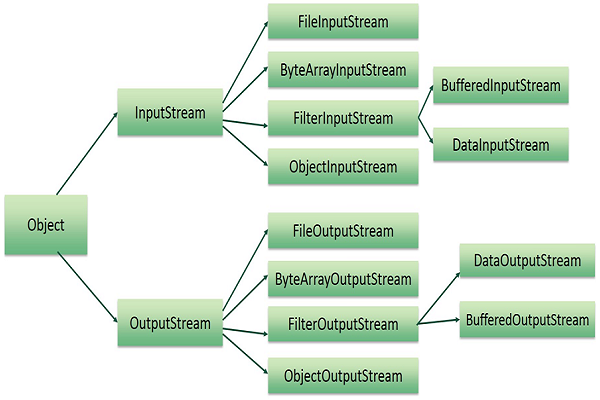
OutputStream - Java application uses an output stream to write data to a destination; it may be a file, an array, peripheral device or socket. OutputStream class is an abstract class. It is the superclass of all classes representing an output stream of bytes.