Module 2: Collections and Generics
The Collection in Java is a framework that provides an architecture to store and manipulate the group of objects.
Java Collections can achieve all the operations that you perform on a data such as searching, sorting, insertion, manipulation, and deletion.
-
HashCode
- The
hashCode()method is defined in Java Object class which computes the hash values of given input objects. It returns an integer whose value represents the hash value of the input object. - The
hashCode()method is used to generate the hash values of objects. Using these hash values, these objects are stored in Java collections such as HashMap, HashSet and HashTable. - The Integer class in Java contains two methods -
hashCode()andhashCode(int value)which compute the hash values of Integer objects and primitive int values respectively.
- The
-
Equals
- The Java String class
equals()method compares the two given strings based on the content of the string. If any character is not matched, it returns false. If all characters are matched, it returns true. - The
equals()method is defined in the Java Object class. The Stringequals()method overrides theequals()method of the Object class.
- The Java String class
- The Collection in Java is a framework that provides an architecture to store and manipulate the group of objects.
- Java Collections can achieve all the operations that you perform on a data such as searching, sorting, insertion, manipulation, and deletion.
- The
java.utilpackage contains all the classes and interfaces for the Collection framework. There are different Methods are used in the Collection framework. - add() method is used to insert the specified element into the specified collection.
- addAll() method is used to insert the specified collection into the specified collection.
- remove() method is used to remove the specified element from the specified collection.
- removeAll() method is used to remove the specified collection from the specified collection.
- retainAll() method is used to retain the specified collection from the specified collection.
- clear() method is used to remove all the elements from the specified collection.
- contains() method is used to check whether the specified element is present in the specified collection or not.
- containsAll() method is used to check whether the specified collection is present in the specified collection or not.
- isEmpty() method is used to check whether the specified collection is empty or not.
- size() method is used to return the number of elements in the specified collection.
- toArray() method is used to return an array containing all the elements of the specified collection.
- iterator() method is used to return an iterator over the elements of the specified collection.
- listIterator() method is used to return a list iterator over the elements of the specified collection.
- spliterator() method is used to create a late-binding and fail-fast Spliterator over the elements in the specified collection.
- forEach() method is used to perform the given action for each element of the Iterable until all elements have been processed or the action throws an exception.
- removeIf() method is used to remove all of the elements of this collection that satisfy the given predicate.
- stream() method is used to return a sequential Stream with this collection as its source.
- parallelStream() method is used to return a possibly parallel Stream with this collection as its source.
- toArray() method is used to return an array containing all the elements of this collection.
- toArray() method is used to return an array containing all the elements of this collection; the runtime type of the returned array is that of the specified array. and many more methods are there in the Collection framework.
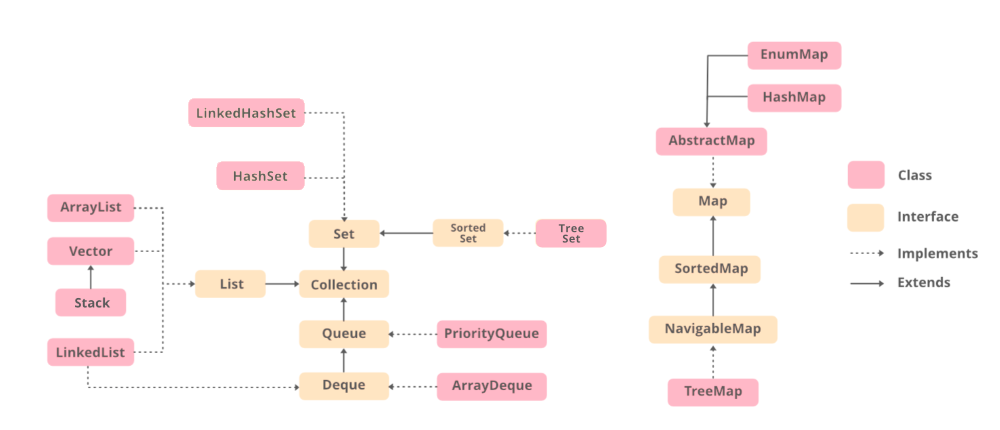
Comparable
- Comparable provides a single sorting sequence. In other words, we can sort the collection on the basis of a single element such as
id,name, andprice. - The
Comparableinterface is found in thejava.langpackage and is used to order the objects of its own class. This interface contains only one method namedcompareTo(Object obj). - Comparable affects the original class, i.e., the actual class is modified.
import java.util.*;
class Student implements Comparable<Student>{
    int rollno;
    String name;
    int age;
    Student(int rollno,String name,int age){
        this.rollno=rollno;
        this.name=name;
        this.age=age;
    }
    public int compareTo(Student st){
        if(age==st.age)
            return 0;
        else if(age>st.age)
            return 1;
        else
            return -1;
    }
}
Comparator
- The Comparator provides multiple sorting sequences. In other words, we can sort the collection on the basis of multiple elements such as
id,name, andpriceetc. - Comparator doesn't affect the original class, i.e., the actual class is not modified.
- A Comparator is present in the
java.utilpackage. It is used to compare two objects. It provides twocompare()methods to compare two objects.
import java.util.*;
class Student{
    int rollno;
    String name;
    int age;
    Student(int rollno,String name,int age){
        this.rollno=rollno;
        this.name=name;
        this.age=age;
    }
}
class AgeComparator implements Comparator<Student>{
    public int compare(Student s1,Student s2){
        if(s1.age==s2.age)
            return 0;
        else if(s1.age>s2.age)
            return 1;
        else
            return -1;
    }
}
class NameComparator implements Comparator<Student>{
    public int compare(Student s1,Student s2){
        return s1.name.compareTo(s2.name);
    }
}Java Collections class provides us with a very convenient method Collections.sort() to sort all List implementations such as LinkedList and ArrayList. There are two overloaded Collections.sort() methods, which are:
-
sort(List list): Sorts the elements of the List in ascending order of their natural ordering. -
sort(List list, Comparator c): Sorts the elements of the list according to the order induced by the comparator.
import java.util.*;
class Fruit{
    String name, taste;
    int size;
    Fruit(String name, String taste, int size){
        this.name = name;
        this.taste = taste;
        this.size = size;
    }
    public static void main(String args[]){
        ArrayList<Fruit> al = new ArrayList<Fruit>();
        al.add(new Fruit("Apple","Sweet",100));
        al.add(new Fruit("Orange","Sour",80));
        al.add(new Fruit("Banana","Sweet",120));
        Collections.sort(al, new FruitComparator());
        for(Fruit f:al){
            System.out.println(f.name+" "+f.taste+" "+f.size);
        }
    }
    public static class FruitComparator implements Comparator<Fruit>{
        public int compare(Fruit f1, Fruit f2){
            return f1.size - f2.size;
        }
    }
}
Generics means parameterized types. The idea is to allow type (Integer, String, … etc., and user-defined types) to be a parameter to methods, classes, and interfaces. Using Generics, it is possible to create classes that work with different data types. An entity such as class, interface, or method that operates on a parameterized type is a generic entity.
public class Test<T> {
    // An object of type T is declared
    T obj;
    Test(T obj) {  this.obj = obj;  }  // constructor
    public T getObject()  { return this.obj; }
}