Module 2 : Threads
A thread in Java is a lightweight process requiring fewer resources to create and share the process resources. In Java both Multithreading and Multiprocessing are supported. But Multithreading is more efficient than Multiprocessing.
There are two ways to create a thread in Java:
- By extending the Thread class
- By implementing the Runnable interface
public class ThreadDemo extends Thread {
    public void run() {
        System.out.println("Thread " + Thread.currentThread().getId() + " is running");
    }

    public static void main(String[] args) {
        for (int i = 0; i < 5; i++) {
            ThreadDemo threadDemo = new ThreadDemo();
            threadDemo.start();
        }
    }
}
public class ThreadDemo implements Runnable {
public void run() {
System.out.println("Thread " + Thread.currentThread().getId() + " is running");
}
public static void main(String[] args) {
for (int i = 0; i < 5; i++) {
ThreadDemo threadDemo = new ThreadDemo();
Thread thread = new Thread(threadDemo);
thread.start();
}
}
}Life Cycle of a Thread A thread can be in one of the following states:
- New
- Runnable
- Running
- Waiting
- Terminated
-
New: A thread that has not yet started is in this state. -
Runnable: A thread executing in the Java virtual machine is in this state. -
Running: A thread executing in the Java virtual machine is in this state. -
Waiting: A thread that is waiting for another thread to perform a particular action is in this state. -
Terminated: A thread that has exited is in this state.
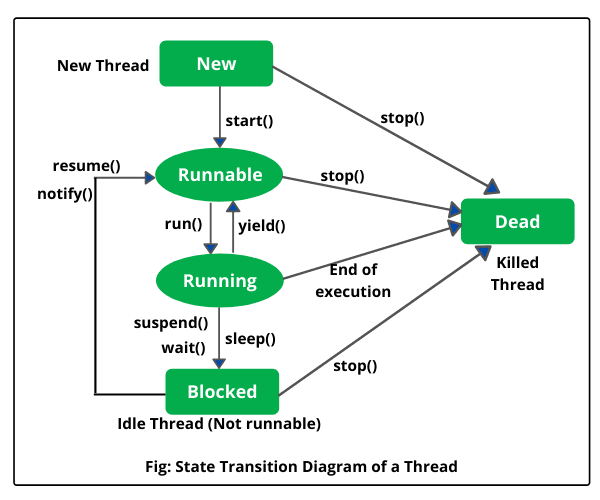
-
run(): The run() method used to perform the action for a thread. It is called when the thread starts. -
start(): The start() method is used to start the execution of the thread. It calls the run() method on the Runnable object. -
sleep(): The sleep() method causes the currently executing thread to sleep (temporarily cease execution) for the specified number of milliseconds. -
join(): The join() method waits for a thread to die. In other words, it causes the currently running threads to stop executing until the thread it joins with completes its task. -
yield(): The yield() method causes the currently executing thread object to temporarily pause and allow other threads to execute. -
wait(): The wait() method causes the current thread to wait until another thread invokes the notify() method or the notifyAll() method for this object. -
notify(): The notify() method wakes up a single thread that is waiting on the object's monitor. -
notifyAll(): The notifyAll() method wakes up all the threads that are waiting on the object's monitor.
Synchronization is a mechanism in Java that helps to control the access of multiple threads to a shared resource. It is used to avoid race conditions and other synchronization problems.
In Java, synchronization can be achieved by using the synchronized keyword, which can be applied to methods or blocks of code. When a method or block is declared as synchronized, only one thread can execute it at a time.
public class Counter extends Thread {
    public static int count = 0;
    public static void main(String args[]){
        Counter c1 = new Counter();
        Counter c2 = new Counter();
        c1.start();
        c2.start();
    }
    public synchronized void run(){
        for(int i=0;i<10;i++){
            count++;
        }
        sout("Thread "+Thread.currentThread().getId()+" count is "+count);
    }
}In Java for synchronization, we can use locks. Locks are used to provide exclusive access to a shared resource. A lock is a tool for controlling access to a shared resource by multiple threads. Commonly, a lock provides exclusive access to a shared resource: only one thread at a time can acquire the lock and all access to the shared resource requires that the lock be acquired first.
public class Counter extends Thread {
    public static int count = 0;
    public static Lock lock = new ReentrantLock();
    public static void main(String args[]){
        Counter c1 = new Counter();
        Counter c2 = new Counter();
        c1.start();
        c2.start();
    }
    public void run(){
        for(int i=0;i<10;i++){
            lock.lock();
            count++;
            lock.unlock();
        }
        sout("Thread "+Thread.currentThread().getId()+" count is "+count);
    }
}
Thread Interaction all about allowing synchronized threads to communicate with each other. Thread Communication is a mechanism in which a thread is paused running in its critical section and another thread is allowed to enter (or lock) in the same critical section to be executed
In Java, threads can communicate with each other by using the following methods:
-
wait(): The wait() method causes the current thread to wait until another thread invokes the notify() method or the notifyAll() method for this object. -
notify(): The notify() method wakes up a single thread that is waiting on the object's monitor. -
notifyAll(): The notifyAll() method wakes up all the threads that are waiting on the object's monitor.
public class ThreadDemo {
    public static void main(String[] args) {
        Thread t1 = new Thread(new Runnable() {
            @Override
            public void run() {
                try {
                    Thread.sleep(1000);
                } catch (InterruptedException e) {
                    e.printStackTrace();
                }
                System.out.println("Thread 1");
            }
        });
        Thread t2 = new Thread(new Runnable() {
            @Override
            public void run() {
                try {
                    t1.join();
                } catch (InterruptedException e) {
                    e.printStackTrace();
                }
                System.out.println("Thread 2");
            }
        });
        t1.start();
        t2.start();
    }
}