Module 2: Dates
- The
Dateclass in Java is used to represent a specific instant in time, with millisecond precision. - The
Dateclass is a part of thejava.utilpackage.
import java.util.Date;
 class Main{
    public static void main(String[] args){}
        Date d = new Date();
        System.out.println(d); // Wed Jan 25 11:28:32 IST 2023
    }
}
The Java Date class is now deprecated. It is recommended to use the
Calendarclass instead.
- There are different constructors available in the
Dateclass to create a date object.
Date d = new Date(); // creates a date object with the current date and time
Date d = new Date(1000000000000L); // creates a date object with the specified milliseconds
Date d = new Date("Jan 25, 2023"); // creates a date object with the specified date
Date d = new Date(2023, 2, 25); // creates a date object with the specified year, month, and day)
Date d = new Date(2023, 0, 25, 11, 28, 32); // creates a date object with the specified year, month, day, hour, minute, and second- There are different methods available in the
Dateclass to perform operations on dates.
d.getTime(); // returns the number of milliseconds since January 1, 1970, 00:00:00 GMT represented by this date
d.after(d1); // checks if this date is after the specified date
d.before(d1); // checks if this date is before the specified date
d.compareTo(d1); // compares two dates
d.equals(d1); // checks if two dates are equal
d.getDate(); // returns the day of the month represented by this date
d.getDay(); // returns the day of the week represented by this date
d.getYear(); // returns the year represented by this date.
// .
// .
// .
// .
// For Methods :
// https://docs.oracle.com/en/java/javase/19/docs/api/java.base/java/util/Date.html- The
TimeZoneclass in Java is used to get the time zone offset, time zone ID, and time zone name. - The
TimeZoneclass is a part of thejava.utilpackage. - There are different constructors available in the
TimeZoneclass to create aTimeZoneobject.
import java.util.TimeZone;
class Main{
    public static void main(String[] args){
        TimeZone tz = TimeZone.getTimeZone("Asia/Kolkata");
        System.out.println(tz.getDisplayName()); // India Standard Time
        System.out.println(tz.getID()); // Asia/Kolkata
        System.out.println(tz.getRawOffset()); // 19800000
        TimeZone tz1 = TimeZone.getTimeZone("Asia/Singapore");
        syso(tz1.getDisplayName()); // Singapore Standard Timeout
    }
}- The
SimpleDateFormatclass in Java is used to format and parse dates in a locale-sensitive manner. - The
SimpleDateFormatclass is a part of thejava.textpackage. - There are different constructors available in the
SimpleDateFormatclass to create aSimpleDateFormatobject.
import java.text.SimpleDateFormat;
class Main{
    public static void main(String[] args){
        SimpleDateFormat formatter = new SimpleDateFormat("dd/MM/yyyy");
        Date date = new Date();
        System.out.println(formatter.format(date)); // 25/01/2023
        SimpleDateFormat formatter1 = new SimpleDateFormat("dd/MM/yyyy HH:mm:ss");
        Date date1 = new Date();
        System.out.println(formatter1.format(date1)); // 25/01/2023 11:28:32
    }
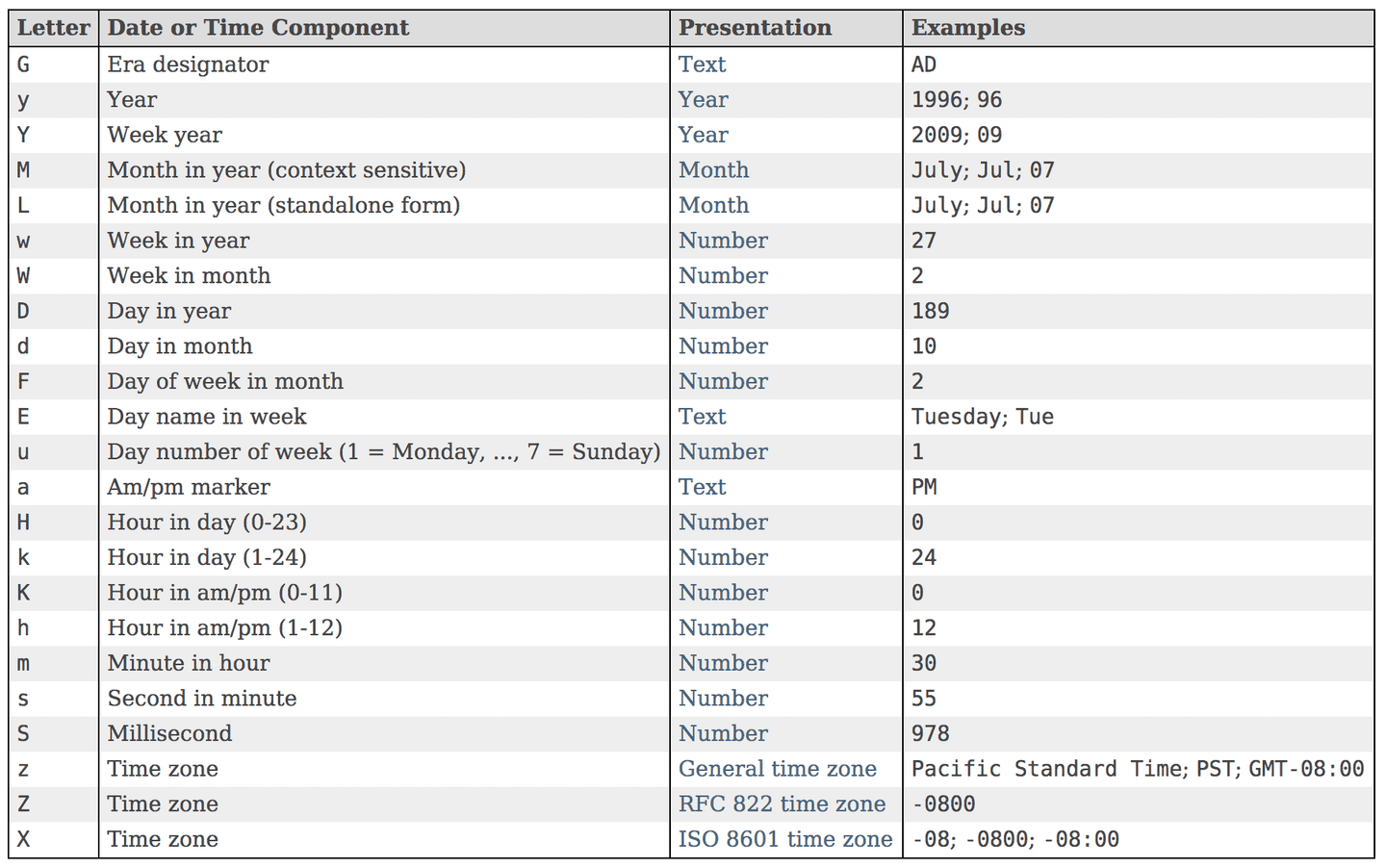
}- There are different java pattterns and symbols available in the
SimpleDateFormatclass.