Module 2
In Java, declarations are used to define variables, methods, and classes, while access controls are used to specify the level of visibility and accessibility of these entities.
There are four access control modifiers in Java:
- Public: When a variable, method, or class is declared as public, it can be accessed from any class in any package.
- Private: When a variable, method, or class is declared as private, it can only be accessed within the same class.
- Protected: When a variable, method, or class is declared as protected, it can be accessed within the same class, subclasses, and other classes in the same package.
- Default: When a variable, method, or class is declared without any access control modifier, it can be accessed within the same package.
public class Example {
    public int publicVariable;
    private int privateVariable;
    protected int protectedVariable;
    int defaultVariable;

    public void publicMethod() {
        // method implementation
    }

    private void privateMethod() {
        // method implementation
    }

    protected void protectedMethod() {
        // method implementation
    }

    void defaultMethod() {
        // method implementation
    }
}
In Java, a class is declared using the class keyword, followed by the name of the class and a pair of curly braces that enclose the class body. Here's an example of a simple class declaration:
public class MyClass {
    // class variables
    private int myVar1;
    public String myVar2;

    // constructor
    public MyClass(int var1, String var2) {
        this.myVar1 = var1;
        this.myVar2 = var2;
    }

    // methods
    public int getMyVar1() {
        return this.myVar1;
    }

    public void setMyVar1(int var1) {
        this.myVar1 = var1;
    }

    public void doSomething() {
        // method implementation
    }
}
In Java, an interface is declared using the interface keyword, followed by the name of the interface and a pair of curly braces that enclose the interface body. Here's an example of a simple interface declaration:
public interface MyInterface {
    // constant variables
    public static final int MY_CONSTANT = 10;

    // abstract methods
    public void doSomething();
    public int getSomething();
}
- Class members are the fields and method declared inside the class.
- A class can have any or unlimlited number of methods defined inside it.
public class Bicycle {

    private int cadence;
    private int gear;
    private int speed;

    public int getCadence() {
        return cadence;
    }

    public void setCadence(int newValue) {
        cadence = newValue;
    }
}
In Java, constructors are special methods that are used to initialize the objects of a class. Constructors have the same name as the class and do not have any return type, not even void. When an object of a class is created using the new keyword, the constructor is called automatically to initialize the object.
public class MyClass {
    private int myVar;

    public MyClass(int var) {
        this.myVar = var;
    }

    public int getMyVar() {
        return this.myVar;
    }
}
Deconstructors, also known as destructors, are not available in Java. In Java, the garbage collector automatically reclaims the memory used by objects that are no longer referenced by any part of the program. Therefore, there is no need for a destructor to explicitly release the memory used by an object.
However, Java does provide a finalize() method that can be used to perform some cleanup tasks before an object is garbage collected. The finalize() method is called by the garbage collector before reclaiming the memory used by the object.
public class MyClass {
    // constructor and other methods

    protected void finalize() throws Throwable {
        // cleanup code here
        super.finalize();
    }
}
The access modifiers in Java specifies the accessibility or scope of a field, method, constructor, or class. There are four types of Java access modifiers.
- Private: The access level of a private modifier is only within the class. It cannot be accessed from outside the class.
- Default: The access level of a default modifier is only within the package. It cannot be accessed from outside the package. If you do not specify any access level, it will be the default.
- Protected: The access level of a protected modifier is within the package and outside the package through child class. If you do not make the child class, it cannot be accessed from outside the package.
- Public: The access level of a public modifier is everywhere. It can be accessed from within the class, outside the class, within the package and outside the package.
- Initialization blocks are executed whenever the class is initialized and before constructors are invoked.
- They are typically placed above the constructors within braces.
- It is not at all necessary to include them in your classes.
- Instance Initialization Blocks run every time a new instance is created.
- Initialization Blocks run in the order they appear in the program
- The Instance Initialization Block is invoked after the parent class constructor is invoked (i.e. after super() constructor call)
Java array is an object which contains elements of a similar data type. Additionally, The elements of an array are stored in a contiguous memory location. It is a data structure where we store similar elements. We can store only a fixed set of elements in a Java array.
dataType[] arr; (or)
dataType []arr; (or)
dataType arr[];
The Enum in Java is a data type which contains a fixed set of constants.The Java enum constants are static and final implicitly.Enums are used to create our own data type like classes. The enum data type (also known as Enumerated Data Type) is used to define an enum in Java. Unlike C/C++, enum in Java is more powerful. Here, we can define an enum either inside the class or outside the class.
- Enum improves type safety
- Enum can be easily used in switch
- Enum can be traversed
- Enum can have fields, constructors and methods
- Enum may implement many interfaces but cannot extend any class because it internally extends Enum class Syntax:
class EnumExample1{
    public enum Season { WINTER, SPRING, SUMMER, FALL }
    public static void main(String[] args) {
       for (Season s : Season.values())
            System.out.println(s);
       }
}
Encapsulation is one of the fundamental principles of object-oriented programming (OOP) and refers to the concept of hiding the internal details of an object from the outside world and providing access to it only through well-defined interfaces. In Java, encapsulation is achieved by using access modifiers to restrict access to the internal state and behavior of an object.
Inheritance is a fundamental concept in object-oriented programming (OOP) that allows one class to inherit properties and methods from another class. The class that inherits is called the subclass or derived class, and the class being inherited from is called the superclass or base class.
Polymorphism is a fundamental concept in object-oriented programming that refers to the ability of an object to take on multiple forms. It is a way of designing and organizing code so that objects of different classes can be used interchangeably.
There are two types of polymorphism: static and dynamic.
- Static polymorphism is also known as compile-time polymorphism, and it occurs when the compiler determines which function to call at compile time based on the type of arguments passed to the function.
- Dynamic polymorphism, on the other hand, is also known as run-time polymorphism. It occurs when the compiler cannot determine which function to call at compile time and instead delegates the decision to the program at run time.
Polymorphism allows for code reuse, flexibility, and extensibility in object-oriented programming, and it is a key concept in creating modular, scalable software systems.
It is also known as static/Compile-time polymorphism. This type of polymorphism is achieved by function overloading or operator overloading.
- But java doesn't support operator overloading.
- Method Overloading: When there are multiple functions with the same name but different parameters then these functions are said to be overloaded. Functions can be overloaded by changes in the number of arguments or/and a change in the type of arguments.
public int func1(int a, int b) {
    return (a+b);
}

public int func1(int a, int b, int c) {
    return (a+b+c);
}
It is also known as Dynamic Method Dispatch/runtime polymorphism. It is a process in which a function call to the overridden method is resolved at Runtime. This type of polymorphism is achieved by Method Overriding. On the other hand, occurs when a derived class has a definition for one of the member functions of the base class. That base function is said to be overridden.
class Helper1{
    void print() {
        System.out.println("Parent print.");
    }
}

class A1 extends Helper1 {
    void print() {
        System.out.println("Overridden 1");
    }
}

class A2 extends Helper1 {
    void print() {
        System.out.println("Overrriden 2");
    }
}

public class learningOver {
    public static void main(String[] args) {
        Helper1 a;
        a = new A1();
        a.print();
        a = new A2();
        a.print();
    }
}
The instanceof operator in Java is used to check whether an object is an instance of a particular class or not.
objectName instanceOf className;
Conditional operators check the condition and decides the desired result on the basis of both conditions.
- Ternary operator The ternary operator (? :) consists of three operands. It is used to evaluate Boolean expressions. The operator decides which value will be assigned to the variable. It is the only conditional operator that accepts three operands. It can be used instead of the if-else statement. It makes the code much more easy, readable, and shorter. Syntax:
variable = (condition) ? expression1 : expression2
- Logical AND The operator is applied between two Boolean expressions. It is denoted by the two AND operators (&&). It returns true if and only if both expressions are true, else returns false. Syntax:condition1 && condition2
- Logical OR The operator is applied between two Boolean expressions. It is denoted by the two OR operator (||). It returns true if any of the expression is true, else returns false. Syntax: condition1 || condition2
- Logical NOT This is a unary operator and returns true when the condition under consideration is not satisfied or is a false condition. Basically, if the condition is false, the operation returns true and when the condition is true, the operation returns false.
!(condition)
The Java programming language supports various arithmetic operators for all floating-point and integer numbers. These operators are + (addition), - (subtraction), * (multiplication), / (division), and % (modulo).
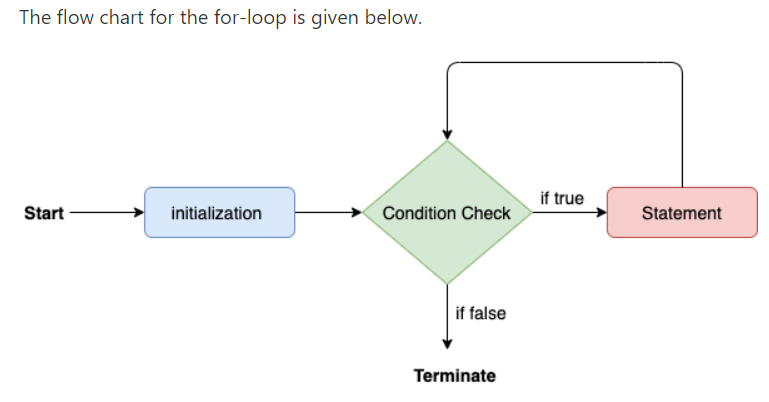
Java for loop provides a concise way of writing the loop structure. The for statement consumes the initialization, condition and increment/decrement in one line thereby providing a shorter, easy to debug structure of looping.
for (initialization expr; test expr; update exp)
{
     // body of the loop
     // statements we want to execute
}
- It provides an alternative approach to traverse the array or collection in Java. It is mainly used to traverse the array or collection elements. The advantage of the for-each loop is that it eliminates the possibility of bugs and makes the code more readable. It is known as the for-each loop because it traverses each element one by one.
- The drawback of the enhanced for loop is that it cannot traverse the elements in reverse order. Here, you do not have the option to skip any element because it does not work on an index basis. Moreover, you cannot traverse the odd or even elements only.
for(data_type variable : array | collection){
//body of for-each loop
}
The Java while loop is used to iterate a part of the program repeatedly until the specified Boolean condition is true. As soon as the Boolean condition becomes false, the loop automatically stops.
while (condition){
//code to be executed
Increment / decrement statement
}
Flow Chart for while loop:

- The Java switch statement executes one statement from multiple conditions. It is like if-else-if ladder statement. The switch statement works with byte, short, int, long, enum types, String and some wrapper types like Byte, Short, Int, and Long.
- In other words, the switch statement tests the equality of a variable against multiple values.
switch(expression){
case value1:
 //code to be executed;
 break;  //optional
case value2:
 //code to be executed;
 break;  //optional
......

default:
  code to be executed if all cases are not matched;
}
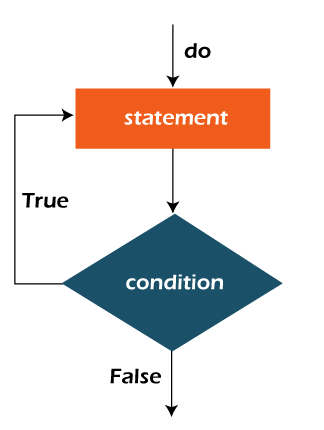
- The Java do-while loop is used to iterate a part of the program repeatedly, until the specified condition is true. If the number of iteration is not fixed and you must have to execute the loop at least once.
- Java do-while loop is called an exit control loop. Therefore, unlike while loop and for loop, the do-while check the condition at the end of loop body. The Java do-while loop is executed at least once because condition is checked after loop body.
do{
//code to be executed / loop body
//update statement
}while (condition);
Flow chart for do-while loop:
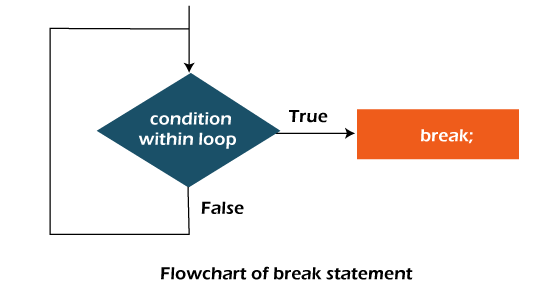
The Java break statement is used to break loop or switch statement. It breaks the current flow of the program at specified condition. In case of inner loop, it breaks only inner loop.
jump-statement;
break;
The Java continue statement is used to continue the loop. It continues the current flow of the program and skips the remaining code at the specified condition. In case of an inner loop, it continues the inner loop only.
jump-statement;
continue;
A label is a valid variable name that denotes the name of the loop to where the control of execution should jump. To label a loop, place the label before the loop with a colon at the end. Therefore, a loop with the label is called a labeled loop. In layman terms, we can say that label is nothing but to provide a name to a loop. It is a good habit to label a loop when using a nested loop. We can also use labels with continue and break statements.
labelname:
for(initialization; condition; incr/decr)
{
//functionality of the loop
}
Java catch block is used to handle the Exception by declaring the type of exception within the parameter. The declared exception must be the parent class exception ( i.e., Exception) or the generated exception type. However, the good approach is to declare the generated type of exception.
try{
//code that may throw an exception
}catch(Exception_class_Name ref){
//Block of code to handle errors
}
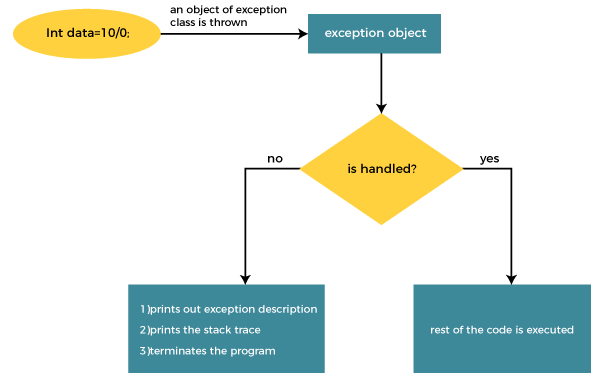
In Java, the try-with-resources statement is a try statement that declares one or more resources. The resource is as an object that must be closed after finishing the program. The try-with-resources statement ensures that each resource is closed at the end of the statement execution.
static String readFirstLineFromFile(String path) throws IOException {
	    try (FileReader fr = new FileReader(path);
	         BufferedReader br = new BufferedReader(fr)) {
	        return br.readLine();
	    }
	}
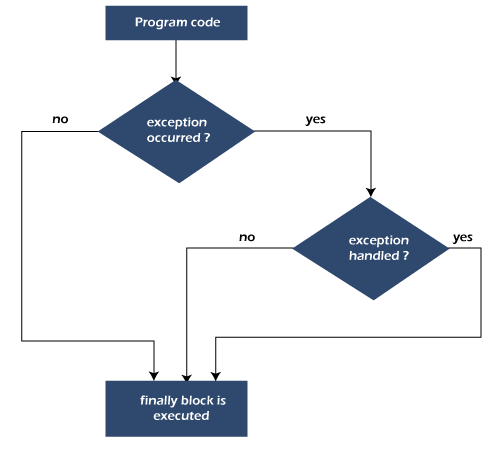
- Java finally block is a block used to execute important code such as closing the connection, etc.
- Java finally block is always executed whether an exception is handled or not. Therefore, it contains all the necessary statements that need to be printed regardless of the exception occurs or not.
- The finally block follows the try-catch block.
Flow chart:
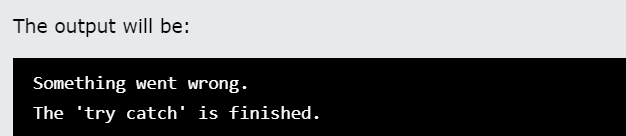
public class Main {
  public static void main(String[] args) {
    try {
      int[] numbers = {1, 2, 3};
      System.out.println(myNumbers[10]);
    } catch (Exception e) {
      System.out.println("Something went wrong.");
    } finally {
      System.out.println("The 'try catch' is finished.");
    }
  }
}
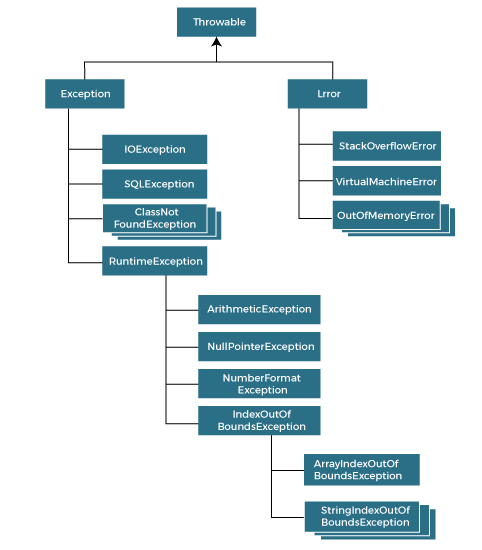
- The java.lang.Throwable class is the root class of Java Exception hierarchy inherited by two subclasses: Exception and Error.
- One branch is headed by Exception. This class is used for exceptional conditions that user programs should catch. NullPointerException is an example of such an exception.
- Another branch, Error is used by the Java run-time system(JVM) to indicate errors having to do with the run-time environment itself(JRE). StackOverflowError is an example of such an error.
- The hierarchy of Java Exception classes is given below:
In Java, we can create our own exceptions that are derived classes of the Exception class. Creating our own Exception is known as custom exception or user-defined exception. Basically, Java custom exceptions are used to customize the exception according to user need.
In order to create custom exception, we need to extend Exception class that belongs to java.lang package.
Following are few of the reasons to use custom exceptions:
- To catch and provide specific treatment to a subset of existing Java exceptions.
- Business logic exceptions: These are the exceptions related to business logic and workflow. It is useful for the application users or the developers to understand the exact problem.
we create a custom exception named WrongFileNameException:
public class WrongFileNameException extends Exception {
    public WrongFileNameException(String errorMessage) {
    super(errorMessage);
    }
}
In Java, string is basically an object that represents sequence of char values. An array of characters works same as Java string.
The Java String is immutable which means it cannot be changed. Whenever we change any string, a new instance is created. For mutable strings, you can use StringBuffer and StringBuilder classes.
Java StringBuilder class is used to create mutable (modifiable) String. The Java StringBuilder class is same as StringBuffer class except that it is non-synchronized. It is available since JDK 1.5.
StringBuilder str1 = new StringBuilder(str);
Java StringBuffer class is used to create mutable (modifiable) String objects. The StringBuffer class in Java is the same as String class except it is mutable i.e. it can be changed.
StringBuffer var = new StringBuffer(str);
- charAt(index): It returns the char value for the particular index.
- length(): It returns string length.
- substring(int beginIndex, int endIndex): It returns a substring for the given begin index and end index.
- contains(str): It returns true or false after matching the sequence of char value.
- indexOf(string subString): It returns the specified substring index.
- Strings are used to store a sequence of characters in Java, they are treated as objects. The String class of the java.lang package represents a String.
- Strings are stored on the heap area in a separate memory location known as String Constant pool.
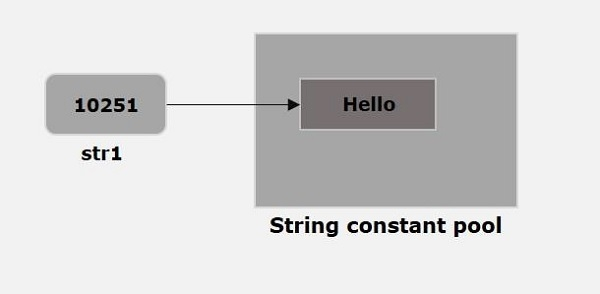
- String constant pool: It is a separate block of memory where all the String variables are held.
When you store a String as
String str1 = "Hello";
directly, then JVM creates a String object with the given value in a String constant pool.
The class Date represents a specific instant in time, with millisecond precision. The Date class of java.util package implements Serializable, Cloneable and Comparable interface. It provides constructors and methods to deal with date and time with java.
// Java program to demonstrate constuctors of Date
import java.util.*;

public class Main
{
    public static void main(String[] args)
    {
        Date d1 = new Date();
        System.out.println("Current date is " + d1);
        Date d2 = new Date(2323223232L);
        System.out.println("Date represented is "+ d2 );
    }
}
OUTPUT:
Current date is Tue Jul 12 18:35:37 IST 2016
Date represented is Wed Jan 28 02:50:23 IST 1970
- Java TimeZone class represents a time zone offset, and also figures out daylight savings. It inherits the Object class.
- you get a TimeZone using getDefault which creates a TimeZone based on the time zone where the program is running. For example, for a program running in Japan, getDefault creates a TimeZone object based on Japanese Standard Time.
public abstract class TimeZone
extends Object
implements Serializable, Cloneable
You can also get a TimeZone using getTimeZone along with a time zone ID. For instance, the time zone ID for the U.S. Pacific Time zone is "America/Los_Angeles". So, you can get a U.S. Pacific Time TimeZone object with:
TimeZone tz = TimeZone.getTimeZone("America/Los_Angeles");
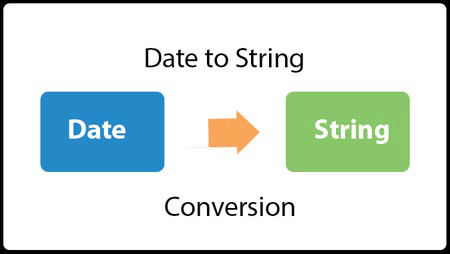
- We can convert String to Date in java using parse() method of DateFormat and SimpleDateFormat classes.
- The format() method of this class accepts a java.util.Date object and returns a date/time string in the format represented by the current object.
import java.text.SimpleDateFormat;
import java.util.Date;
public class StringToDateExample1 {
public static void main(String[] args)throws Exception {
    String sDate1="31/12/1998";
    Date date1=new SimpleDateFormat("dd/MM/yyyy").parse(sDate1);
    System.out.println(sDate1+"\t"+date1);
}
}
The wrapper class in Java provides the mechanism to convert primitive into object and object into primitive.
Use of Wrapper classes in Java: Java is an object-oriented programming language, so we need to deal with objects many times like in Collections, Serialization, Synchronization, etc. Let us see the different scenarios, where we need to use the wrapper classes.
- Change the value in Method: Java supports only call by value. So, if we pass a primitive value, it will not change the original value. But, if we convert the primitive value in an object, it will change the original value.
- Serialization: We need to convert the objects into streams to perform the serialization. If we have a primitive value, we can convert it in objects through the wrapper classes.
- Synchronization: Java synchronization works with objects in Multithreading. java.util package: The java.util package provides the utility classes to deal with objects.
- Collection Framework: Java collection framework works with objects only. All classes of the collection framework (ArrayList, LinkedList, Vector, HashSet, LinkedHashSet, TreeSet, PriorityQueue, ArrayDeque, etc.) deal with objects only.
The automatic conversion of primitive data type into its corresponding wrapper class is known as autoboxing, for example, byte to Byte, char to Character, int to Integer, long to Long, float to Float, boolean to Boolean, double to Double, and short to Short.
//Java program to convert primitive into objects
//Autoboxing example of int to Integer
public class WrapperExample1{
public static void main(String args[]){
//Converting int into Integer
int a=20;
Integer i=Integer.valueOf(a);//converting int into Integer explicitly
Integer j=a;//autoboxing, now compiler will write Integer.valueOf(a) internally

System.out.println(a+" "+i+" "+j);
}}
In Java, memory management is the process of allocation and de-allocation of objects, called Memory management. Java does memory management automatically. Java uses an automatic memory management system called a garbage collector. Thus, we are not required to implement memory management logic in our application. Java memory management divides into two major parts:
- JVM Memory Structure
- Working of the Garbage Collector
JVM creates various run time data areas in a heap. These areas are used during the program execution. The memory areas are destroyed when JVM exits, whereas the data areas are destroyed when the thread exits.
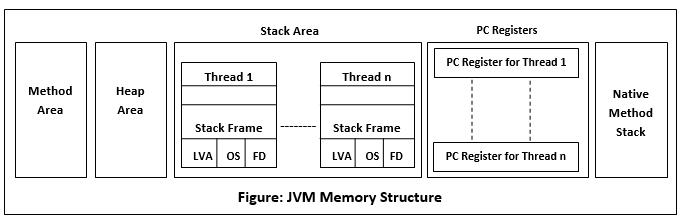
When a program executes in Java, it uses memory in different ways. The heap is a part of memory where objects live. It?s the only part of memory that involved in the garbage collection process. It is also known as garbage collectible heap. All the garbage collection makes sure that the heap has as much free space as possible. The function of the garbage collector is to find and delete the objects that cannot be reached.
The equals() and hashcode() are the two important methods provided by the Object class for comparing objects. Since the Object class is the parent class for all Java objects, hence all objects inherit the default implementation of these two methods.
- The java equals() is a method of lang.Object class, and it is used to compare two objects.
- To compare two objects that whether they are the same, it compares the values of both the object's attributes.
- By default, two objects will be the same only if stored in the same memory location.
public boolean equals(Object obj)
- A hashcode is an integer value associated with every object in Java, facilitating the hashing in hash tables.
- To get this hashcode value for an object, we can use the hashcode() method in Java. It is the means hashcode() method that returns the integer hashcode value of the given object.
- Since this method is defined in the Object class, hence it is inherited by user-defined classes also.
- The hashcode() method returns the same hash value when called on two objects, which are equal according to the equals() method. And if the objects are unequal, it usually returns different hash values.
public int hashCode()
Java collection class is used exclusively with static methods that operate on or return collections. It inherits Object class.
The important points about Java Collections class are:
- Java Collection class supports the polymorphic algorithms that operate on collections.
- Java Collection class throws a NullPointerException if the collections or class objects provided to them are null.
public class Collections extends Object
Commonly used collection classes:
- ArrayList Class
- LinkedList Class
- HashMap Class
- TreeMap Class
- TreeSet Class
A comparator interface is used to order the objects of user-defined classes. A comparator object is capable of comparing two objects of the same class. Following function compare obj1 with obj2.
public int compare(Object obj1, Object obj2):
The Comparable interface is used to compare an object of the same class with an instance of that class, it provides ordering of data for objects of the user-defined class. The class has to implement the java.lang.Comparable interface to compare its instance, it provides the compareTo method that takes a parameter of the object of that class. In this article, we will see how we can sort an array of pairs of different data types on the different parameters of comparison.
class Student implements Comparable<Student>{ //code }
Collections class provides static methods for sorting the elements of a collection. If collection elements are of a Set type, we can use TreeSet. However, we cannot sort the elements of List. Collections class provides methods for sorting the elements of List type elements.
Method of Collections class for sorting List elements:
public void sort(List list): is used to sort the elements of List. List elements must be of the Comparable type.
We can sort the elements of:
- String objects
- Wrapper class objects
- User-defined class objects
The Java Generics programming is introduced in J2SE 5 to deal with type-safe objects. It makes the code stable by detecting the bugs at compile time.
Advantage of Java Generics:
- Type-safety: We can hold only a single type of objects in generics. It doesn?t allow to store other objects.
- Type casting is not required: There is no need to typecast the object.
- Compile-Time Checking: It is checked at compile time so problem will not occur at runtime. The good programming strategy says it is far better to handle the problem at compile time than runtime.
ClassOrInterface<Type>
Java File class represents the files and directory pathnames in an abstract manner. This class is used for creation of files and directories, file searching, file deletion, etc.
Constructors of File Class:
- File(File parent, String child): Creates a new File instance from a parent abstract pathname and a child pathname string.
- File(String pathname): Creates a new File instance by converting the given pathname string into an abstract pathname.
- File(String parent, String child): Creates a new File instance from a parent pathname string and a child pathname string.
- File(URI uri): Creates a new File instance by converting the given file: URI into an abstract pathname.
There are multiple ways of writing and reading a text file. this is required while dealing with many applications. There are several ways to read a plain text file in Java e.g. you can use FileReader, BufferedReader, or Scanner to read a text file. Every utility provides something special e.g. BufferedReader provides buffering of data for fast reading, and Scanner provides parsing ability.
Methods:
- Using BufferedReader class
- Using Scanner class
- Using File Reader class
- Reading the whole file in a List
- Read a text file as String
we use the Scanner class to read the contents of the text file we created in the previous chapter:
import java.io.File;  // Import the File class
import java.io.FileNotFoundException;  // Import this class to handle errors
import java.util.Scanner; // Import the Scanner class to read text files

public class ReadFile {
  public static void main(String[] args) {
    try {
      File myObj = new File("filename.txt");
      Scanner myReader = new Scanner(myObj);
      while (myReader.hasNextLine()) {
        String data = myReader.nextLine();
        System.out.println(data);
      }
      myReader.close();
    } catch (FileNotFoundException e) {
      System.out.println("An error occurred.");
      e.printStackTrace();
    }
  }
}
To create a file in Java, you can use the createNewFile() method. This method returns a boolean value: true if the file was successfully created, and false if the file already exists. Note that the method is enclosed in a try...catch block. This is necessary because it throws an IOException if an error occurs
import java.io.File;  // Import the File class
import java.io.IOException;  // Import the IOException class to handle errors

public class CreateFile {
  public static void main(String[] args) {
    try {
      File myObj = new File("filename.txt");
      if (myObj.createNewFile()) {
        System.out.println("File created: " + myObj.getName());
      } else {
        System.out.println("File already exists.");
      }
    } catch (IOException e) {
      System.out.println("An error occurred.");
      e.printStackTrace();
    }
  }
}
Java I/O (Input and Output) is used to process the input and produce the output.
Java uses the concept of a stream to make I/O operation fast. The java.io package contains all the classes required for input and output operations.
We can perform file handling in Java by Java I/O API.
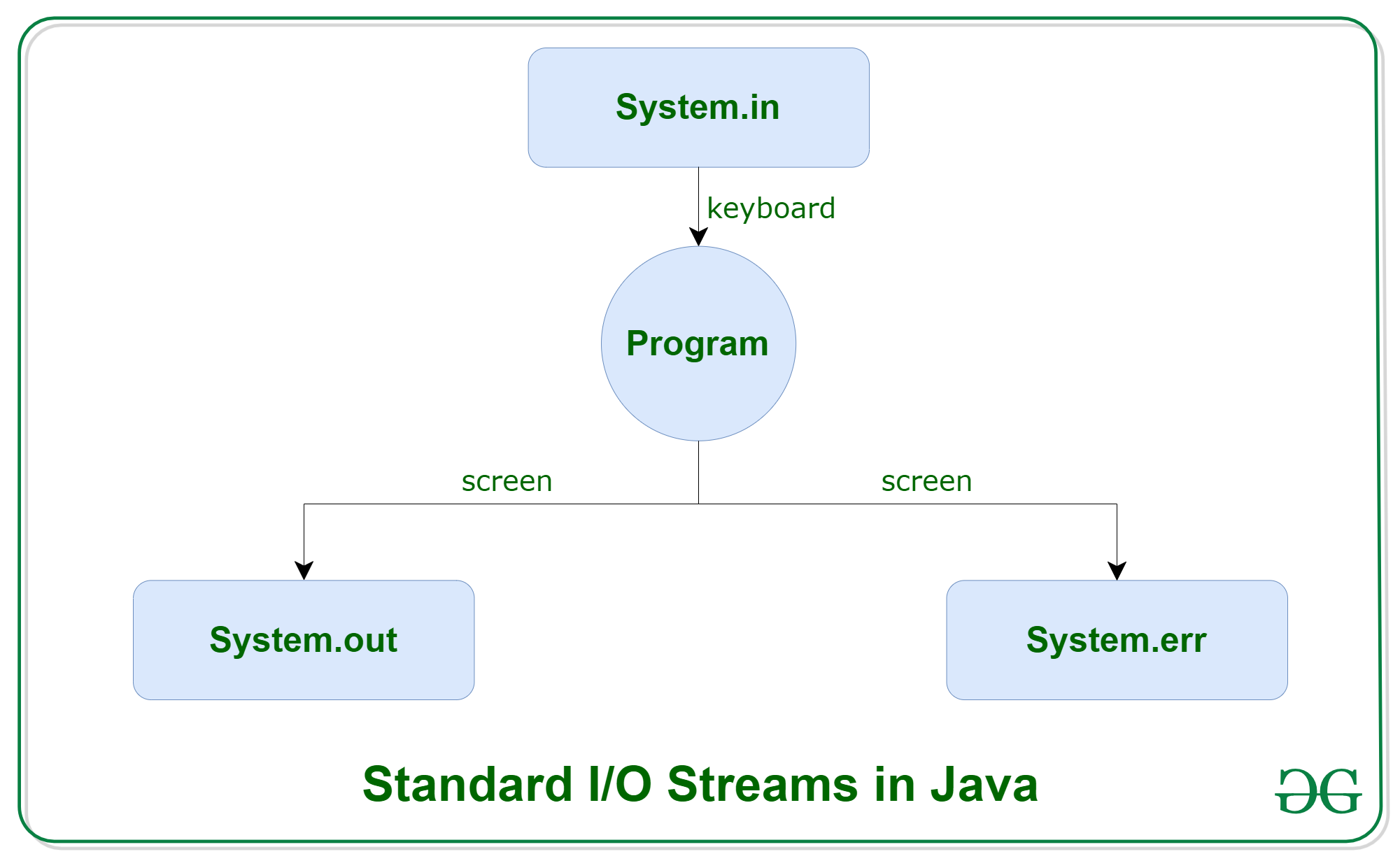
In Java, 3 streams are created for us automatically. All these streams are attached with the console.
- System.out: standard output stream
- System.in: standard input stream
- System.err: standard error stream
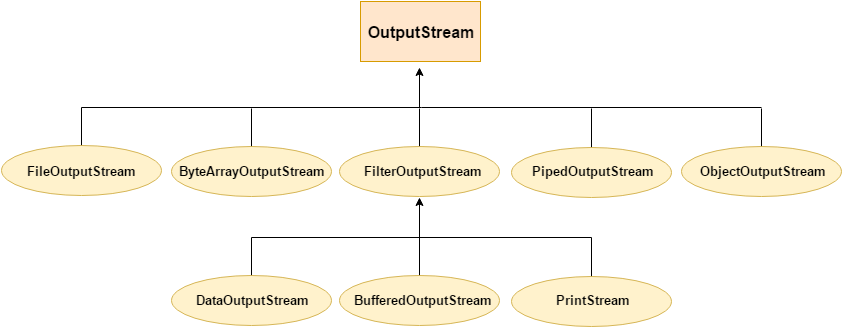
OutputStream Hierarchy:
InputStream Hierarchy:
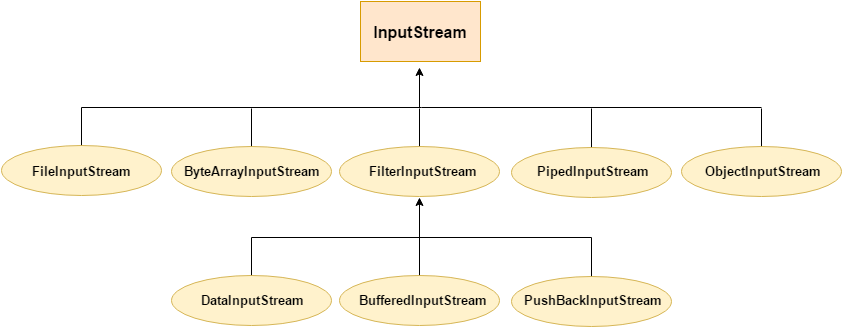
Lambda expression is a new and important feature of Java which was included in Java SE 8. It provides a clear and concise way to represent one method interface using an expression. It is very useful in collection library. It helps to iterate, filter and extract data from collection.
Why use Lambda Expression
- To provide the implementation of Functional interface.
- Less coding.
Java Lambda Expression Syntax:
(argument-list) -> {body}
Java lambda expression is consisted of three components:
- Argument-list: It can be empty or non-empty as well.
- Arrow-token: It is used to link arguments-list and body of expression.
- Body: It contains expressions and statements for lambda expression.
An Interface that contains exactly one abstract method is known as functional interface. It can have any number of default, static methods but can contain only one abstract method. It can also declare methods of object class.
Functional Interface is also known as Single Abstract Method Interfaces or SAM Interfaces. It is a new feature in Java, which helps to achieve functional programming approach.
@FunctionalInterface
interface sayable{
    void say(String msg);
}
public class FunctionalInterfaceExample implements sayable{
    public void say(String msg){
        System.out.println(msg);
    }
    public static void main(String[] args) {
        FunctionalInterfaceExample fie = new FunctionalInterfaceExample();
        fie.say("Hello there");
    }
}
A Consumer interface is a predefined functional interface that can be used when creating lambda expressions or method references. This interface represents an operation that accepts a single input parameter and doesn't return anything. It contains only one method named accept().
The BiConsumer interface is similar to a Consumer interface and accepts two input parameters and doesn’t return anything.
@FunctionalInterface
public interface Consumer<T>

@FunctionalInterface
public interface BiConsumer<T, U>
A Predicate interface defined in java.util.function package. It represents a boolean-valued function with one argument. It is kind of a functional interface whose functional method is the test().
BiPredicate<T, U> interface is similar to the Predicate interface with two arguments. It can be used as an assignment target for a lambda expression.
@FunctionalInterface
public interface Predicate<T>
public interface BiPredicate<T, V>
The Function interface is a pre-defined functional interface that can be used as an assignment target for a lambda expression or method reference. It takes a single parameter and returns result by calling the apply() method.
While the BiFunction interface is also a pre-defined functional interface that takes two parameters and returns a result. It is similar to the Function interface except it takes two parameters
@FunctionalInterface
public interface Function<T, R>

@FunctionalInterface
public interface BiFunction<T, U, R>
-
The UnaryOperator Interface is a part of the java.util.function package which has been introduced since Java 8, to implement functional programming in Java. It represents a function which takes in one argument and operates on it. However what distinguishes it from a normal Function is that both its argument and return type are the same.
Hence this functional interface which takes in one generic namely:-
T: denotes the type of the input argument to the operation
@FunctionalInterface
public interface UnaryOperator<T> extends Function<T, U>
{
    ……...
}
-
The BinaryOperator Interface is a part of the java.util.function package which has been introduced since Java 8, to implement functional programming in Java.It represents a binary operator which takes two operands and operates on them to produce a result. However, what distinguishes it from a normal BiFunciton is that both of its arguments and its return type are same.
This functional interface which takes in one generic namely:-
T: denotes the type of the input arguments and the return value of the operation
@FunctionalInterface
public interface BinaryOperator<T> extends BiFunction<T, U, R>
{
    ……...
}
Java provides a new additional package in Java 8 called java.util.stream. This package consists of classes, interfaces, and enum to allow functional-style operations on the elements. You can use stream by importing java.util.stream package.
Stream provides the following features:
- Stream does not store elements. It simply conveys elements from a source such as a data structure, an array, or an I/O channel, through a pipeline of computational operations.
- The stream is functional in nature. Operations performed on a stream do not modify its source. For example, filtering a Stream obtained from a collection produces a new Stream without the filtered elements, rather than removing elements from the source collection.
- Stream is lazy and evaluates code only when required.
- The elements of a stream are only visited once during the life of a stream. Like an Iterator, a new stream must be generated to revisit the same elements of the source.
The objectinputstream class is mainly used to deserialize the primitive data and objects which are written by using ObjectOutputStream. ObjectInputStream can also be used to pass the objects between hosts by using a SocketStream. The objects which implement Serializable or Externalizable interface can only be read using ObjectInputStream.
public class ObjectInputStream extends InputStream implements ObjectInput, ObjectStreamConstants
An ObjectOutputStream writes primitive data types and graphs of Java objects to an OutputStream. The objects can be read (reconstituted) using an ObjectInputStream. Persistent storage of objects can be accomplished by using a file for the stream.
- Only objects that support the java.io.Serializable interface can be written to streams. The class of each serializable object is encoded including the class name and signature of the class, the values of the object’s fields and arrays, and the closure of any other objects referenced from the initial objects.
- The Java ObjectOutputStream is often used together with a Java ObjectInputStream. The ObjectOutputStream is used to write the Java objects, and the ObjectInputStream is used to read the objects again.
Syntax :protected void annotateClass(Class cl) throws IOException
Parameters:cl - the class to annotate custom data for
Throws:IOException
An Object Graph is the set of objects which will be serialized automatically, if the object which contains reference to them is serialized. In other words, we can say that when we serialize any object and if it contains any other object reference then JVM serializes the object and as well as its object references.
- Java classes which require user defined handling of serialization and deserialization, they need to use readObject and writeObject methods.
- In serialization, the writeObject method writes the byte stream in physical location.
- The readObject method is used to read byte stream from physical location and type cast to required class.
- In default mechanism, static field and transient variable are not serialized or deserialized. If we want to serialize transient variable, we need to use readObject and writeObject methods.
Java inner class or nested class is a class that is declared inside the class or interface.
We use inner classes to logically group classes and interfaces in one place to be more readable and maintainable.
Additionally, it can access all the members of the outer class, including private data members and methods.
class Java_Outer_class{
 //code
 class Java_Inner_class{
  //code
 }
}
A class i.e., created inside a method, is called local inner class in java. Local Inner Classes are the inner classes that are defined inside a block. Generally, this block is a method body. Sometimes this block can be a for loop, or an if clause. Local Inner classes are not a member of any enclosing classes. They belong to the block they are defined within, due to which local inner classes cannot have any access modifiers associated with them. However, they can be marked as final or abstract. These classes have access to the fields of the class enclosing it.
Java anonymous inner class is an inner class without a name and for which only a single object is created. An anonymous inner class can be useful when making an instance of an object with certain "extras" such as overloading methods of a class or interface, without having to actually subclass a class.
In simple words, a class that has no name is known as an anonymous inner class in Java. It should be used if you have to override a method of class or interface. Java Anonymous inner class can be created in two ways:
- Class (may be abstract or concrete).
- Interface.
A static class is a class that is created inside a class, is called a static nested class in Java. It cannot access non-static data members and methods. It can be accessed by outer class name.
- It can access static data members of the outer class, including private.
- The static nested class cannot access non-static (instance) data members.
Thread class provide constructors and methods to create and perform operations on a thread.Thread class extends Object class and implements Runnable interface.
There are two ways to create a thread:
- By extending Thread class
class Multi extends Thread{
public void run(){
System.out.println("thread is running...");
}
public static void main(String args[]){
Multi t1=new Multi();
t1.start();
 }
}
- By implementing Runnable interface.
class Multi3 implements Runnable{
public void run(){
System.out.println("thread is running...");
}

public static void main(String args[]){
Multi3 m1=new Multi3();
Thread t1 =new Thread(m1);   // Using the constructor Thread(Runnable r)
t1.start();
 }
}
The start() method of Thread class is used to start a newly created thread. It performs the following tasks: Play Video
- A new thread starts(with new callstack).
- The thread moves from New state to the Runnable state.
- When the thread gets a chance to execute, its target run() method will run.
A thread is a path of execution in a program that goes through the following states of a thread. The five states are as follows:
- New
- Runnable
- Running
- Blocked (Non-runnable state)
- Dead
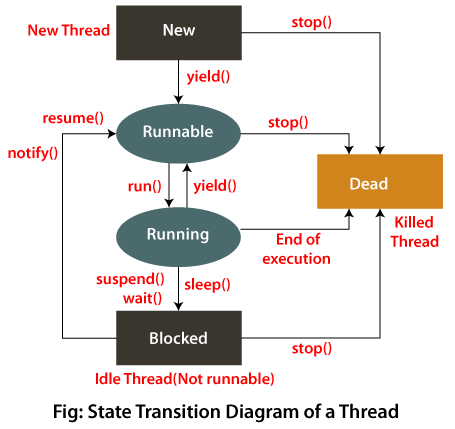
The Java Thread class provides the two variant of the sleep() method. First one accepts only an arguments, whereas the other variant accepts two arguments. The method sleep() is being used to halt the working of a thread for a given amount of time. The time up to which the thread remains in the sleeping state is known as the sleeping time of the thread. After the sleeping time is over, the thread starts its execution from where it has left.
public static void sleep(long mls) throws InterruptedException
public static void sleep(long mls, int n) throws InterruptedException
The notify() method of thread class is used to wake up a single thread. This method gives the notification for only one thread which is waiting for a particular object.
If we use notify() method and multiple threads are waiting for the notification then only one thread get the notification and the remaining thread have to wait for further notification.
public final void notify()
The notifyAll() method of thread class is used to wake up all threads. This method gives the notification to all waiting threads of a particular object.
If we use notifyAll() method and multiple threads are waiting for the notification then all the threads got the notification but execution of threads will be performed one by one because thread requires a lock and only one lock is available for one object.
public final void notifyAll()
The yield() method of thread class causes the currently executing thread object to temporarily pause and allow other threads to execute.
public static void yield()
When the join() method is invoked, the current thread stops its execution and the thread goes into the wait state. The current thread remains in the wait state until the thread on which the join() method is invoked has achieved its dead state. If interruption of the thread occurs, then it throws the InterruptedException.
public final void join() throws InterruptedException
Synchronization in Java is the capability to control the access of multiple threads to any shared resource.
Java Synchronization is better option where we want to allow only one thread to access the shared resource.
The synchronization is mainly used to:
- To prevent thread interference.
- To prevent consistency problem.
There are two types of synchronization:
- Process Synchronization.
- Thread Synchronization.
In Java, Lock is an interface available in the Java.util.concurrent.locks package. Java lock acts as thread synchronization mechanisms that are similar to the synchronized blocks. After some time, a new locking mechanism was introduced. It is very flexible and provides more options in comparison to the Synchronized block.
The lock() method is one of the most important methods of the Lock interface. It is used for acquiring the lock. For thread scheduling purposes, the current thread becomes disabled when the lock is not available. The lock() method is a public method that returns void.
public void lock()
Thread interaction refers to the communication and coordination between multiple threads in a program. This is necessary to ensure that different threads work together correctly and to avoid race conditions and other synchronization issues that can arise when multiple threads access shared resources simultaneously.
There are various methods for achieving thread interaction, including locks, semaphores, condition variables, and message passing. These synchronization mechanisms allow threads to coordinate their access to shared resources, signal each other, wait for each other, and exchange data.