This repository was archived by the owner on Dec 30, 2021. It is now read-only.
How to use
1. check prerequisites.
-
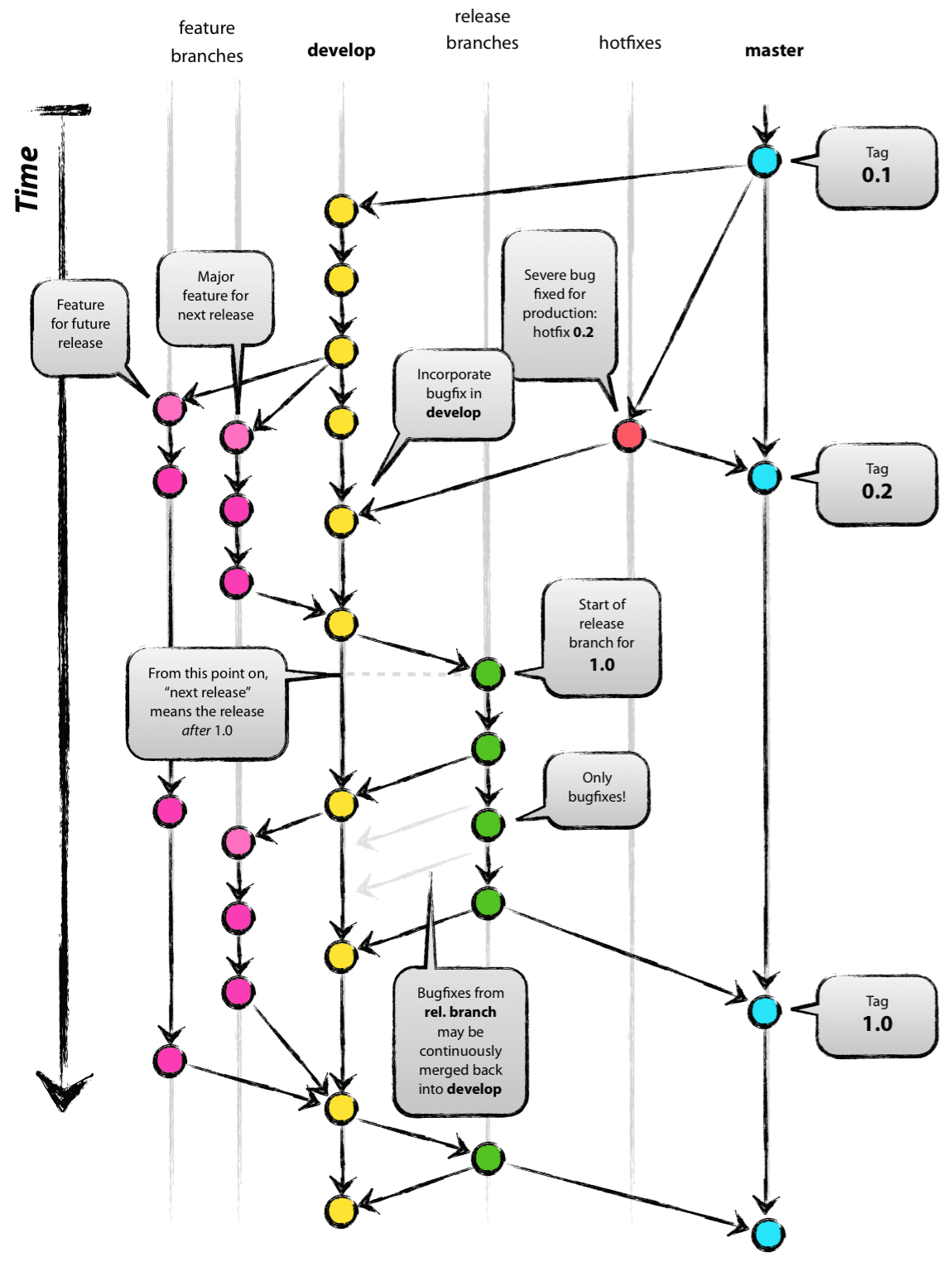
Understand git-flow.
-
Clone Repository to your Mac.
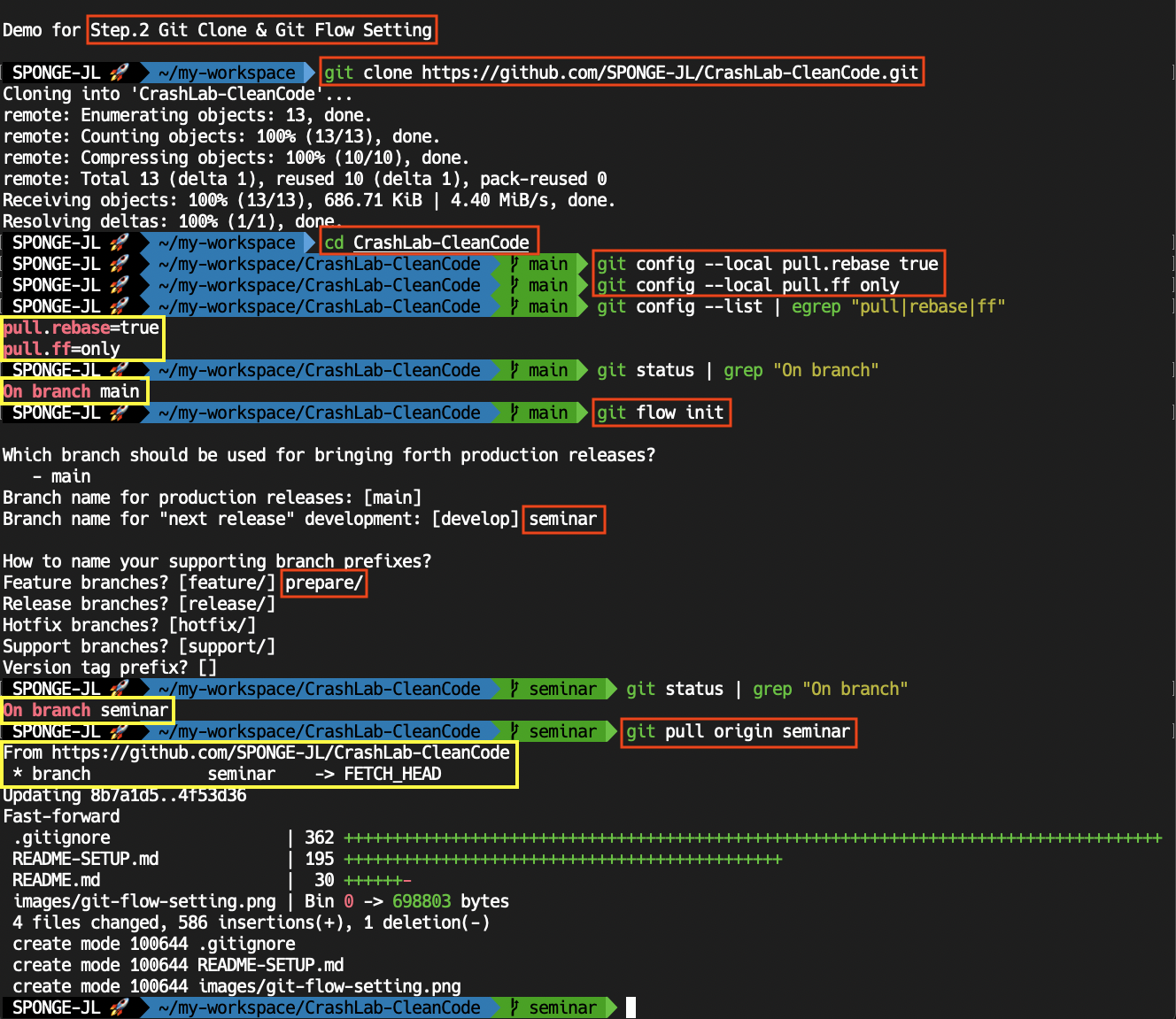
git clone https://github.com/SPONGE-JL/CrashLab-CleanCode.git
-
Setting Local Config for Rebase & Fast-Forward.
cd CrashLab-CleanCode
git config --local pull.rebase true
git config --local pull.ff only

# Check
git config --list |egrep "pull|rebase|ff"
  # Like below ...
  # pull.rebase=true    >> Set pulling strategy into 'rebase' not 'merge'.
  # pull.ff=only        >> Set fast-forward only
-
Setting Git-Flow
# Check Current Branch
git status |grep "On branch"
  # Like below ...
  # On branch main

# Start Git-Flow
git flow init
  # Like below ..
  # Which branch should be used for bringing forth production releases?
  #    - main
  # Branch name for production releases: [main]                   << ENTER
  # Branch name for "next release" development: [develop] seminar << TYPE 'seminar'
  #
  # How to name your supporting branch prefixes?
  # Feature branches? [feature/] prepare/  << TYPE 'prepare/'
  # Release branches? [release/]           << ENTER
  # Hotfix branches? [hotfix/]             << ENTER
  # Support branches? [support/]           << ENTER
  # Version tag prefix? []                 << ENTER

# Check Current Branch has been switched
git status |grep "On branch"
  # Like below : Switched to 'semonar' branch for merging developed feautres (name by 'chapter')
  # On branch seminar

# Pull
git pull origin seminar
-
Switch to 'seminar' branch with updating.
# Check branch list
git branch |cat
  # Maybe like below...
  #   main
  # * seminar
  #   (other prepare branches could exist)

git checkout seminar
  # If you see like this, the seminar branch is latest state
  # Already on 'seminar'
  # Your branch is up to date with 'origin/seminar'.

# If it isn't up-to-date, pull from remote.
git pull origin seminar
-
Start to prepare your leading-seminar
# Start new feautre for preparing your seminar
git flow feature start Chapter00-Title

  # Add and edit your files. (e.g Java or Typescript codes or README.md)
  # Commit changes with messages.
-
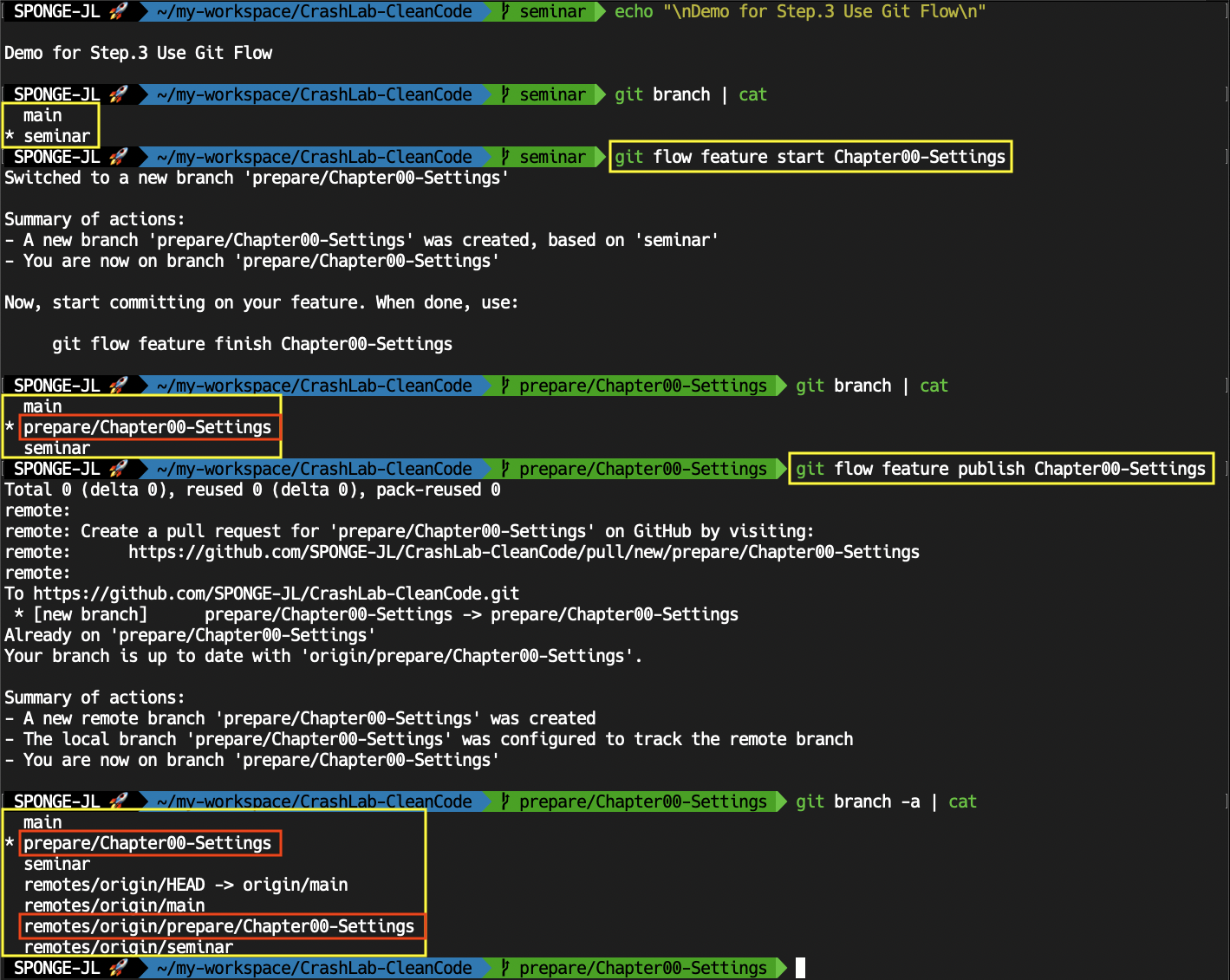
Publish your works when you want to save in remote.
# Publish
CURRENT_BRANCH=`git branch |grep "*" |cut -c 3-` && echo "CURRENT_BRANCH: ${CURRENT_BRANCH}"
git flow feature publish $CURRENT_BRANCH
-
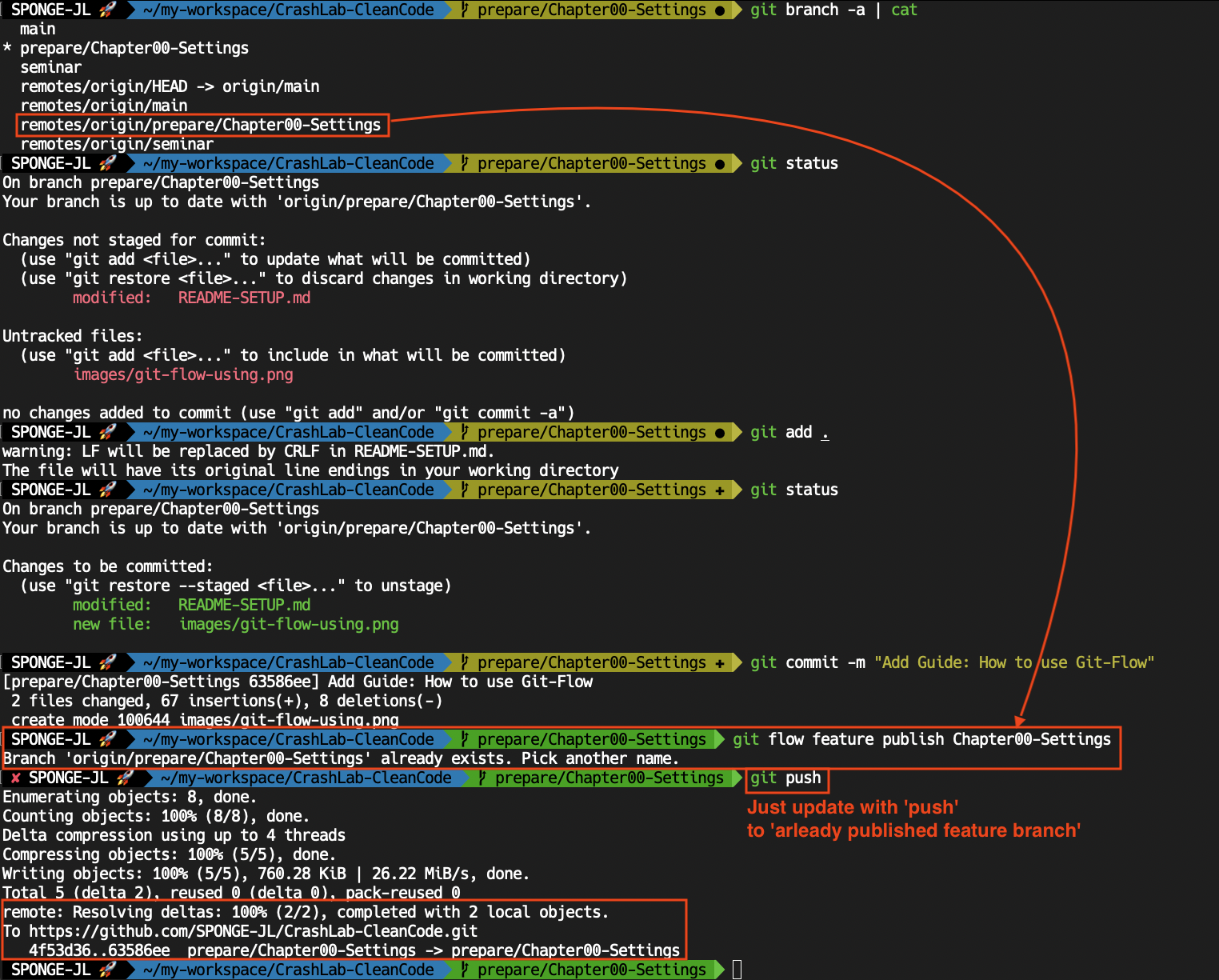
Push to already published feature branch.
# After commit
CURRENT_BRANCH=`git branch |grep "*" |cut -c 3-` && echo "CURRENT_BRANCH: ${CURRENT_BRANCH}"
git push -u origin $CURRENT_BRANCH
-
Pull your works or others.
# Check our remote branch list
git fetch -u origin
git branch -r |cat
  # Like below ...
  #  origin/HEAD -> origin/main
  #  origin/main
  #  origin/prepare/Chapter00-Tile  << Target feature branch with pulling
  #  ...
  #  origin/seminar

# Pull what you want
git flow feature pull origin Chapter00-Title
  # Like below ..
  # Created local branch prepare/Chapter00-Title based on origin's prepare/Chapter00-Title.

# Check your branch has switched
git branch |cat
  # Like below
  #   main
  # * prepare/Chapter00-Settings
  #   seminar
-
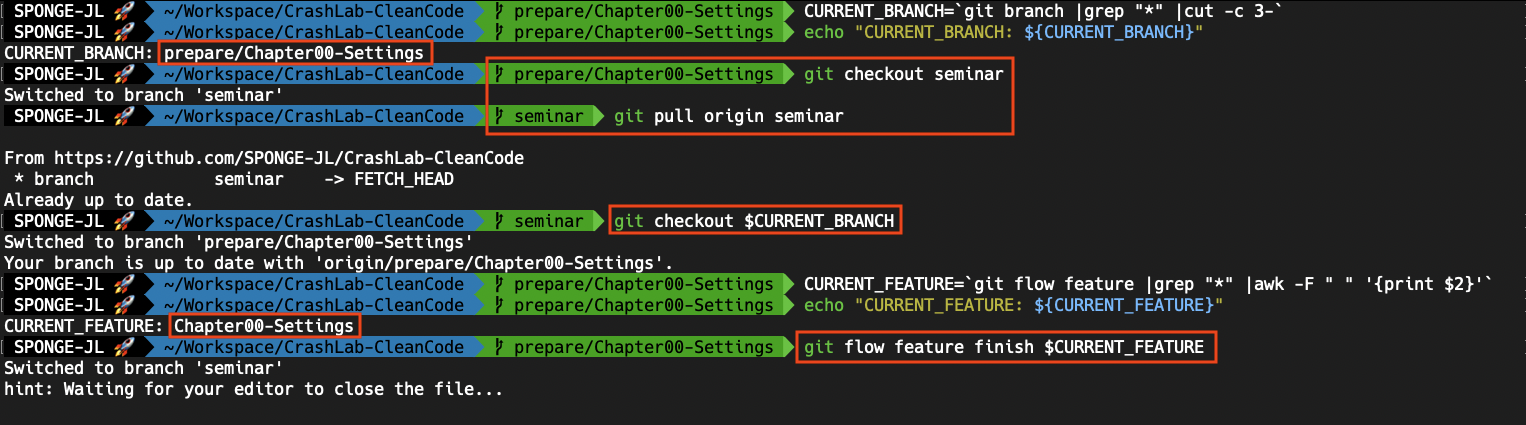
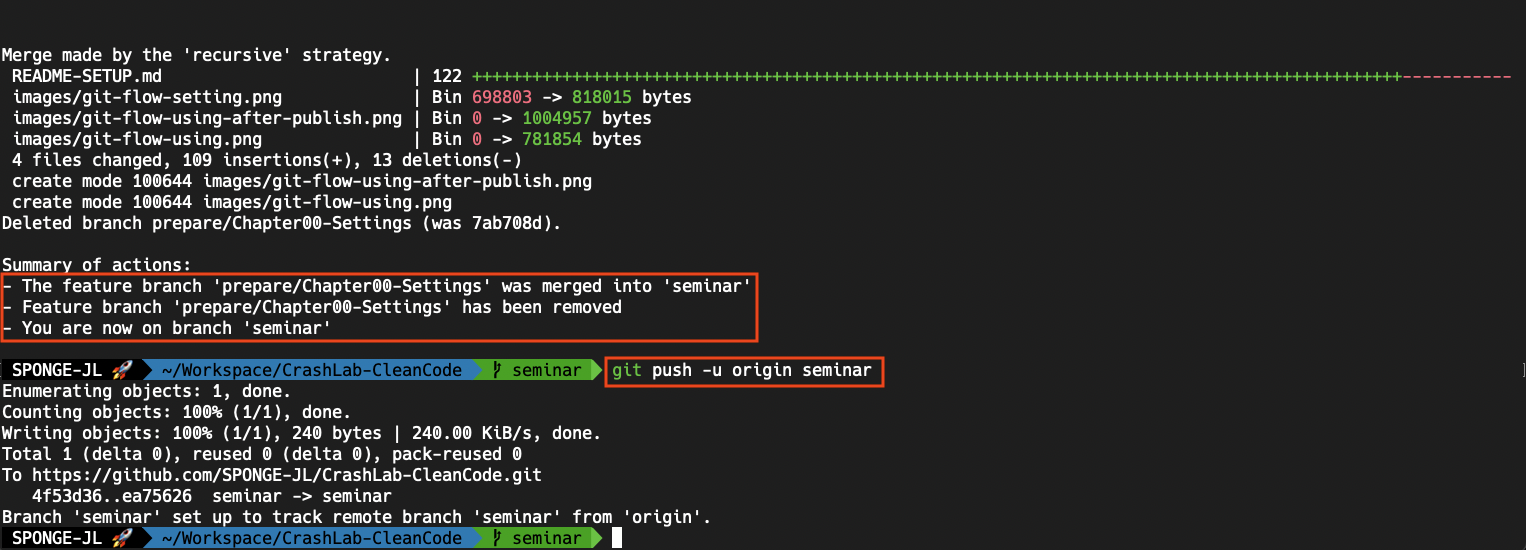
Merge 'your branch (feature)' to 'seminar (develop)' with
finishcommand.# After finish to prepare your seminar CURRENT_BRANCH=`git branch |grep "*" |cut -c 3-` echo "CURRENT_BRANCH: ${CURRENT_BRANCH}" # First, Update seminar (develop) branch git checkout seminar git pull origin seminar # Then, finish your prepare (feature) branch git checkout $CURRENT_BRANCH CURRENT_FEATURE=`git flow feature |grep "*" |awk -F " " '{print $2}'` echo "CURRENT_FEATURE: ${CURRENT_FEATURE}" git flow feature finish $CURRENT_FEATURE # Type Merge Message (maybe auto-completed) # Add Merge Commit with this message : Type [esc] key --> Type ":wq" --> Type [enter] key # Finally Merged. # Your workspace has been switch to seminar (develop) branch. # Push to remote git push -u origin seminar