ControllerAIO
ControllerAIO stands for Controller All in One. We use multiple different controllers in our control setups, and they do not have the same binds. That means that the X button on one controller is the Y button on another. Using the ControllerAIO class, it automatically detects what controller you are using, and using universal enums can always have the correct binds no matter what controller you are using. It also allows us to write special classes that also interface with the ControllerAIO, which you can learn about by visting the sub pages listed under this one.
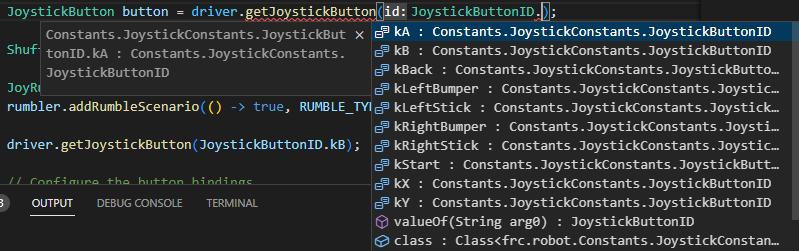
Just like how you would declare a XboxController or a PS4Controller, you have one constructor: ControllerAIO(int port). Port is the id of the controller on Driver Station under the HID devices category. It will then automatically identify what kind of controller you have. The best way to get new buttons is through the new method getJoystickButton(JoystickButtonID id). This makes accessing every single button extremely easy, as the auto complete will give you a nice list of options to index from.
When you declare a ControllerAIO, it compares the name of the device on the port ID for all possible listed HID devices. If it finds one, it defines that device as one of the children from the JoystickVariant enum. Those children have already been programmed each number in by hand, so you don't have to. If you want to add a joystick, go to BDConstants and follow the instructions there.