
edge 大声朗读微软 TTS 服务, 在阅读 APP 中添加配置语音引擎方式收听微软 TTS / Edge 大声朗读 也可以在浏览器直接访问自动下载的.mp3 文件流
- min.py 是精简版 仅有一个接口'
- EdgeSpeakFetch.kt 是基于[edge-tts](https://github.com/rany2/edge-tts) 通过gpt提取核心逻辑生成的, 可直接在阅读内部集成
- DouBaoFetch.kt 是基于[doubao-tts](https://github.com/callmerio/doubao-tts)通过豆包提取核心逻辑生成的, 可直接在阅读内部集成
- 理论上和rany2/edge-tts 参数都一致, 一荣俱荣一损俱损 EdgeVersion=140.0.3485.14
- 如果没有VPS部署可以使用 https://github.com/wangz-code/legado-tts 阅读内部集成了Edge大声朗读和豆包
- 豆包的这个不要调用太频繁几分钟一次,基本无大碍了 问题不大
pip3 install Flask edge-tts

python3 main.py


# `GET接口是 /ra  和 POST接口 /rap
# 浏览器访问:
http://127.0.0.1:1233/api/ra?text=helloword&rate=25&voice=zh-CN-YunjianNeural

# 阅读内朗读引擎配置url
http://127.0.0.1:1233/api/rap,{"method": "POST", "body": "text={{encodeURIComponent(speakText)}}&rate={{speakSpeed}}&voice=zh-CN-XiaoxiaoNeural"}

# 豆包无法顺畅朗读 仅供测试 极其容易被拦截, 貌似是频繁会被拦截, 单次长内容约 1000字每次 貌似能长一点不会拦截,
#  如果准备两个 key 进行切换 1A,2B 3A,4B 这样 可以大大降低拦截概率, 达到基本能用的地步
http://127.0.0.1:12333/api/doubao,{"method": "POST", "body": "text={{encodeURIComponent(speakText)}}&rate={{speakSpeed}}&cookie=sessionid=你的sessionid; sid_guard=你的sid_guard; uid_tt=你的uid_tt"}

# 阅读内朗读引擎配置url 支持对话&旁白切换音色   感谢 https://github.com/retaw106 贡献
http://127.0.0.1:1233/api/rap2,{"method": "POST", "body": "text={{encodeURIComponent(speakText)}}&rate={{speakSpeed}}"}

# 在阅读内开启 "流式播放音频" 更好
# 语速最好设置为2.5     >2.5 就读的快, < 2.5 就读的慢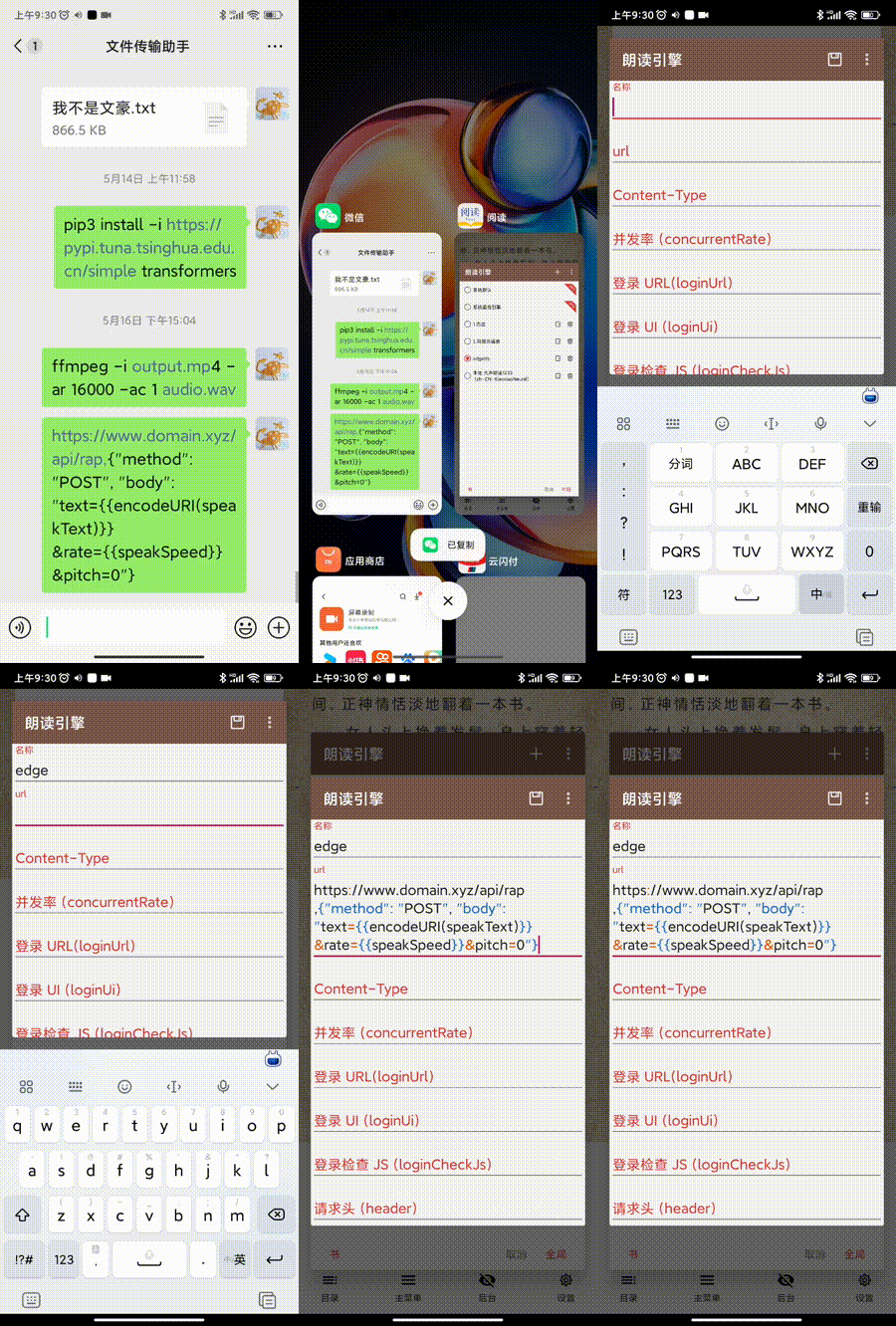
| 参数 | 默认值 |
|---|---|
| voice | zh-CN-XiaoxiaoNeural |
| 语音模型 | 性别 | 适用场景 | 风格特点 |
|---|---|---|---|
| zh-CN-XiaoxiaoNeural | Female | 新闻、小说 | 温和 |
| zh-CN-XiaoyiNeural | Female | 动漫、小说 | 活泼 |
| zh-CN-YunjianNeural | Male | 体育、小说 | 激昂 |
| zh-CN-YunxiNeural | Male | 小说 | 活泼、阳光 |
| zh-CN-YunxiaNeural | Male | 动漫、小说 | 可爱 |
| zh-CN-YunyangNeural | Male | 新闻 | 专业、可靠 |
| zh-CN-liaoning-XiaobeiNeural | Female | 方言 | 幽默 |
| zh-CN-shaanxi-XiaoniNeural | Female | 方言 | 明快 |
| 参数 | 默认值 | 描述 |
|---|---|---|
| voice | zh-CN-XiaoxiaoNeural | 旁白音色 |
| voice_chat | zh-CN-YunxiNeural | 对话音色 |
| volume_chat | 0 | 对话音量 |
# 如果没有node 需要先安装node, 推荐使用nvm  https://github.com/nvm-sh/nvm
node -v
# 安装pm2 至全局
npm install pm2 -g
# 运行,负载均衡, 进程守护:PM2 可以始终保持应用程序运行。当应用程序崩溃时,PM2 可以自动重启它,确保服务的可用性。
pm2 start "python3 main.py"