Recent Exchange versions have built-in support of journaling for recording all inbound and outbound email messages for backup or compliance reasons. Overtime, the journal mailbox grows so large and needs to be trimmed or pruned.
This article documents a PowerShell maintenance script written for reporting and automating the monthly archive-to-PST process of the Exchange 2013 journaling mailbox. (Based on reader feedback, it also suits Exchange 2016 Standard.)
This script uses the PowerShell cmdlet New-MailboxExportRequest -Mailbox <journal mailbox> to export Exchange Journaling Mailbox of previous month (e.g. 2016-01-01 to 2016-01-31) as a standard PST file (e.g. archive 2016_01_31.pst) to specified locations (up to two locations) and then uses Search-Mailbox -DeleteContent to delete email messages within the date range if successful. It is designed to be run at the beginning of each month (e.g. 2/Feb/16) using Windows Task Scheduler.
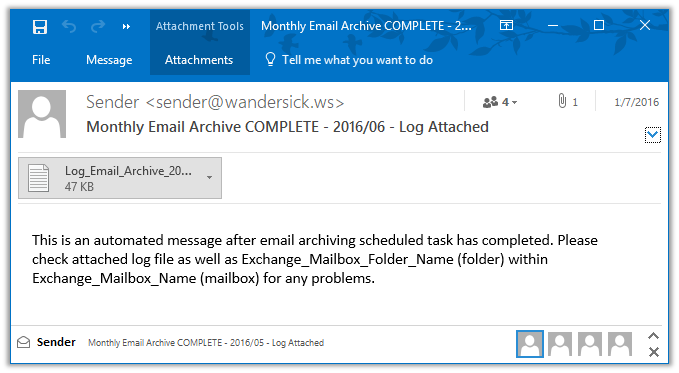
A log file is created under a specified directory during each execution. An email is sent to specified email addresses with the log file when done. The email message subject indicates COMPLETE/FAILURE.
In addition, a list of email messages returned from search and deleted by Search-Mailbox cmdlet will be available as zip(csv) attachments in another specified mailbox and folder as mentioned in the message body of above email.
In case mail archiving has failed, script will send an alert mail and exit so that no mail deletion will occur. In technical terms, when status of Get-MailboxExportRequest is not "Completed", script keeps on waiting (looping) until it is complete. If the loop is broken or script receives any status other than "Completed", execution will be terminated and failure will be reported by email.
- PowerShell 3.0 or above
- Execute this script on Exchange server where (preferably):
- System Locale is English (United States)
- Short date format (for en-US) is MM/dd/yyyy
- Sufficient disk space for storing PST files in the specified location(s)
Note: This script was designed and tested for email messages of previous month, and has not been tested in other configurations but could still work with some tweaking. (In fact, it does not only work for journal mailbox.)
- Edit variable parameters as required ( Refer to the script comment sections 1-4 )
- Save the script in a local folder e.g. C:\scripts\ws_email_archiving_script.ps1
- To export email of last month, the script should be scheduled to run any day within the current month.
For example, to export Jan 2016 email, running the script any day within Feb 2016 would do; the beginning of month is recommended (e.g. 2/Feb/16) .
Program/script:
- C:\Windows\System32\WindowsPowerShell\v1.0\powershell.exe
Add arguments:
- -PSConsoleFile "C:\Program Files\Microsoft\Exchange Server\V15\Bin\exshell.psc1" -command ". 'C:\Program Files\Microsoft\Exchange Server\V15\Bin\Exchange.ps1'; &'C:\scripts\ws_email_archiving_script.ps1'"
Start in:
- C:\Scripts
Alternatively, start the .ps1 script using a .bat script:
- "C:\Windows\System32\WindowsPowerShell\v1.0\powershell.exe" -PSConsoleFile "C:\Program Files\Microsoft\Exchange Server\V15\Bin\exshell.psc1" -command ". 'C:\Program Files\Microsoft\Exchange Server\V15\Bin\Exchange.ps1'; &'C:\scripts\ws_email_archiving_script.ps1'"
Below are some of the kind comments left by users of the script. (Thanks!)
- "We have some very large journaling mailboxes that we’ve been racking our brains trying to figure out what to do with to stop the sprawl. We’re on Exchange 2016 Standard, so we’re limited on our database count. This script has made it really easy for us to dig out emails by month and save them off to PST that we can store out on second tier storage for archive. Thanks for this!"
- “I’ve used your script for a couple of years. It’s GREAT and do a GREAT job. Thank you very much!”
| Ver | Date | Changes |
|---|---|---|
| 1.3 | 20200614 | - Add missing bcc parameters in the first two lines of Send-MailMessage - Change default setting of archiveEnable2ndCopy to false as it should not be commonly enabled - Add a tip in the comment section of the script at part 3 to make it easier to configure the parameters |
| 1.2 | 20171022 | - Turn journal mailbox name into a variable - Further ensure New/Get-MailboxExportRequest job name uniqueness by naming it with current date time (in yyyyMMdd_hhmmsstt) - Remove unused variables, scriptDir, startDateShort and endDateShort - Improve script comments |
| 1.1 | 20160712 | First public release |
| 1.0 | 20160314 | First internal release |
