We want to read Netcdf variables given their offsets, without loading the entire file into memory. If any visitors have insights into achieving this, please see the issue titled "Reading variables without loading entire Netcdf File".
#Introduction
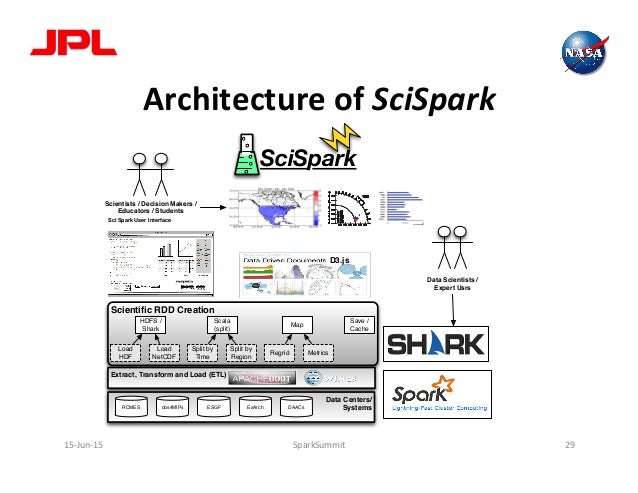
SciSpark is a scalable scientific processing platform that makes interactive computation and exploration possible. This prototype project outlines the architecture of the scientific RDD (SRDD), and a library of linear algebra and geospatial operations. Its initial focus is expressing Grab em' Tag em' Graph em' algorithm as a map-reduce algorithm.
#Installation
-
Install Scala: 2.10.x (http://www.scala-lang.org/download/) Be sure to add scala/bin folder to your environment.
-
Install Maven 2.0x+ at https://maven.apache.org/download.cgi and be sure to add Maven to your environment.
-
Install Spark 1.6.0 which has a Scala 2.10 dependency at http://spark.apache.org/downloads.html. To build for Scala 2.10, run the following commands from your Spark folder:
./dev/change-scala-version.sh 2.10 mvn -Pyarn -Phadoop-2.4 -Dscala-2.10 -DskipTests clean package -
Add the installation folder to your environment SPARK_HOME = /path/to/installation
-
Download the latest version of SciSpark from https://github.com/SciSpark/SciSpark
-
SBT: v0.13.5+ http://www.scala-sbt.org/download.html
-
Within your SciSpark folder, run
sbt clean assembly -
Find where your SciSpark.jar (or similarly named) file is and get its path as follows /path_to_SciSpark/target/scala-2.10/SciSpark.jar.
-
Download and untar Zeppelin 0.5.6 at https://zeppelin.incubator.apache.org/download.html
-
Find zeppelin-env.sh.template in Zeppelin's conf folder and create zeppelin-env.sh with the following command:
cp zeppelin-env.sh.template -
Point your configuration to your SciSpark jar file by adding the following to zeppelin-env.sh:
export ZEPPELIN_JAVA_OPTS="-Dspark.jars=/path/to/SciSpark.jar" export SPARK_SUBMIT_OPTIONS="--jars /path/to/SciSpark.jar" -
Start Zeppelin:
bin/zeppelin-daemon.sh start -
Open your local configuration (localhost:8080/#) and create a new note. Paste the following into the first cell:
//SciSpark imports import org.dia.Parsers import org.dia.core.{ SciSparkContext, SciTensor } import org.dia.algorithms.mcc.MCCOps import org.dia.algorithms.mcc.MainDistGraphMCC import org.dia.urlgenerators.{RandomDatesGenerator} -
Run this note. If it works, your configuration is set up correctly.
-
Now, we want to change the skin of our notebook to have a SciSpark theme. This can be done by downloading a zip file of the Zeppelin web repo at https://github.com/SciSpark/scispark_zeppelin_web. Then, go to your zeppelin installation and replace all folders under webapps/webapp/ with the folders of the same name under your web installation's src folder.
Possible pitfalls:
Your computer may cache some of your web files, resulting in a page that does not display the SciSpark skin correctly. If you suspect this is the case, you can reset the cache with command + shift + R (on Mac).
#Getting Started
We extend the following functionality for users trying to use scientific datasets like NetCDF on Apache Spark. A file containing a list of paths to NetCDF files must be created. We have provided a file containing 6000+ NetCDF URL's to use.
The following example connects to a spark instance running on localhost:7077. It reads the Netcdf files and loads the "data" variable array into tensor objects. The array is masked for values under 241.0, and then reshaped by averaging blocks of dimension 20 x 20.
Finally the arrays are summed together in a reduce operation.
val sc = new SciSparkContext("spark://localhost:7077", "SciSpark Program")
val scientificRDD = sc.NetcdfFile("TRMM_L3_Links.txt", List("data"))
val filteredRDD = scientificRDD.map(p => p("data") <= 241.0)
val reshapedRDD = filteredRDD.map(p => p.reduceResolution(20)
val sumAllRDD = reshapedRDD.reduce(_ + _)
println(sumAllRDD)
#Running the test
sbt
To run all the test use at the sbt prompt:
test
To run individual test use a command such as:
test-only org.dia.tensors.BasicTensorTest
#API SciSpark documentation can be found at https://scispark.jpl.nasa.gov/api/
#Grab em' Tag em' Graph em' : An Automated Search for Mesoscale Convective Complexes
GTG is an algorithm designed to search for Mesoscale Convective Complexes given temperature brightness data.
The map-reduce implementation of GTG is found in the following files : MainNetcdfDFSMCC : Reads all NetCDF files from a directory MainMergHDFS : Reads all MERG files from a directory in HDFS
MainMergRandom : Generates random arrays without any source. The randomness is seeded by the hash value of your input paths, so the same input will yield the same output. ##Project Status
This project is in active development. Currently it is being refactored as the first phase of development has concluded with a focus on prototyping and designing GTG as a map-reduce algorithm.
##Want to Use or Contribute to this Project? Contact us at scispark-team@jpl.nasa.gov
##Technology This project utilizes the following open-source technologies Apache Spark and is based on the NASA AIST14 project led by the PI Chris Mattmann. The SciSpark team is at at JPL and actively working on the project.
###Apache Spark
Apache Spark is a framework for distributed in-memory data processing. It runs locally, on an in-house or commercial cloud environment.