You signed in with another tab or window. Reload to refresh your session.You signed out in another tab or window. Reload to refresh your session.You switched accounts on another tab or window. Reload to refresh your session.Dismiss alert
There will be an update notification when there’s a new version from the Blender extension platform.
When there’s object space normal used, a different method will be used for the final baked normal, so the result will look closer to the unbaked one. (Sample file)
Bugfixes
Fix: In certain cases, Refresh Linear Color Space button can appear and cannot be removed.
Fix: Blender can crash while baking other objects data.
Fix: Changing the blend type of a color channel with an alpha channel pair inside a group can make the layer entirely transparent.
Fix: Alpha channel can't be baked into a color attribute.
Fix: Baking other objects with alpha or with SSAA enabled can result in wrong baked data.
Fix: Baking other objects with no BSDF node will return an error.
This version includes performance optimization for UI drawing, which can be five times faster in some cases, especially on complex layer setups. This meant navigating Ucupaint UI will be less laggy. More improvements are still coming for future versions.
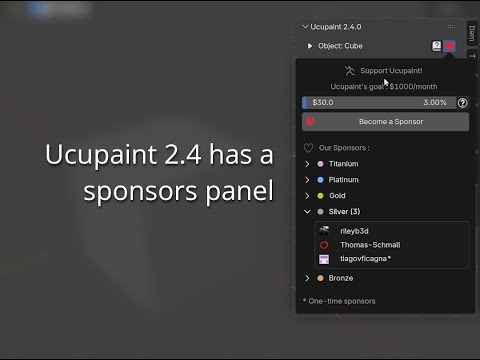
Sponsors Panel Update
More tier members are now visible by default, and all icons are consistently aligned to the left. Support Ucupaint if you also want your name and icons to be included in this list.
Bugfixes
Fix: Cannot use Use Layer Vector option for mask.
Fix: A mistakenly unpacked UDIM image can be lost when saving the blend file.
Fix: Using a color ID mask on a color attribute layer will show a Fix Missmatch button that can't be removed.
"Smoothness" suffix in the file name is now detectable for loading images to a single layer.
Other object color baking is now available for creating a mask.
Mirror modifier will be temporarily applied when sculpting VDM images if Mirror U/V is enabled. This will make it possible to sculpt at the mirrored mesh.
New operator in the normal channel cog wheel button to apply all VDM layers to multires modifier.
OSL option is now available for layer/mask baking.
New option to add Ambient Occlusion channel after Quick Setup.
New option to use transparency for missing ray in other object normal baking.
Layer alpha is now selectable as the layer channel source.
UI Updates
New sponsors panel to show Ucupaint supporters and the goal (Demo)
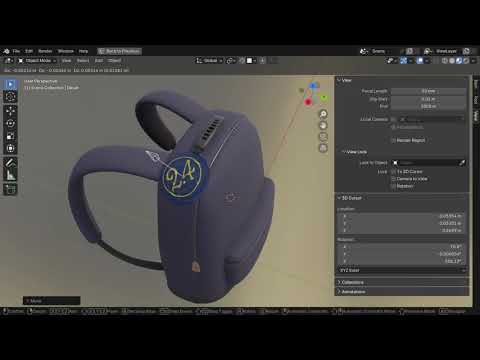
Info panel now shows contributor icons.
Both sponsors' and contributors' data are updated once per day.
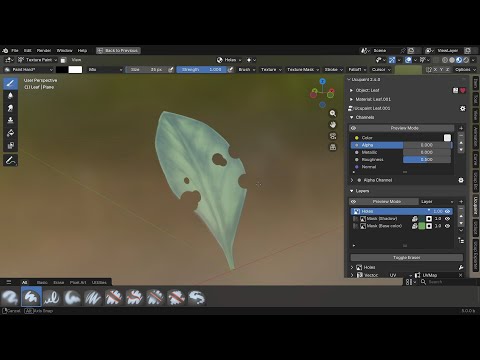
There will be a button to switch to material view when the user is in solid/wireframe viewport.
There will be a warning message when creating realtime AO/Edge Detect layer/mask, which mentions that the rendered/baked result can be different
Active channel name will be visible when the main channels list is collapsed and layer preview mode is enabled.
Material-specific options like render method/alpha blending are now moved to the new material dropdown.
Info panel now shows contributor icons
Ucupaint sponsors will be shown in the sponsors panel
New material dropdown for material related settings
Performance Improvements
Less lag when doing a transformation operation while Ucupaint UI is open.
Less lag when changing Ucupaint UI sliders.
Faster native VDM baking for Blender 5.0
Faster VDM baking since all unrelated objects are automatically hidden while baking.
Changes
Background layer and alpha toggle are no longer available to use since the functionality is already covered by a dedicated alpha channel.
Baking other object data now will hide the source objects after baking (It can be changed in the bake dialog box and there’s a button to unhide the source objects).
Baking fake lighting will use a 32-bit float image by default for better gradient (Blender 2.80+)
Vertex Color is now called Color Attributes in Blender 3.2+ to match Blender convention.
Open Available Image renamed to Open Existing Image
Smooth bump will be enabled by default, but only for Blender 2.76 and 2.77, since it’s the only way to make the bump map visible in the viewport.
Loading material assets is now only available for Blender 4.0+ since it returns an error in earlier versions.
Bugfixes
Blender built-in icons are now used whenever possible to avoid missing icons.
Fix: Baking channel with multiple objects can cause some objects to have wrong color when there is missing vertex color data
Fix: Sculpting VDM image with Flip Y/Z disabled produces a wrong mesh
Fix: Baking mask to image returns an error if the active object is hidden in the viewport.
Fix: Blender 5.0 doesn’t create an output node by default, which is causing an error.
Fix: Cannot bake layer/mask with blur enabled in Blender 5.0
Fix: In certain cases, Refresh Linear Color Space button can appear and cannot be removed
Fix: Toggling the eraser on custom brush with Erase Alpha blending sometimes can cause an error
Fix: User can mistakenly open color ID attribute as a layer/mask.
Fix: Removing a layer does not remove its baked image masks
Fix: Baking mask to image with preview mode enabled sometimes can disconnect the preview node.
Fix: Animation playback causes errors on Blender 5.0
Fix: Wrong default value when baking custom bake target if there’s no layer using the channel
Fix: Cannot register addon when updater JSON is empty
Fix: Bake other object extrusion and ray settings are not available to access when Use Cage is disabled.
Note
Ucupaint 2.4.0 still supports all Blender versions from Blender 2.76, so no worries for anyone who still uses older hardware/software
Replace Image in layer/mask source now will open the image from disk.
Mute Stencil Mask Opacity option is no longer available when doing the quick setup, since it has no purpose anymore.
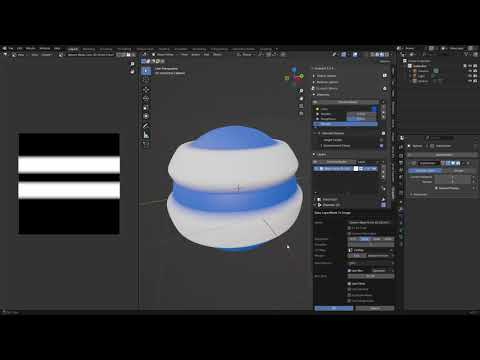
Blur types option is now available when doing Bake layer/mask as image
Now Transition Bump Max Height can use negative values. It’s needed for creating some peel effects (Example)
Youtube demo of baking color ID mask with gaussian blur
Bugfixes
Fix: Right-click menu on the File Browser can be spawned multiple times after creating a new blend file.
Fix: Toggle Eraser doesn't work on Blender 5.0.
Fix: Replace decal layer/mask image is causing the image extension to be repeated
Fix: Back to Original UV doesn't work when the active image is from a channel's custom source data.
Fix: Wrong baked channel result if displacement setup is enabled and there's a layer with a non-UV vector. The result is still not an exact match, but close enough.
Fix: Preview Mode doesn't work with Blender 5.0.
Fix: Error when trying to bake a channel when there's a missing decal mask image
Fix: Refill UDIM Tiles returns an error when there's no layer.
Fix: Paste Layers sometimes can return an error.
Fix: Cannot set channel’s name on Blender 5.0.
Fix: Using Add blending for bump map does not contribute to the final maximum height value.
Fix: Merge layers with normal main channel will return an error.
Fix: Baked Normal without bump sometimes does not get saved when saving the blend file.
Opening other layer image/vertex color as a mask no longer automatically set the source input to Alpha since the user doesn't always want to use the image as an alpha clip.
Using Enable Baked Outside and Displacement Setup will use the combined normal as the final normal rather than the normal without bump. This is because displacement maps are not exportable using GLTF, so by using the combined normal, it makes sure the displacement data is at least already included in the baked normal map.
Bugfixes
Fix: Baking with Denoise/Dithering enabled doesn’t work with the latest Blender 5.0 Alpha
Fix: Alpha socket default value gets reset after enabling/disabling channel's alpha
Fix: Max height on node input always gets reset to 0.1, causing a wrong bake result
Fix: Vector displacement input socket won't get properly reconnected after enabling/disabling Displacement Setup
Fix Displacement image won't get baked if there's no layer using but there's a connection to input displacement socket (#307)
Fix: Moving a layer with a transition ramp inside or outside a group can produce wrong color because of wrong connections
Fix: Baking other object data can spawn an empty image texture node on some materials
Fix: Wrong other object's channel bake result for channels after Normal
Fix: Clicking Brush tool after toggling eraser with Smear/Blur tool will revert to using the eraser brush instead of the real paint brush
Fix: Error when trying to refill UDIM tiles with an empty UDIM image