These code snippets can be run inside the python IDE in an active Revit project. 🐍
I will be adding more and more scripts as ideas come to me.
The main focus of this scratchpad is to test out and develop proof of concepts.
I have a cheatsheet for beginners to get involved and start the learning process of how to create scripts and buttons in Revit.
the button building part builds off of the PyRevit library. Check the Cheatsheet for more information on PyRevit!
update May '19

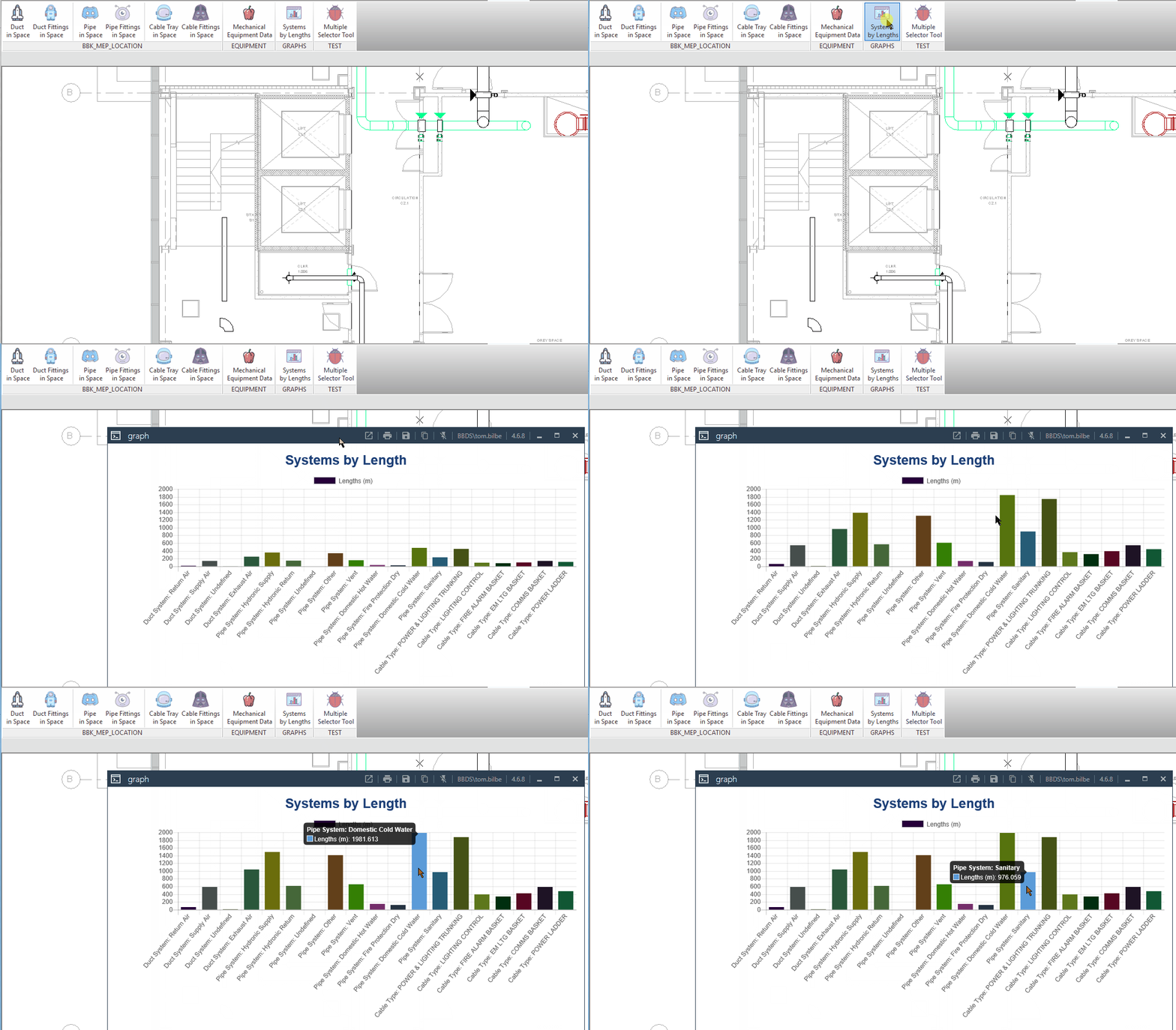
Within the Revit Ribbon we can add buttons to execute scripts both with and without user input. This allows the Revit user to work with the tools without feeling like they are 'hacking' a solution together. The source code to the buttons is available to the Revit user by using Alt + leftMouse Click this will show the folder location of the button on their local install of the software.
This script can calculate the quantities within the open Revit document to create a report for the BID/ Team or Project Delivery team ahead of site commencement works.
This report could also give some indication to the Offsite fabrication teams to help with resourcing and planning ahead of deliveries to site.
This tool could be ran in conjunction with Location tools to give support to planning and logistics teams around where, and when quantities of supplies would be delivered to site.
This tool facilitates the creation of Location data on MEP objects within the Revit whereby it can be exported for use outside of the Revit environment.
The tool creates a Transaction within Revit writing to a Global Parameter -> BBK_MEP_LOCATION
Utilising the Revit Transaction process the script can be turned back, using the built in Undo function (at the top of the Revit window)
The tool writes to both fittings, and lengths (Revit: MEP_Curves) giving them a location built upon the space within the model.
The MEP Object has to be within the same model as the space it resides in, the function of the button does not work at this time with linked MEP files. It can however be modified to utilise Revit Architectural ROOMS.
Quick report to check if Arch and MEP models match on naming.
This tool outputs to chart.js window at the minute it is a pie chart 🍰
Write to excel database to collect information on project - and ultimately create understanding of what a consultant sees a stage 3 model is at.
- Builders work clash tool
- Utilise Dynamo script created by BBK in India
- Schedule out Builderswork applying Hole-number property
- Refactor to apply Shared Parameters
- BBK_MEP_LOCATION
- Duct Accessories - BuiltInCategory.OST_DuctAccessory
- Pipe Accessories - BuiltInCategory.OST_PipeAccessory
- Electrical Fixtures - BuiltInCategory.OST_ElectricalFixtures
- Electrical Equipment - BuiltInCategory.OST_ElectricalEquipment
- Create MEP System analytics
- Captured how to generate system assignment - All MEP systems

- Break systems down into MEP classes - Duct/ Air : Pipe/Liquid fluid : CableTray/ Elec
- Capture all plant not assigned to MEP System - Number of items, analysis of which system is worse (Elec / Mech)
- Captured how to generate system assignment - All MEP systems
- Create possible d3 visualisations of all this data collection?
- Create output of Warnings on project
- Understand how to transact and with document and create file.writeStream()
- Create a file either .txt or .csv as direct export from Revit document
- Create CSV Point (X,Y,Z) exports for comparisons with arch files. - FOR LCY
- Use export to create visualisations to avoid imports into Revit Python Wrapper 😵
- Visulation types:
- Find filters by System Classification
- Systems - Named vs. Unnamed
- Systems - MEP Broken down by DUCT vs. PIPE vs. ELEC
- Systems - MEP Broken down by Service: - This is a new filtered window implementation
- DUCT - Services
- PIPE - Services
- Elec - Services
- Linked model data vs MEP consultant model
- If MEP model has been linked to room names/ numbers
- If Grids/Levels have Copy/Monitor applied
These are obviously unknown 👾