I have decided to move away from the planned Ruby version towards a different approach. My end goal to construct a tool for crypto trading and portfolio/analysis and management did not align with the state of this project.
RubyCryptoETF is a Ruby implementation of a Crypto ETF inspired by the original Javascript version developed by benmarten/CryptoETF.
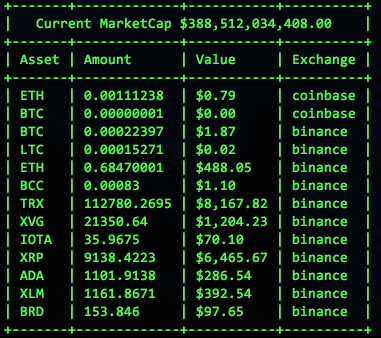
- To provide a modular Ruby gem that will eventually be used for a either an online account based ETF or crypto asset brokerage.
- A command-line tool to enable rapid trading and purchasing across multiple crypto asset exchanges via their public APIs
Below is the current status for supported crypto asset exchange integrations
[x] Coinbase via coinbase/coinbase-ruby
[x] Binance via Jakenberg/binance-ruby
[x] CoinMarketCap
- Git clone this project
git clone git@github.com:taywils/RubyCryptoETF.git - Install dependencies with bundle
bundle install - Run Rspec
bundle exec rspec
- Git clone this project
git clone git@github.com:taywils/RubyCryptoETF.git - Then build the gem locally
gem build ruby_crypto_etf.gemspec
You should see the following in your console
Successfully built RubyGem
  Name: ruby_crypto_etf
  Version: 0.1.0
  File: ruby_crypto_etf-0.1.0.gem
- Next install the local gem
gem install ./ruby_crypto_etf-0.1.0.gem
You should see the following in your console
Successfully installed ruby_crypto_etf-0.1.0
1 gem installed
- Create a settings.yaml file by copying and then editing the
settings.example.yaml
cp ./settings.example.yaml ./settings.yaml
-
Copy paste your api keys and api secrets to the
settings.yaml -
Use irb or pry to launch a new console
require 'ruby_crypto_etf'
=> true- Create a new
Marketobject
cm = RubyCryptoETF::CoinMarketCap.new- We need to grab the live market data, first get the current Market Capitalization
cm.fetch_total_market_cap- Next we need all the tickers for each currency symbol being actively traded
cm.fetch_tickers- Create a new
Displayobject, we will use the TerminalDisplay
display = RubyCryptoETF::TerminalDisplay.new- Load a new
Portfoliowith the market and display chosen
portfolio = RubyCryptoETF::Portfolio.new({ market: cm, display: display })- From the
setting.yamlfile created earlier, initialize the exchanges
path_to_your_settings_yaml = "Replace this string with the full path to your settings.yaml"
portfolio.initialize_exchanges_from_settings(path_to_your_settings_yaml)- Lastly send the
visualizemethod to your portfolio
puts portfolio.visualizeApache License, see LICENSE.md