Final Funhouse, is a procedural dungeon generator implementation based on the binary space partitioning algorithm. At the core of the generation are these three steps:
- Room Connection
- Space Partitioning
- Corridor Generation
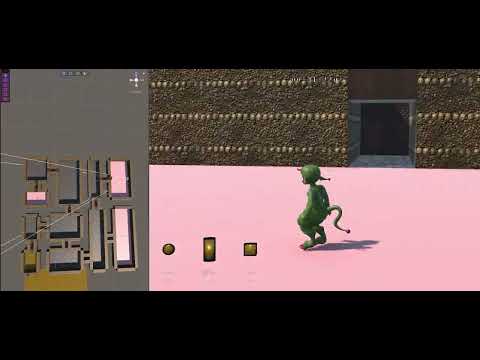
Here is a small demo of the current state of the project:
✒️ Acknowledgements ✒️
The following projects have contributed in large to the development of the prototype:
- Third Person Character Controller - developed from tutorial by spaderdabomb
Spaderdabomb (2024). FinalCharacterController. URL: https://github.com/spaderdabomb/FinalCharacterController
- BSP Dungeon Generation Architecture - adapted from SunnyValleyStudio [MIT Licence]
SunnyValleyStudio (2020). Unity_Procedural_Dungeon_binary_space_partitioning. URL: https://github.com/SunnyValleyStudio/Unity_Procedural_Dungeon_binary_space_partitioning
📥 Project Installation 📥
- Unity 2022.3.28f1
- Unity Hub 3.8.0 | (if Unity 2022.3.28f1 downloaded separatley)
- Git-LFS | For accessing textures and models
To run the project please install the above version of Unity. Then proceed to clone the project to create a local repository using the following commands:
git clone https://gitlab.doc.gold.ac.uk/miliy001/PDG_Funhouse.git
git clone git@gitlab.doc.gold.ac.uk:miliy001/PDG_Funhouse.git
As larger assets such as the models and textures are stored using Git Larger File Storage the following command need to be run with Git-LFS installed:
git lfs install
After cloning the repo and loading lfs files, open the folder via Unity Hub:
- Navigate to the Projects tab on the left hand menu.
- Select the Add dropdown on the right and add project from disk.
[ ]
]
- Then double click the file in the projects menu to open.
⚙️ Setting Up Generator ⚙️
Opening up the Unity file you will be greeted with an untitled scene:

To setup the dungeon generator scene, navigate to:
./Assets/Scenes
double click the Dungeon file to open the scene.
🧱 Using the Generator 🧱
The generator will be found on the left-hand side in the hierarchy labeled DungeonGen:

It is possible to manipulate various properties of the dungeon such as the Dungeon Properties and Room Properties by clicking on the DungeonGen game object:
- For the DungeonCalculator:

- For the DungeonDecorator:

The gizmo on the dungeon generator can be moved and edited within the editor or in play mode:

🕹️ Play Mode 🕹️
You can demo the generated dungeon using a simple third person character controller in playmode. To enter play mode in the editor press ctrl-p
Use the following controlls to navigate around the dungeon:
