This is simple implementation of 'To do list" app in REST architecture.
you need JRE 17 or greater (download here: https://www.oracle.com/java/technologies/javase/jdk17-archive-downloads.html)
You have two options to run the app:
First, checkout the master branch to your local PC and import it to your favorite IDE
then you can run the app directly from the IDE or you can copy app.jar from target directory and run in command prompt
java -jar app.jar
after application has been deployed and running, an H2 in memory DB automatically created with the following tables. OWNERS(Users) table TASKS COMMENTS
also, a default Admin user called SYS created on the application startup
you can access the DB via web browser on URL: http://localhost:8080/h2-console you will see the following login screen
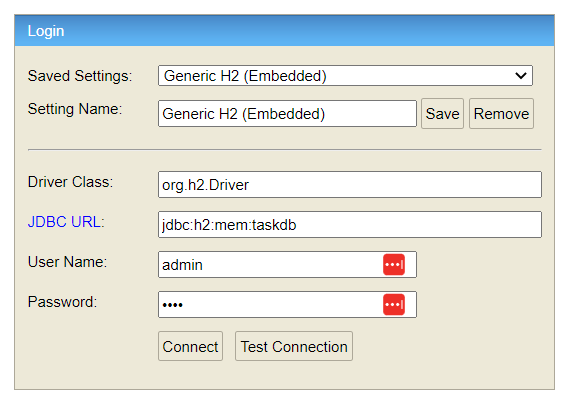
enter credentials: user name: admin password: 1234
first you need to download Postman from here https://www.postman.com/downloads/
the application receive the following requests, all in JSON format
#User operations
#get all users in the DB
GET localhost:8080/user/all (no body needed)
#add new user
POST http://localhost:8080/user/add
{
"name": "username",
"email": "email@myOrg.com",
"isAdmin":false,
"isActive": false,
"password":"password",
"requester": "SYS" //(or any admin user) mandatory field
}
the requester parameter value must be username that exist in the DB
#update user details (email\password\name)
PATCH http://localhost:8080/user/update/general-data
{
"name": "username",
"email": "email@myOrg.com",
"password":"password",
"requester":"SYS" //(or any admin user). mandatory field
}
#change user role (admin\regular user)
PATCH http://localhost:8080/user/update/isAdmin
{
"name":"username",
"isAdmin": true, //false
"requester":"SYS" //(or any admin user). mandatory field
}
#activate\deactivate users
PATCH http://localhost:8080/user/update/activation
{
"name":"username",
"isActive": true, //false
"requester":"SYS" //(or any admin user). mandatory field
}
#delete user
DELETE http://localhost:8080/user/{name}
{
"requester":"SYS" //(or any admin user). mandatory field
}
e.x: DELETE http://localhost:8080/user/dan will delete the user with value "dan" on the name field
#Task operations
#get all tasks in the system
GET localhost:8080/task/get-all (no body needed)
#get task by assignee
GET localhost:8080/task/get-all/dan
{
"requester":"dan" //admin or assignee. mandatory field
}
in this example you will get all tasks assigned to user Dan. if you replace the requester Dan with any other user with admin role, this will also work because
user with admin role can see all the tasks for all users. A non-admin user can see only his tasks
consider two users, Shay and Dan. the following example will produce an error since Shay asks to see Dan's tasks
GET localhost:8080/task/get-all/dan
{
"requester":"shay"
}
BUT, if Shay is admin, the he WILL see Dan's tasks
#add a task
POST localhost:8080/task/add
{
"title":"title",
"description": "description",
"assignee":"assignee",
"requester":"SYS" //(or any admin user). mandatory field
}
OK response should look loke this in console:
{
"title": "title",
"description": "description",
"status": "PENDING",
"assignee": "assignee",
"id": 1,
"visible": true
}
it is important to take a note of the id parameter value. This is needed in other requests
#delete a task
DELETE localhost:8080/task/{task_id}
{
"requester":"SYS" //(or any admin user). mandatory field
}
you can obtain the task_id parameter value from the H2 DB console (TASK table) or from the response of the 'add task' API
e.x DELETE localhost:8080/task/3 will delete the task with id 3
#change task assignee
PATCH http://localhost:8080/task/assignee-update/{task_id}
{
"assignee": "new assignee",
"requester":"SYS" //(or any admin user). mandatory field
}
you can obtain the task_id parameter value from the H2 DB console (TASK table) or from the response of the 'add task' API
#update task status
task status start with PENDING status by default. the assignee can move it to COMPLETE status and the next status after COMPLETE is ARCHIVED. only admin users can move the task to status ARCHIVED. 'get task by user' API will not show ARCHIVED tasks. the update operation must follow a certain flow: PENDING>COMPLETED>ARCHIVED
the Status enum values are:
PENDING(1),
COMPLETED(2),
ARCHIVED(3),
PATCH localhost:8080/task/status-update/{task_id}
{
"status": 2, //new status for task
"requester":"user" //any user, in case new status is 2, admin user in case new status is 3
}
e.x PATCH localhost:8080/task/status-update/3 will change the status of task 3 from PENDING to COMPLETED
#update task general data: title or description
PATCH localhost:8080/task/general/{task_id}
{
"title": "new title",
"description": "new desc",
"requester": "SYS" //(or any admin user). mandatory field
}
#Comment operations
#get assignee comment
return an assignee comment
in this case, the requester can be any user that exist on the system
GET localhost:8080/comment/get-all/{username}
{
"requester":"SYS" // or ANY user on the system
}
e.x GET localhost:8080/comment/get-all/shay will retrieve the user Shay and the task assigned to Shay (e.g Shay is the assignee). the OK response should look like:
[
{
"userId": {
"name": "shay",
"email": "dan@gmail.com",
"isAdmin": false,
"isActive": false,
"password": "4543523",
"requester": "SYS",
"id": 2
},
"taskId": {
"title": "tas3",
"description": "des3c2",
"status": "PENDING",
"assignee": "shay",
"id": 2,
"visible": true
},
"date": "2023-04-10T18:52:46.898+00:00",
"comment": "sssssssssssssssssssss",
"id": 2
}
]
#add comment to task
POST localhost:8080/comment/add
only admin user or the task's assignee can add comment to task
POST localhost:8080/comment/add
{
"taskId":1, // the taskId the comment will associated to
"assignee": "shay",
"comment": "comment",
"requester":"shay" //any admin user or the task assignee
}
e.x if task 1 assigned to Shay, then the above request will work. Also if requester is not the assignee but he is an user with admin role.
the below request will produce an error because Dan has no admin role and he isnt assigned to task 1
{
"taskId":1,
"assignee": "shay",
"comment": "comment",
"requester":"dan"
}