SadhanaDeshmukh:Module2Java
Declaration of variables in Java can begin with a letter, an underscore, or a currency character. Other types of naming are not allowed. There are mainly three types local, instance, and static variable.
Local Variables : The scope of local variables will be only within the given method or class. These variables should be initialized during declaration. Access modifiers cannot be applied to local variables. A local variable declaration will be as shown below: eg.
public static void main(String[] args){
int a=10;
int b=10;
int c=a+b;
System.out.println(c);
}
Instance variable : The variables which are declared outside method but in side they class are instance variables and they are initialized by default values of it. They get memory in heap area. And, sperate memory is allocated to each object in case of instance variable. eg.
class Demo
{
int num;
public static void main(String[] args){
}
}
Static variable: The variables which are declared with static keyword are static variables and static variables can not be local. Same memory is allocated to each object corresponding to an object.
eg.
class Demo
{
static int num;
public static void main(String[] args){
System.out.println(num);
}
}
Access modifiers are an important part of a declaration that can be accessed outside the class or package in which it is made. Access modifiers enable you to decide whether a declaration is limited to a particular class, a class including its subclasses, a package, or if it is freely accessible. Java language has four access modifiers: public, protected, and private.
- Public: Enables a class or interfaces to be located outside of its package. It also permits a variable, method, or constructor to be located anywhere its class may be accessed.
- Protected: Enables a variable, method, or constructor to be accessed by classes or interfaces of the same package or by subclasses of the class in which it is declared.
- Private: Prevents a variable, method, or constructor from being accessed only from within the class in which it is declared.
- Default: The default access occurs when none of the above access specifiers are specified. In such a case, the member is accessible within the package but not without the Java package.
class Demo
{
    // field, constructor, and
    // method declarations
}
This is a class declaration. The class body contains all the code that provides for the life cycle of the objects created from the class: constructors for initializing new objects, declarations for the fields that provide the state of the class and its objects, and methods to implement the behavior of the class and its objects. We can declare nested classes as well. Java inner class or nested class is a class that is declared inside the class or interface. We use inner classes to logically group classes and interfaces in one place to be more readable and maintainable. Additionally, it can access all the members of the outer class, including private data members and methods.
eg.
class Outer_class
{
 //code
 class Inner_class
 {
  //code
 }
}
An interface is declared by using the interface keyword. It provides total abstraction; means all the methods in an interface are declared with the empty body, and all the fields are public, static and final by default. A class that implements an interface must implement all the methods declared in the interface. We will use implements to access data of interface in a class and we use extends in interface to interface.
interface interfaceName
{
    // declare constant fields
    // declare methods that abstract
    // by default.
}
In interfaces we can declare only abstract methods but in JDK 8 java allowed us to make default non abstract or concreate methods inside an interface and later in version 9 they allowed to create private and static methods as well.
Declaring class variable and methods to to achieve encapsulation. You want to create a number of Bicycle objects and assign each a serial number, beginning with 1 for the first object. This ID number is unique to each object and is therefore an instance variable. At the same time, you need a field to keep track of how many Bicycle objects have been created so that you know what ID to assign to the next one. Such a field is not related to any individual object, but to the class as a whole. For this you need a class variable, numberOfBicycles, as follows:
public class Bicycle {

    private int cadence;
    private int gear;
    private int speed;

    // add an instance variable for the object ID
    private int id;

    // add a class variable for the
    // number of Bicycle objects instantiated
    private static int numberOfBicycles = 0;
}
- Constructor is a special type of member function.
- Constructors are used to initialize instance variables of a class.
- Constructors name is same as class name.
- And they don't have return types, if we declare return type of a constructor then they are considered as a normal method.
- Constructors can be overloaded.
- If we are inheriting a class then super class constructor is called, because in a constructor super is first statement.
constructors are used to initialize objects but the destructors are used to free resources which are no longer useful. But in java there is no such concept by which we can perform destruction, In java GC is responsible for memory deallocation. GC destroy unreferenced and unreachable objects. Though we can make objects eligible for garbage collection, by five ways-
- Reassign object
- Nullify object
- Anonymous object
- Local object
- Island of isolation
Before destroying any object GC calls finalize method of object class for the purpose of clean up activities. By overriding that object class finalize method we can perform those action which we wanted to do before destruction of an object.
- Private: The access level of a private modifier is only within the class. It cannot be accessed from outside the class.
- Default: The access level of a default modifier is only within the package. It cannot be accessed from outside the package. If you do not specify any access level, it will be the default.
- Protected: The access level of a protected modifier is within the package and outside the package through child class. If you do not make the child class, it cannot be accessed from outside the package.
- Public: The access level of a public modifier is everywhere. It can be accessed from within the class, outside the class, within the package and outside the package.
In order to perform any operations while assigning values to an instance data member, an initializer block is used. In simpler terms, the initializer block is used to declare/initialize the common part of various constructors of a class. It runs every time whenever the object is created. The initializer block contains the code that is always executed whenever an instance is created and it runs each time when an object of the class is created. As we know constructor's first statement is super() but it's second statement is initialization block itself. It is automatically placed into the constructor. eg.
class Demo
{
    int age;

    Demo()//constructor
    {
      System.out.println("speed is "+age);
    }

    {age=100;}  //instance block

    public static void main(String args[]){
    Demo b1=new Demo();
    Demo b2=new Demo();
    }
}
Java array is an object which contains elements of a similar data type. Additionally, The elements of an array are stored in a contiguous memory location. It is a data structure where we store similar elements. We can store only a fixed set of elements in a Java array. Array in Java is index-based, the first element of the array is stored at the 0th index, 2nd element is stored on 1st index and so on. In Java, array is an object of a dynamically generated class. Java array inherits the Object class, and implements the Serializable as well as Cloneable interfaces. We can store primitive values or objects in an array in Java. Java provides the feature of anonymous arrays which is not available in C/C++.
-
Advantages of array
Code Optimization: It makes the code optimized, we can retrieve or sort the data efficiently. Random access: We can get any data located at an index position. -
Disadvantages of array
Size Limit: We can store only the fixed size of elements in the array. It doesn't grow its size at runtime. To solve this problem, collection framework is used in Java which grows automatically.
The Enum in Java is a data type which contains a fixed set of constants.Java Enums can be thought of as classes which have a fixed set of constants (a variable that does not change). The Java enum constants are static and final implicitly. It is available since JDK 1.5. Enums are used to create our own data type like classes. The enum data type (also known as Enumerated Data Type) is used to define an enum in Java. Unlike C/C++, enum in Java is more powerful. Here, we can define an enum either inside the class or outside the class.
Points to remember for Java Enum-
- Enum improves type safety
- Enum can be easily used in switch
- Enum can be traversed
- Enum can have fields, constructors and methods
- Enum may implement many interfaces but cannot extend any class because it internally extends Enum class
Java variable naming conventions-
For variables, the Java naming convention is to always start with a lowercase letter and then capitalize the first letter of every subsequent word. Variables in Java are not allowed to contain white space, so variables made from compound words are to be written with a lower camel case syntax.
Here are three examples of variables that follow the standard Java naming convention:
- firstName
- timeToFirstLoad
Java method naming conventions-
Lower camel case, also known as dromedary case, is also the Java naming convention for methods.
e.g. -
- compareToIgnoreCase(String str)
- copyValueOf(char[] data)
Final variables are written in uppercase.
Java reference type names-
The standard Java naming convention demands that all reference types be written in PascalCase, also known as upper camel case.
- ServerErrorException
- RuntimeType
Encapsulation is defined as the wrapping up of data under a single unit. It is the mechanism that binds together code and the data it manipulates. Another way to think about encapsulation is, that it is a protective shield that prevents the data from being accessed by the code outside this shield. Encapsulation is one of the key features of object-oriented programming. Encapsulation refers to the bundling of fields and methods inside a single class. It prevents outer classes from accessing and changing fields and methods of a class. This also helps to achieve data hiding.
class Area {

 // fields to calculate area
 int length;
 int breadth;

 // constructor to initialize values
 Area(int length, int breadth) {
   this.length = length;
   this.breadth = breadth;
 }

 // method to calculate area
 public void getArea() {
   int area = length * breadth;
   System.out.println("Area: " + area);
 }
}

class Main {
 public static void main(String[] args) {

   // create object of Area
   // pass value of length and breadth
   Area rectangle = new Area(5, 6);
   rectangle.getArea();
 }
}
Inheritance in java, is a concept that acquires the properties from one class to other classes; for example, the relationship between father and son. Inheritance in Java is a process of acquiring all the behaviors of a parent object. The concept of inheritance in Java is that new classes can be constructed on top of older ones. You can use the parent class’s methods and properties when you inherit from an existing class. You can also add additional fields and methods to your existing class. The parent-child relationship, also known as the IS-A relationship, is represented by inheritance. To explain further, One object can acquire all of a parent object’s properties and actions through the technique of inheritance in Java Programming. It is a crucial component of OOPs (Object Oriented programming system).
In Java, the idea of inheritance means that new classes can be built on top of existing ones. When you derive from an existing class, you can use its methods and properties. To your current class, you may also add new fields and methods. Types of inheritance -
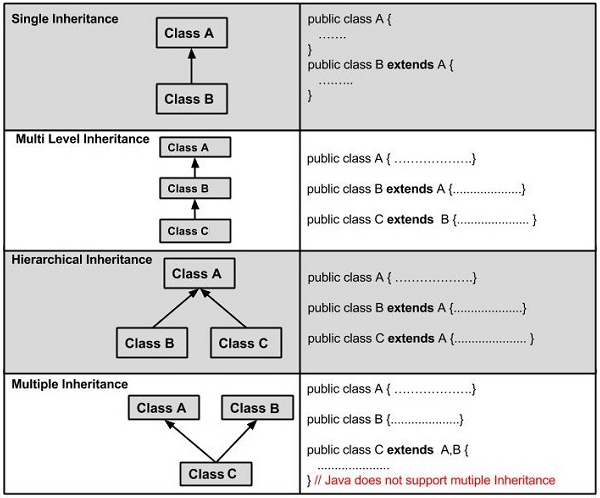
Java does not support multiple inheritance and also there is another inheritance which is hybrid which is also not supported by java.
Polymorphism means "many forms", and it occurs when we have many classes that are related to each other by inheritance. Like we specified in the previous chapter; Inheritance lets us inherit attributes and methods from another class. Polymorphism uses those methods to perform different tasks. This allows us to perform a single action in different ways.
For example, think of a superclass called Animal that has a method called animalSound(). Subclasses of Animals could be Pigs, Cats, Dogs, Birds - And they also have their own implementation of an animal sound (the pig oinks, and the cat meows, etc.):
There are two types of polymorphism in Java: compile-time polymorphism and runtime polymorphism. We can perform polymorphism in java by method overloading and method overriding. If you overload a static method in Java, it is the example of compile time polymorphism. Here, we will focus on runtime polymorphism in java.
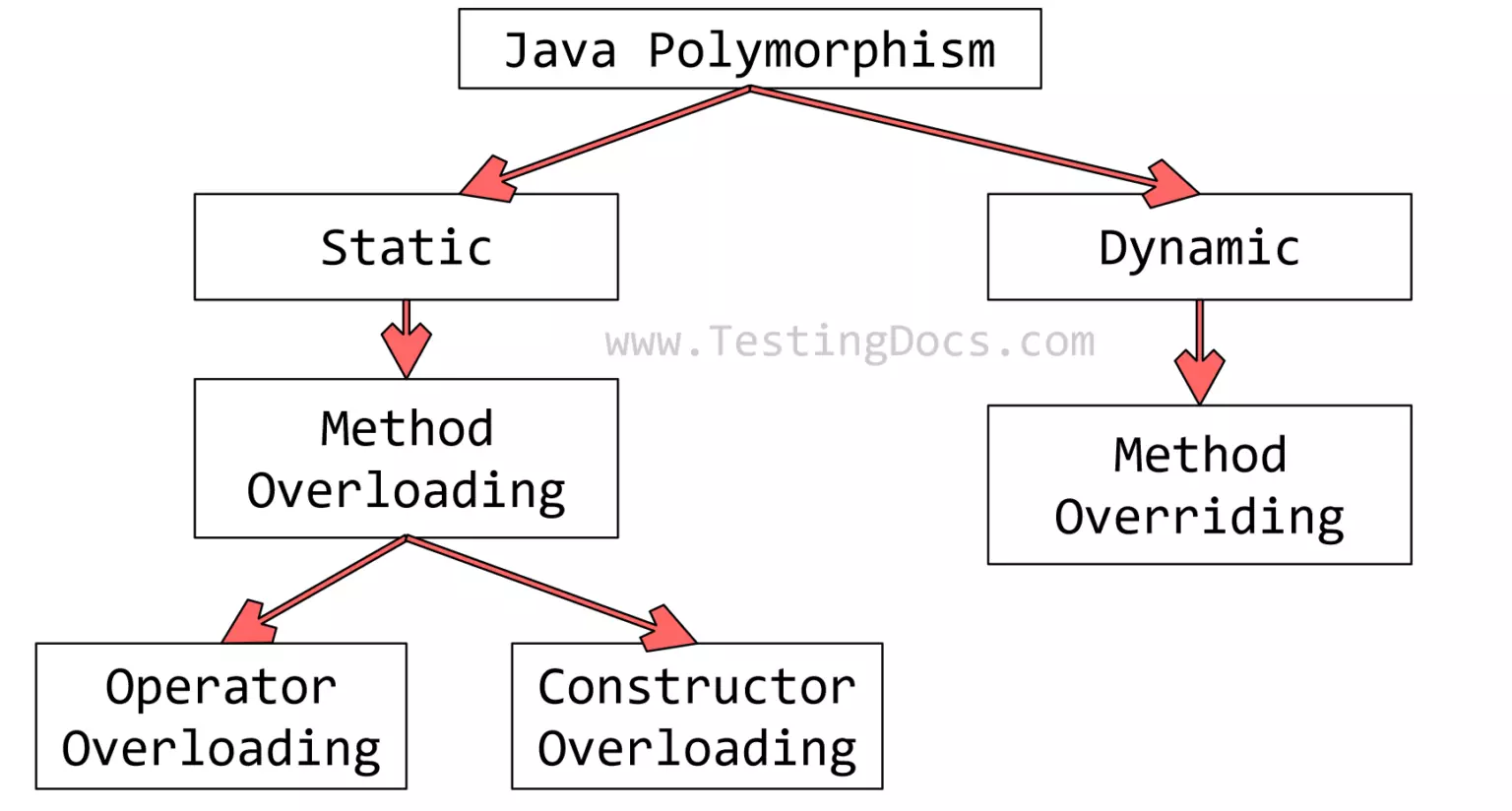
If subclass (child class) has the same method as declared in the parent class, it is known as method overriding in Java. In other words, If a subclass provides the specific implementation of the method that has been declared by one of its parent class, it is known as method overriding.
Rules for Java Method Overriding-
- The method must have the same name as in the parent class
- The method must have the same parameter as in the parent class.
- There must be an IS-A relationship (inheritance).
example-
class Vehicle{
  //defining a method
  void run(){System.out.println("Vehicle is running");}
}
//Creating a child class
class Bike2 extends Vehicle{
  //defining the same method as in the parent class
  void run(){System.out.println("Bike is running safely");}

  public static void main(String args[]){
  Bike2 obj = new Bike2();//creating object
  obj.run();//calling method
  }
If a class has multiple methods having same name but different in parameters, it is known as Method Overloading. If we have to perform only one operation, having same name of the methods increases the readability of the program. Suppose you have to perform addition of the given numbers but there can be any number of arguments, if you write the method such as a(int,int) for two parameters, and b(int,int,int) for three parameters then it may be difficult for you as well as other programmers to understand the behavior of the method because its name differs.
class Adder{
static int add(int a,int b){return a+b;}
static int add(int a,int b,int c){return a+b+c;}
}
class Demo{
public static void main(String[] args){
System.out.println(Adder.add(11,11));
System.out.println(Adder.add(11,11,11));
}}
The java instanceof operator is used to test whether the object is an instance of the specified type (class or subclass or interface). The instanceof in java is also known as type comparison operator because it compares the instance with type. It returns either true or false. If we apply the instanceof operator with any variable that has null value, it returns false. There must be parent child relation between the class objects which are being checked by the operators. When we do typecast, it is always a good idea to check if the typecasting is valid or not. instanceof helps us here. We can always first check for validity using instancef, then do typecasting.
class Parent
{
    int value = 1000;
}

class Child extends Parent
{
    int value = 10;
}

// Driver class
class Test
{
    public static void main(String[] args)
    {
        Parent cobj = new Child();
        Parent par = cobj;

        // Using instanceof to make sure that par
        // is a valid reference before typecasting
        if (par instanceof Child)
        {
            System.out.println("Value accessed through " +"parent reference with typecasting is " +((Child)par).value);
        }
    }
}
- ternary
The meaning of ternary is composed of three parts. The ternary operator (? :) consists of three operands. It is used to evaluate Boolean expressions. The operator decides which value will be assigned to the variable. It is the only conditional operator that accepts three operands. It can be used instead of the if-else statement. It makes the code much more easy, readable, and shorter.
variable = (condition) ? expression1 : expression2
public class Demo
{
public static void main(String args[])
{
int x, y;
x = 20;
y = (x == 1) ? 61: 90;
System.out.println("Value of y is: " +  y);
y = (x == 20) ? 61: 90;
System.out.println("Value of y is: " + y);
}
}
There are some more operators -
- Less than: a < b
- Less than or equal to: a <= b
- Greater than: a > b
- Greater than or equal to: a >= b
- Equal to a == b
- Not Equal to: a != b You can use these conditions to perform different actions for different decisions.
Java uses logical operators AND (&&), OR (||) or NOT (!). These operators yield 1 or 0 depending upon the outcome of different expressions.
import java.io.*;
class Demo {
	public static void main(String[] args)
	{
		int a = 10, b = 20, c = 20, d = 0;
		System.out.println(a);
		System.out.println(b);
		System.out.println(c);
		if ((a < b) && (b == c))
		{
			d = a + b + c;
			System.out.println("The sum is: " + d);
		}
		else
			System.out.println("False conditions");
	}
}
Arithmetic Operators
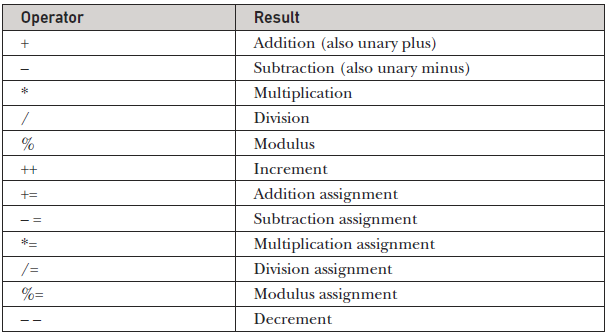
These operators involve the mathematical operators that can be used to perform various simple or advanced arithmetic operations on the primitive data types referred to as the operands. These operators consist of various unary and binary operators that can be applied on a single or two operands. Let’s look at the various operators that Java has to provide under the arithmetic operators.
Arithmetic Operators in Java
The Java for loop is used to iterate a part of the program several times. If the number of iteration is fixed, it is recommended to use for loop.
//Java Program to demonstrate the example of for loop
//which prints table of 1
public class Demo{
public static void main(String[] args) {
    //Code of Java for loop
    for(int i=1;i<=10;i++){
        System.out.println(i);
    }
}
}
The for-each loop is used to traverse array or collection in Java. It is easier to use than simple for loop because we don't need to increment value and use subscript notation. It works on the basis of elements and not the index. It returns element one by one in the defined variable.
public class Demo{
public static void main(String[] args) {
    //Declaring an array
    int arr[]={12,23,44,56,78};
    //Printing array using for-each loop
    for(int i:arr){
        System.out.println(i);
    }
}
}
The Java while loop is used to iterate a part of the program repeatedly until the specified Boolean condition is true. As soon as the Boolean condition becomes false, the loop automatically stops. The while loop is considered as a repeating if statement. If the number of iteration is not fixed, it is recommended to use the while loop
public class Demo{
public static void main(String[] args) {
    int i=1;
    while(i<=10){
        System.out.println(i);
    i++;
    }
}
}
The Java switch statement executes one statement from multiple conditions. It is like if-else-if ladder statement. The switch statement works with byte, short, int, long, enum types, String and some wrapper types like Byte, Short, Int, and Long. Since Java 7, you can use strings in the switch statement. In other words, the switch statement tests the equality of a variable against multiple values.
- There can be one or N number of case values for a switch expression.
- The case value must be of switch expression type only. The case value must be literal or constant. It doesn't allow variables
- The case values must be unique. In case of duplicate value, it renders compile-time error.
- The Java switch expression must be of byte, short, int, long (with its Wrapper type), enums and string.
- Each case statement can have a break statement which is optional. When control reaches to the break statement, it jumps the control after the switch expression. If a break statement is not found, it executes the next case.
- The case value can have a default label which is optional.
public class Demo{
public static void main(String[] args) {
    //Declaring a variable for switch expression
    int number=20;
    //Switch expression
    switch(number){
    //Case statements
    case 10: System.out.println("10");
    break;
    case 20: System.out.println("20");
    break;
    case 30: System.out.println("30");
    break;
    //Default case statement
    default:System.out.println("Not in 10, 20 or 30");
    }
}
}
The Java do-while loop is used to iterate a part of the program repeatedly, until the specified condition is true. If the number of iteration is not fixed and you must have to execute the loop at least once, it is recommended to use a do-while loop.
Java do-while loop is called an exit control loop. Therefore, unlike while loop and for loop, the do-while check the condition at the end of loop body. The Java do-while loop is executed at least once because condition is checked after loop body.
public class Demo{
public static void main(String[] args) {
    do{
        System.out.println("infinitive do while loop");
    }while(true);
}
}
Break: The break statement in java is used to terminate from the loop immediately. When a break statement is encountered inside a loop, the loop iteration stops there, and control returns from the loop immediately to the first statement after the loop. Basically, break statements are used in situations when we are not sure about the actual number of iteration for the loop, or we want to terminate the loop based on some condition.
class Demo{
    public static void main(String[] args)
    {
        // Initially loop is set to run from 0-9
        for (int i = 0; i < 10; i++) {
            // Terminate the loop when i is 5
            if (i == 5)
                break;
            System.out.println("i: " + i);
        }
        System.out.println("Out of Loop");
    }
}
The continue statement in Java is used to skip the current iteration of a loop. We can use continue statement inside any types of loops such as for, while, and do-while loop. Basically continue statements are used in the situations when we want to continue the loop but do not want the remaining statement after the continue statement.
// Java program to demonstrates the continue
// statement to continue a loop
class GFG {
    public static void main(String args[])
    {
        for (int i = 0; i < 10; i++) {
            // If the number is 2
            // skip and continue
            if (i == 2)
                continue;

            System.out.print(i + " ");
        }
    }
}
A label is a valid variable name that denotes the name of the loop to where the control of execution should jump. To label a loop, place the label before the loop with a colon at the end. Therefore, a loop with the label is called a labeled loop. In layman terms, we can say that label is nothing but to provide a name to a loop. It is a good habit to label a loop when using a nested loop. We can also use labels with continue and break statements.
public class Demo
{
public static void main(String args[])
{
int i, j;
//outer loop
outer:     //label
for(i=1;i<=5;i++)
{
System.out.println();
//inner loop
inner:      //label
for(j=1;j<=10;j++)
{
System.out.print(j + " ");
if(j==9)
break inner;
}
}
}
}
When executing Java code, different errors can occur: coding errors made by the programmer, errors due to wrong input, or other unforeseeable things. When an error occurs, Java will normally stop and generate an error message. The technical term for this is: Java will throw an exception (throw an error).
In Java, the try-with-resources statement is a try statement that declares one or more resources. The resource is as an object that must be closed after finishing the program. The try-with-resources statement ensures that each resource is closed at the end of the statement execution. You can pass any object that implements java.lang.AutoCloseable, which includes all objects which implement java.io.Closeable. The following example writes a string into a file. It uses an instance of FileOutputStream to write data into the file. FileOutputStream is a resource that must be closed after the program is finished with it. So, in this example, closing of resource is done by itself try.
import java.io.FileOutputStream;
public class Demo{
public static void main(String args[]){
        // Using try-with-resources
try(FileOutputStream fileOutputStream =newFileOutputStream("abc.txt")){
String msg = "Welcome to javaTpoint!";
byte byteArray[] = msg.getBytes(); //converting string into byte array
fileOutputStream.write(byteArray);
System.out.println("Message written to file successfuly!");
}catch(Exception exception){
       System.out.println(exception);
}
}
}
The try statement allows you to define a block of code to be tested for errors while it is being executed. The catch statement allows you to define a block of code to be executed, if an error occurs in the try block. The try and catch keywords come in pairs:
public class Demo {

    public static void main(String[] args) {
        try
        {
        int data=50/0; //may throw exception
        }
            //handling the exception
        catch(ArithmeticException e)
        {
            System.out.println(e);
        }
        System.out.println("rest of the code");
    }

}
Java finally block is a block used to execute important code such as closing the connection, etc. Java finally block is always executed whether an exception is handled or not. Therefore, it contains all the necessary statements that need to be printed regardless of the exception occurs or not. The finally block follows the try-catch block. Or we can use try with finally.
class Demo
{
  public static void main(String args[]){
  try{
//below code do not throw any exception
   int data=25/5;
   System.out.println(data);
  }
//catch won't be executed
  catch(NullPointerException e){
System.out.println(e);
}
//executed regardless of exception occurred or not
 finally {
System.out.println("finally block is always executed");
}

System.out.println("rest of phe code...");
  }
}
The Exception hierarchy is as follows-
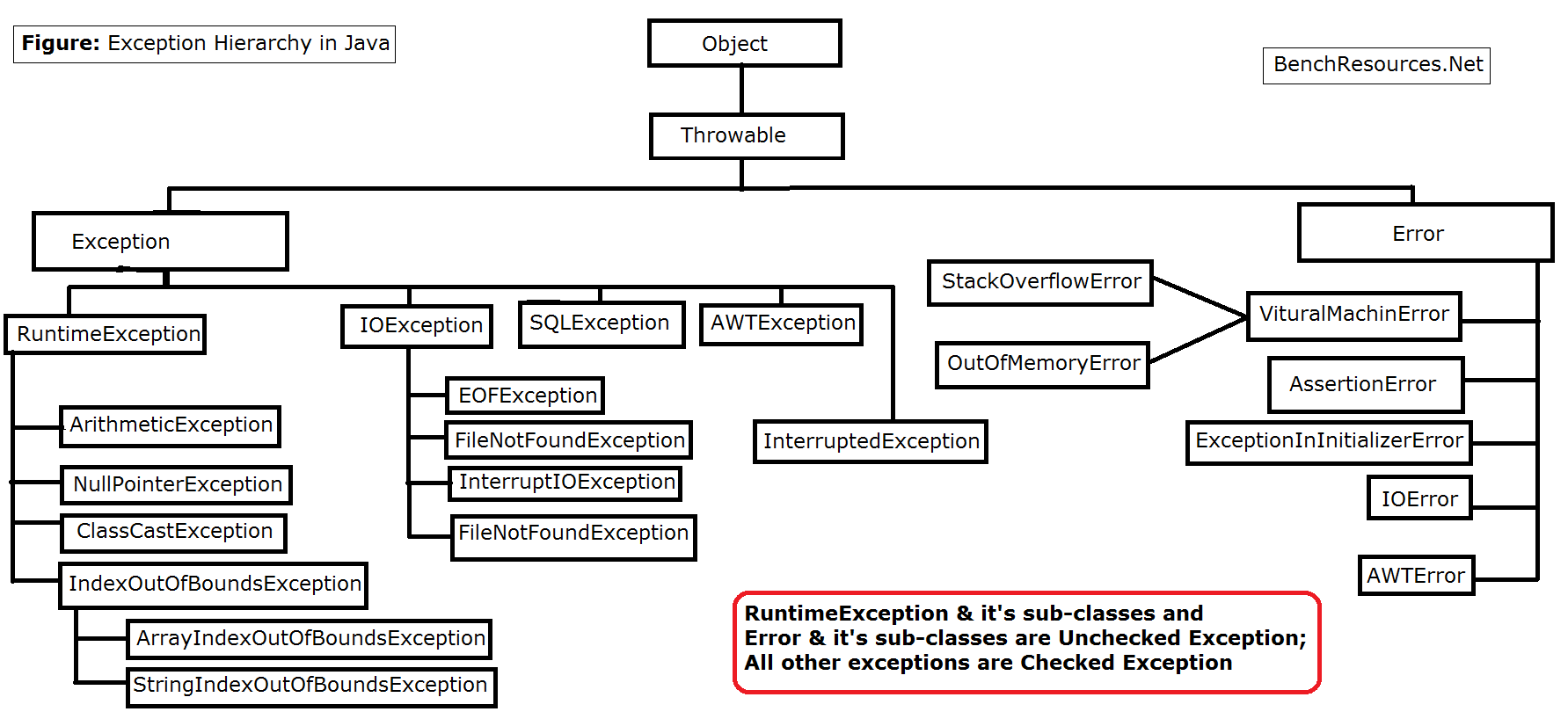
In Java, we can create our own exceptions that are derived classes of the Exception class. Creating our own Exception is known as custom exception or user-defined exception. Basically, Java custom exceptions are used to customize the exception according to user need. Consider the example 1 in which InvalidAgeException class extends the Exception class. Using the custom exception, we can have your own exception and message. Here, we have passed a string to the constructor of superclass i.e. Exception class that can be obtained using getMessage() method on the object we have created.
class InvalidAgeException  extends Exception
{
    public InvalidAgeException (String str)
    {
        // calling the constructor of parent Exception
        super(str);
    }
}

// class that uses custom exception InvalidAgeException
public class TestCustomException1
{

    // method to check the age
    static void validate (int age) throws InvalidAgeException{
       if(age < 18){

        // throw an object of user defined exception
        throw new InvalidAgeException("age is not valid to vote");
    }
       else {
        System.out.println("welcome to vote");
        }
     }

    // main method
    public static void main(String args[])
    {
        try
        {
            // calling the method
            validate(13);
        }
        catch (InvalidAgeException ex)
        {
            System.out.println("Caught the exception");

            // printing the message from InvalidAgeException object
            System.out.println("Exception occured: " + ex);
        }

        System.out.println("rest of the code...");
    }
}
String is basically an object that represents sequence of char values. An array of characters works same as Java string. Java String class provides a lot of methods to perform operations on strings such as compare(), concat(), equals(), split(), length(), replace(), compareTo(), intern(), substring() etc.
There are two ways to create String object:
- By string literal
- By new keyword
By string literal-
String s="welcome";
By new keyword-
String s=new String("Welcome");
Strings are immutable - String references are used to store various attributes like username, password, etc. In Java, String objects are immutable. Immutable simply means unmodifiable or unchangeable. Once String object is created its data or state can't be changed but a new String object is created. If we write -
String s="Sachin";
s.concat(" Tendulkar");
Sachin is not changed but a new object is created with Sachin Tendulkar. That is why String is known as immutable.
StringBuilder in Java represents a mutable sequence of characters. Since the String Class in Java creates an immutable sequence of characters, the StringBuilder class provides an alternative to String Class, as it creates a mutable sequence of characters. The function of StringBuilder is very much similar to the StringBuffer class, as both of them provide an alternative to String Class by making a mutable sequence of characters. However, the StringBuilder class differs from the StringBuffer class on the basis of synchronization. The StringBuilder class provides no guarantee of synchronization whereas the StringBuffer class does. Therefore this class is designed for use as a drop-in replacement for StringBuffer in places where the StringBuffer was being used by a single thread (as is generally the case). Where possible, it is recommended that this class be used in preference to StringBuffer as it will be faster under most implementations. Instances of StringBuilder are not safe for use by multiple threads. If such synchronization is required then it is recommended that StringBuffer be used. String Builder is not thread-safe and high in performance compared to String buffer. It have 4 overloaded constructors as default, int, CharSequence, String.
import java.util.*;
import java.util.concurrent.LinkedBlockingQueue;

public class Demo{
    public static void main(String[] argv) throws Exception
    {
        // Create a StringBuilder object
        // using StringBuilder() constructor
        StringBuilder str = new StringBuilder();

        str.append("HEllo");

        // print string
        System.out.println("String = " + str.toString());

        // create a StringBuilder object
        // using StringBuilder(CharSequence) constructor
        StringBuilder str1
            = new StringBuilder("AAAABBBCCCC");

        // print string
        System.out.println("String1 = " + str1.toString());

        // create a StringBuilder object
        // using StringBuilder(capacity) constructor
        StringBuilder str2 = new StringBuilder(10);

        // print string
        System.out.println("String2 capacity = "
                           + str2.capacity());

        // create a StringBuilder object
        // using StringBuilder(String) constructor
        StringBuilder str3
            = new StringBuilder(str1.toString());

        // print string
        System.out.println("String3 = " + str3.toString());
    }
}
StringBuffer is a peer class of String that provides much of the functionality of strings. The string represents fixed-length, immutable character sequences while StringBuffer represents growable and writable character sequences. StringBuffer may have characters and substrings inserted in the middle or appended to the end. It will automatically grow to make room for such additions and often has more characters preallocated than are actually needed, to allow room for growth. StringBuffer class is used to create mutable (modifiable) string. The StringBuffer class in java is same as String class except it is mutable i.e. it can be changed. It has 3 overloaded constructors default, string and int.
charAt() | Returns the character at the specified index (position) | char compareTo() | Compares two strings lexicographically | int compareToIgnoreCase() | Compares two strings lexicographically, ignoring case differences | int concat() | Appends a string to the end of another string | String contains() | Checks whether a string contains a sequence of characters | boolean endsWith() | Checks whether a string ends with the specified character(s) | boolean equals() | Compares two strings. Returns true if the strings are equal, and false if not | boolean equalsIgnoreCase() | Compares two strings, ignoring case considerations | boolean hashCode() | Returns the hash code of a string | int indexOf() | Returns the position of the first found occurrence of specified characters in a string | int isEmpty() | Checks whether a string is empty or not | boolean lastIndexOf() | Returns the position of the last found occurrence of specified characters in a string | int length() | Returns the length of a specified string | int replace() | Searches a string for a specified value, and returns a new string where the specified values are replaced | String replaceFirst() | Replaces the first occurrence of a substring that matches the given regular expression with the given replacement | String replaceAll() | Replaces each substring of this string that matches the given regular expression with the given replacement | String
String pool is nothing but a storage area in Java heap where string literals stores. It is also known as String Intern Pool or String Constant Pool. It is just like object allocation. By default, it is empty and privately maintained by the Java String class. Whenever we create a string the string object occupies some space in the heap memory. Creating a number of strings may increase the cost and memory too which may reduce the performance also.
The JVM performs some steps during the initialization of string literals that increase the performance and decrease the memory load. To decrease the number of String objects created in the JVM the String class keeps a pool of strings. When we create a string literal, the JVM first check that literal in the String pool. If the literal is already present in the pool, it returns a reference to the pooled instance. If the literal is not present in the pool, a new String object takes place in the String pool.
- Sting is immutable in Java.
- All Strings are stored in the String Pool (or String Intern Pool) that is allocated in the Java heap.
- String pool is an implementation of the String Interring Concept.
- String Interning is a method that stores only a copy of each distinct string literal.
- The distinct values are stored in the String pool.
Java has introduced a new Date and Time API since Java 8. The java.time package contains Java 8 Date and Time classes. These classes are present in java.time.*;
Java LocalDate class Java LocalDate class is an immutable class that represents Date with a default format of yyyy-mm-dd. It inherits Object class and implements the ChronoLocalDate interface
import java.time.LocalDate;
public class Demo {
  public static void main(String[] args) {
    LocalDate date = LocalDate.now();
    LocalDate yesterday = date.minusDays(1);
    LocalDate tomorrow = yesterday.plusDays(2);
    System.out.println("Today date: "+date);
    System.out.println("Yesterday date: "+yesterday);
    System.out.println("Tomorrow date: "+tomorrow);

    LocalDate date1 = LocalDate.of(2017, 1, 13);
    System.out.println(date1.isLeapYear());
    LocalDate date2 = LocalDate.of(2016, 9, 23);
    System.out.println(date2.isLeapYear());
  }
}
Java LocalTime class is an immutable class that represents time with a default format of hour-minute-second. It inherits Object class and implements the Comparable interface. declaration of java.time.LocalTime class.
public final class LocalTime extends Object
implements Temporal, TemporalAdjuster, Comparable<LocalTime>, Serializable
examples -
import java.time.LocalTime;
public class LocalTimeExample1 {
  public static void main(String[] args) {
    LocalTime time = LocalTime.now();
    System.out.println(time);

    LocalTime time1 = LocalTime.of(10,43,12);
    System.out.println(time1);

    LocalTime time2=time1.minusHours(2);
    LocalTime time3=time2.minusMinutes(34);
    System.out.println(time3);
  }
}
LocalDate class which is present in java.time.*; have a static method parse which convert a format of date to specified format.
- public static LocalDate parse(CharSequence text)
- public static LocalDate parse(CharSequence text, DateTimeFormatter formatter)
import java.time.*;
import java.time.format.*;

public class Dum
{
public static void main(String[] args)
{
// create an LocalDate object
LocalDate lt= LocalDate.parse("2018-12-27");
// print result
System.out.println("LocalDate :"+ lt);
DateTimeFormatter formatter = DateTimeFormatter.ofPattern("dd/MM/yyyy");
// create a LocalDate object and
LocalDate lt1= LocalDate.parse("31/12/2018", formatter);
// print result
System.out.println("LocalDate : "+ lt1.toString());
}
}
A Wrapper class is a class which contains the primitive data types (int, char, short, byte, etc). In other words, wrapper classes provide a way to use primitive data types (int, char, short, byte, long, float, double, boolean) as objects. These wrapper classes come under java.util package.
- Wrapper Class will convert primitive data types into objects. The objects are necessary if we wish to modify the arguments passed into the method (because primitive types are passed by value).
- The classes in java.util package handles only objects and hence wrapper classes help in this case also.
- Data structures in the Collection framework such as ArrayList and Vector store only the objects (reference types) and not the primitive types.
- The object is needed to support synchronization in multithreading.
Implementation of the wrapper class in Java Autoboxing is used to convert primitive data types into corresponding objects.
public class AutoBoxingTest {
   public static void main(String args[]) {
      int num = 10; // int primitive
      Integer obj = Integer.valueOf(num); // creating a wrapper class object
      System.out.println(num + " " + obj);
   }
}
Unboxing is used to convert the Wrapper class object into corresponding primitive data types.
public class UnboxingTest {
   public static void main(String args[]) {
      Integer obj = new Integer(10); // Creating Wrapper class object
      int num = obj.intValue(); // Converting the wrapper object to primitive datatype
      System.out.println(num + " " + obj);
   }
}
- Integer class have two constructors one with int parameter and another with string.
- Byte class have two constructors one with byte parameter and another with string.
- Short class have two constructors one with short parameter and another with string.
- Long class have two constructors one with long parameter and another with string.
Super class of all wrapper classes is a class called Number.
Integer t=new Integer(VALUE);
In the same way we create objects of all other wrapper classes.
//Java program to convert primitive into objects
//Autoboxing example of int to Integer
public class WrapperExample1{
public static void main(String args[]){
//Converting int into Integer
int a=20;
Integer i=Integer.valueOf(a);//converting int into Integer explicitly
Integer j=a;//autoboxing, now compiler will write Integer.valueOf(a) internally

System.out.println(a+" "+i+" "+j);
}}
//Java program to convert object into primitives
//Unboxing example of Integer to int
public class WrapperExample2{
public static void main(String args[]){
//Converting Integer to int
Integer a=new Integer(3);
int i=a.intValue();//converting Integer to int explicitly
int j=a;//unboxing, now compiler will write a.intValue() internally

System.out.println(a+" "+i+" "+j);
}}
In Java, memory management is the process of allocation and de-allocation of objects, called Memory management. Java does memory management automatically. Java uses an automatic memory management system called a garbage collector. Thus, we are not required to implement memory management logic in our application. Java memory management divides into two major parts:
- JVM Memory Structure
- Working of the Garbage Collector
JVM Memory Structure
JVM creates various run time data areas in a heap. These areas are used during the program execution. The memory areas are destroyed when JVM exits, whereas the data areas are destroyed when the thread exits.
Method Area Method Area is a part of the heap memory which is shared among all the threads. It creates when the JVM starts up. It is used to store class structure, superclass name, interface name, and constructors.
Heap Area Heap stores the actual objects. It creates when the JVM starts up. The user can control the heap if needed. It can be of fixed or dynamic size. When you use a new keyword, the JVM creates an instance for the object in a heap. While the reference of that object stores in the stack. There exists only one heap for each running JVM process. When heap becomes full, the garbage is collected.
Stack Area Stack Area generates when a thread creates. It can be of either fixed or dynamic size. The stack memory is allocated per thread. It is used to store data and partial results. It contains references to heap objects. It also holds the value itself rather than a reference to an object from the heap. The variables which are stored in the stack have certain visibility, called scope.
Java garbage collection is an automatic process. Automatic garbage collection is the process of looking at heap memory, identifying which objects are in use and which are not, and deleting the unused objects. An in-use object, or a referenced object, means that some part of your program still maintains a pointer to that object. An unused or unreferenced object is no longer referenced by any part of your program. So the memory used by an unreferenced object can be reclaimed. The programmer does not need to mark objects to be deleted explicitly. The garbage collection implementation lives in the JVM.
Garbage Collector is responsible for memory deallocation. GC destroy unreferenced and unreachable objects. Though we can make objects eligible for garbage collection, by five ways-
- Reassign object
- Nullify object
- Anonymous object
- Local object
- Island of isolation
Before destroying any object GC calls finalize method of object class for the purpose of clean up activities. By overriding that object class finalize method we can perform those action which we wanted to do before destruction of an object.
Both these methods belong to Object class which is super of all classes directly or indirectly. Method signature is as follows-
- public int hashCode()
- public boolean equals(Object o)
hashCode() is a method of object class which generates unique value corresponding to each object
equals() method of object class is used to compare references of two objects.
These are simple work of these methods but there is a contract between these methods-
- If two Objects are equal, according to the equals(Object) method, then hashCode() method must produce the same Integer on each of the two Objects.
- If two Objects are unequal, according to the equals(Object) method, It is not necessary the Integer value produced by hashCode() method on each of the two Objects will be distinct.
These methods are important for implementing java collection framework, if we want to manipulate data accordingly these methods are powerful weapons for that.
The Collection in Java is a framework hierarchy -
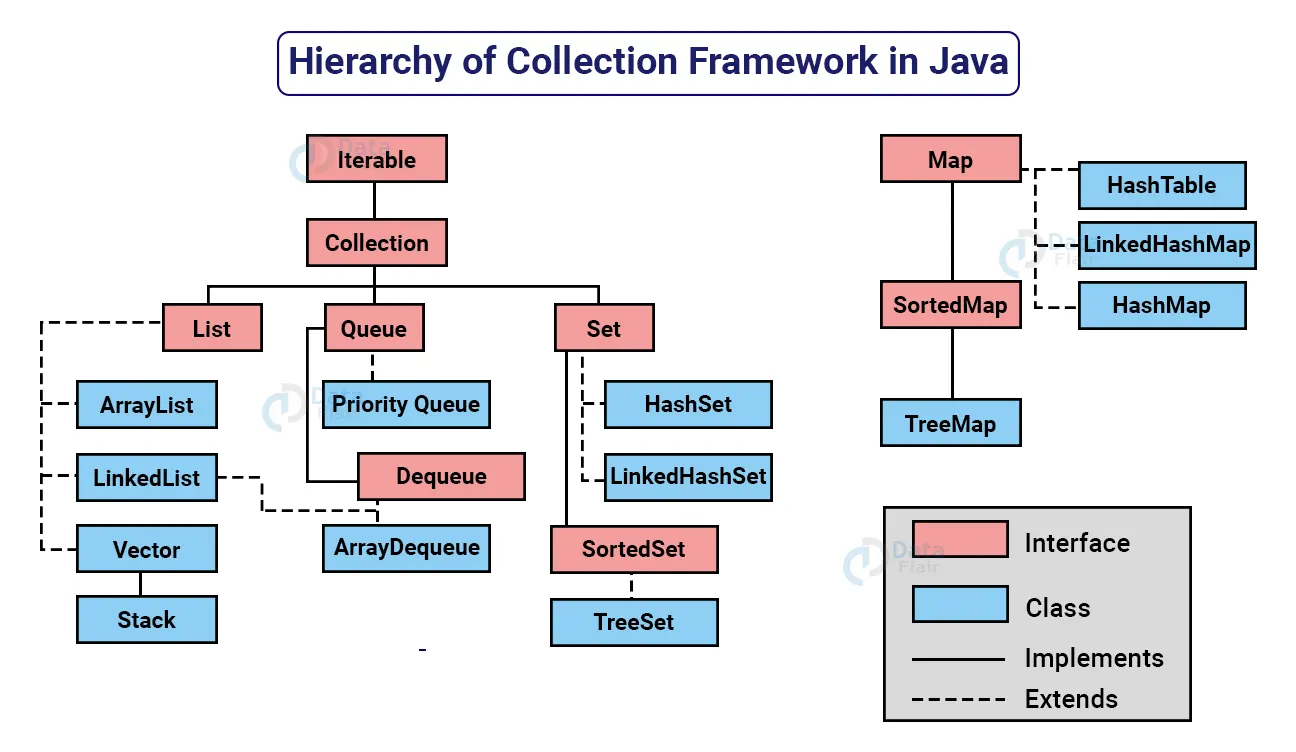
These classes are used to manipulate data and each one of this is having different feature and properties.
ArrayList
- ArrayList inherit AbstractList class and implements List interface.
- It maintains insertion order.
- ArrayList allows random access because the array works on an index basis.
- It is non synchronized.
- It can contain duplicate elements.
- In ArrayList, manipulation is a little bit slower than the LinkedList in because a lot of shifting needs to occur if any element is removed from the array list.
LinkedList
- It can contain duplicate elements.
- It is non synchronized.
- It, manipulation is fast because no shifting needs to occur.
- It can be used as a list, stack or queue.
- It maintains insertion order.
Vector
- Its internal working is based on ArrayList.
- It is synchronized.
- It is thread safe.
- It implements list, RandomAccess, Cloneable, serializable
- It is growable in nature.
- It allows random acess.
- Insertion & deletion complex and searching is easy.
Stack
- It implements list interface.
- It is child of vector.
- It follows FIFO.
- Its incremental factor is :-new capacity=current capacity*2
- Its internal ds is array.
HashSet
- It stores the elements by using a mechanism called hashing.
- It contains unique elements only.
- It allows null value.
- It is non synchronized.
- It doesn't maintain the insertion order. Here, elements are inserted on the basis of their hashcode.
- It is the best approach for search operations.
- The initial default capacity of It is 16, and the load factor is 0.75.
LinkedHashSet
- The class contains unique elements only like HashSet.
- It permits null insertion only once.
- It is non-synchronized.
- It maintains insertion order.
TreeSet
- The package for the TreeSet class is java.util
- It also implements the Cloneable and Serializable interfaces.
- It contains unique elements like the HashSet.
- It does not allow to store the null elements.
- It is a non-synchronized class.
- It stores and maintains the elements in ascending order.
- It extends the AbstractSet class.
HashMap
- HashMap contains values based on the key.
- HashMap contains only unique keys.
- HashMap may have one null key and multiple null values.
- HashMap is non synchronized.
- HashMap maintains no order.
- The initial default capacity of HashMap class is 16 with a load factor of 0.75.
LinkedHashMap
- LinkedHashMap contains values based on the key.
- LinkedHashMap contains unique elements.
- LinkedHashMap may have one null key and multiple null values.
- LinkedHashMap is non synchronized.
- LinkedHashMap maintains insertion order.
- The initial default capacity of HashMap class is 16 with a load factor of 0.75.
TreeMap
- TreeMap contains values based on the key.
- It implements the NavigableMap interface and extends AbstractMap class.
- TreeMap contains only unique elements.
- TreeMap cannot have a null key but can have multiple null values.
- TreeMap is non synchronized.
- TreeMap maintains ascending order.
**Hashtable **
- A Hashtable is an array of a list. The index is identified by calling the hashcode() method.
- A Hashtable contains values based on the key.
- Hashtable contains unique elements.
- Hashtable doesn't allow null key or value.
- Hashtable is synchronized.
- The initial default capacity of Hashtable is 11 whereas loadFactor is 0.75.
Comparable-
A comparable object is capable of comparing itself with another object. The class itself must implements the java.lang.Comparable interface to compare its instances. Consider a Movie class that has members like, rating, name, year. Suppose we wish to sort a list of Movies based on year of release. We can implement the Comparable interface with the Movie class, and we override the method compareTo() of Comparable interface.
Abstract method of comparable interface is compareTo() and it is present in java.lang.Comparable;
Comparator- When working with custom types, or trying to compare objects that aren't directly comparable, we need to make use of a comparison strategy. We can build one simply by making use of the Comparator or Comparable interfaces. It is used to customize predefine implementation. Like TreeSet by default sort integers in asc order but we want them to be desc then we can use this interface. abstract method of this interface is compare(Object o1, Object o2) and this interface is present in util package.
The Collections.sort() method is available in the java.util.Collections class. The Collections.sort() method helps us to sort the elements available in the specified list of Collections. By default, the sort() method sorts the elements in ascending order.
import java.util.*;
public class Demo
{
    public static void main(String[] args)
    {
      // Creating a linked list of integer values
        LinkedList<Integer> age = new LinkedList<Integer>();
        age.add(23);
        age.add(25);
        age.add(22);
        age.add(24);
        age.add(27);

        // Printing the unsorted linked list
        System.out.println("The elements of the linked list before sorting:" + age);

        /* Sorting the age linked-list in ascending order */
        Collections.sort(age);

        // Printing the sorted linked list
        System.out.println("The elements of the linked list after sorting" + age);
    }
}
The Collections.reverseOrder() is a method which returns a Comparator. The Comparator applies the reverse of the natural ordering on the objects. Collections provide two different types of Java reverseOrder() method based on the parameter. These methods are as follows:
- Java Collections reverseOrder() Method
- Java Collections reverseOrder(comp) Method
import java.util.*;
public class ReverseOrderExample1
{
    public static void main(String[] args)
    {
        // Creating linked list of student age
        LinkedList<Integer> age = new LinkedList<Integer>();
        age.add(23);
        age.add(19);
        age.add(34);
        age.add(40);
        age.add(12);

      // Printing unsorted linked list
        System.out.println("Linked list before sorting" + age);

        /* Performing sorting in descending order using sort and reverseOrder method of Collections*/
        Collections.sort(age, Collections.reverseOrder());

        // Printing the sorted linked list
        System.out.println("Linked list after sorting" + age);
    }
}
The Java Generics programming is introduced in J2SE 5 to deal with type-safe objects. It makes the code stable by detecting the bugs at compile time. They types of objects are checked at compile time so problem will not occur at runtime. The good programming strategy says it is far better to handle the problem at compile time than runtime. No need of types casting if u are using this.
import java.util.*;
class Demo
{
public static void main(String args[])
{
ArrayList<String> list=new ArrayList<String>();
list.add("rahul");
list.add("jai");

//list.add(32);//compile time error

for(String s: list)//no need to types caste
System.out.println(s);
}
}
}
Java FileWriter and FileReader classes are used to write and read data from text files. It is recommended not to use the FileInputStream and FileOutputStream classes if you have to read and write any textual information as these are Byte stream classes.
FileWriter
- FileWriter is useful to create a file writing characters into it.
- This class inherits from the OutputStream class.
- FileWriter creates the output file if it is not present already.
FileWriter class is having various constructors two of them -
- FileWriter(File file) – Constructs a FileWriter object given a File object.
- FileWriter (File file, boolean append) – constructs a FileWriter object given a File object.
Some methods are -
- public void write (int c) throws IOException – Writes a single character.
- public void write (char [] stir) throws IOException – Writes an array of characters.
- public void write(String str)throws IOException – Writes a string.
- public void flush() throws IOException flushes the stream
- public void close() throws IOException flushes the stream first and then closes the writer.
FileReader
FileReader is useful to read data in the form of characters from a ‘text’ file. This class inherited from the InputStreamReader Class. FileReader is meant for reading streams of characters. For reading streams of raw bytes, consider using a FileInputStream.
Constructor-
- FileReader(File file) – Creates a FileReader , given the File to read from
- FileReader(String fileName) – Creates a new FileReader , given the name of the file to read from
Methods-
- public int read () throws IOException – Reads a single character. This method will block until a character is available, an I/O error occurs, or the end of the stream is reached.
- public void close() throws IOException closes the reader.
- public long skip(long n) throws IOException –Skips characters. This method will block until some characters are available, an I/O error occurs, or the end of the stream is reached.
Parameters: n – The number of characters to skip
Writing into a file
// Creating a text File using FileWriter
import java.io.FileWriter;
import java.io.IOException;
class Dum
{
	public static void main(String[] args) throws IOException
	{
		// Accept a string
		String str = "File Handling in Java";

		// attach a file to FileWriter
		FileWriter fw=new FileWriter("input1.txt");

		// read character wise from string and write
		// into FileWriter
		fw.write("Hello there\n");

		for (int i = 0; i < str.length(); i++)
			fw.write(str.charAt(i));

		System.out.println("Writing successful");
		//close the file
		fw.close();
	}
}
Reading a file
// Reading data from a file using FileReader
import java.io.FileNotFoundException;
import java.io.FileReader;
import java.io.IOException;
class ReadFile
{
	public static void main(String[] args) throws IOException
	{
		// variable declaration
		int ch;

		// check if File exists or not
		FileReader fr=null;
		try
		{
			fr = new FileReader("text");
		}
		catch (FileNotFoundException fe)
		{
			System.out.println("File not found");
		}

		// read from FileReader till the end of file
		while ((ch=fr.read())!=-1)
			System.out.print((char)ch);

		// close the file
		fr.close();
	}
}
ByteStream: This is used to process data byte by byte (8 bits). Though it has many classes, the FileInputStream and the FileOutputStream are the most popular ones. The FileInputStream is used to read from the source and FileOutputStream is used to write to the destination. Here is the list of various ByteStream Classes:
BufferedInputStream | It is used for Buffered Input Stream. DataInputStream | It contains method for reading java standard datatypes. FileInputStream | This is used to reads from a file InputStream | This is an abstract class that describes stream input. PrintStream | This contains the most used print() and println() method BufferedOutputStream | This is used for Buffered Output Stream. DataOutputStream | This contains method for writing java standard data types. FileOutputStream | This is used to write to a file. OutputStream | This is an abstract class that describe stream output.
CharacterStream: In Java, characters are stored using Unicode conventions (Refer this for details). Character stream automatically allows us to read/write data character by character. Though it has many classes, the FileReader and the FileWriter are the most popular ones.
BufferedReader | It is used to handle buffered input stream. FileReader | This is an input stream that reads from file. InputStreamReader | This input stream is used to translate byte to character. OutputStreamReader | This output stream is used to translate character to byte. Reader | This is an abstract class that define character stream input. PrintWriter | This contains the most used print() and println() method Writer | This is an abstract class that define character stream output. BufferedWriter | This is used to handle buffered output stream. FileWriter | This is used to output stream that writes to file.
Java uses the concept of a stream to make I/O operation fast. The java.io package contains all the classes required for input and output operations.
OutputStream- Java application uses an output stream to write data to a destination; it may be a file, an array, peripheral device or socket. OutputStream class is an abstract class. It is the superclass of all classes representing an output stream of bytes. An output stream accepts output bytes and sends them to some sink.
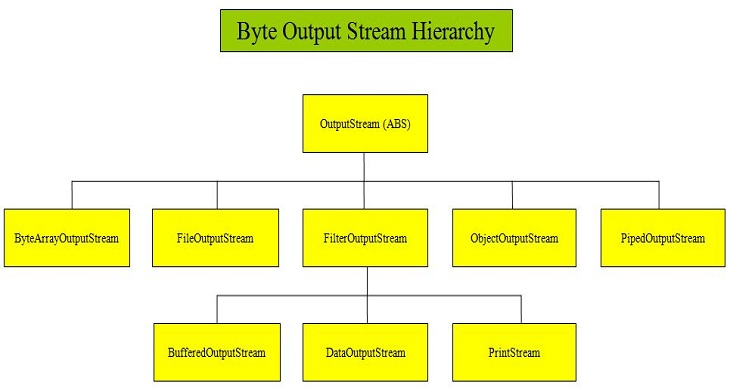
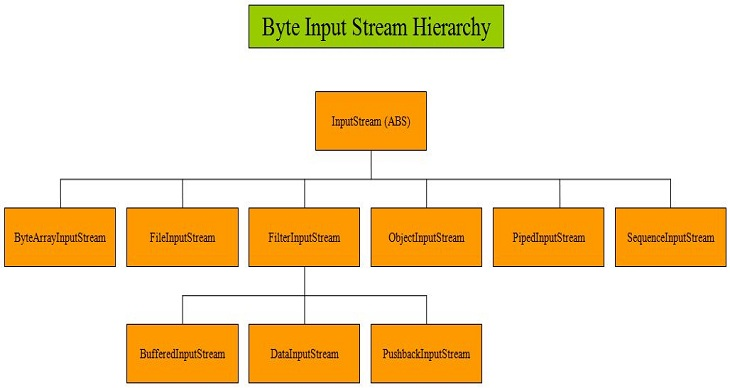
InputStream- Java application uses an input stream to read data from a source; it may be a file, an array, peripheral device or socket. InputStream class is an abstract class. It is the superclass of all classes representing an input stream of bytes.
The Lambda expression is used to provide the implementation of an interface which has functional interface. It saves a lot of code. In case of lambda expression, we don't need to define the method again for providing the implementation. Here, we just write the implementation code.
interface Drawable{
    public void draw();
}
public class LambdaExpressionExample {
    public static void main(String[] args) {
        int width=10;

        //without lambda, Drawable implementation using anonymous class
        Drawable d=new Drawable(){
            public void draw(){ System.out.println("Drawing "+width); }
        };
        d.draw();
    }
}
Functional interface is a interface which have only one abstract method though it can have multiple static, private or default methods. This can be declared with annotation called @FunctionalInterface. Lambda Expression can be applied on this interface.
inteface Inter1
{
 public void show();
}
Consumer - The Consumer Interface is a part of the java.util.function package which has been introduced since Java 8, to implement functional programming in Java. It represents a function which takes in one argument and produces a result. However these kind of functions don’t return any value.
The lambda expression assigned to an object of Consumer type is used to define its accept() which eventually applies the given operation on its argument. Consumers are useful when it not needed to return any valueimport java.util.function.Consumer;
This interface have a abstract method accept and a default method as- abstract Consumer void accept() default Consumer andThen(Consumer<? super T> after)
public class Main {
    public static void main(String args[])
    {
        // Consumer to display a number
        Consumer<Integer> display = a -> System.out.println(a);

        // Implement display using accept()
        display.accept(10);
     }
}
Supplier- Supplier is an interface which is used to supply or return values to somewhere. It has an abstract method T get();
import java.util.function.Supplier;

public class Main {
    public static void main(String args[])
    {

        // This function returns a random value.
        Supplier<Double> randomValue = () -> Math.random();

        // Print the random value using get()
        System.out.println(randomValue.get());
    }
}
BiConsumer-
The BiConsumer Interface is a part of the java.util.function package which has been introduced since Java 8, to implement in Java. It represents a function that takes in two arguments and produces a result. However, these kinds of functions doesn’t return any value.
This functional interface takes in two generics, namely:-
T: denotes the type of the first input argument to the operation
U: denotes the type of the second input argument to the operation
The lambda expression assigned to an object of BiConsumer type is used to define its accept() which eventually applies the given operation to its arguments.
void accept(T t, U u)
The Functional Interface PREDICATE is defined in the java.util.function package. It improves manageability of code, helps in unit-testing them separately, and contain some methods like:
- static Predicate isEqual(Object targetRef)
- default Predicate and(Predicate other)
- default Predicate negate()
- default Predicate or(Predicate other)
- abstract boolean test(T t)
// Java program to illustrate Simple Predicate

import java.util.function.Predicate;
public class PredicateInterfaceExample1 {
	public static void main(String[] args)
	{
		// Creating predicate
		Predicate<Integer> lesserthan = i -> (i < 18);

		// Calling Predicate method
		System.out.println(lesserthan.test(10));
	}
}
BiPredicate-
The BiPredicate<T, V> interface was introduced in JDK 8. This interface is packaged in java.util.function package. It operates on two objects and returns a predicate value based on that condition. It is a functional interface and thus can be used in lambda expression also.
public interface BiPredicate<T, V>
- boolean test(T obj, V obj1)
- default BiPredicate<T, V> and(BiPredicate<? super T, ? super V> other)
- default BiPredicate<T, V> negate()
- default BiPredicate<T, V> or(BiPredicate<? super T, ? super V> other)
// Java example to demonstrate BiPredicate interface
import java.util.function.BiPredicate;
public class BiPredicateDemo
{
 public static void main(String[] args)
 {
 // Simple predicate for checking equality
 BiPredicate<Integer, String> biPredicate = (n, s) ->
 {
 if (n == Integer.parseInt(s))return true;
 return false;
 };
 System.out.println(biPredicate.test(2, "2"));
 }
}
The Function interface is a pre-defined functional interface that can be used as an assignment target for a lambda expression or method reference. It takes a single parameter and returns result by calling the apply() method. While the BiFunction interface is also a pre-defined functional interface that takes two parameters and returns a result. It is similar to the Function interface except it takes two parameters.
@FunctionalInterface
public interface Function<T, R>

@FunctionalInterface
public interface BiFunction<T, U, R>
java.util.function.UnaryOperator is a java 8 functional interface that extends java.util.function.Function. UnaryOperator is used to work on a single operand. It returns the same type as an operand. UnaryOperator can be used as lambda expression to pass as an argument. While defining UnaryOperator, we need to define Function.apply(Object) where Function will be the instance of UnaryOperator. Find the example.
import java.util.function.UnaryOperator;

public class UnaryOperatorDemo
{
    public static void main(String[] args)
    {
      UnaryOperator<Integer> un = i->i*i;
      System.out.println(un.apply(10));
     }
}
java.util.function.BinaryOperator is a functional interface that can be assigned as lambda expression. BinaryOperator extends java.util.function.BiFunction. It accepts two operands of the same type and process it and then returns results of the same type as operands.
import java.util.function.BinaryOperator;

class Dum
{
	public static void main(String ar[])
	{
	   BinaryOperator<Integer> binaryOpt = (s1,s2)-> s1+s2;
	   System.out.println(binaryOpt.apply(10,20));
    }
}
There is a method stream in which we use with collection objects the stream() will return stream of that object which will help us to perform some task without modifying the original collection object. A created stream can be used once only, after we preform some operation on that it get closed and we can't use it further. Stream class have some methods like sorted(), map(), filter() these methods help us to perform task easily. map can perform tasks like doubling the values and storing them, these all three methods itself returns a stream which we can use further.
Stream.filter()
You filter a stream using the filter() method. Here is a stream filtering example:
stream.filter( item -> item.startsWith("o") );
The filter() method takes a Predicate as parameter. The Predicate interface contains a function called test() which the lambda expression passed as parameter above is matched against. In other words, the lambda expression implements the Predicate.test() method.
Stream.map() It is possible to map the items in a collection to other objects. In other words, for each item in the collection you create a new object based on that item. How the mapping is done is up to you. Here is a simple Java stream mapping example:
items.stream()
     .map( item -> item.toUpperCase() )
Stream.collect()
The collect() method is one of the stream processing methods on the Stream interface. When this method is invoked, the filtering and mapping will take place and the object resulting from those actions will be collected. Here is a stream.collect() example:
List<String> filtered = items.stream()
    .filter( item -> item.startsWith("o") )
    .collect(Collectors.toList());
Serialization is a mechanism of converting the state of an object into a byte stream. Deserialization is the reverse process where the byte stream is used to recreate the actual Java object in memory. This mechanism is used to persist the object.
In a software project, in many instances, there are necessities to transfer the data, and it can be handled by using ObjectOutputStream and ObjectInputStream from Java IO packages. Usually, the data is written in binary format and hence we cannot view the contents. Serialization is the process of writing an object to an output stream. We can write a class object itself, which contains a combination of primitive datatype and graphs of Java objects. Deserialization is the process of reconstructing an object from an input stream.
To serialize an object, that object class should be implemented by serializable interface.
import java.io.*;

FileOutputStream fi=new FileOutputStream(filename);
ObjectOutputStream os=new ObjectOutputStream(fi);
.....
os.writeObject(ObjectName);
To deserialize it-
import java.io.*;

FileInputStream fi=new FileInputStream(filename);
ObjectInputStream os=new ObjectInputStream(fi);
ClassName object=(ClassName) os.readObject();
....
An Object Graph is the set of objects which will be serialized automatically, if the object which contains reference to them is serialized. In other words, we can say that when we serialize any object and if it contains any other object reference then JVM serializes the object and as well as its object references.
import java.io.FileInputStream;
import java.io.FileOutputStream;
import java.io.ObjectInputStream;
import java.io.ObjectOutputStream;
import java.io.Serializable;

class Student implements Serializable{
  private String name="John";
  private Address address = new Address();
  public String getName() {
    return name;
  }
  public void setName(String name) {
    this.name = name;
  }
  public Address getAddress() {
    return address;
  }
  public void setAddress(Address address) {
    this.address = address;
  }
}

class Address implements Serializable{
  private String pinCode = "101";
  private City city = new City();
  public String getPinCode() {
    return pinCode;
  }
  public void setPinCode(String pinCode) {
    this.pinCode = pinCode;
  }
  public City getCity() {
    return city;
  }
  public void setCity(City city) {
    this.city = city;
  }
}

class SerializationExample {
  public static void main(String args[]) throws Exception {
    Student student = new Student();

    System.out.println("Serialization started");
    FileOutputStream fos = new FileOutputStream("test.ser");
    ObjectOutputStream oos = new ObjectOutputStream(fos);
    oos.writeObject(student);
    System.out.println("Serialization ended");

    System.out.println("Deserialization started");
    FileInputStream fis = new FileInputStream("test.ser");
    ObjectInputStream ois = new ObjectInputStream(fis);

    Student stu = (Student) ois.readObject( );
    System.out.println("Deserialization ended");

    System.out.println("Student name: " + stu.getName());
    System.out.println("Student pincode: " + stu.getAddress().getPinCode());
    System.out.println("Student city: " + stu.getAddress().getCity().getCity());

  }
}
- writeObject is method of ObjectOutputStream class which we use to store data or write data in a certain file.
- readObject is method of ObjectInputStream which helps us to get or read objects from a file.
 void writeObject(java.io.ObjectOutputStream stream) throws IOException {}
 void readObject(java.io.ObjectInputStream stream) throws IOException, ClassNotFoundException {}
A regular inner class is a nested class that only exists within an instance of enclosing class. In other words, you cannot instantiate an object of an inner class without first having an object of the outer class. An inner class can use all the methods and fields of the outer class even the private ones directly. The methods and fields of outer class are used as if they were part of the inner class.
class outer
 {
       private int i = 11;
       class inner
       {
             int j ;
             public void display()
             {
             j = 5;
             System.out.println("i = " + i);
             System.out.println("j = " + j);
             }
      }
 }
 class InnerClass
 {
      public static void main(String[] args)
      {
         outer outobj = new outer(); //create instance of enclsing class
         outer.inner innobj = outobj.new inner(); // create intansce of regular inner class
         innobj.display();
      }
 }
Local Inner Classes are the inner classes that are defined inside a block. Generally, this block is a method body. Sometimes this block can be a for loop or an if clause. Local Inner classes are not a member of whole class. They belong to the block they are defined within, due to which local inner classes cannot have any access modifiers associated with them. However, they can be marked as final or abstract. This class has access to the fields of the class enclosing it. Local inner class must be instantiated in the block they are defined in.
public class localInner1{
 private int data=30;//instance variable
 void display(){
  class Local{
   void msg(){System.out.println(data);}
  }
  Local l=new Local();
  l.msg();
 }
 public static void main(String args[]){
  localInner1 obj=new localInner1();
  obj.display();
 }
}
Java anonymous inner class is an inner class without a name and for which only a single object is created. An anonymous inner class can be useful when making an instance of an object with certain "extras" such as overloading methods of a class or interface, without having to actually subclass a class. Java Anonymous inner class can be created in two ways:
- for classes
- for interfaces
Making anonymous class and overriding abstract method of abstract class.
abstract class Person{
  abstract void eat();
}
class TestAnonymousInner{
 public static void main(String args[]){
  Person p=new Person(){
  void eat(){System.out.println("nice fruits");}
  };
  p.eat();
 }
}
Making anonymous class and overriding abstract method of functional interface.
interface Eatable{
 void eat();
}
class TestAnnonymousInner1{
 public static void main(String args[]){
 Eatable e=new Eatable(){
  public void eat(){System.out.println("nice fruits");}
 };
 e.eat();
 }
}
A static class is a class that is created inside a class, is called a static nested class in Java. It cannot access non-static data members and methods. It can be accessed by outer class name. It can access static data members of the outer class, including private. The static nested class cannot access non-static (instance) data members.
class TestOuter1{
  static int data=30;
  static class Inner{
   void msg(){System.out.println("data is "+data);}
  }
  public static void main(String args[]){
  TestOuter1.Inner obj=new TestOuter1.Inner();
  obj.msg();
  }
}
Thread can be referred to as a lightweight process. Thread uses fewer resources to create and exist in the process; thread shares process resources. The main thread of Java is the thread that is started when the program starts.
A thread can programmatically be created by:
- Implementing the java.lang.Runnable interface.
- Extending the java.lang.Thread class.
You can create threads by implementing the runnable interface and overriding the run() method. Then, you can create a thread object and call the start() method. Two important methods are
public void run(): is used to perform action for a thread. public void start(): starts the execution of the thread.JVM calls the run() method on the thread.
Thread Class:-
import java.io.*;
class Demo extends Thread {
	public void run()
	{
		System.out.print("Welcome to GeeksforGeeks.");
	}
	public static void main(String[] args)
	{
		GFG g = new GFG(); // creating thread
		g.start(); // starting thread
	}
}
By Runnable interface :-
import java.io.*;
class GFG implements Runnable {
	public static void main(String args[])
	{
		// create an object of Runnable target
		GFG gfg = new GFG();

		// pass the runnable reference to Thread
		Thread t = new Thread(gfg, "gfg");

		// start the thread
		t.start();

		// get the name of the thread
		System.out.println(t.getName());
	}
	@Override public void run()
	{
		System.out.println("Inside run method");
	}
}
A thread is a program in execution created to perform a specific task. Life cycle of a Java thread starts with its birth and ends on its death. The start() method of the Thread class is used to initiate the execution of a thread and it goes into runnable state and the sleep() and wait() methods of the Thread class sends the thread into non runnable state. After non runnable state, thread again comes into runnable state and starts its execution. The run() method of thread is very much important. After executing the run() method, the lifecycle of thread is completed. All these phases of threads are the states of thread in Java.
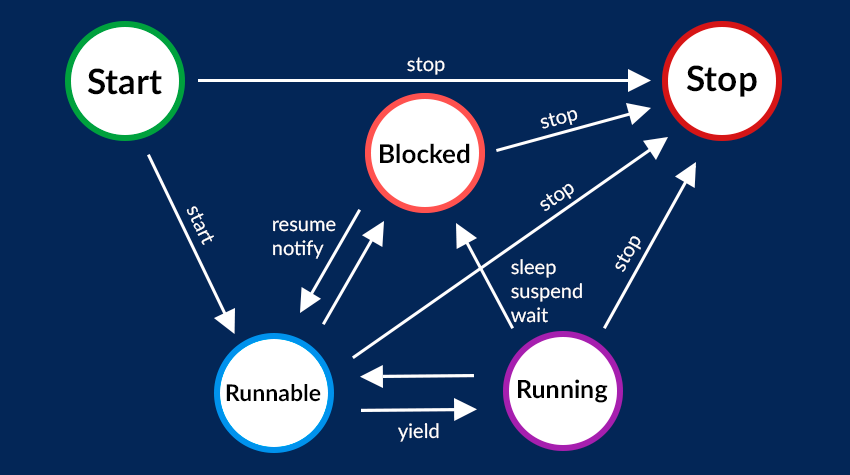
yield() Method Suppose there are three threads t1, t2, and t3. Thread t1 gets the processor and starts its execution and thread t2 and t3 are in Ready/Runnable state. The completion time for thread t1 is 5 hours and the completion time for t2 is 5 minutes. Since t1 will complete its execution after 5 hours, t2 has to wait for 5 hours to just finish 5 minutes job. In such scenarios where one thread is taking too much time to complete its execution, we need a way to prevent the execution of a thread in between if something important is pending. yield() helps us in doing so.
The yield() basically means that the thread is not doing anything particularly important and if any other threads or processes need to be run, they should run. Otherwise, the current thread will continue to run.
sleep() Method This method causes the currently executing thread to sleep for the specified number of milliseconds, subject to the precision and accuracy of system timers and schedulers.
//  sleep for the specified number of milliseconds
public static void sleep(long millis) throws InterruptedException

//sleep for the specified number of milliseconds plus nano seconds
public static void sleep(long millis, int nanos) throws InterruptedException
Join() method Join method wait for thread to execute there task and join them again. The join() method of a Thread instance is used to join the start of a thread’s execution to the end of another thread’s execution such that a thread does not start running until another thread ends. If join() is called on a Thread instance, the currently running thread will block until the Thread instance has finished executing. The join() method waits at most this many milliseconds for this thread to die. A timeout of 0 means to wait forever
- isAlive() method tells us if a thread is in running state or not
- There are methods to getName() and setNames() for thread also we can use constructors of thread class to do that
- These are methods to getPriority() and setPriority(). The range of priority is from 1 to 10. 1 is the least priority and 10 is highest if we don't give priorities then by default it is considered to be 5 which is a normal priority.
- We can priority by Thread.currentThread().getPriority();
The notify() and notifyAll() methods with wait() methods are used for communication between the threads. A thread that goes into waiting for state by calling the wait() method will be in waiting for the state until any other thread calls either notify() or notifyAll() method on the same object.
notify method wakes up only one thread waiting on the object and that thread starts execution. So if there are multiple threads waiting for an object, this method will wake up only one of them. The choice of the thread to wake depends on the OS implementation of thread management.
notify method wakes up only one thread waiting on the object and that thread starts execution. So if there are multiple threads waiting for an object, this method will wake up only one of them. The choice of the thread to wake depends on the OS implementation of thread management.
// Java program to illustrate the
// behaviour of notify() method
class Demo1 extends Thread {
  public void run() {
    synchronized(this) {
      System.out.println(Thread.currentThread().getName() + "...starts");
      try {
        this.wait();
      } catch (InterruptedException e) {
        e.printStackTrace();
      }
      System.out.println(Thread.currentThread().getName() + "...notified");
    }
  }
}
class Demo2 extends Thread {
  Demo1 th1;

  Demo2(Demo1 th1) {
    this.th1 = th1;
  }

  public void run() {
    synchronized(this.th1) {
      System.out.println(Thread.currentThread().getName() + "...starts");

      try {
        this.th1.wait();
      } catch (InterruptedException e) {
        e.printStackTrace();
      }
      System.out.println(Thread.currentThread().getName() + "...notified");
    }
  }
}
class Demo3 extends Thread {
  Demo1 th1;
  Demo3(Demo1 th1) {
    this.th1 = th1;
  }
  public void run() {
    synchronized(this.th1) {
      System.out.println(Thread.currentThread().getName() + "...starts");
      this.th1.notify();
      System.out.println(Thread.currentThread().getName() + "...notified");
    }
  }
}
class MainClass {
  public static void main(String[] args)
  throws InterruptedException {

    Demo1 th1 = new Demo1();
    Demo2 th2 = new Demo2(th1);
    Demo3 th3 = new Demo3(th1);
    Thread t1 = new Thread(th1, "Thread-1");
    Thread t2 = new Thread(th2, "Thread-2");
    Thread t3 = new Thread(th3, "Thread-3");
    t1.start();
    t2.start();
    Thread.sleep(100);
    t3.start();
  }
}
OUTPUT :- Thread-1...start Thread-2...starts Thread-3...starts Thread-3...notified Thread-1...notified
Synchronization in Java is the capability to control the access of multiple threads to any shared resource.Java Synchronization is better option where we want to allow only one thread to access the shared resource.
class Table {
  void printTable(int n) { //method not synchronized
    for (int i = 1; i <= 5; i++) {
      System.out.println(n * i);
      try {
        Thread.sleep(400);
      } catch (Exception e) {
        System.out.println(e);
      }
    }

  }
}

class MyThread1 extends Thread {
  Table t;
  MyThread1(Table t) {
    this.t = t;
  }
  public void run() {
    t.printTable(5);
  }

}
class MyThread2 extends Thread {
  Table t;
  MyThread2(Table t) {
    this.t = t;
  }
  public void run() {
    t.printTable(100);
  }
}

class TestSynchronization1 {
  public static void main(String args[]) {
    Table obj = new Table(); //only one object
    MyThread1 t1 = new MyThread1(obj);
    MyThread2 t2 = new MyThread2(obj);
    t1.start();
    t2.start();
  }
}
In Java, Lock is an interface available in the Java.util.concurrent.locks package. Java lock acts as thread synchronization mechanisms that are similar to the synchronized blocks. After some time, a new locking mechanism was introduced. It is very flexible and provides more options in comparison to the Synchronized block.
The lock() method is one of the most important methods of the Lock interface. It is used for acquiring the lock. For thread scheduling purposes, the current thread becomes disabled when the lock is not available. The lock() method is a public method that returns void.
// Example of lock interface
Lock lock = new ReentrantLock();
lock.lock();
If any thread is in sleeping or waiting state (i.e. sleep() or wait() is invoked), calling the interrupt() method on the thread, breaks out the sleeping or waiting state throwing InterruptedException. If the thread is not in the sleeping or waiting state, calling the interrupt() method performs normal behaviour and doesn't interrupt the thread but sets the interrupt flag to true.
The 3 methods provided by the Thread class for interrupting a thread
- public void interrupt()
- public static boolean interrupted()
- public boolean isInterrupted()
class TestInterruptingThread1 extends Thread{
public void run(){
try{
Thread.sleep(1000);
System.out.println("task");
}catch(InterruptedException e){
throw new RuntimeException("Thread interrupted..."+e);
}

}

public static void main(String args[]){
TestInterruptingThread1 t1=new TestInterruptingThread1();
t1.start();
try{
t1.interrupt();
}catch(Exception e){System.out.println("Exception handled "+e);}

}
}