
Skip to content

rajkumat3344/SpringBootApi

Folders and files

NameName
Last commit message
Last commit date

Latest commit


History

2 Commits


Repository files navigation

SpringBootApi

image

BegineerMongoDB

Spring Quickstart Guide

Step 1: Start a new Spring Boot project

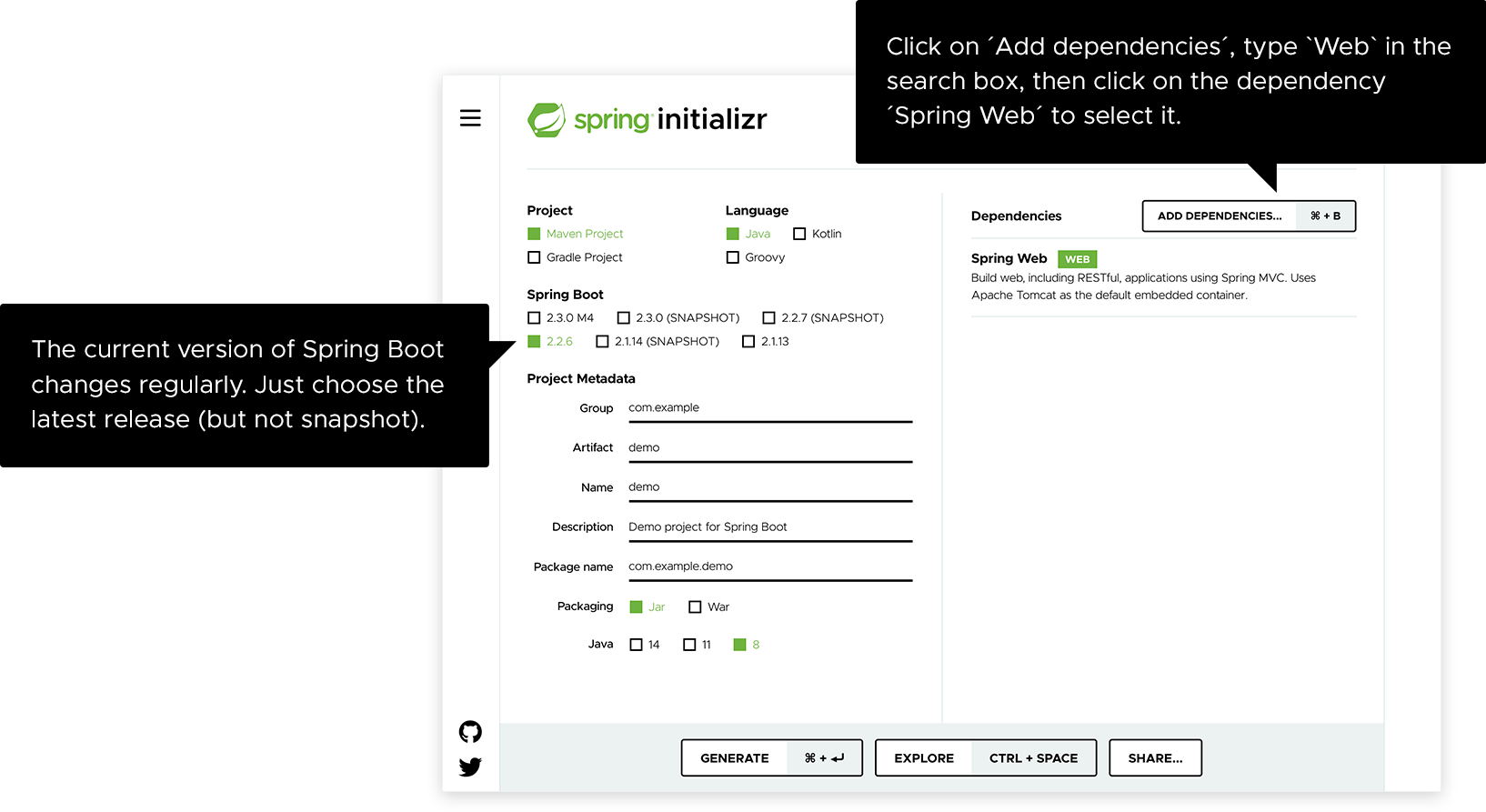
Use start.spring.io to create a “web” project. In the “Dependencies” dialog search for and add the “web” dependency as shown in the screenshot. Hit the “Generate” button, download the zip, and unpack it into a folder on your computer.
image

Projects created by start.spring.io contain Spring Boot, a framework that makes Spring ready to work inside your app, but without much code or configuration required. Spring Boot is the quickest and most popular way to start Spring projects.

Step 2: Add your code

Open up the project in your IDE and locate the DemoApplication.java file in the src/main/java/com/example/demo folder. Now change the contents of the file by adding the extra method and annotations shown in the code below. You can copy and paste the code or just type it.

package com.example.demo;

import org.springframework.boot.SpringApplication; import org.springframework.boot.autoconfigure.SpringBootApplication; import org.springframework.web.bind.annotation.GetMapping; import org.springframework.web.bind.annotation.RequestParam; import org.springframework.web.bind.annotation.RestController;

@SpringBootApplication @RestController public class DemoApplication {

public static void main(String[] args) { SpringApplication.run(DemoApplication.class, args); }

@GetMapping("/hello") public String hello(@RequestParam(value = "name", defaultValue = "World") String name) { return String.format("Hello %s!", name); } }

This is all the code required to create a simple “Hello World” web service in Spring Boot.

The hello() method we’ve added is designed to take a String parameter called name, and then combine this parameter with the word "Hello" in the code. This means that if you set your name to “Amy” in the request, the response would be “Hello Amy”.

The @RestController annotation tells Spring that this code describes an endpoint that should be made available over the web. The @GetMapping(“/hello”) tells Spring to use our hello() method to answer requests that get sent to the http://localhost:8080/hello address. Finally, the @RequestParam is telling Spring to expect a name value in the request, but if it’s not there, it will use the word “World” by default.

Important Notes:

Overview

The @Controller annotations is used for traditional spring MVC framework Controller for long time.The @RestController annotation was introduced in Spring 4.0 to simplify the creation of RESTful web services.
The @RestController annotation in Spring MVC/Spring BOOT is nothing but a combination of @Controller and @ResponseBody annotation.
It was added into Spring 4.0 to make the development of RESTful Web Services in Spring framework easier.
If you know REST web services you know that the fundamental difference between a REST API and a web application.
That is the response from a web application is generally view (HTML + CSS) because they are intended for human viewers.
REST API just returns data in form of JSON or XML because most of the REST clients are programs. This difference is also obvious in the @Controller and @RestController annotation.
Difference between @Controller and @RestController in Spring MVC/BOOT
The @Controller is a annotation to mark class as Controller Class in Spring While @RestController is used in REST Web services and similar to @Controller and @ResponseBody.
The @Controller annotation indicates that the class is controller like web Controller while @RestController annotation indicates that the class is controller where @RequestMapping Method assume @ResponseBody by Default(i.e REST APIs).
The key difference is that you do not need to use @ResponseBody on each and every handler method once you annotate the class with @RestController.
@Controller create a Map of Model Object and find a view while @RestController simply return object and object data directly written into http response as JSON orXML.
This can be also done with @Controller annotation and @ResponseBody annotation but since this is the default behaviour of RESTful Web Services. Spring introduced @RestController which is combined behaviour of @Controller and @ResponseBody together.

About

No description, website, or topics provided.

Resources

Stars

Watchers

Forks

Releases

No releases published

Packages

No packages published

Languages