Releases: pointerboy/Windows-Frameless-Terminal
Releases · pointerboy/Windows-Frameless-Terminal
Beta 1.3 is now out!

Features
- Beta 1.3 now features a window highlighter. This allows you to customize your terminal's borders.
- You can now stop the watch by pressing the same button you started it with.
NOTE: The highlighter is still an experimental feature. Besides, after pressing stop watch button - your default terminal window menu & borders & titlebar won't be restored.
Fixes
- Fixed bug where the thread would resume running even after the main window has been closed.
Beta 1.2 is now out!
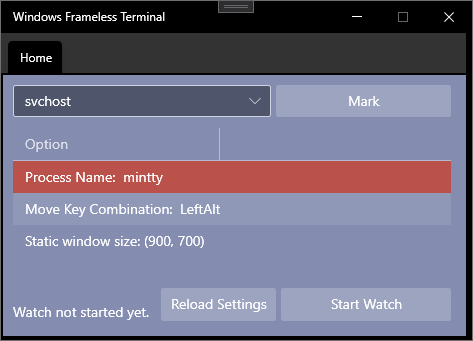
New, simpler, interface!
- Theme now matches Window's selected theme.
- All components are now merged into the main page.
- You can now look up for running processes and mark them.
- All configuration elements can now be viewed from the main page.
- Refresh button no longer causes a crash.
- You can set static width and height of the terminal and resize it to your own will!
- Icon has now been added alongside minor application information.
Developers, developers, developers!
- Structured the solution accordingly.
- Fixed code constraints violations.
- Reformatted some names and removed unused resources & declarations.
Note: File size is 135 MB. Dependencies are squeezed inside the main executable. Over time, the file size will reduce.
The future ahead
Future releases will feature a custom window border decoration style alongside improvements in the overall experience, including the user interface.
Beta 1.1
Latest Update Notes (BETA 1.1)
- I'm activly working on fixing the resize issue.
- Reload feature is now added. You can modify the configuration file and reload the changes on the go, without having to restart the application.
- Some minor code and UI cleanups.