
MTProxyTLS 一键安装绿色脚本 English
Telegram 群组:https://t.me/EllerHK
执行如下代码进行安装
mkdir /home/mtproxy && cd /home/mtproxy
curl -s -o mtproxy.sh https://raw.githubusercontent.com/ellermister/mtproxy/master/mtproxy.sh && chmod +x mtproxy.sh && bash mtproxy.sh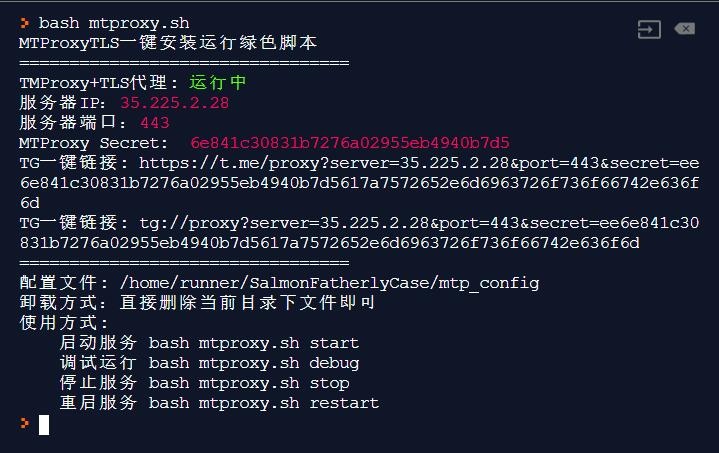
The image integrates nginx and mtproxy+tls to disguise traffic, and uses a whitelist mode to deal with firewall detection.
该镜像集成了 nginx、mtproxy+tls 实现对流量的伪装,并采用白名单模式来应对防火墙的检测。
If you use this Docker image, you don't need to use the script, you can choose one of the two, don't mix it up.
若使用该 Docker 镜像, 就不需要用脚本了,二者二选一,不要搞混了。
secret=$(head -c 16 /dev/urandom | xxd -ps)
domain="cloudflare.com"
docker run --name nginx-mtproxy -d -e secret="$secret" -e domain="$domain" -p 8080:80 -p 8443:443 ellermister/nginx-mtproxy:latest
镜像默认开启了 IP 段白名单,如果你不需要可以取消:
docker run --name nginx-mtproxy -d -e secret="$secret" -e domain="$domain" -e ip_white_list="IP" -p 8080:80 -p 8443:443 ellermister/nginx-mtproxy:latest更多使用请参考: https://hub.docker.com/r/ellermister/nginx-mtproxy
运行服务
bash mtproxy.sh start调试运行
bash mtproxy.sh debug停止服务
bash mtproxy.sh stop重启服务
bash mtproxy.sh restart因为是绿色版卸载极其简单,直接删除所在目录即可。
rm -rf /home/mtproxy开机启动脚本,如果你的 rc.local 文件不存在请检查开机自启服务。
通过编辑文件/etc/rc.local将如下代码加入到开机自启脚本中:
cd /home/mtproxy && bash mtproxy.sh start > /dev/null 2>&1 &