


A high-performance WebSocket server for Python, with first-class Django support. The core server is implemented in Rust using PyO3 for maximum performance.
- High-performance - Rust-powered WebSocket server using axum and fastwebsockets
- Django Integration - Built-in authentication classes and management commands
- Pattern Matching - Route messages based on discriminator fields with optional Pydantic validation
- Broadcasting - Built-in support for Redis and RabbitMQ message brokers
- Async Ready - Supports both sync and async Python callbacks
webrockets significantly outperforms other Python WebSocket implementations thanks to its Rust-powered core.
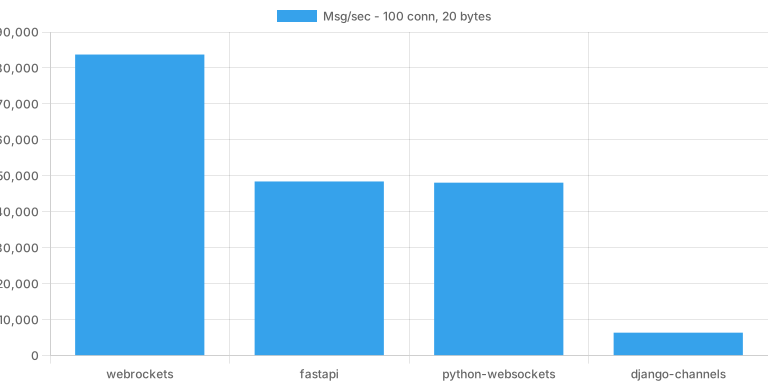
In a simple echo benchmark with 100 concurrent connections, webrockets achieves up to 10x higher throughput compared to Django Channels with Daphne. See the full benchmark results for detailed comparisons across different scenarios.
Benchmark machine: Thinkpad E16, Intel Core i7-1355U (12 cores), 16 GB RAM, EndeavourOS Linux (kernel 6.12.61-1-lts)
# Basic installation
pip install webrockets

# With Django integration
pip install webrockets[django]

# With Pydantic schema validation
pip install webrockets[schema]

# All extras
pip install webrockets[schema,django]from webrockets import WebsocketServer
# Create a WebSocket server
server = WebsocketServer(host="0.0.0.0", port=8080)
# Create a route on the server
echo = server.create_route("ws/echo/", "echo")
@echo.connect("before")
def on_connect(conn):
print(f"Client connected: {conn.path}")
@echo.receive
def on_message(conn, data):
# Echo the message back
conn.send(f"You said: {data}")
@echo.disconnect
def on_disconnect(conn, code=None, reason=None):
print(f"Client disconnected: {code}")
server.start()webrockets provides seamless Django integration with built-in authentication support.
Add webrockets to your INSTALLED_APPS:
INSTALLED_APPS = [
    ...
    "webrockets",
]
Optionally configure the server in your settings:
WEBSOCKET_HOST = "0.0.0.0"  # default
WEBSOCKET_PORT = 46290      # default
WEBSOCKET_BROKER = None     # or {"type": "redis", "url": "redis://localhost:6379"}
Create your WebSocket routes in a websockets.py file in any of your Django apps:
# myapp/websockets.py
from webrockets.django import server
from webrockets.django.auth import SessionAuthentication

chat = server.create_route(
    "ws/chat/",
    "chat",
    authentication_classes=[SessionAuthentication()]
)

@chat.connect("before")
def on_connect(conn):
    print(f"User {conn.user} joined the chat")

@chat.receive
def on_message(conn, data):
    conn.send(f"{conn.user}: {data}")

@chat.disconnect
def on_disconnect(conn, code=None, reason=None):
    print(f"User {conn.user} left the chat")
Start the WebSocket server:
python manage.py runwebsocketswebrockets includes several authentication classes following Django REST Framework patterns:
from webrockets.django import server
from webrockets.django.auth import (
    SessionAuthentication,       # Django session-based auth
    CookieTokenAuthentication,   # Token from cookie
    HeaderTokenAuthentication,   # Token from header
    QueryStringTokenAuthentication,  # Token from URL query
)

# Use session auth (for browser clients)
chat = server.create_route("ws/chat/", "chat", authentication_classes=[
    SessionAuthentication()
])

# Custom token authentication
class MyTokenAuth(CookieTokenAuthentication):
    cookie_name = "ws_token"

    def validate_token(self, token):
        # Return user object or None
return User.objects.filter(auth_token=token).first()Route messages based on JSON fields using the Match class:
from pydantic import BaseModel
from webrockets import Match, WebsocketServer

class ChatMessage(BaseModel):
    type: str
    content: str
    room: str

server = WebsocketServer()
chat = server.create_route("ws/chat/", "chat")

# Match on a single key/value with Pydantic validation
@chat.receive(match=Match("type", "message"), schema=ChatMessage)
def on_chat(conn, data: ChatMessage):
    conn.broadcast([data.room], data.content)

# Match without schema - data is the raw JSON string
@chat.receive(match=Match("type", "ping"))
def on_ping(conn, data: str):
    conn.send('{"type": "pong"}')

# Fallback for unmatched messages
@chat.receive
def on_fallback(conn, data):
    conn.send("Unknown message type")