Getting Started
Make sure you're using the latest Visual Studio 2022. When you first build the project, it should automatically install the required dependencies provided you have vcpkg installed.
If this doesn't work for some reason, install these using vcpkg:
-
tmxlite
-
sfml
-
box2d
-
nlohmann-json
-
spdlog
In modern C++, it's best to use smart pointers, I suggest reading up on them in detail at the following page: https://www.geeksforgeeks.org/smart-pointers-cpp/
However, if you're too lazy for that, shared_ptr is basically a class wrapped around a pointer and when that object isn't being referenced by anything anymore it automatically calls delete on the internal pointer.
Everything (with the exception of the tile map world) in the game is defined as a "Game Object" class. This class should not have any derived classes and is a generic class that can be used for many different types of object.
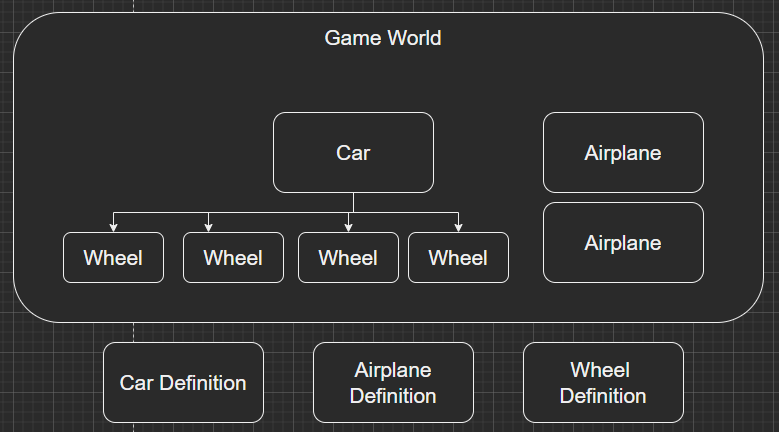
Game objects inherit the transform and drawable base classes. To add functionality to game objects, you can add components to them. Each game object contains a map structure that contains shared pointers to components.
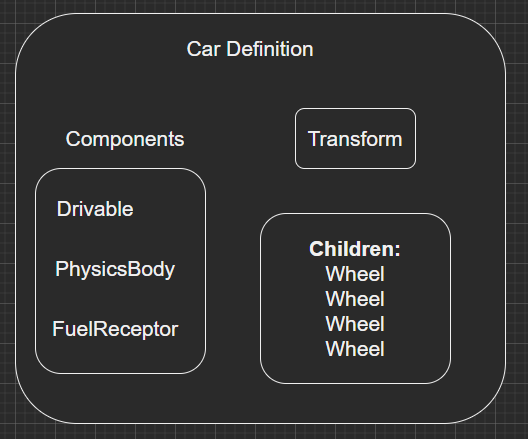
Game objects can also have child game object, this simply means that the child game object will match the transform of it's parent. An example is adding a wheel to a car, the wheel moves along with the car but the wheel can also rotate and move independently relative to the movement of the car.
Game objects can be defined in JSON files located at game/gameObjects, these JSON files tell the engine which components to add to each game object. However, you can't define new components using JSON, they must be created as new C++ classes derived from Component. These game objects can be instantiated at runtime.
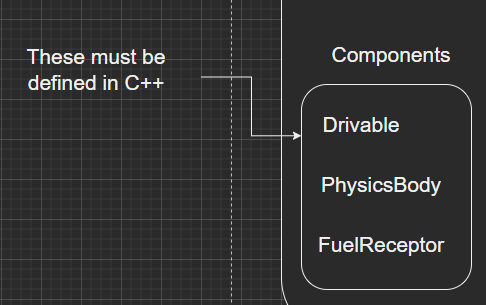
Define functionality in C++ classes that derive from Component, create game objects that use those components in JSON.
Adding game objects to the world (instantiating them) is as simple as modifying game/world.json
Define a class like this and put it in the components filter in VS:
#include "Component.h"

using namespace PlatformDataEngine
{
  class MyComponent : public Component
  {
        // called once when the game starts for every instance of the game object
        void init();

        // for updating things
    	void update(const float& dt, const float& elapsedTime);

        // for drawing things (called on separate thread)
	void draw(sf::RenderTarget& target, sf::RenderStates states) const;

        // YOU MUST IMPLEMENT COPY (BAD THINGS WILL HAPPEN IF YOU DON'T)
        // like a copy constructor but you must std::dynamic_pointer_cast the parameter
	void copy(std::shared_ptr<Component> otherCompPtr);

        // called with the "properties" object in a game object json file,
        // called once for the definition (not called on instances)
	void loadDefinition(nlohmann::json object);
  }
}
(IMPORTANT)
Now add this to ComponentFactory.h:
        static inline const map_type factoryMap = {
            {"AnimationController", &construct<AnimationController>},
            {"CharacterController", &construct<CharacterController>},
            {"SpriteRenderer", &construct<SpriteRenderer>},
            {"PhysicsBody", &construct<PhysicsBody>},
            {"TextRenderer", &construct<TextRenderer>},
            {"EngineStatsText", &construct<EngineStatsText>},
            {"RocketLauncher", &construct<RocketLauncher>},
            {"ParticleSystem", &construct<ParticleSystem>},
            {"RocketProjectile", &construct<RocketProjectile>},
            {"TimedDestroy", &construct<TimedDestroy>},
            ADD YOUR COMPONENT HERE!
};This is a game object definition, when this is loaded, a single instance of GameObject will be created and instances of this game object will be copied from the first instance. This allows us to create new game objects based on a definition very quickly (around 100 microseconds, even useful for particle systems! That means each particle can be a game object!)
{
  "components": [
    {
      "type": "SpriteRenderer",
      "properties": {
        "texture": "assets/RocketLauncher.png",
        "rect": {
          "x": 0,
          "y": 0,
          "width": -1,
          "height": -1
        }
      }
    },
    {
      "type": "RocketLauncher",
      "properties": {
        "velocity": 600,
        "cooldown": 800
      }
    },
    {
      "type": "AnimationController",
      "properties": {
        "aespriteFile": "assets/RocketLauncher.json",
        "animation": "Idle",
        "loop": true,
        "speed": 1
      }
    }
  ]
}You'll notice a properties object defined for each component in the game object definition. This is a system that lets you very easily add configurable values to your component classes.
These config values are loaded at game start for each game object definition, but not for each instance (the instance properties are copied from the definition using the copy() function.
An example of loading properties for a component (reference the game object definition above):
void RocketLauncher::loadDefinition(nlohmann::json object)
{
	this->m_rocketCooldown = object.at("cooldown");
	this->m_velocity = object.at("velocity");
}