
This extension makes it easy to inspect data with just a few clicks.
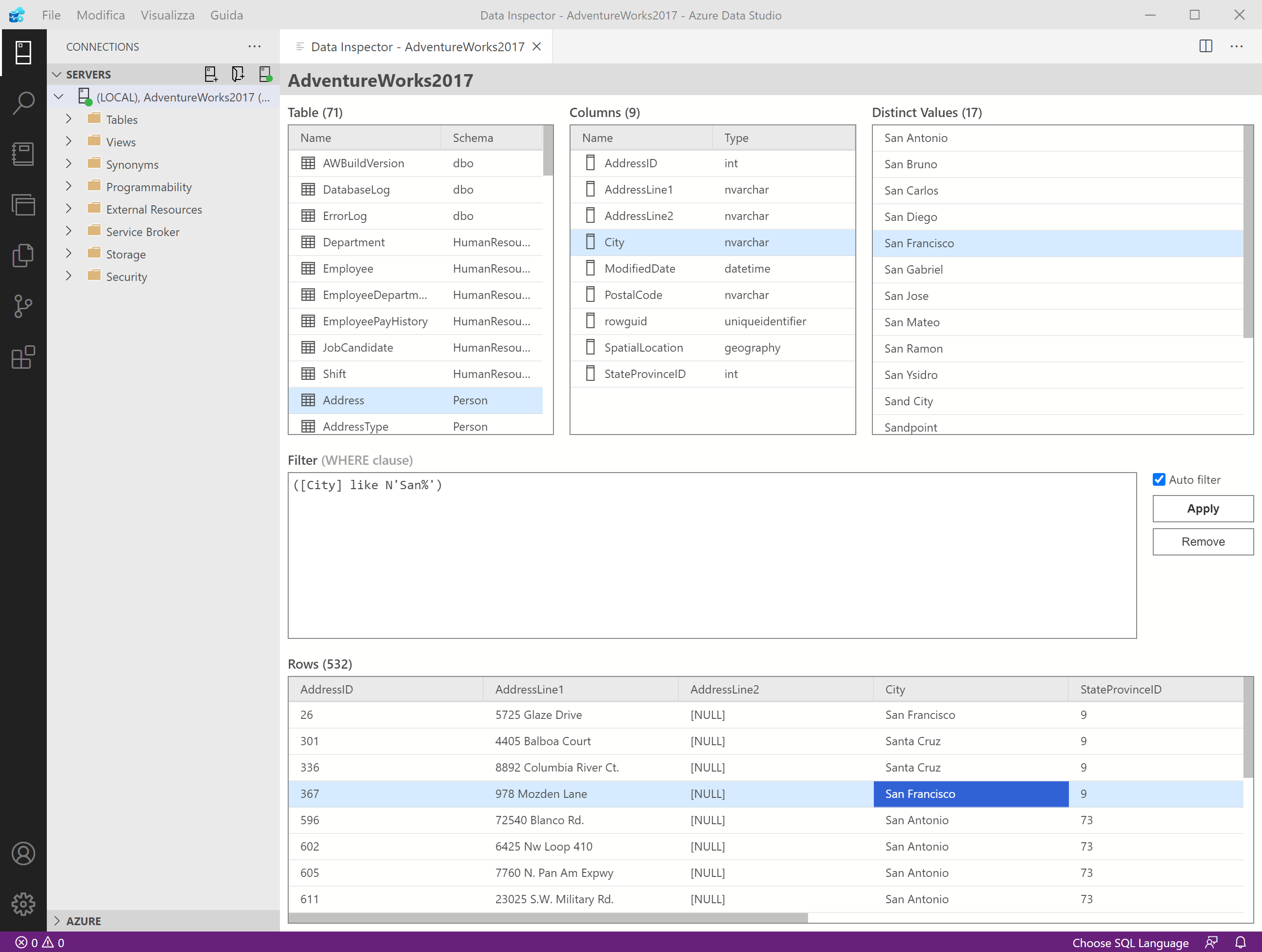
- Start inspecting data from the database context menu using the menu item "Inspect data".
- Shows the list of tables of the database.
- Shows the list of columns of the selected table.
- Shows all the distinct values of the selected column.
- Shows a snapshot of the first 10 rows of the selected tables.
- You can edit the WHERE clause that will be applied to each query that retrieves data.
- By double clicking on a distinct value, a filter on that value is automatically added in the "Filters" section.
- By double clicking on a row in the table snapshot, it shows a dialog with a detailed record of the row.
- Each selectable element can be copied with CTRL+C.
The current release will be available through the Extensions Marketplace in Azure Data Studio.
Current and Pre-releases will be available from the Releases tab of the projects repository. Simply download the VSIX of the release you want, and use the Install Extension from VSIX Package option in Azure Data Studio.
See the Change Log for the full changes.
If you find a bug or have an idea to improve this collection please create a new issue in this project.
You are more than welcoem to help contribute to this project if you wish, please create a new fork of the dev branch, then submit a pull request to the dev branch after making your changes.
This project is released under the MIT License