The reason I was doing this is because I don't want to pay the expensive fee to see the certification dumps lol.
- Website on webscraping & crawling https://webscraping.fyi/
^ https://webscraping.fyi/overview/browser-automation/
^ I am currently using browser automation instead of http clients
^ https://webscraping.fyi/overview/languages/#http-clients
-
Youtube channels on webscraping & crawling https://www.youtube.com/@MichaelMintz https://www.youtube.com/@JohnWatsonRooney/playlists
-
Airflow being used for webscraping https://www.youtube.com/watch?v=CraPKax37lo
-
Official Reddit Date Engineering website https://dataengineering.wiki/Tools/Tools
-
Kodekloud https://kodekloud.com/courses/data-engineering-fundamentals
-
Architecture for Data https://www.youtube.com/watch?v=gsUqW1IookY
-
Workflow Orchestration
-
Airflow certification link: https://academy.astronomer.io/page/astronomer-certification
-
Notes on Airflow certification: https://substack.com/@michaelsalata/p-181463528
- Data Ingestion
- Dlt Certification links: https://dlthub.learnworlds.com/course/dlt-fundamentals https://dlthub.learnworlds.com/course/dlt-advanced
- Data Processing
-
DBT Certification links: https://learn.getdbt.com/learning-paths/dbt-certified-developer https://learn.getdbt.com/learning-paths/dbt-certified-cloud-architect
-
Apache Spark
- Data Analytics
- Excel
- Power BI
Github Actions solves
- Codebase
- Build, Release and Run ^ You have to learn Git before Github Actions to make sense ^ Can try below: https://blinry.itch.io/oh-my-git
- Install node version manager:
- curl -o- https://raw.githubusercontent.com/nvm-sh/nvm/v0.39.7/install.sh | bash
^^^^^^ The following wont work if ~/.profile exist, Then you need to manually add to .bashrc by doing the following:
- echo 'export NVM_DIR="$HOME/.nvm" [ -s "$NVM_DIR/nvm.sh" ] && . "$NVM_DIR/nvm.sh" # This loads nvm [ -s "$NVM_DIR/bash_completion" ] && . "$NVM_DIR/bash_completion" # This loads nvm bash_completion' >> ~/.bashrc
- Make .bashrc take effect immediately by sourcing:
- source ~/.bashrc
- Install Node 20:
- nvm install 20
- Verify node:
- node -v
- Install Typescript:
- npm install -g typescript
- Install Dependencies:
- npm install
- Compile Typescript and launch with node with sample arguments:
- tsc && node ./build/index.js
- Minio
- Postgres ^ Both of these need to use volume, otherwise they would data would be lost
I am not entirely sure if I should create an image for the webscraper ^ If I am not mistaken, the 12 factor app mentioned about containerize scripts ^ The famous voting app has a image that is not a web server, it's like a script that has loop forevor until it errors
Docker is actually a server, it comes with
- Docker Daemon (dockerd)
- REST API
- Docker CLI (docker) ^ Based on Kodekloud's Docker-Certified-Associate-Exam-Course, You still need indepth knowledge of Linux
Link to Docker Certified Associate (DCA) Exam: https://a.storyblok.com/f/146871/x/2001ce939c/docker-study-guide_v1-5-jan-2025.pdf
Mirantis bought over the Docker Certification Exam: https://training.mirantis.com/certification/dca-certification-exam/
An alternative to Kodekloud's docker courses https://labs.iximiuz.com/roadmaps/docker
Not sure what is the importance for the process tree looking like that https://labs.iximiuz.com/challenges/docker-101-container-run-in-background
Download an image without starting a container:
-
docker image pull minio/minio
-
docker image pull postgres:14.21-trixie
-
Build Image for the webscraper
-
Create docker compose file
-
Install DBT fusion https://docs.getdbt.com/docs/fusion/install-fusion-cli
-
Install DBT extension by "dbt Labs Inc" https://docs.getdbt.com/docs/install-dbt-extension
-
Rescrape pages that result in dirty data, need to update / merge existing data. ^ Partially added for Answers, never needed for question & discussions
-
Error handling for missing src images
-
Workflow Orchestration with Airflow
-
Column lineage with dbt
-
Schema Drift from upstream (The HTML, Javascript from examtopics)
-
SQL backup dump on repository, so when switch computer we get the data back
-
Maybe instead of scraping the data directly, you take all the data first and dump it into a data lake, then only process it at some future point ^ Try to use MINIO as a datalake, Hadoop also works
-
Convert the project into a CLI
-
Answer cannot be scraped: https://www.examtopics.com/discussions/oracle/view/92435-exam-1z0-071-topic-1-question-24-discussion/ ^ The answers was already scraped, but it is contained within questions
-
Need to handle
-
https://www.examtopics.com/assets/media/exam-media/04351/0002400002.jpg
-
Apparently there was nothing wrong with my scraping code, the image's src just did not appear, meaning the resource did not lead.
-
Need to rescrape images from 103, 119, 120, 127, 128, 131, 133, 146, 166, 228, 236, 245, 256
-
replace pngMost with png
-
if pngMost exist, then replace 'pngMost' with 'png' & replace 'Voted' with ''


/Applications/Google\ Chrome.app/Contents/MacOS/Google\ Chrome
--remote-debugging-port=9222
--user-data-dir=/tmp/chrome-profile
Apparently if you edit class="popup-overlay show" to "popup-overla show", the popup will break
/html/body/div[2]/div/div[4]/div/div[1]/div[2]/p
/html/body/div[2]/div/div[4]/div/div[1]/div[2]/p/img
https://www.examtopics.com/assets/media/exam-media/04351/0000200001.png
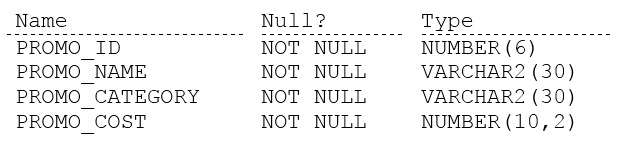
/html/body/div[2]/div/div[4]/div/div[1]/div[2]/div[2]/ul/li[1]/text()
/html/body/div[2]/div/div[4]/div/div[1]/div[2]/div[2]/ul/li[2]/text()
/html/body/div[2]/div/div[4]/div/div[1]/div[2]/div[2]/ul/li[3]/text()
/html/body/div[2]/div/div[4]/div/div[1]/div[2]/div[2]/ul/li[4]/text()
/html/body/div[2]/div/div[4]/div/div[1]/div[2]/div[2]/ul/li[5]/text()
/html/body/div[2]/div/div[4]/div/div[2]/div[2]/div/div/div[2]/div[1]/div/div[2]/div[2]
/html/body/div[2]/div/div[4]/div/div[2]/div[2]/div/div/div[2]/div[2]/div/div[2]/div[2]
/html/body/div[2]/div/div[4]/div/div[2]/div[2]/div/div/div[2]/div[1]/div/div[2]/div[3]/span[2]/span
/html/body/div[2]/div/div[4]/div/div[2]/div[2]/div/div/div[2]/div[2]/div/div[2]/div[3]/span[2]/span