This repository contains the implementation of a load balancer using Docker, aimed at efficiently distributing requests among several servers. The load balancer routes requests from multiple clients asynchronously to ensure nearly even distribution of the load across the server replicas.
-
Endpoint (/home, method=GET): This endpoint returns a string with a unique identifier to distinguish among the replicated server containers. For instance, if a client requests this endpoint and the load balancer schedules the request to Server: 3, then an example return string would be Hello from Server: Hint: Server ID can be set as an env variable while running a container instance from the docker image of the server
- Command:
curl -X GET -H "Content-type: application/json" http://localhost:5000/home - Response:
{"message": "Hello from server_1"}}
- Command:
-
Endpoint (/heartbeat, method=GET): This endpoint sends heartbeat responses upon request. The load balancer further uses the heartbeat endpoint to identify failures in the set of containers maintained by it. Therefore, you could send an empty response with a valid response code.
- Command:
curl -X GET -H "Content-type: application/json" http://localhost:5000/heartbeat - Response:
{}
- Command:
-
In this task, you need to implement a consistent hash map using an array, linked list, or any other data structure. This map data structure details are given in Appendix A. Use the following parameters and hash functions for your implementation.
- Number of Server Containers managed by the load balancer (N) = 3
- Total number of slots in the consistent hash map (#slots) = 512
- Number of virtual servers for each server container (K) = log (512) = 9 2
- Hash function for request mapping H(i) = i + 2i + 17 2 2
- Hash function for virtual server mapping Φ(i, j) = i + j + 2j + 25
-
Consistant Hashing Algorithm Implementation
- Implementation Details:
- Uses array-based data structure
- Number of Server Containers (N): 3
- Total number of slots in the consistent hash map (#slots): 512
- Number of virtual servers for each server container (K): log(512) = 9
- Hash functions used:
- Hash function for request mapping H(i): H(i) = i + 2i + 17
- Hash function for virtual server mapping Φ(i, j): Φ(i, j) = i + j + 2j + 25
- Implementation Details:
-
Endpoint (/add, method=POST): This endpoint adds new server instances in the load balancer to scale up with increasing client numbers in the system. The endpoint expects a JSON payload that mentions the number of newinstances and their preferred hostnames (same as the container name in docker) in a list. An example request and response is below.
- Command:
curl -X POST -H "Content-Type: application/json" --data-binary "{\"n\": 4, \"hostnames\": [\"server11\", \"server12\", \"server13\", \"new_servers4\"]}" http://localhost:5000/add - Response:
{"message": {"N": 5,"replicas": ["server12","new_servers4","server_1","server11","server13"]}, "status": "successful"}
- Perform simple sanity checks on the request payload and ensure that hostnames mentioned in the Payload are less than or equal to newly added instances. Note that the hostnames are preferably set. One can never set the hostnames. In that case, the hostnames (container names) are set randomly. However, sending a hostname list with greater length than newly added instances will result in an error.
- Command:
curl -X POST -H "Content-Type: application/json" --data-binary "{\"n\": 2, \"hostnames\": [\"server11\", \"server12\", \"server13\", \"new_servers4\"]}" http://localhost:5000/add - Response:
{"message": "<Error> Length of hostname list is more than newly added instances","status": "failure"}
- Command:
- Command:
-
Endpoint (/rep, method=GET): This endpoint only returns the status of the replicas managed by the load balancer. The response contains the number of replicas and their hostname in the docker internal network:n1 as mentioned in Fig. 1. An example response is shown below.
- Command:
curl -X GET -H "Content-type: application/json" http://localhost:5000/rep - Response:
{"message": {"N": 0,"replicas": []},"status": "successful"}
- Command:
-
Endpoint (/rm, method=DELETE): This endpoint removes server instances in the load balancer to scale down with decreasing client or system maintenance. The endpoint expects a JSON payload that mentions the number of instances to be removed and their preferred hostnames (same as container name in docker) in a list. An example request and response is below.
- Command:
curl -X POST -H "Content-Type: application/json" --data-binary "{\"n\": 2, \"hostnames\": [\"server11\", \"server12\"] }" http://localhost:5000/rm - Response:
{"message": {"N": 3,"replicas": ["new_servers4","server_1","server13"]},"status": "successful"} - shows that the server12 and server11 have been removed successfully
- Command:
-
Endpoint (/checkpoint, method=GET): This endpoint is used to view all of the servers that are currently being used. Additonally, it provides a list of the amount each server has that aids in visualising the load balancing. An example request and response is below.
- Command:
curl -X GET -H "Content-type: application/json" http://localhost:5000/checkpoint - Response:
{"requests": {"new_servers4": 10,"server13": 28,"server_1": 63}, "servers": ["new_servers4","server_1","server13"]} - Using the existing servers, "new_servers4","server_1","server13", you are able to see the distribution of requests to each server after sending 100 requests to the
/homeendpoint
- Command:
-
Endpoint (/graph, method=GET): This endpoint is used to create a bar graph using the distribution data from the
/checkpointendpoint, where the server names are on the x-axis, and the number of requests are on the y-axis. An example request and response is below.- Command:
curl -X GET -H "Content-type: application/json" -o endpoint_example.png http://localhost:5000/graph - Response:
% Total % Received % Xferd Average Speed Time Time Time Current Dload Upload Total Spent Left Speed 100 23576 100 23576 0 0 57646 0 --:--:-- --:--:-- --:--:-- 57784 - a new graph is created, "endpoint_example.png", that shows the distribution as seen in
checkpointdata
- Command:
-
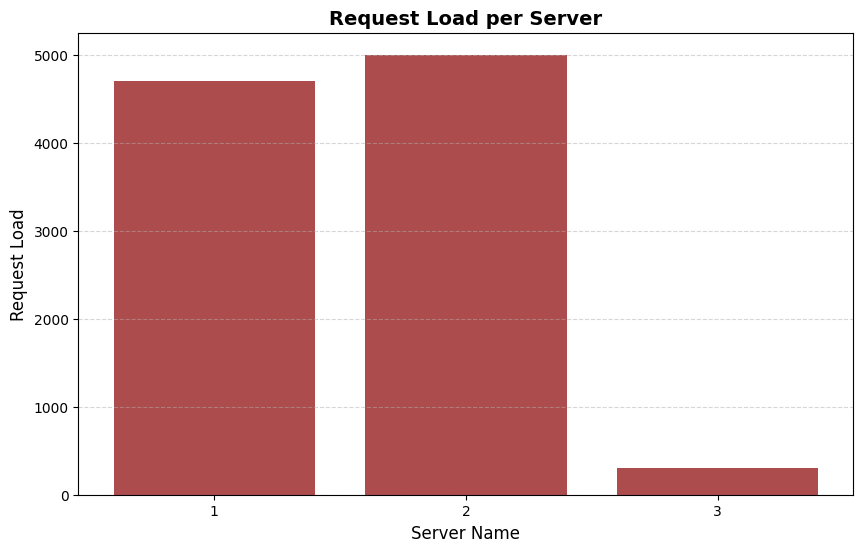
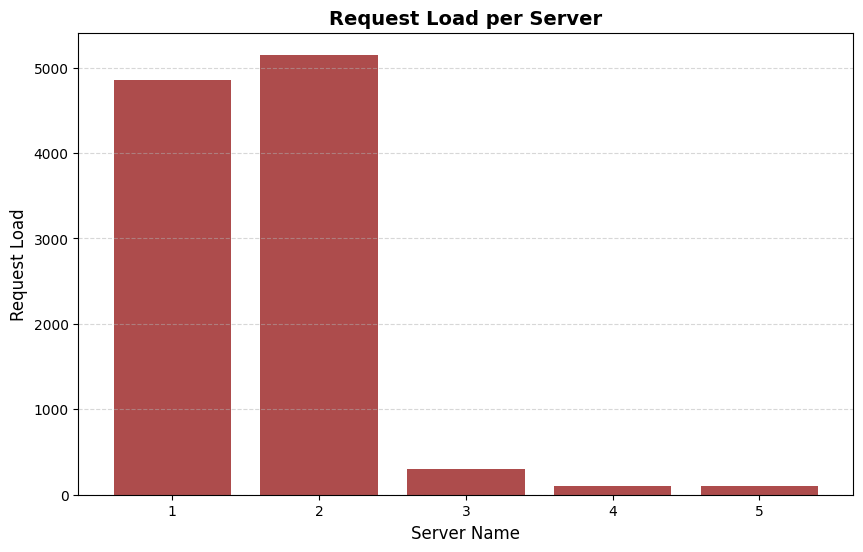
Launch 10000 async requests on N = 3 server containers and report the request count handled by each server instance in a bar chart. Explain your observations in the graph and your view on the performance.
- After adding three servers ('1', '2', '3'):
- Ran 10,000 requests routed to the
/homeand used the endpoint/server_statsto view the number of requests each server recieved - Graph:
-
- Observations:
- Servers 1 and 2 bear the majority of the load, with Server 2 consistently handling the highest load followed by Server 1.
- In contrast, Server 3 carries a significantly lighter load compared to the other servers, indicating a potential imbalance in the load distribution strategy.
-
- Ran 10,000 requests routed to the
- After adding three servers ('1', '2', '3'):
-
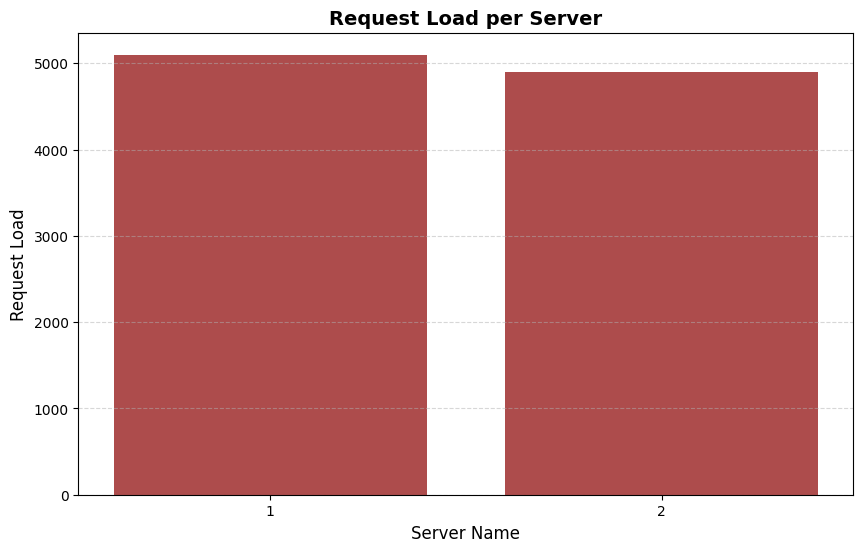
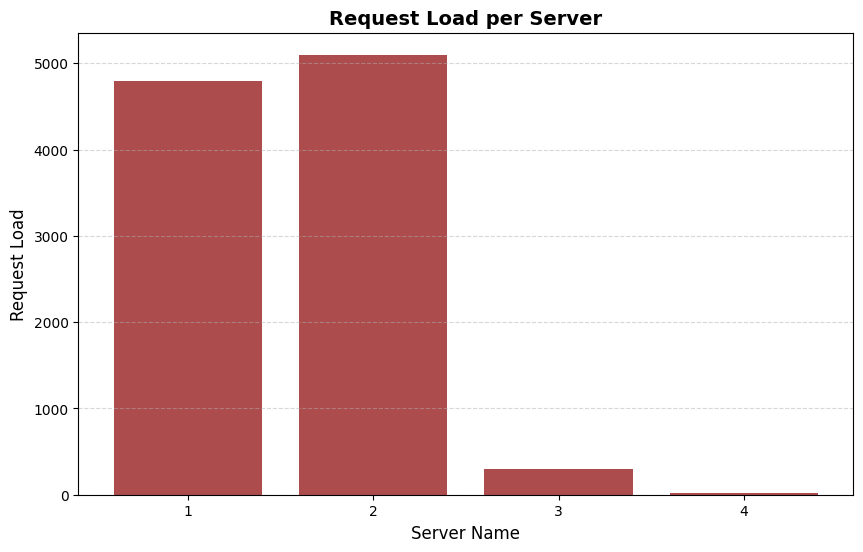
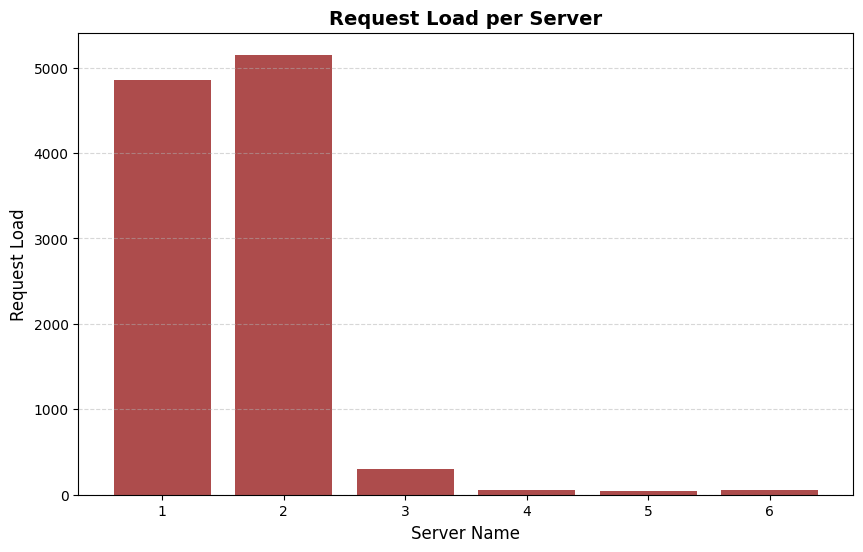
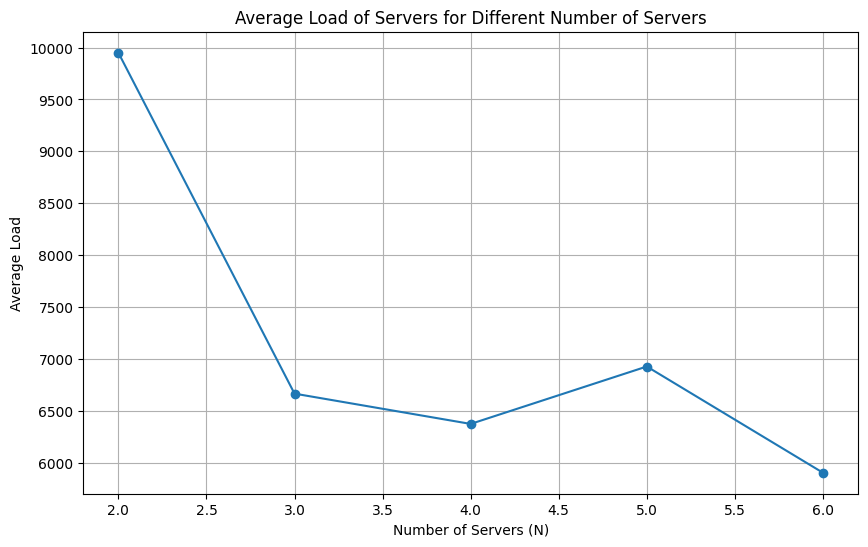
Next, increment N from 2 to 6 and launch 10000 requests on each such increment. Report the average load of the servers at each run in a line chart. Explain your observations in the graph and your view on the scalability of the load balancer implementation
- When N = 2
- Graph:
-
- Graph:
- When N = 3
- Graph:
-
- Graph:
- When N = 4
- Graph:
-
- Graph:
- When N = 5
- Graph:
-
- Graph:
- When N = 6
- Graph:
-
- Graph:
- Average load accross each server with 10,000 requests:
- Graph:
-
- Observation:
- In the case of two servers, both servers handle a relatively similar load, with Server 1 slightly edging out Server 2.
- This suggests a relatively balanced load distribution, although there is still room for improvement to ensure equitable resource utilization across the servers.
- Graph:
- When N = 2
-
Test all endpoints of the load balancer and show that in case of server failure, the load balancer spawns a new instance quickly to handle the load.
- By simulating a forced exit of a server and the latency betweeen a new server arriving, this is shown in a graph below where
Nrepresents the amount of servers: -
Number of Servers Latency for New Server Spawn 2 servers 1.2313279 seconds 3 servers 0.8681224 seconds 4 servers 0.2518046 seconds 5 servers 0.2355351 seconds
- By simulating a forced exit of a server and the latency betweeen a new server arriving, this is shown in a graph below where
-
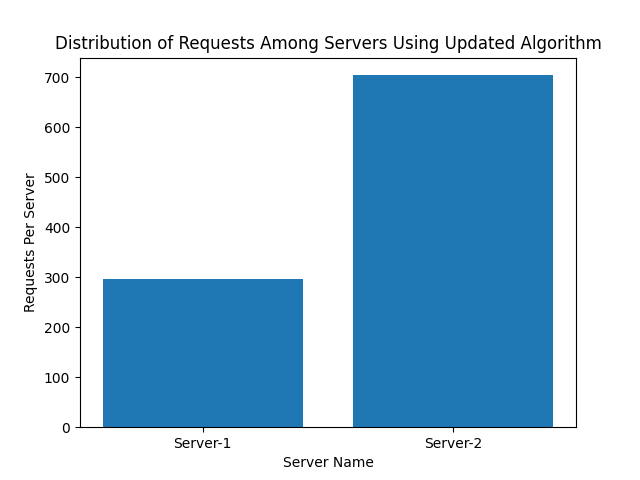
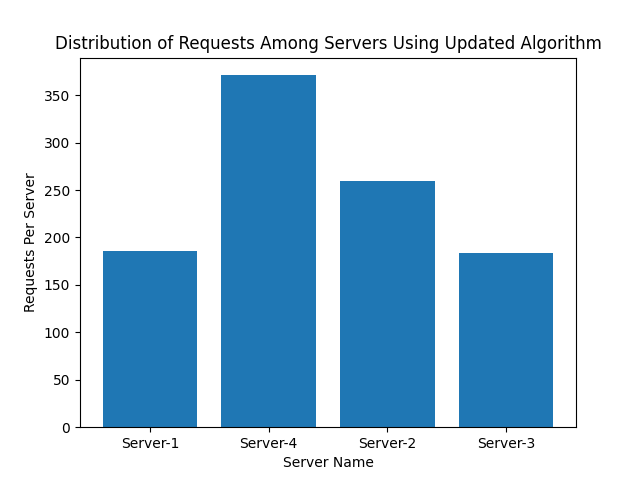
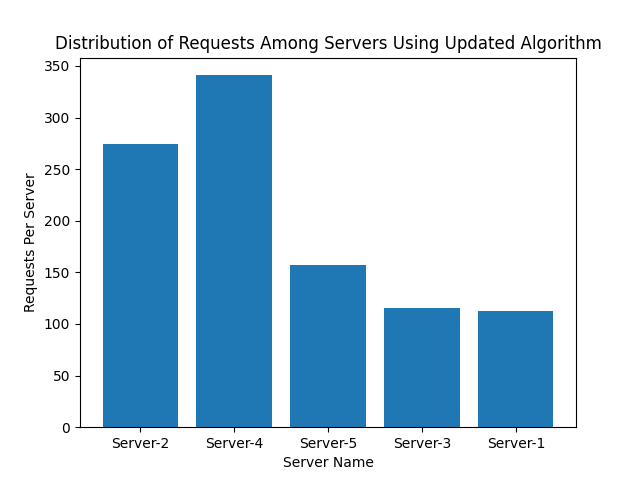
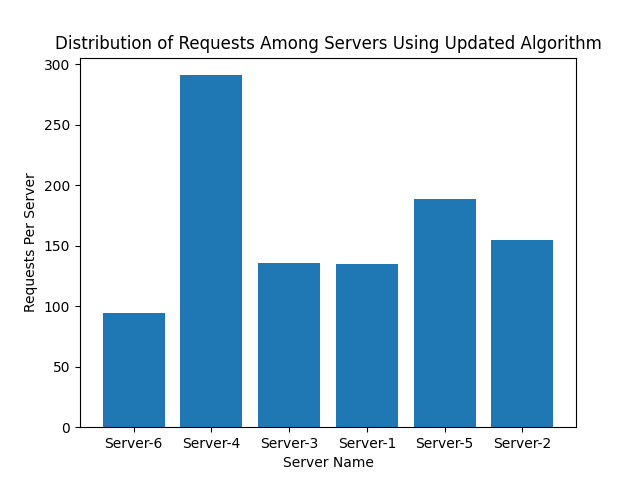
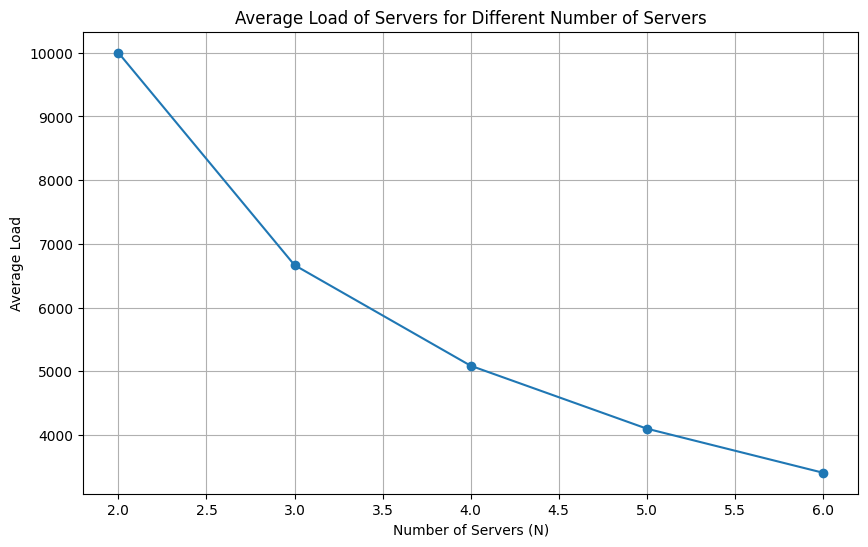
Finally, modify the hash functions H(i), Φ(i, j) and report the observations from (A-1) and (A-2).
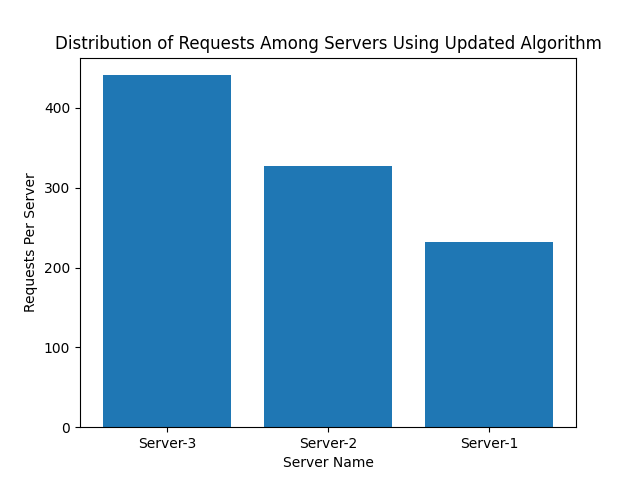
- To achieve a better distribution, the following changes were made to the consistent hashing function:
- Number of Server Containers managed by the load balancer (N) = 3
- Total number of slots in the consistent hash map (#slots) = 512
- Number of virtual servers for each server container (K) = 20
- Hash function for request mapping H(i) = Rid % M
- Hash function for virtual server mapping Φ(i, j) = (Sid + i) % M
- Although there is still a bias towards one of the servers, the load balancer is able to effectively balance the load accross all respective servers
- Additionally, after closing a healthy server using the
/rmendpoint, all of its previous requests are distributed amongst the existing healthy servers
-
Launch 10000 async requests on N = 3 server containers and report the request count handled by each server instance in a bar chart. Explain your observations in the graph and your view on the performance.
- After adding three servers ('1', '2', '3'):
- Graph:
-
- Observations:
- Server 1 consistently handles the highest load, followed by Server 2 and then Server 3. Despite minor variations, this trend remains consistent across the different server counts.
- The performance of the load balancer appears effective in distributing the load somewhat evenly across the servers, with Server 1 consistently bearing the highest load
-
-
Next, increment N from 2 to 6 and launch 10000 requests on each such increment. Report the average load of the servers at each run in a line chart. Explain your observations in the graph and your view on the scalability of the load balancer implementation
- When N = 2
- Graph:
-
- Graph:
- When N = 3
- Graph:
-
- Graph:
- When N = 4
- Graph:
-
- Graph:
- When N = 5
- Graph:
-
- Graph:
- When N = 6
- Graph:
-
- Graph:
- Average load accross each server with 10,000 requests:
- Graph:
-
- Graph:
- Observation:
- In the case of two servers, Server 1 consistently handles a higher load compared to Server 2, suggesting an imbalance in the load distribution.
- Despite this, the load balancer demonstrates a basic ability to distribute the load across multiple servers as compared to the first consistant hashing which happened to skew more into the first two servers
- When N = 2
- To achieve a better distribution, the following changes were made to the consistent hashing function:

- 137991 - Jesse Kamau
- 144914 - Aman Vasani
- 138216 - Sylvester Letting
- 146254 - Jeevan Sehmi