
This is a custom container Apache Mesos executor written in Go. It actually can launch Docker containers but is designed to accept others container engines as soon as they implement the container interface. The particuliarity of this executor is the fact that it can use hooks to do actions at some container life steps.
This project uses the new (v1) Mesos HTTP API to communicate with the agent.
- Subscribe to the agent and send its unacknowledged updates and tasks (in case we re-subscribe after we have lost the connection to the agent)
- Handle the
subscribedevent - Handle the
launchevent- Launch
pre-createhooks - Create the container
- Launch
pre-runhooks - Run the container
- Launch
post-runhooks - Set task status
- Launch
- Handle the
acknowledgedevent - Handle intermediate events such as
messageorerrorfrom the agent, or just some acknowledgement for tasks updates - Handle the
killorshutdownevent- Launch
pre-stophooks - Kill the task(s)
- Launch
post-stophooks
- Launch
- Shutdown the executor
This executor implements a hook system, allowing you to run custom functions on pre-create, pre-run, post-run, pre-stop and post-stop. The containerizer and the task information are passed to hooks so you can interact with containers directly or even manipulate task data before running the container (eg. to sandbox mount path). All hooks are executed sequentially and synchronously, and an error in one hook make the executor to stop the running task (and send an error to the scheduler). Also, hooks are sorted by priority in descending order. It means that the hook with the highest number as priority will be executed first.
You can take a look into the hook folder to view some examples.
This hook removes the stopped container after shutting down (or task kill) in order to keep containerizer clean.
This hook injects iptables rules in the container network namespace. To use it, just pass a list of IP, comma separated, with or without CIDR, to the EXECUTOR_ALLOWED_IP label. For example: EXECUTOR_ALLOWED_IP: 8.8.8.8,10.0.0.0/24.
As soon as the hook is enabled, and even if no user-defined rules are defined, it appends some extra rules at the very end:
- one to allow traffic on the loopback interface
- one to allow established and related traffic on all interfaces
- one to drop all the traffic
You can add extra rules for all containers by adding this section to the configuration file:
acl:
  default_allowed_cidr:
    - 172.17.0.1/32
Those rules will be injected after the label defined rules and before the default rules. All rules (except the default ones) are filtering on the mapped ports and protocols given in the task.
Please note that you are in charge of allowing needed sources for health checks. If you are using the executor-based health checks (as described below), no extra rule is needed. If you are using framework-based health checks, you will have to allow either the bridge IP or the host IP (the one which is doing the health checks), depending on your container network configuration.
Since Mesos 1.1.0, health checks should be done locally, by the executor, in order to avoid network issues and be more scalable. Because the health check system should not be containerizer dependent (except the command health check, more information below), all checks are done by entering required namespaces and execute commands.
Please note that Mesos native health checks are actually not available in Marathon UI, and can be tested only when sending raw JSON. You must prefix the check protocol with MESOS_ (only for HTTP and TCP). Another thing to know is that you can only have one Mesos native health check per task.
The design is really simple: each task has one checker, in charge to execute one check periodically and to send result to the executor core using a channel.
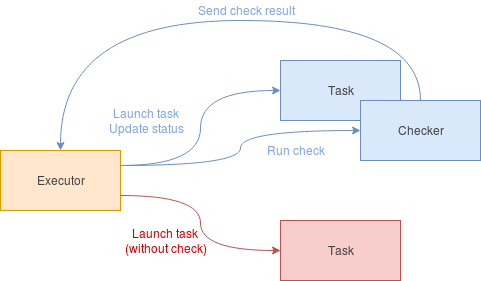
The runtime is done like this:
- wait for
delayseconds before starting first check - check periodically with timeout
- if check is
healthy, just consider thegrace periodas ended and send result - if check is
unhealthy, send result (to update status) and- if we are in the
grace period, just continue - else, if the
consecutive failures thresholdis not reached, just continue - else, the task should be killed
- if we are in the
- if check is
To tell the executore core to stop the task, the checker does it in a 3-steps design:
- trigger the
Donechannel (to tell that the checker has finished its work) - wait for the core to trigger the
Quitchannel (to tell the checker to free resources) - trigger the
Exitedchannel (to tell the core that everything is done, resources are free)
This is a security pattern to avoid a check to stay stuck when core kills the checker. It ensures that the work done by the checker is finished.
Here are how the different health checks are implemented. Please note that these health checks lock the executing goroutine to its actual thread during the check to avoid namespace switching due to goroutine multiplexing.
- enter container network namespace (only if in bridged network mode)
- open a TCP connection to the given port to check
- write a raw HTTP request
- read response and check status code
- exit container network namespace (only if in bridged network mode)
Please note that http.Get can't be used here because runtime default transport (round tripper) launches a lot of goroutines, making the call to be done in another thread (and so, to do not be inside the container network namespace).
- enter container network namespace (only if in bridged network mode)
- open a TCP connection to the given port to check
- exit container network namespace (only if in bridged network mode)
- execute given command in the given container using its containerizer
Please note that you can't get inside the mount namespace of a process in Go because of multithreading. In fact, even by locking the goroutine to a specific thread can't fix it. setns syscall must be called in a single-threaded context. You can, at least, call this syscall using Cgo (and constructor trick) to execute C code before running the Go runtime (and so, run this C code in a single-threaded context). But it doesn't allow to dynamically join a mount namespace while running. This is why the containerizer is in charge of providing a way to execute a command inside the container.
Please take a look at this issue and this issue to know more about the setns Go issue.
- http://mesos.apache.org/documentation/latest/health-checks/#mesos-native-health-checks
- http://mesos.apache.org/documentation/latest/health-checks/#under-the-hood
- https://github.com/mesosphere/health-checks-scale-tests/blob/06ac7a2f0fa52836fedfd4b26fdb5420b5ab207e/README.md
Configuration file allows you to enable or not some hooks. The file must be named config.yaml and placed at the same place than the binary, or in /etc/mesos-executor. There's an example at project root.
If you want to test the executor, you can run make docker. It will create a basic stack with:
- ZooKeeper
- Mesos master
- Mesos agent
- Marathon
You can access Marathon framework UI using your http://<IP>:8080/. Executor logs are in the stderr of the task sandbox. When finished, please run make clean to remove stack containers.
You can run tests using make test. Tests are using testify package to create suite and ensure tests are always ran in the same conditions. Some external packages are monkey patched in order to emulate its behavior. Finally, a fake containerizer (implementing the containerizer interface) is in the types package and is only used for testing.
- Implement docker parameters
- Commands
- Return container error message when an error occurs during container run
- Add some useful hooks
- Error on privileged containers
- Volumes sandboxing
- Forced network mode (bridged)
- Health checks: please take a look at health checks section
- Add HTTPS support (not tested)
- Implement missing features
- Environment, arguments and user for command checks
- Statuses for HTTP checks
- Containerizer
- libcontainer (runc)
The executor actually does not handle custom parameters sent to Docker CLI. This has to be done with a matching enum (I think) and it is actually a little bit boring to do this :)