





FastScroll is lib to allow you to add easily a scrollBar to your collectionView or your tableView.
The particularity of this scrollBar is that you can drag the bar to scroll faster.
There is also a bubble to display the information you want about where you are in your scroll.
You can almost customize all what you want to have the design you want
| Default | Custom Design | Custom Image | No bubble |
|---|---|---|---|
 |
 |
 |
 |
- iOS 9.0+
- Xcode 9.0+
Use CocoaPods with Podfile:
pod 'FastScroll'import FastScroll(or UITableView inherit from FastScrollTableView)
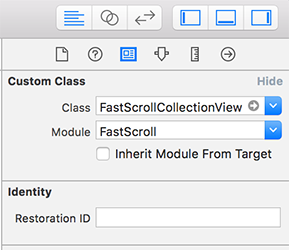
@IBOutlet weak var collectionView : FastScrollCollectionView!
extension DemoFastScrollCollectionViewController : UIScrollViewDelegate {
    func scrollViewDidScroll(_ scrollView : UIScrollView) {
        collectionView.scrollViewDidScroll(scrollView)
    }

    func scrollViewWillBeginDragging(_ scrollView : UIScrollView) {
        collectionView.scrollViewWillBeginDragging(scrollView)
    }

    func scrollViewDidEndDecelerating(_ scrollView : UIScrollView) {
        collectionView.scrollViewDidEndDecelerating(scrollView)
    }

    func scrollViewDidEndDragging(_ scrollView : UIScrollView, willDecelerate decelerate : Bool) {
        collectionView.scrollViewDidEndDragging(scrollView, willDecelerate : decelerate)
    }
}fileprivate func configFastScroll() {
collectionView.delegate = self
collectionView.dataSource = self
//callback action to display bubble name
collectionView.bubbleNameForIndexPath = { indexPath in
let visibleSection: Section = self.data[indexPath.section]
return visibleSection.sectionTitle
}
}You can easily customize what you want.
You should make the config in viewDidLoad otherwise you'll need to call collectionView.setup() to refresh fast scroll views
fileprivate func configFastScroll() {
    collectionView.delegate = self
    collectionView.dataSource = self

    //bubble
    collectionView.bubbleFocus = .dynamic
    collectionView.bubbleTextSize = 14.0
    collectionView.bubbleMarginRight = 50.0
    collectionView.bubbleColor = UIColor(red: 38.0 / 255.0, green: 48.0 / 255.0, blue: 60.0 / 255.0, alpha: 1.0)

    //handle
    collectionView.handleHeight = 40.0
    collectionView.handleWidth = 40.0
    collectionView.handleRadius = 20.0
    collectionView.handleMarginRight = -20
    collectionView.handleColor = UIColor(red: 38.0 / 255.0, green: 48.0 / 255.0, blue: 60.0 / 255.0, alpha: 1.0)

    //scrollbar
    collectionView.scrollbarWidth = 0.0
    collectionView.scrollbarMarginTop = 20.0
    collectionView.scrollbarMarginBottom = 0.0
    collectionView.scrollbarMarginRight = 10.0

    //callback action to display bubble name
    collectionView.bubbleNameForIndexPath = { indexPath in
        let visibleSection: Section = self.data[indexPath.section]
        return visibleSection.sectionTitle
    }
}| Property | Type | Default | Description |
|---|---|---|---|
| bubbleNameForIndexPath | Function | {} | The callback to display what you want in the bubble |
| deactivateBubble | Bool | false | Allow to activate or deactivate bubble functionnality |
| bubbleFocus | BubbleFocus | .first | Set the logic for returning the right indexPath conditionning to the scroll offset. The value can be first, last, dynamic (dynamic calculate the percentage of the scroll to take the visible cell index corresponding to the percentage) |
| bubble | UITextView | UITextView() | TextView to display bubble information |
| bubbleFont | UIFont | UIFont.systemFont(ofSize | 12.0) |
| bubbleTextSize | CGFloat | 12.0 | Size of the text in the bubble |
| bubbleTextColor | UIColor | White | Color of the text in the bubble |
| bubbleRadius | CGFloat | 20.0 | Manage bubble radius |
| bubblePadding | CGFloat | 12.0 | Padding around text of the bubble |
| bubbleMarginRight | CGFloat | 30.0 | Manage the margin between the bubble and the scrollbar |
| bubbleColor | UIColor | DarkGray | Change the background color |
| bubbleShadowColor | UIColor | DarkGray | Change the shadow color |
| bubbleShadowOpacity | Float | 0.7 | Shadow opacity |
| bubbleShadowRadius | CGFloat | 3.0 | Shadow radius |
| bubbleShadowOffset | CGSize | (0.0, 5.0) | Shadow offset |
| Property | Type | Default | Description |
|---|---|---|---|
| handle | UIView | UIView() | View for the handle allowing to scroll on touch (appear on scroll) |
| handleImage | UIImage | nil | Allow to add an image in the handle |
| handleWidth | CGFloat | 30.0 | Handle width |
| handleHeight | CGFloat | 30.0 | Handle height |
| handleRadius | CGFloat | 15.0 | handle radius |
| handleMarginRight | CGFloat | 6.0 | Margin between the right border and the handle |
| handleShadowColor | UIColor | DdarkGray | Shadow color |
| handleShadowOpacity | Float | 0.7 | Shadow opacity |
| handleShadowOffset | CGSize | (0.0, 5.0) | Shadow offset |
| handleShadowRadius | CGFloat | 3.0 | Shadow Radius |
| handleColor | UIColor | DarkGray | Manage handle background color |
| handleTimeToDisappear | CGFloat | 1.5 | The handle is displayed when a scoll is detected. After handleTimeToDisappear seconds of inactivity, the handle disappear |
| handleDisappearAnimationDuration | CGFloat | 0.2 | Time of the alpha animation to hide handle after inactivity |
| Property | Type | Default | Description |
|---|---|---|---|
| scrollbar | UIView | UIView() | View of the vertical scrollbar (appear on scroll) |
| scrollbarWidth | CGFloat | 2.0 | Scrollbar width, you can set 0.0 to hide the vetical bar |
| scrollbarColor | UIColor | Gray | Scrollbar color |
| scrollbarRadius | CGFloat | 1.0 | Scrollbar radius |
| scrollbarMarginTop | CGFloat | 40.0 | Manage margin top, it will be used to position nicely the bubble and the handle |
| scrollbarMarginBottom | CGFloat | 20.0 | Manage margin bottom, it will be used to position nicely the bubble and the handle |
| scrollbarMarginRight | CGFloat | 20.0 | Manage margin between right border and scrollbar |
| Property | Type | Default | Description |
|---|---|---|---|
| gestureHandleView | UIView | UIView() | View to handle gesture allowing to scroll following the touch |
| gestureWidth | CGFloat | 50.0 | Width of the touch zone |
| gestureHeight | CGFloat | 50.0 | Height of the touch zone |
| Property | Type | Description |
|---|---|---|
| setup | Function | You can use this of you need to update the views (bubble, handle, scrollbar) |
This project is maintained by Frichti, Inc.
We are making awesome fresh food.
FastScroll is released under the MIT license. See LICENSE for details.