


react-msa-viewer is a performant, extendable, highly-customizable, production-ready
React Component that renders a Multiple Sequence Alignment (MSA).
WARNING: Work in progress - use with caution
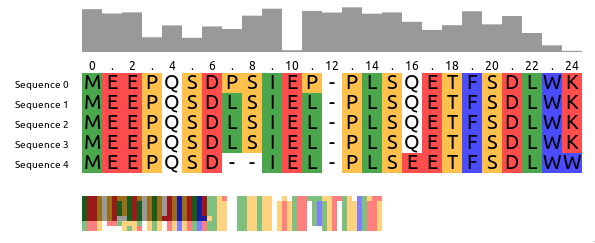
Checkout the storybook at https://msa.bio.sh
import MSAViewer from "@plotly/react-msa-viewer";

function MSA() {
  const options = {
    sequences: [
      {
        name: "seq.1",
        sequence:
          "MEEPQSDPSIEP-PLSQETFSDLWKLLPENNVLSPLPS-QA-VDDLMLSPDDLAQWLTED",
      },
      {
        name: "seq.2",
        sequence:
          "MEEPQSDLSIEL-PLSQETFSDLWKLLPPNNVLSTLPS-SDSIEE-LFLSENVAGWLEDP",
      },
      {
        name: "seq.3",
        sequence:
          "MEEPQSDLSIEL-PLSQETFSDLWKLLPPNNVLSTLPS-SDSIEE-LFLSENVAGWLEDP",
      },
    ],
    colorScheme: "zappo",
  };
  return <MSAViewer {...options} />;
}For npm users, run:
npm i --save @plotly/react-msa-viewer
For yarn users, run:
yarn add @plotly/react-msa-viewer
<MSAViewer> acts a Context Provider for all MSA subcomponents.
Hence, it will automatically take care of synchronization between all MSA components in its tree:
import {
  Labels,
  MSAViewer,
  OverviewBar,
  PositionBar,
  SequenceOverview,
  SequenceViewer,
} from "@plotly/react-msa-viewer";

function MSA() {
  const options = {
    sequences: [
      {
        name: "seq.1",
        sequence:
          "MEEPQSDPSIEP-PLSQETFSDLWKLLPENNVLSPLPS-QA-VDDLMLSPDDLAQWLTED",
      },
      {
        name: "seq.2",
        sequence:
          "MEEPQSDLSIEL-PLSQETFSDLWKLLPPNNVLSTLPS-SDSIEE-LFLSENVAGWLEDP",
      },
      {
        name: "seq.3",
        sequence:
          "MEEPQSDLSIEL-PLSQETFSDLWKLLPPNNVLSTLPS-SDSIEE-LFLSENVAGWLEDP",
      },
    ],
  };
  return (
    <MSAViewer {...options}>
      <SequenceOverview method="information-content" />
      <div style={{ display: "flex" }}>
        <div>
          <SequenceViewer />
          <br />
          <OverviewBar />
          <PositionBar />
        </div>
        <Labels />
      </div>
    </MSAViewer>
  );
}Using the react-msa-viewer with React is highly recommended.
However, it can be used in Vanilla JS:
<html>
  <meta charset="utf-8" />
  <script src="https://cdnjs.cloudflare.com/ajax/libs/react/15.4.2/react.min.js"></script>
  <script src="https://cdnjs.cloudflare.com/ajax/libs/react-dom/15.4.2/react-dom.min.js"></script>
  <script src="https://cdnjs.cloudflare.com/ajax/libs/prop-types/15.5.2/prop-types.js"></script>
  <script src="https://unpkg.com/@plotly/react-msa-viewer/dist/index.umd.min.js"></script>
  <body>
    <div id="my-msa" />
    <script>
      var options = {
        sequences: [
          {
            name: "seq.1",
            sequence:
              "MEEPQSDPSIEP-PLSQETFSDLWKLLPENNVLSPLPS-QA-VDDLMLSPDDLAQWLTED",
          },
          {
            name: "seq.2",
            sequence:
              "MEEPQSDLSIEL-PLSQETFSDLWKLLPPNNVLSTLPS-SDSIEE-LFLSENVAGWLEDP",
          },
          {
            name: "seq.3",
            sequence:
              "MEEPQSDLSIEL-PLSQETFSDLWKLLPPNNVLSTLPS-SDSIEE-LFLSENVAGWLEDP",
          },
        ],
        colorScheme: "zappo",
      };
      ReactDOM.render(
        React.createElement(ReactMSAViewer.MSAViewer, options),
        document.getElementById("my-msa")
      );
    </script>
  </body>
</html>
See an example on CodePen.
Warning: these properties are still susceptible to a change at any moment.
A general-purpose layout for the MSA components
When children are passed it acts as a Context Provider for the msaStore, otherwise it provides a default layout and forwards it props the respective components.
Attributes to apply to each bar.
type: object
Fill color of the OverviewBar, e.g. #999999
type: string
Method to use for the OverviewBar:
information-content: Information entropy after Shannon of a column (scaled)conservation: Conservation of a column (scaled)
type: enum('information-content'|'conservation')
Inline styles to apply to each bar.
type: object
Colorscheme to use. Currently the follow colorschemes are supported:
aliphatic, aromatic, buried, buried_index, charged, cinema, clustal2, clustal, helix, helix_propensity, hydro, lesk, mae, negative, nucleotide, polar, positive, purine, purine_pyrimidine, serine_threonine, strand, strand_propensity, taylor, turn, turn_propensity, zappo, conservation,
See msa-colorschemes for details.
type: custom
Height of the sequence viewer (in pixels), e.g. 500.
type: number
Attributes to apply to each label.
type: object
Component to create labels from.
type: union(object|func)
Inline styles to apply to each label.
type: object
Predefined layout scheme to use (only used when no child elements are provided).
Available layouts: basic, inverse, full, compact, funky
type: enum('basic'|'default'|'inverse'|'full'|'compact'|'funky')
Attributes to apply to each marker.
type: object
Component to create markers from.
type: union(object|func)
At which number the PositionBar marker should start counting.
Typical values are: 1 (1-based indexing) and 0 (0-based indexing).
type: number
At which steps the position labels should appear, e.g. 2 for (1, 3, 5)
type: number
Inline styles to apply to each marker.
type: object
A custom msaStore (created with createMSAStore).
Useful for custom interaction with other components
type: object
Callback fired when the mouse pointer clicked a residue.
type: func
Callback fired when the mouse pointer clicked a residue.
type: func
Callback fired when the mouse pointer is entering a residue.
type: func
Callback fired when the mouse pointer is leaving a residue.
type: func
Callback fired when the mouse pointer clicked a highlight.
type: func
Current x and y position of the viewpoint
in the main sequence viewer (in pixels).
This specifies the position of the top-left corner
of the viewpoint within the entire alignment,
e.g. {xPos: 20, yPos: 5}.
type: custom
Whether to draw a border.
type: bool
Color of the border. Name, hex or RGB value.
type: string
Width of the border.
type: number
What should happen if content overflows.
type: enum("hidden"|"auto"|"scroll")
What should happen if x-axis content overflows (overwrites "overflow")
type: enum("hidden"|"auto"|"scroll"|"initial")
What should happen if y-axis content overflows (overwrites "overflow")
type: enum("hidden"|"auto"|"scroll"|"initial")
X Position of the scroll bar ("top or "bottom")
type: enum("top"|"bottom")
Y Position of the scroll bar ("left" or "right")
type: enum("left"|"right")
Color of the text residue letters (name, hex or RGB value)
type: string
Font to use when drawing the individual residues.
type: string
Sequence data.
sequences expects an array of individual sequences.
sequence: Raw sequence, e.g. MEEPQSDPSIEP (required)
name: name of the sequence, e.g. Sequence X
Example:
const sequences = [
  {
    name: "seq.1",
    sequence: "MEEPQSDPSIEP-PLSQETFSDLWKLLPENNVLSPLPS-QA-VDDLMLSPDDLAQWLTED",
  },
  {
    name: "seq.2",
    sequence: "MEEPQSDLSIEL-PLSQETFSDLWKLLPPNNVLSTLPS-SDSIEE-LFLSENVAGWLEDP",
  },
];
type: arrayOf[SequencePropType]
Height of the main tiles (in pixels), e.g. 20
type: number
Width of the main tiles (in pixels), e.g. 20
type: number
Width of the sequence viewer (in pixels), e.g. 500.
type: number
Displays the sequence names.
defaultValue: 10
Font of the sequence labels, e.g. 20px Arial
type: string
Attributes to apply to each label.
type: object
Component to create labels from.
type: union(object|func)
Inline styles to apply to each label.
type: object
defaultValue: {}
Inline styles to apply to the Label component
type: object
Creates a small overview box of the sequences for a general overview.
Rendering engine: canvas or webgl (experimental).
type: enum('canvas'|'webgl')
defaultValue: "canvas"
Fill color of the OverviewBar, e.g. #999999
type: string
defaultValue: "#999999"
Width of the component (in pixels), e.g. 100
type: number
defaultValue: 50
Method to use for the OverviewBar:
information-content: Information entropy after Shannon of a column (scaled)conservation: Conservation of a column (scaled)
type: enum('information-content'|'conservation')
defaultValue: "conservation"
Custom style configuration.
type: object
Width of the component (in pixels), e.g. 100
type: number
Displays the sequence names with an arbitrary Marker component
defaultValue: 10
Font of the sequence labels, e.g. 20px Arial
type: string
Height of the PositionBar (in pixels), e.g. 100
type: number
defaultValue: 15
Attributes to apply to each marker.
type: object
Component to create markers from.
type: union(object|func)
At which steps the position labels should appear, e.g. 2 for (1, 3, 5)
type: number
defaultValue: 2
Inline styles to apply to each marker.
type: object
defaultValue: {}
At which number the PositionBar marker should start counting.
Typical values are: 1 (1-based indexing) and 0 (0-based indexing).
type: number
defaultValue: 1
Inline styles to apply to the PositionBar component
type: object
defaultValue: { font: "12px Arial", }
Rendering engine: canvas or webgl (experimental).
type: enum('canvas'|'webgl')
defaultValue: "canvas"
Width of the component (in pixels), e.g. 100
type: number
defaultValue: 50
Custom style configuration.
type: object
Height of a tile in the OverviewBar, e.g. 5
type: number
defaultValue: 5
Width of a tile in the OverviewBar, e.g. 5
type: number
defaultValue: 5
Width of the component (in pixels), e.g. 100
type: number
Component to draw the main sequence alignment.
Whether to draw a border.
type: bool
defaultValue: false
Color of the border. Name, hex or RGB value.
type: string
defaultValue: "black"
Width of the border.
type: number
defaultValue: 1
Number of residues to prerender outside of the visible viewbox.
type: number
defaultValue: 20
Callback fired when the mouse pointer clicked a residue.
type: func
Callback fired when the mouse pointer clicked a residue.
type: func
Callback fired when the mouse pointer is entering a residue.
type: func
Callback fired when the mouse pointer is leaving a residue.
type: func
Callback fired when the mouse pointer clicked a highlight.
type: func
What should happen if content overflows.
type: enum("hidden"|"auto"|"scroll")
defaultValue: "hidden"
What should happen if x-axis content overflows (overwrites "overflow")
type: enum("hidden"|"auto"|"scroll"|"initial")
defaultValue: "auto"
What should happen if y-axis content overflows (overwrites "overflow")
type: enum("hidden"|"auto"|"scroll"|"initial")
defaultValue: "auto"
X Position of the scroll bar ("top or "bottom")
type: enum("top"|"bottom")
defaultValue: "bottom"
Y Position of the scroll bar ("left" or "right")
type: enum("left"|"right")
defaultValue: "right"
Show the custom ModBar
type: bool
defaultValue: false
Color of the text residue letters (name, hex or RGB value)
type: string
defaultValue: "black"
Font to use when drawing the individual residues.
type: string
defaultValue: "18px Arial"
Number of residues to cluster in one tile (x-axis) (default: 10)
type: number
defaultValue: 10
Number of residues to cluster in one tile (y-axis) (default: 10)
type: number
defaultValue: 10
The React MSA Viewer uses an Redux store internally. You can connect your components with it too.
import React, { Component } from "react";
import {
  msaConnect,
  MSAViewer,
  SequenceViewer,
} from "@plotly/react-msa-viewer";

class MyFirstMSAPluginComponent extends React.Component {
  render() {
    const residue = "E";
    const style = {
      width: this.props.tileWidth,
      height: this.props.tileHeight,
      backgroundColor: this.props.colorScheme.getColor(residue),
    };
    return <div style={style}>{residue}</div>;
  }
}

const mapStateToProps = (state) => {
  return {
    tileHeight: state.props.tileHeight,
    tileWidth: state.props.tileWidth,
    colorScheme: state.props.colorScheme,
  };
};

const MyFirstMSAPlugin = msaConnect(mapStateToProps)(MyFirstMSAPluginComponent);

function MyMSA() {
  return (
    <MSAViewer sequences={sequences}>
      <SequenceViewer />
      <br />
      <MyFirstMSAPlugin />
    </MSAViewer>
  );
}However, for performance reasons you need to use a special mixin to listen for position events.
import {
  withPositionStore,
  MSAViewer,
  SequenceViewer,
} from "@plotly/react-msa-viewer";

class MyFirstMSAPlugin extends React.Component {
  shouldRerender(newPosition) {
    return true;
  }
  render() {
    return (
      <div>
        x: {this.position.xPos}, y: {this.position.yPos}
      </div>
    );
  }
}

// inject the MSAPositionStore as this.position
withPositionStore(MyFirstMSAPlugin);

function MyMSA() {
  return (
    <MSAViewer sequences={sequences}>
      <SequenceViewer />
      <MyFirstMSAPlugin />
    </MSAViewer>
  );
}

ReactDOM.render(<MyMSA />, document.getElementById("my-msa"));Alternatively, you can also listen to events.
The MSAViewer components (and its subcomponents) provide a variety of callbacks
like onResidueClick that can be used to plug with your code:
import { MSAViewer } from "react-msa-viewer";

function MyMSA() {
  return <MSAViewer sequences={sequences} onResidueClick={console.log} />;
}Some events also trigger custom DOM events which might simply subscription outside of React:
<html>
  <meta charset="utf-8" />
  <script src="https://cdnjs.cloudflare.com/ajax/libs/react/15.4.2/react.min.js"></script>
  <script src="https://cdnjs.cloudflare.com/ajax/libs/react-dom/15.4.2/react-dom.min.js"></script>
  <script src="https://cdnjs.cloudflare.com/ajax/libs/prop-types/15.5.2/prop-types.js"></script>
  <script src="https://unpkg.com/@plotly/react-msa-viewer/dist/index.umd.min.js"></script>
  <body>
    <div id="my-msa" />
    <script>
      var options = {
        sequences: [
          {
            name: "seq.1",
            sequence:
              "MEEPQSDPSIEP-PLSQETFSDLWKLLPENNVLSPLPS-QA-VDDLMLSPDDLAQWLTED",
          },
          {
            name: "seq.2",
            sequence:
              "MEEPQSDLSIEL-PLSQETFSDLWKLLPPNNVLSTLPS-SDSIEE-LFLSENVAGWLEDP",
          },
          {
            name: "seq.3",
            sequence:
              "MEEPQSDLSIEL-PLSQETFSDLWKLLPPNNVLSTLPS-SDSIEE-LFLSENVAGWLEDP",
          },
        ],
        colorScheme: "zappo",
      };
      var el = document.getElementById("my-msa");
      ReactDOM.render(
        React.createElement(ReactMSAViewer.MSAViewer, options),
        el
      );
      el.addEventListener("residueClick", (e) => console.log(e.detail));
    </script>
  </body>
</html>The custom DOM events bubble up the tree and contain their payload in.detail.
While the most common way to update the MSA is to update its properties, you can also send a variety of actions to the MSAViewer.
import { MSAViewer } from "react-msa-viewer";

class MyMSA extends React.Component {
  moveLeft = () => {
    this.msa.movePosition({ yMovement: -10 });
  };
  moveRight = () => {
    this.msa.movePosition({ yMovement: 10 });
  };
  jumpOrigin = () => {
    debugger;
    this.msa.movePosition({ yPos: 0 });
  };
  render() {
    return (
      <div>
        <MSAViewer sequences={sequences} ref={(ref) => (this.msa = ref)} />
        <button onClick={this.moveLeft}>Move left</button>
        <button onClick={this.moveRight}>Move right</button>
        <button onClick={this.jumpOrigin}>Jump to the origin</button>
      </div>
    );
  }
}It's also possible to use actions to create a payload and dispatch it later:
import { MSAViewer } from "react-msa-viewer";

class MyMSA extends React.Component {
  moveLeft = () => {
    const payload = actions.movePosition({ yMovement: -10 });
    this.msa.dispatch(payload);
  };
  moveRight = () => {
    const payload = actions.movePosition({ yMovement: 10 });
    this.msa.dispatch(payload);
  };
  jumpOrigin = () => {
    const payload = actions.updatePosition({ yPos: 0 });
    this.msa.dispatch(payload);
  };
  render() {
    return (
      <div>
        <MSAViewer sequences={sequences} ref={(ref) => (this.msa = ref)} />
        <button onClick={this.moveLeft}>Move left</button>
        <button onClick={this.moveRight}>Move right</button>
        <button onClick={this.jumpOrigin}>Jump to the origin</button>
      </div>
    );
  }
}Get the code:
git clone https://github.com/plotly/react-msa-viewer
Install the project dev dependencies:
npm install
Please, see the CONTRIBUTING file.
Please note that this project is released with a Contributor Code of Conduct. By participating in this project you agree to abide by its terms. See CODE_OF_CONDUCT file.
react-msa-viewer is released under the MIT License. See the bundled LICENSE file for details.