[Mission002] TODOS 시스템에 비동기/온오프라인을 고려하여 업데이트하기#15
[Mission002] TODOS 시스템에 비동기/온오프라인을 고려하여 업데이트하기#15eastjun-dev wants to merge 18 commits intomasterfrom
Conversation


mission002/eastjun/js/App.js
Outdated
| this.todoItems = [] | ||
| this.isOnline = navigator.onLine | ||
|
|
||
| const initNetworkEventListener = () => { |
There was a problem hiding this comment.
온라인 세션때 언급하셨던 코드네요!
동준님 통해서 처음 알게되었습니다 :)
 s280493
left a comment
s280493
left a comment
s280493
left a comment
There was a problem hiding this comment.
한 함수가 하나의 역할만 담당하기 때문에 코드가 읽기 수월했습니다!
전반적으로, 기능별 모듈화가 잘 되어있다는 인상을 받았습니다.
특히 utils 폴더의 validator, templates, utils.js에서 기능별로 파일을 잘 나누어두셔서,
추후 확장성이 좋을 것 같은 점이 인상깊었어요.
|
|
||
| initEventListener() | ||
|
|
||
| this.addTodoItem = async (event) => { |
There was a problem hiding this comment.
값을 입력 후 Enter키를 연타하면, 아마 값이 여러 개 추가될 것 같습니다!
$newTodoTarget의 value가 비어있을 때 onAdd 함수가 실행되지 않는 조건을 추가해주고,
onAdd 함수 내에 initValue로 값을 비워주는 함수의 순서를 바꿔주면 해결될 것 같아요~
There was a problem hiding this comment.
앗 제가 제대로 체크하지 못했던 부분을 발견해주셔서 감사합니다!!!
피드백 반영하여 아래와 같이 변경하니, 중복으로 추가되는 에러가 발생하지 않네요 감사합니다! 😄
  this.addTodoItem = async (event) => {
    const $newTodoTarget = event.target

    if (!this.isValid(event, $newTodoTarget.value)) {
      return
    }

    this.onAdd($newTodoTarget)
  }

  this.isValid = (event, newTodoContents) => {
    return validator.isEnterKey(event.key) && !validator.isEmptyString(newTodoContents)
  }

  this.onAdd = async ($newTodoTarget) => {
    if (!navigator.onLine) {
      return
    }

    try {
      await api.todoItem.add(new TodoItem($newTodoTarget.value))
      this.initValue($newTodoTarget)
      const updateTodoItems = await api.todoItem.get()
      setState(updateTodoItems)
    } catch (e) {
      throw new Error(e)
    }
  }
There was a problem hiding this comment.
저도 같은 증상을 경험했었는데 동준님 코드 참고할게요 ㅠㅠ 👍
| this.onAdd = async ($newTodoTarget) => { | ||
| try { | ||
| await api.todoItem.add(new TodoItem($newTodoTarget.value)) | ||
| const updateTodoItems = await api.todoItem.get() |
There was a problem hiding this comment.
todoList에 data를 추가하거나, 수정하거나, 삭제할
localStorage의 데이터도 함께 추가/삭제/수정하지 않는 것 같아요.
offline 모드일 때 불러올 localStorage의 data와, 서버에 저장된 data가 일치하지 않아서
사용자가 헷갈릴 수 있을 것 같습니다 :)
There was a problem hiding this comment.
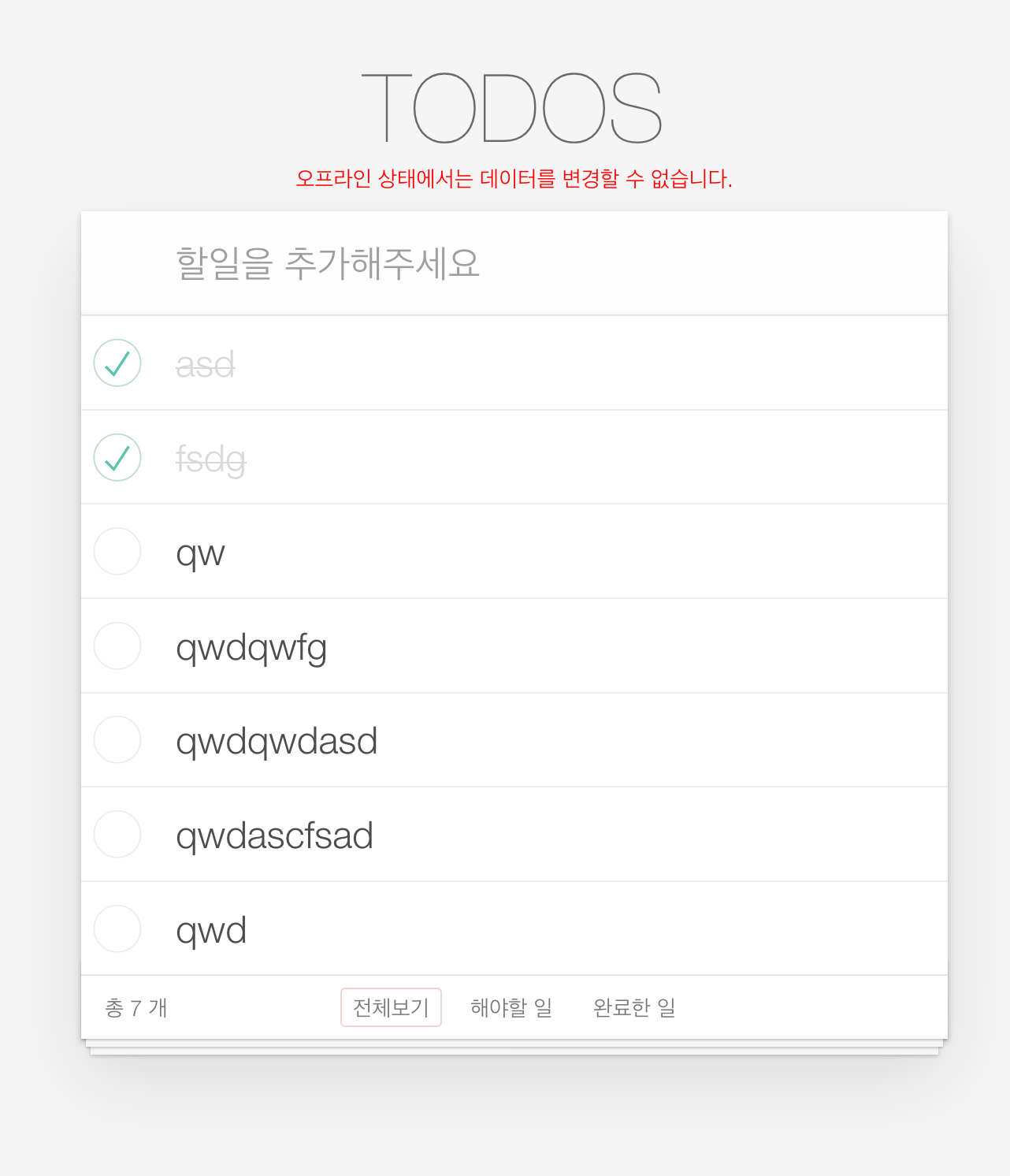
api가 제한적이라 sync 맞추기가 쉽지 않아, todoList를 set할 때 localStorage에 같이 set해주고, 오프라인 상태에서 앱에 접근하면 localStorage에서 가지고 있는 todoList만 render만 해주는 방식으로 통일하였습니다. 그리고 오프라인 상태로 페이지에 접근하면 데이터의 수정이 불가능하다는 alert메시지도 추가해보았습니다. :)

s280493
left a comment
s280493
left a comment
There was a problem hiding this comment.
한 함수가 하나의 역할만 담당하기 때문에 코드가 읽기 수월했습니다!
전반적으로, 기능별 모듈화가 잘 되어있다는 인상을 받았습니다.
특히 utils 폴더의 validator, templates, utils.js에서 기능별로 파일을 잘 나누어두셔서,
추후 확장성이 좋을 것 같은 점이 인상깊었어요.
 StellaKim1230
left a comment
StellaKim1230
left a comment
StellaKim1230
left a comment
There was a problem hiding this comment.
동준님 코드는 항상 보고 배우는 것 같습니다.
기능별로 함수를 잘개 잘 쪼개신것과, api 모듈 분리 등 재사용 하기 좋게 잘 짜신 것 같아요
👍
저도 잘 참고하고, 리뷰 남기고 갑니다^^
고생하셨습니다.
mission002/eastjun/js/App.js
Outdated
| const setIsOnline = () => { | ||
| this.isOnline = navigator.onLine | ||
| const $offlineAlert = document.querySelector('.alert-container .offline') | ||
| if (!this.isOnline) { |
There was a problem hiding this comment.
if (!this.isOnline){  return $offlineAlert.classList.remove('hidden') }
return $offlineAlert.classList.add('hidden')
조심스레 리뷰 남깁니다.. 전 이런 문법이 더 가독성에 들어옵니다만..^^ 개인취향인지라 ㅎㅎ
There was a problem hiding this comment.
의견을 종합하여 아래와 같이 변경해보았습니다 :)
const setIsOnline = () => {
    this.isOnline = navigator.onLine
    const offlineAlertClassList = document.querySelector('.alert-container .offline').classList
    this.isOnline ? offlineAlertClassList.add('hidden') : offlineAlertClassList.remove('hidden')
}
mission002/eastjun/js/App.js
Outdated
| } | ||
|
|
||
| const offlineMode = () => { | ||
| const initTodoList = () => { |
There was a problem hiding this comment.
const initTodoList 요 함수는 밖으로 빼도 괜찮지 않을까요 ㅎㅎ
offlineMode 함수 안에 또 함수 있으니 사용자가 헷갈릴수도 있을 것 같습니다 ㅎㅎ
There was a problem hiding this comment.
지금은 offlineMode를 지원하는 기능이 다양하게 있는게 아니니 피드백 주신 것처럼 하나의 메서드로만 사용해도 될 것 같네요 피드백 반영하여 아래와 같이 수정해보았습니다 :)
this.initOfflineTodoList = () => {
    const $offlineAlert = document.querySelector('.alert-container .offline')
    $offlineAlert.classList.remove('hidden')
    this.todoItems = storage.get()
    if (this.todoItems) {
        this.render(this.todoItems)
    }
}|
|
||
| if (!navigator.onLine) { | ||
| toggleItem(getIndex(event)) | ||
| return |
There was a problem hiding this comment.
궁금한건데 return toggleitem(getIndex(event)) 이거랑
toggleItem(getIndex(event))
return
위 두가지 차이점이 있을까요??
There was a problem hiding this comment.
return toggleItem(getIndex(event)) 이라고 하면 toggleItem(getIndex(event)) 이 부분에서 어떠한 값이 return 된다고 오해할 수 있을 것 같습니다.
저는 저 if문이 포함된 함수가 종료하려는게 목적이지, 값을 반환하려는게 아니기 때문에 분리하였는데 혹시 다른 의견 있으시면 알려주세요 :)
There was a problem hiding this comment.
아하 그런 오해를 불러일으킬수 있겠군요~~! 제가 함수의 역할을 오해했었네요 ㅎㅎ 의견 감사합니다^^
|
|
||
| const USERNAME = 'eastjun' | ||
|
|
||
| const METHOD = { |


 ganeodolu
left a comment
ganeodolu
left a comment
ganeodolu
left a comment
There was a problem hiding this comment.
리뷰시 구조의 보완점을 찾기는 어려워서 보통 눈에 보이는 기능을 이것저것 실험해서 리뷰를 하고 있습니다. 하지만 모두 잘 동작하네요.ㅎㅎ
navigator.onLine 기능과 API 메소드별 통합 기능이 인상적이었습니다.
Approve를 하며 질문하나 드리겠습니다.
localstorage를 실험하기 위해 오프라인모드는 어떻게 만들 수 있는지 궁금합니다.
App.js에 있는 21번째 줄 this.isOnline을 false로 바꿔보았는데 오프라인이라는 문구를 못 찾았거든요.
const setIsOnline = () => {
this.isOnline = navigator.onLine
const offlineAlertClassList = document.querySelector('.alert-container .offline').classList
this.isOnline ? offlineAlertClassList.add('hidden') : offlineAlertClassList.remove('hidden')
}
아니면 코드변환없이 환경을 바꿔서 할 수도 있나요?? 중간에 인터넷을 끊어보아도 안되더라구요.
5 participants


🔗 미션 링크
#7
🏴 미션 진행 내역
💬 소감
우리나라처럼 인터넷이 어디서나 잘 터지는 곳은 큰 불편함이 없지만, 해외에서는 인터넷이 불안정한 곳들이 많기 때문에 비행기모드와 같은 오프라인모드를 지원하는 경우가 많다고 합니다. 그런 점을 고려해서 localStorage를 넣어보려고 한 것인데, localStorage를 어떻게 활용해야 더 좋을지 같이 고민해보면 좋을 것 같아요 :)