
Note: the AI is kinda bad writing the readme its overloaded from massive code base lol use the samples in the test cases in teh code as your primary reference. It did ok here but not great.
For x64 support you will need a native utypes.dll open source here: (put in same dir as source/exe) https://sandsprite.com/tools.php?id=31
note this uses true x64 numbers not the normal bullshit JS pretty big almost x64 numbers
for teh debugger sample you will need the open source scivb2.ocx https://sandsprite.com/openSource.php?id=96
(regsvr32 as admin from 32bit cmd.exe or use pdfstreamdumper/vbdec/ida jscript installers to get it)
license: MIT
have fun
author: David Zimmer dzzie@yahoo.com AI: claude.ai site: http://sandsprite.com
Contributors: yokesee - Date handling
Its big and lots of stuff was added as I scaffolded my way up, so there will be bugs hiding!
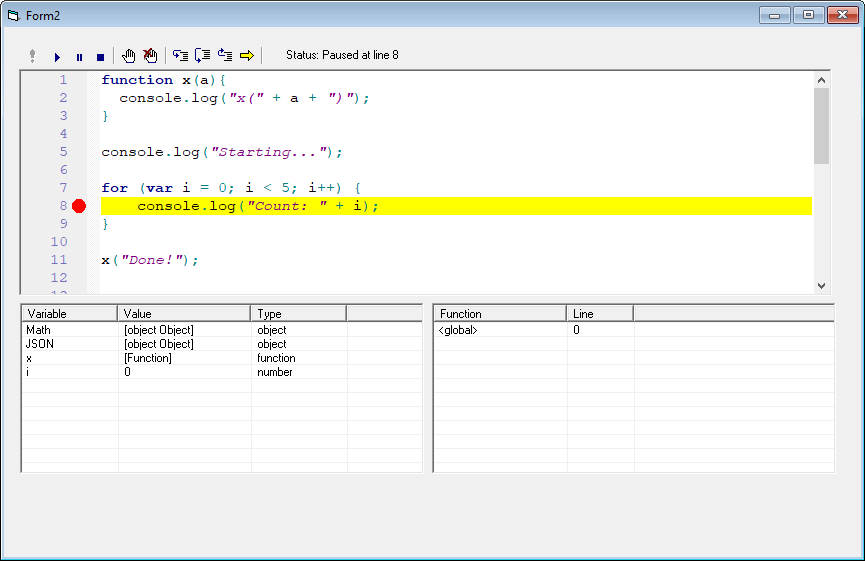 VB6 JavaScript Interpreter with Scintilla-based debugger
A full-featured JavaScript interpreter with integrated visual debugger, built entirely in VB6.
- ES5+ Syntax: Variables (
var), functions, objects, arrays - 64-bit Integer Support: Native BigInt (
42n) for precise large number arithmetic - Operators: Arithmetic, logical, bitwise, comparison, assignment,
typeof,delete - Control Flow:
if/else,for,while,do-while,switch/case - Exception Handling:
try/catch/finally,throwwith Error objects - Functions: First-class functions, closures, recursion
- Objects: Object literals, property access, methods, dynamic properties
- Arrays: Array literals, indexing, length, iteration
- Type System:
number,string,boolean,object,function,undefined,null,bigint,comobject - enhanced print(): can dump arrays and object (including JSON) instead of just scalar values
- console:
console.log(),console.error(),console.warn() - Math:
Math.abs(),Math.floor(),Math.ceil(),Math.round(),Math.sqrt(),Math.pow(),Math.random(),Math.min(),Math.max(), constants (Math.PI,Math.E) - JSON:
JSON.stringify(),JSON.parse() - Array Methods:
map(),filter(),reduce(),forEach(),push(),pop(),shift(),unshift(),slice(),splice(),indexOf(),join() - global functions
parseInt,parseFloat,isNaN,isFinite,isInteger,encodeURIComponent,decodeURIComponent,encodeURI,decodeURI, _escape,unescape,eval,print,alert,prompt,format,printf,hex,Number, `String'
- Seamless COM automation integration
- Supports
ActiveXObject()with optionalUseSafeSubsetsafety mode - Script host can expose its own
IDispatchCOM objects (similar to MS Script Control) - Custom
CallByNameEx(native C) supporting argument arrays and object returns without requiring a secondSetcall - COM objects can be extended and overridden at runtime using JavaScript, without proxies, subclassing, or loss of identity
- COM methods may return native JavaScript values directly, allowing VB6 code to act as a zero-overhead JS object factory
- Audit event system allows the host to inspect or veto calls before COM methods are invoked
- Abilty to access js objects through VB6's generic Object type and IDispatch proxying
- See ./dynproxy/readme.md for more details
try {
    throw new Error("Something went wrong!");
} catch (e) {
    console.log("Caught: " + e.message);
    console.log("Error name: " + e.name);
} finally {
    console.log("Cleanup code runs here");
}// Work with large integers without precision loss
var big = 9007199254740992n;
var result = big + 1n;
console.log(result.toString()); // "9007199254740993"
// Hex formatting
var addr = 0x140000000n;
console.log("0x" + addr.toString(16)); // "0x140000000"
// Bitwise operations
var flags = 0xFFFFFFFFn;
var masked = flags & 0xFF00FF00n;
console.log("0x" + masked.toString(16)); // "0xff00ff00"' VB6 Host Application
Dim interp As New CInterpreter
Dim fso As Object
' Create COM object in VB6
Set fso = CreateObject("Scripting.FileSystemObject")
' Expose to JavaScript (safe - you control what's exposed)
interp.AddCOMObject "fso", fso
' JavaScript can now use it
interp.Execute "var tempFolder = fso.GetSpecialFolder(2);"
interp.Execute "console.log(tempFolder.Path);"// JavaScript side - use exposed COM objects
var folder = fso.GetSpecialFolder(2);
console.log(folder.Path);
// Chain COM calls
var env = shell.Environment('Process');
console.log(env.Item('WINDIR'));
// Get objects back from COM methods
var tempFolder = fso.GetSpecialFolder(2);
var files = tempFolder.Files;// Unsafe mode allows creating COM objects directly
var fso = new ActiveXObject('Scripting.FileSystemObject');
var tempFolder = fso.GetSpecialFolder(2);
console.log(tempFolder.Path);
// WScript.Shell
var shell = new ActiveXObject('WScript.Shell');
var env = shell.Environment('Process');
console.log(env.Item('COMPUTERNAME'));
// ADODB for database access
var conn = new ActiveXObject('ADODB.Connection');
var rs = new ActiveXObject('ADODB.Recordset');' VB6 - Enable unsafe mode
interp.UseSafeSubset = False ' Allow ActiveXObjectYou can attach JavaScript properties and methods directly to COM objects, effectively extending them without modifying the underlying binary object.
' Expose a COM object
interp.AddCOMObject "form", Me

' Attach a JS helper function to it
interp.AttachCOMHelper "form", "taco", "function(cmd){print('its tuesday ' + cmd + '!');}"var wsh = new ActiveXObject("WScript.Shell");
// Add a helper method that wraps the real COM method
wsh.safeExpandEnv = function(varName) {
var result = this.ExpandEnvironmentStrings("%" + varName + "%");
if (result === "%" + varName + "%") {
return "(undefined)";
}
return result;
};
console.log(wsh.safeExpandEnv("PATH"));JS methods are checked first, so you can override COM methods transparently:
var wsh = new ActiveXObject("WScript.Shell");

// Override Run to add logging
wsh.Run = function(cmd) {
    console.log("[LOG] Run called: " + cmd);
    return this._Run(cmd, 1, true);  // Call original via underscore prefix
};

wsh.Run("notepad.exe"); // Logs then executesWhen a JS override exists, prefix the method name with _ to call the original COM method:
| Call | Behavior |
|---|---|
obj.Run(...) |
Calls JS override if exists, else COM |
obj._Run(...) |
Always calls original COM method |
This allows overrides to wrap and delegate to the original implementation without recursion.
The engine now uses an enhanced COM dispatch layer (CallByNameEx) that correctly supports methods, property gets, and property puts using a unified late-bound invocation path. This implementation transparently handles argument passing via either SAFEARRAY* or VARIANT-wrapped arrays, performs proper argument reversal, and correctly marks named arguments for DISPATCH_PROPERTYPUT and DISPATCH_PROPERTYPUTREF calls. It also addresses a classic VB/VBA friction point: the legacy CallByName pattern can’t reliably handle object returns without a second attempt using the Set keyword, while CallByNameEx returns object values cleanly in one pass and explicitly reports whether the result is an object. The result is more reliable COM interaction across methods, properties, and indexed access patterns, with consistent return typing and fewer COM edge-case failures.
In addition to automatic translation of VARIANT arrays into JavaScript arrays, COM methods can now return native JavaScript engine types directly. If a COM method returns an engine object (such as a CValue), the runtime detects this and passes it straight through without wrapping it as a generic COM object. This allows COM components to construct and return rich JavaScript values—objects, arrays, or parsed JSON structures—directly into the interpreter with minimal marshaling overhead.
' COM side (VB/VBA) can return a CValue (native JS object) directly:
Function getFunc(IndexVaOrName) 'as CValue of a Json object (or string if we fail!)
    Dim ret As CValue, s As String
    '{'index':483, 'name':'small_sub_421881', 'start':'0x421881', 'end':'0x4218cf', 'size':'78', 'xrefs':'2', 'refqty':'0',  'argsize':'0', 'tailqty':'0', 'labelqty':'0', 'frsize':'0'}

    s = ipc.SendCmdRecvText("getfunc:" & IndexVaOrName & ":" & ipc.listenHwnd)
    s = Replace(s, "'", """") 'oopsie
    Set ret = json.ParseToCVal(s)
    If IsObject(ret) Then
        Set getFunc = ret
    Else
        getFunc = s
    End If
End Function
And on the engine side, CallCOMMethod recognizes that “object return” might actually be a native JS value container and routes it accordingly:
If hr = 0 Then  ' S_OK
    If isObj Then
        If TypeName(resultVar) = "CValue" Then
            'caller is returning a JS engine type
            Set result = resultVar
        Else
            result.vType = vtCOMObject
            Set result.objVal = resultVar
        End If
    Else
        Set result = VariantToCValue(resultVar)
    End If
Else
    ' Call failed - return undefined
    result.vType = vtUndefined
End If
This makes COM a first-class producer of JavaScript values: you can return structured objects directly (not just strings or IDispatch), while still keeping the existing behavior for normal COM objects and scalar variants.
js4vb supports bidirectional COM interop.
In addition to calling COM objects from JavaScript, JavaScript objects can be exposed as live IDispatch COM objects, allowing native VB6 or other COM clients to call directly into JavaScript using late binding.
This is implemented using a dynamic COM proxy (DynProxy) that intercepts all IDispatch::GetIDsOfNames and IDispatch::Invoke calls and routes them into the JavaScript runtime at call time.
- JS → COM: Call COM methods and properties from JavaScript
- COM → JS: Call JavaScript objects as if they were native COM objects
- No wrappers or code generation — calls are resolved dynamically
- Identity-preserving proxies — no broken chaining or object duplication
- Full late binding — works with
Objectvariables andCallByName
VB6 (or any COM client) sees a normal IDispatch object, while the engine resolves method names, properties, and arguments dynamically inside JavaScript.
    ' Create a JavaScript object
    interp.Execute "var person = { name: 'John', age: 30, city: 'NYC' };"

    ' Get it as a VB COM object!
    Dim person As Object
    Set person = interp.EvalAsObject("person")

    ' USE IT LIKE A VB OBJECT!
    Debug.Print "Name: " & person.name       ' "John"  (trying bad case)
    Debug.Print "Age: " & person.age         ' 30
    Debug.Print "City: " & person.city       ' "NYC"

    ' MODIFY IT!
    person.age = 31
    person.Job = "Developer"                 ' Add new property!
No type libraries. No IDL. No proxy classes.
- A dynamic COM proxy implements
IDispatch - All name resolution and invocation is intercepted
- Method/property calls are forwarded into the JavaScript engine
- Return values flow back as COM variants or native JS values
This mechanism is also used internally to support:
- COM augmentation
- Method overrides
- Dynamic object trees
- Scriptable adapters and facades
Classic COM scripting hosts are one-way: scripts can call COM, but COM can’t call back without rigid interfaces.
js4vb removes that limitation.
It turns JavaScript into:
- a dynamic COM server
- a mockable API surface
- a runtime-extensible automation layer
All while remaining 100% late-bound and compatible with VB6.
- Scintilla Editor: Syntax highlighting, line numbers, code folding
- Breakpoints: Click margin or press F9 to toggle
- Step Controls: Step In (F11), Step Over (F10), Step Out (Shift+F11)
- Call Stack View: See function call hierarchy with line numbers
- Variables View: Inspect local and global variables with types
- Current Line Highlighting: Yellow background + arrow marker shows execution position
| Button | Shortcut | Function |
|---|---|---|
| Run | - | Execute without debugger |
| Start Debugger / Continue | F5 | Start debugging or continue execution |
| Break | - | Pause execution |
| Stop | Shift+F5 | Stop debugging |
| Step In | F11 | Execute one line, enter functions |
| Step Over | F10 | Execute one line, skip over functions |
| Step Out | Shift+F11 | Run until current function returns |
| Toggle Breakpoint | F9 | Add/remove breakpoint at current line |
| Clear All Breakpoints | - | Remove all breakpoints |
- Breakpoints: Set on any executable line
- Single Stepping: Line-by-line execution control
- Variable Inspection: View variable values and types in real-time
- Call Stack Tracking: See the complete function call chain
- Scope-Aware Variables: Shows local variables when in functions, globals in global scope
- Execution Timing: Displays total script execution time on completion
function divide(a, b) {
    if (b == 0) {
        throw new Error('Division by zero');
    }
    return a / b;
}

try {
    var result = divide(10, 2);
    console.log('Result: ' + result);  // 5

    result = divide(10, 0);  // This throws
    console.log('This never prints');
} catch (e) {
    console.log('Error: ' + e.message);
} finally {
    console.log('Cleanup always runs');
}var numbers = [1, 2, 3, 4, 5];
// map - transform each element
var doubled = numbers.map(function(x) {
return x * 2;
});
console.log(doubled); // [2, 4, 6, 8, 10]
// filter - select elements
var evens = numbers.filter(function(x) {
return x % 2 == 0;
});
console.log(evens); // [2, 4]
// reduce - aggregate
var sum = numbers.reduce(function(acc, x) {
return acc + x;
}, 0);
console.log(sum); // 15
// forEach - iterate
numbers.forEach(function(x) {
console.log('Number: ' + x);
});var x = 42;
var y = "hello";
var z = function() {};
console.log(typeof x); // "number"
console.log(typeof y); // "string"
console.log(typeof z); // "function"
if (typeof x == "number") {
console.log("x is a number");
}var person = {
name: "John",
age: 30,
greet: function() {
return "Hello, " + this.name;
}
};
console.log(person.greet()); // "Hello, John"
console.log(typeof person.age); // "number"
// Dynamic properties
person.email = "john@example.com";
console.log(person.email);function makeCounter() {
var count = 0;
return function() {
count = count + 1;
return count;
};
}
var counter = makeCounter();
console.log(counter()); // 1
console.log(counter()); // 2
console.log(counter()); // 3function factorial(n) {
if (n <= 1) {
return 1;
}
return n * factorial(n - 1);
}
console.log("5! = " + factorial(5)); // "5! = 120"' VB6 Host Application
Private interp As CInterpreter
Private Sub Form_Load()
Set interp = New CInterpreter
' Execute JavaScript
interp.AddCode "var greeting = 'Hello from JavaScript!';"
interp.AddCode "console.log(greeting);"
' Get output
txtOutput.Text = interp.GetOutput()
End Sub' VB6 Class: CCalculator
' (Set to PublicNotCreatable, Instancing = 5 - MultiUse)
Public Function Add(ByVal a As Long, ByVal b As Long) As Long
Add = a + b
End Function
Public Function GetData() As Variant
GetData = Array("one", "two", "three")
End Function' VB6 Host Form
Private Sub InitializeScripting()
Dim interp As New CInterpreter
Dim calc As New CCalculator
' Safe mode - you control what JavaScript can access
interp.UseSafeSubset = True
interp.AddCOMObject "calc", calc
' JavaScript can now call your VB6 object
interp.Execute "var result = calc.Add(10, 20);"
interp.Execute "console.log(result);" ' 30
interp.Execute "var data = calc.GetData();"
interp.Execute "console.log(data[0]);" ' "one"
interp.Execute "console.log(data.length);" ' 3
End Sub' Enable unsafe mode for ActiveXObject support
interp.UseSafeSubset = False// Now JavaScript can create COM objects directly
var fso = new ActiveXObject('Scripting.FileSystemObject');
var tempFolder = fso.GetSpecialFolder(2);
console.log('Temp: ' + tempFolder.Path);
// WScript.Shell automation
var shell = new ActiveXObject('WScript.Shell');
var env = shell.Environment('Process');
console.log('Computer: ' + env.Item('COMPUTERNAME'));
console.log('Windows: ' + env.Item('WINDIR'));
// Database access
var conn = new ActiveXObject('ADODB.Connection');
conn.Open('Provider=Microsoft.Jet.OLEDB.4.0;Data Source=db.mdb');
var rs = new ActiveXObject('ADODB.Recordset');
rs.Open('SELECT * FROM Users', conn);' VB6 Host
Dim interp As New CInterpreter
Dim fso As Object
Set fso = CreateObject("Scripting.FileSystemObject")
interp.AddCOMObject "fso", fso// JavaScript - Process all .txt files in a folder
var folder = fso.GetFolder('C:\\Data');
var files = folder.Files;
var txtFiles = [];
// Use forEach to iterate (COM enumeration)
files.forEach(function(file) {
if (file.Name.indexOf('.txt') > -1) {
txtFiles.push(file.Name);
}
});
console.log('Found ' + txtFiles.length + ' text files');
txtFiles.forEach(function(name) {
console.log(' - ' + name);
});' Add ucJSDebugger control to your form
Private Sub Form_Load()
' Load script
ucDebugger1.scivb.Text = _
"function test(x) {" & vbCrLf & _
" var result = x * 2;" & vbCrLf & _
" return result;" & vbCrLf & _
"}" & vbCrLf & _
"console.log(test(21));"
End Sub
' Handle events
Private Sub ucDebugger1_output(msg As String)
txtConsole.Text = txtConsole.Text & msg & vbCrLf
End Sub
Private Sub ucDebugger1_ErrorOccurred(line As Long, msg As String)
MsgBox "Error at line " & line & ": " & msg, vbCritical
End Sub- Type or load JavaScript code into the editor
- Click Run to execute without debugger
- View output in the console
- Load a script into the editor
- Set breakpoints by clicking the left margin (or press F9)
- Click Start Debugger (or press F5)
- Script pauses at first line
- Step through using F10 (Step Over) or F11 (Step In)
- Inspect variables in the Variables panel
- View call stack in the Call Stack panel
- Click Continue (F5) to run to next breakpoint
- Click Stop (Shift+F5) when finished
function fibonacci(n) {
    if (n <= 1) {
        return n;
    }
    return fibonacci(n - 1) + fibonacci(n - 2);
}

var result = fibonacci(6);
console.log("Fibonacci(6) = " + result);
Debug Steps:
- Set breakpoint on line 2 (
if (n <= 1)) - Start debugger (F5) - pauses at
var result = fibonacci(6) - Step In (F11) - enters
fibonacci(6) - Variables panel shows:
n = 6 - Step Over (F10) - evaluates condition
- Step In (F11) - enters recursive call
fibonacci(5) - Call Stack shows:
<global>,fibonacci (line 7),fibonacci (line 4) - Continue (F5) - runs to completion
- Console output:
Fibonacci(6) = 8 - Status bar:
Status: Complete (0.123s)
- Lexer: Tokenizes JavaScript source code
- Parser: Recursive descent parser building Abstract Syntax Tree (AST)
- Interpreter: Tree-walking interpreter with lexical scoping
- Debugger: Event-driven debug hooks with pause/resume control
- COM Bridge: Late-bound COM object invocation with property/method dispatch
- CInterpreter: Core JavaScript engine with COM support
- CParser: JavaScript AST parser
- CLexer: Tokenizer/lexer
- CScope: Lexical scope management with closures
- CValue: Universal value container supporting all JS types + COM objects
- CFunction: Function value storage
- CDebugCallFrame: Debug call stack frames
- ucJSDebugger: Visual debugger user control
- ULong64: 64-bit BigInt implementation
- JavaScript syntax highlighting
- Breakpoint markers (red circles)
- Current line markers (yellow arrow + background)
- Line numbers and code folding
- Margin click for breakpoint toggle
- Custom
ULong64class for 64-bit integers - No precision loss for integers up to 64 bits
- Supports hex, decimal, binary formatting
- Full bitwise operations (
&,|,^,~,<<,>>) - All arithmetic operations (
+,-,*,/,%) - Comparison operators (
<,>,<=,>=,==,!=) - String conversion with
toString(radix)
- Safe Mode: Host controls exactly which COM objects JavaScript can access
- Unsafe Mode: JavaScript can create COM objects via
new ActiveXObject() - Property Access: Both simple properties and parameterized properties
- Method Calls: COM methods with arguments
- Object Returns: Get COM objects back from method calls
- Chaining: Chain COM calls (
shell.Environment('Process').Item('WINDIR')) - Collections: Iterate COM collections with array methods
- Variables (
var) - All operators (arithmetic, logical, bitwise, comparison,
typeof,delete) - Control flow (
if/else,for,while,do-while,switch/case) - Functions (first-class, closures, recursion)
- Objects and arrays
- Exception handling (
try/catch/finally,throw,Error) - BigInt (64-bit integers with
nsuffix) - Array methods (
map,filter,reduce,forEach,push,pop, etc.) Mathobject (all common methods)JSON.stringify()andJSON.parse()console.log(),console.error(),console.warn()- COM object integration (safe and unsafe modes)
new ActiveXObject()for COM automation- Visual debugger with breakpoints and stepping
- Call stack and variable inspection
- this binding
- function hoisting
- argument object inside functions
letandconst(usevar)- Arrow functions (use
function) - Template literals (use string concatenation)
- Destructuring
- Spread operator
- Classes (use constructor functions)
async/await, Promises- Regular expressions
newoperator for constructors (exceptActiveXObject,Error,function)- Prototypal inheritance
- Getters/setters
- No automatic semicolon insertion (always use semicolons)
- Strict mode not supported
- VB6 Application Scripting: Add JavaScript scripting to legacy VB6 apps
- COM Automation: Script Windows COM objects (FSO, ADODB, WScript, Office)
- Plugin System: Allow third-party extensions via JavaScript
- Data Processing: Use
map,filter,reducefor data transformation - Configuration: Complex configuration logic with error handling
- Learning Tool: Visual debugging to understand JavaScript execution
- Prototyping: Quick JavaScript testing with full debugging support
- Legacy Modernization: Bridge VB6 with modern scripting patterns
- Always use semicolons (no automatic insertion)
- Use
varfor all variable declarations - Declare variables before use (no hoisting)
- Use
typeofto check types before operations - Use
try/catchfor error handling
- BigInt literals require
nsuffix:123n,0xABCDn - Cannot mix BigInt and Number in operations
- Use
.toString(16)for hex formatting
- Safe mode (default): Only access objects exposed by
AddCOMObject() - Unsafe mode: Enable
UseSafeSubset = FalseforActiveXObject - Handle COM errors with
try/catch - Use
typeofto check if COM call returned an object
- Press F9 to toggle breakpoints
- F5 starts debugging or continues when paused
- Step Over (F10) to skip function internals
- Step In (F11) to dive into functions
- Variables panel is scope-aware (shows locals in functions)
- Use
mapfor transformations - Use
filterfor selections - Use
reducefor aggregations - Use
forEachfor side effects (like logging)
- Complete ES5 Implementation: Full JavaScript language support
- Exception Handling: Real
try/catch/finallywith Error objects - Array Methods: Modern functional programming with
map,filter,reduce - Visual Debugger: Professional debugging with breakpoints, stepping, inspection
- BigInt Support: Precise 64-bit integer arithmetic
- COM Integration: Seamless Windows automation
- Safe by Default: Host controls COM access (enable unsafe mode when needed)
- Pure VB6: No external dependencies except Scintilla
- Production Ready: Full error handling and debugging capabilities
- Educational: Step through code to learn JavaScript internals
' Execute code
interp.Execute(code As String)
interp.AddCode(code As String)

' Evaluate expressions
Set result = interp.Eval(expression As String)

' Output
output = interp.GetOutput()
interp.ClearOutput()

' COM objects (safe mode)
interp.AddCOMObject(name As String, obj As Object)

' Safety
interp.UseSafeSubset = True  ' Default - blocks ActiveXObject
interp.UseSafeSubset = False ' Allow ActiveXObject

' Debugging
interp.StartDebug(code As String)
interp.StopDebug()
interp.SetBreakpoint(lineNumber As Long)
interp.ClearBreakpoint(lineNumber As Long)
interp.ClearAllBreakpoints()
interp.StepInto()
interp.StepOver()
interp.StepOut()
interp.Run()  ' Continue
js4vb - Full-featured JavaScript with visual debugging for Visual Basic 6.
Built with ❤️ for the VB6 community.