Releases: cerpintext/DebugMod
DebugMod 1221-1.4.5

- Fixed savestate pages making one folder more than it should.
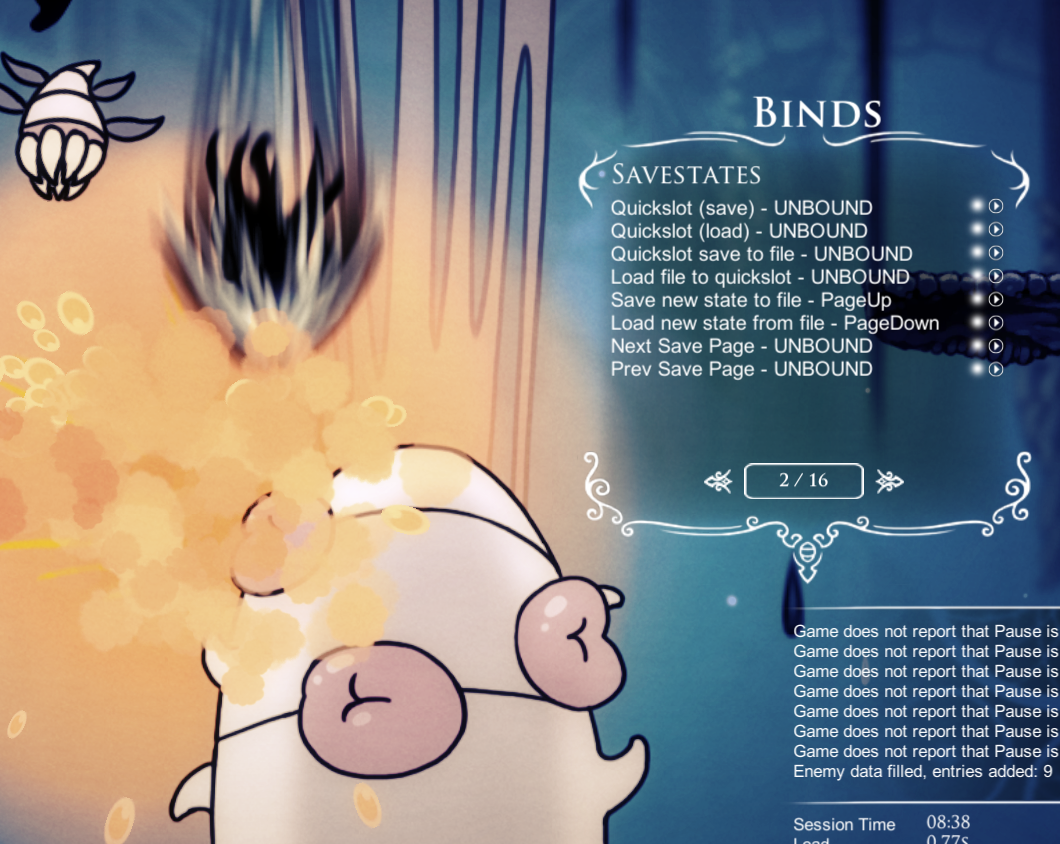
- Big QOL update by @flukebull: Buttons next to all bindable actions which run the actions. This even without having to bind them to anything, which is often desirable.
Use:
Simply click this new icon in the bindings menu and the corresponding action should run as if you bound it and pressed the hotkey.
Installation:
This needs the Modding-Api.
Version 1.2.2.1-41 can be downloaded: here, and should be placed in Hollow Knight\hollow_knight_Data\Managed\. Note: You want to backup the original file first.
To install on windows:
- download the attached dll-file,
- put this dll-file in your
<path to hk install>\Hollow Knight\hollow_knight_Data\Managed\Mods\-folder
(if you don't have the Mods folder: navigate toHollow Knight\hollow_knight_Data\Managed\-> right-click ->New->Folder, and name itMods)
(I have not compiled for Mac or Linux, but will attempt to do so if anyone needs it)
Contributors

Assets 3
DebugMod 1221-1.4.4
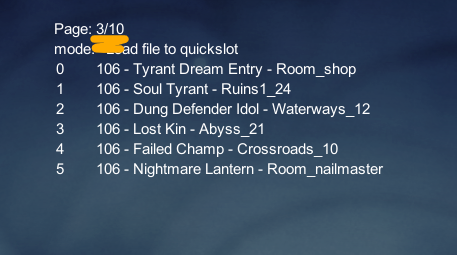
@SkeppysFlipFlops modified the savestates to use pages. This meas you can practically set all the savestate files you could want and always have them available in-game.
In-game use:
- Set your preferred
Next PageandPrev Pagebinds in the binds menu. - Select the savestate function you want (see readme for details)
- Browse the pages until you find the state you want.
- Proceed like usual.
Savestate file handling:
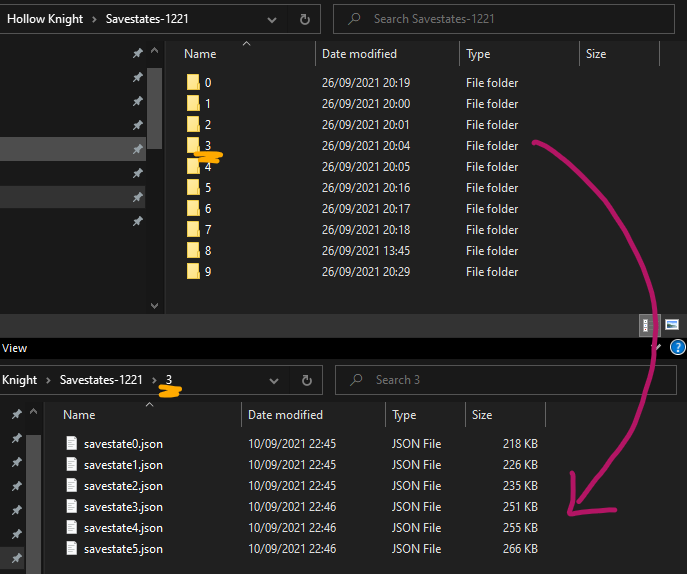
Simply put your savestates in numbered folders inside your %APPDATA%\..\LocalLow\Team Cherry\Hollow Knight\Savestates-1221\ as these screenshots show, and they will appear on their respective page in-game (+1. I messed up the screen shots slightly)
Other changes:
- Number of savestate pages is possible to change in
DebugMod.GlobalSettings-1.2.2.1.json. See see readme for details for details. - Savestates should save permanent scene states without leaving and re-entering the scene (ie. gates, levers, chests, broken walls, etc).
- Yeet Cornifer to practice Dark Joni's in peace.
- Guaranteed Uumuu extra attack binding, can be bound on the Bosses binds panel, and toggled using that binding. Always works on first cycle, almost always works on further cycles.
- Ported "Clear White Screen"-bind from 1.5 debug.

Note: If you have any issues with these not working properly do not hesitate to ping me @cerpintext in the hk-sr discord with a smol description of the issue, and I'll try to help and/or fix it :3
Installation:
This needs the Modding-Api.
Version 1.2.2.1-41 can be downloaded: here, and should be placed in Hollow Knight\hollow_knight_Data\Managed\. Note: You want to backup the original file first.
To install on windows:
- download the attached dll-file,
- put this dll-file in your
<path to hk install>\Hollow Knight\hollow_knight_Data\Managed\Mods\-folder
(if you don't have the Mods folder: navigate toHollow Knight\hollow_knight_Data\Managed\-> right-click ->New->Folder, and name itMods)
(I have not compiled for Mac or Linux, but will attempt to do so if anyone needs it)
Contributors


Assets 3
DebugMod 1221-1.4.3
@DemoJameson rewrote the hitbox viewer, it can now:
- Display significantly more hitboxes properly, even things like nail swings, enemy attacks, projectiles, and more
- Hitboxes are now straight lines rather than the misleading hitboxes from the old version
In addition to that, they added a bindable option to disable screen shake from happening.
You also need the Modding-Api for this to run.
Version 1.2.2.1-41 can be downloaded: here, and should be placed in Hollow Knight\hollow_knight_Data\Managed\. Note: You may want to backup the original file first.
To install on windows:
- download the attached dll-file,
- put this dll-file in your
<path to hk install>\Hollow Knight\hollow_knight_Data\Managed\Mods\-folder
(if you don't have the Mods folder: navigate toHollow Knight\hollow_knight_Data\Managed\-> right-click ->New->Folder, and name itMods)
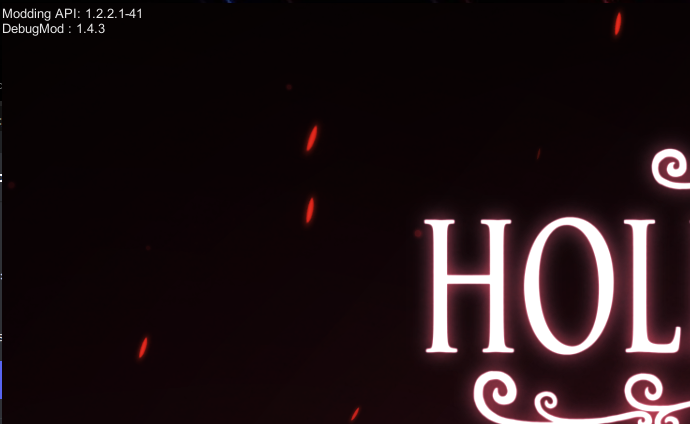
If it you see this text in the top left of your game window, it means the files have been properly placed:
(I have not compiled for Mac or Linux, but will attempt to do so if anyone needs it)
DebugMod 1221-1.4.2
Very comfy to have QOL UX features by @TheMulima:
- Increased accuracy of Hero Pos in the lower info panel.
- To unbind bindings in-game, you can now select it in the
Bindings Menuand pressEscape. - Fixed issue where Hornet would not show up in THK phase 4 when Voidheart was given through debug-mod.
- Added a new binds page for moving the knight by a set number of units, default is 0.1 (to lab out tricks with specific setups, like the recent (June 1, 2021) wallcling storage setups)
- Binds on the same new page to make player face left and face right
- New option in cheats menu to disable all keybinds until turned back on. The only binding that will work with this mode is
toggle all UI.
In addition to these, savestate actions w/ files will now tell you which action you selected, and you can cancel the action by repressing the hotkey for it.
To account for this the timeout-period has also been changed and extended to 30s.
Plus more smaller fixes and tweaks that I have forgotten because they were too inconsequential or too long ago to remember 🥴
To install on windows, you can download this dll-file, then put it in your <path to hk install>\Hollow Knight\hollow_knight_Data\Managed\Mods\-folder, and it should work as long as you have Modding-Api 1.2.2.1-41 in the folder one up from debug-mod -> Hollow Knight\hollow_knight_Data\Managed\.
(I have not compiled for Mac or Linux, but will attempt to do so if anyone needs it)