Have you ever been struggling to create a custom creature for your Pathfinder Table Top RPG game? It's such a hassel to get out the rules, get some paper, and create a creature from scratch and can take so long. Wouldn't you rather be spending that time preparing other aspects of your next playsession? The Creature Generator streamlines this process so you can get back to the Pathfinder preping that you love the most! The Creature Generator will allow you to generate random creature stats or gives you the tools to make your own in minutes. All of your creations will be saved to a database so everytime you login, you can see the creatures you've created. You will also be able to publish your creature onto the forum page where you and your friends can share your creations and download them for yourself.
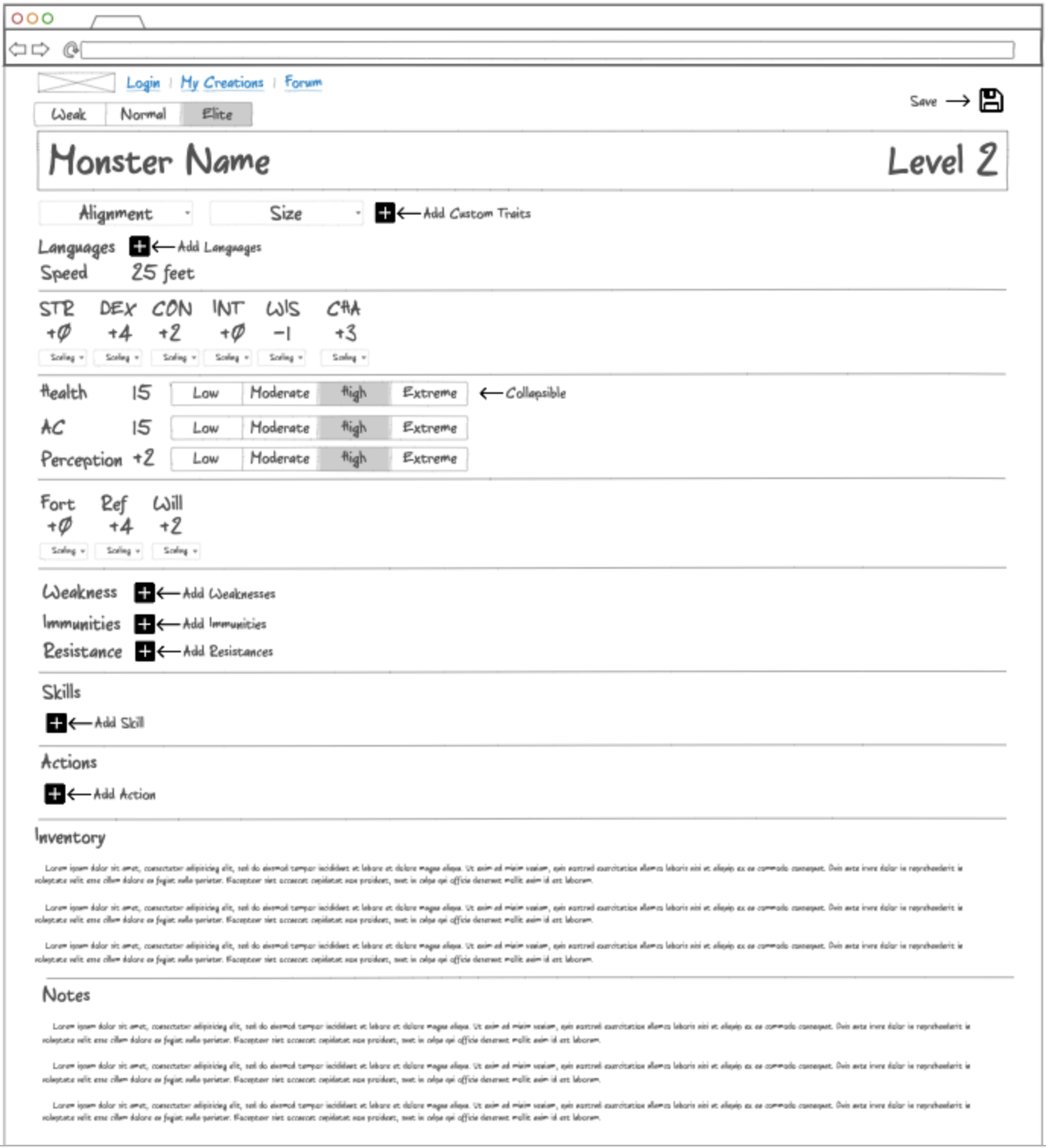
- Secure login over HTTPS
- Ability to create custom creature statistics
- Ability to randomly create creature statistics (with the exclusion of actions, skills, items, immunities, resistances, and weaknesses)
- Ability to save creatures to a user's personal database
- Ability to view/edit/delete creatures already saved to a user's database
- Ability to upload creatures to a forum
- Ability to download creatures from a forum
- Ability for admin to create and delete creatures
- HTML - Uses correct HTML structure for application. Four HTML pages (Login, Creature Creation, View User's Creature Database, Forum).
- CSS - Application styling that looks good on different screen sizes, uses good whitespace, color choice and contrast.
- JavaScript - Provides login, creature stat changes, random stat distribution, stat scaling changes, saving creatures to a DB, download creatures from forum, site navigation.
- Service - Backend service with endpoints for:
- login
- retrieving user's personal DB
- saving to user's personal DB
- uploading creatures to forums
- retrieving the live creature forum
- DB - Store users and user's creatures in database.
- Login - Register and login users. Credentials securely stored in database. Can't save or upload creatures unless authenticated.
- WebSocket - Other user's uploaded creatures can be seen in the forum.
- React - Application ported to use the React web framework.
Structure of the application.
- HTML pages - Four HTML pages (Index, Creature Creation, user_database, forum).
- Links - Navigation menu that links to each of the HTML pages.
- Text - Creature creator contains input form for statistics, descriptions, appearance, tags, inventory, and notes.
- Login - Input box and submit button for login.
- Database - A table to structure the user's preexisting created creatures. Button to save a creature to the database. Button to edit prexisting creature. Button to upload creature to forum. Button to delete creature from the database
- WebSocket - A forum of other user's uploaded creatures. A popup structure to notify other users when someone uploads a new creature.
Application appearance.
- Header, footer, and main content body.
- Menu Bar elements.
- Window resizing for all devices and screen sizes. (Navbar resizing works but doesn't look very pretty, will be updating this.)
- Effective contrast and white spacing techniques for all parts of the app.
- Consistent use fonts and colors.
- Added test buttons for expiramental popups for Websocket to work with when developed.
- Login - When you press enter or the login button it takes you to the User's Creature Database page. Saves user's username to the localstorage.
- Creature Creation - When you press the save button, it saves all of the informaiton on the creature and stores it into that specific user's database.
- Saves all data written by the user. certain HTML fields are created when plus or minus buttons are clicked (saved to an array, pretty cool if you ask me).
- Userdatabase - users can see their saved creatures and click on the button to make a new creature. (clicking the navigation link to the creature creator works for this too).
- Creature edit - users can edit their saved craetures and save them back to the database where the database will be updated (no duplicates).
- creature delete - users can delete their creations from their database
- Creature Upload - When you press the upload button, it uploads the save of that creature to the real time forum where a toast is then displayed of the user's username, creation name, and level of the creature.
- Forum - On the forum user's can see all the uploaded creatures from other users. They can choose to view the creature and save it to their own database.
- WebSocket - will eventually be implemented into the javascript.
HTTP service to host the frontend and provide backend for the web application.
- Node.js/Express HTTP service.
- Static middleware for frontend.
- Backend service endpoints - Placeholders for login that stores the current user on the server.
- Frontend calls service endpoints
- (Couldn't quite figure out how to delete rows using this yet. Still in progress)
Stores and retrieves data from MongoDB.
- MongoDB Atlas database created
- Creature Cluster created
- Forum cluster created
- Endpoints for data
- Stores and calls data in MongoDB
- (Deletion from MongoDB is still in progress)
** Login Deliverable
User registration and authentication.
- User registration - Creates a new account in the database.
- existing user - Verifies the user's name and password from data stored in the database
- Use MongoDB to store credentials.
- Restricts functionality - Unknown creatures will be saved but you won't be able to see your personalized database of creatures.
Enables realtime reporting of uploaded creatures from other users.
- Backend listens for WebSocket connection.
- Frontend makes WebSocket connection.
- Data sent over WebSocket connection.
- WebSocket data displayed - Display all user uploaded creatures on the forum in realtime.
View raw to see future deliverables