

HTML input element clone with support for post-edit formatting of number
values. An input of 1000000 will format to 1,000,000 under en-AU locale.
Usage via npm and webpack is recommended at this stage. build/
contains UMD compatible javascript which could be used in browsers.
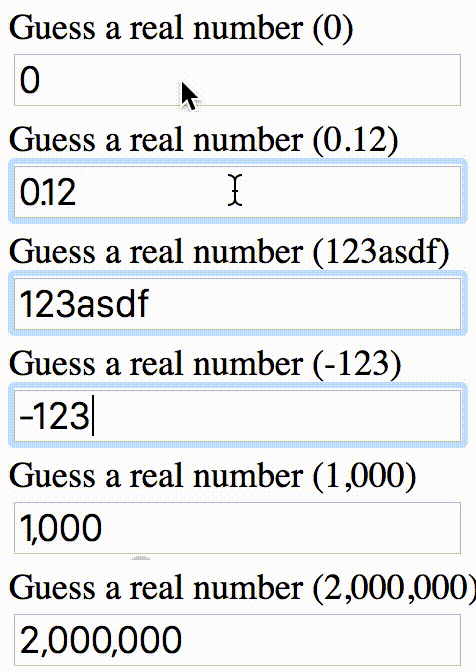
Screencast demo has the following configuration:
* Optionally format to 2 decimal places
* No minimum
* No maximum
React version of the form react@0.x maps to react-number-input@1.x. Currently
supports 0.12, 0.13 and 0.14.
npm install --save react-number-input@1.14
npm install --save react-number-input@1.13
npm install --save react-number-input@1.12
Use it like a normal react form element.
<NumberInput
	id="price"
	type="number"                   // optional, input[type]. Defaults to "tel" to allow non numeric characters
	onChange={this.onPriceChange}   // use it like normal event handler
	onBlur={this.onPricedUpdated}   // use it like normal event handler
	onFocus={this.onPricedEditing}  // use it like normal event handler
	value={this.state.price}        // normal react input binding
	placeholder="Enter price"       // all other input properties are supported
	min={0}                         // optional, set minimum allowed value
	max={100}                       // optional, set maximum allowed value
	format="0"                      // optional, numeral.js format string. Defaults to "0,0[.][00]"
/>
All properties supplied to NumberInput will also be transferred to the
resulting input element (e.g., style or className).
All event handlers supported by <input /> are supported.
All of the event handlers receive the original event object as its argument.
React.createClass({
	_onChange: function (event) {
		console.log(event.target.id); // test
	},

	render: function () {
		return (
			<NumberInput
				id='test'
				onChange={this._onChange}
				value={this.state.price}
				format='0,0'
				placeholder='0'
			/>
		);
	}
});
format="0,0" follows numeral.js format. Defaults to: "0,0[.][00]".
- You get raw, unchange event object
onChange - You get filtered, modified
event.target.valueonBlur
Basically, it allows users to enter anything they want by default. Only onBlur, we change
that to map to whatever is specified in format property.
If you're thinking of contributing, there are a number of npm scripts you can run to speed up the process.
npm install
npm run prerelease
npm run lint
npm run test
npm run build-demos
npm run start
Then head to http://localhost:3000/ to see the demo.
- Renders
input[type=tel]element, can be overriden by providingtypeproperty - Number formatting is removed on focus
- Number formatting is applied on blur
- If input contains all zeroes, zeroes are left in place until blur
- Add support for different locales
- Assume en-AU locale
- Currently requires
numeral