




Run a 1-billion parameter LLM on a $10 board with 256MB RAM.
Pure C. Zero dependencies. One binary. No Python. No cloud.
echo "Explain gravity" | ./picolm model.gguf -n 100 -j 4

PicoLM was built as the local brain for PicoClaw — an ultra-lightweight AI assistant in Go that runs on $10 hardware. Together, they form a fully offline AI agent — no cloud, no API keys, no internet, no monthly bills.
Every other LLM provider needs the internet. PicoLM doesn't.
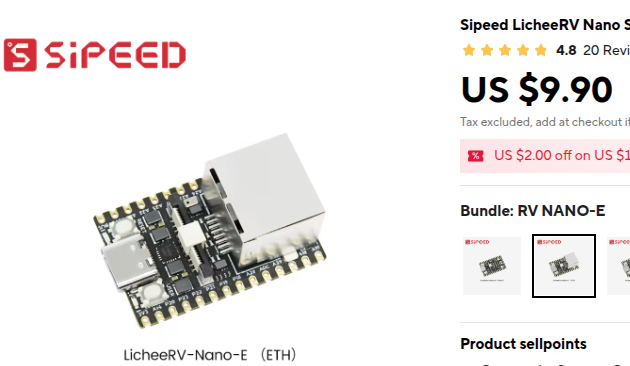
| The Hardware | The Architecture |
 |
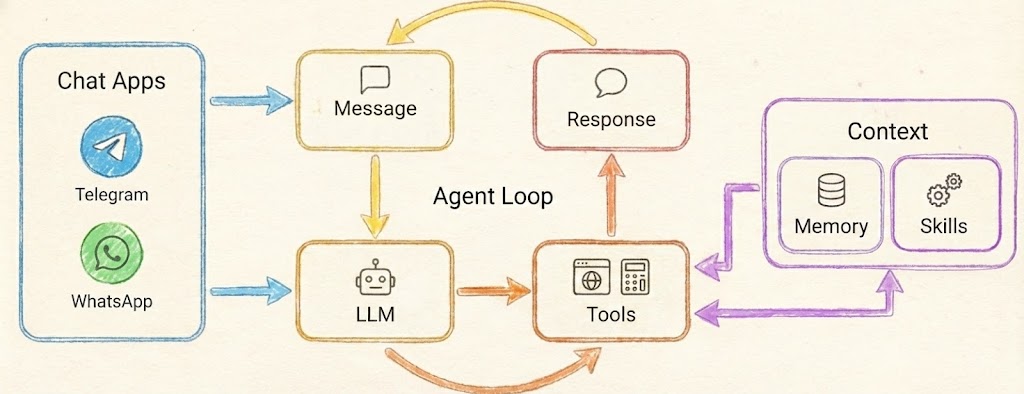 |
| $9.90 — that's the entire server | PicoLM powers the LLM box in PicoClaw's agent loop |
| Cloud Provider (OpenAI, etc.) | PicoLM (Local) | |
|---|---|---|
| Cost | Pay per token, forever | Free forever |
| Privacy | Your data sent to servers | Everything stays on-device |
| Internet | Required for every request | Not needed at all |
| Latency | Network round-trip + inference | Inference only |
| Hardware | Needs a $599 Mac Mini | Runs on a $10 board |
| Binary | N/A | ~80KB single file |
| RAM | N/A | 45 MB total |
PicoClaw's agent loop spawns PicoLM as a subprocess. Messages come in from Telegram, Discord, or CLI — PicoClaw formats them into a chat template, pipes the prompt to picolm via stdin, and reads the response from stdout. When tools are needed, --json grammar mode guarantees valid JSON even from a 1B model.
Telegram / Discord / CLI
        │
        ▼
   ┌──────────┐    stdin: prompt     ┌───────────┐
   │ PicoClaw │ ──────────────────►  │  picolm   │
   │   (Go)   │ ◄──────────────────  │   (C)     │
   └──────────┘    stdout: response  │ + model   │
        │                            └───────────┘
        ▼                            45 MB RAM
   User gets reply                   No internet
# 1. Build PicoLM
cd picolm && make native    # or: make pi (Raspberry Pi)

# 2. Download model (one-time, 638 MB)
make model

# 3. Build PicoClaw
cd ../picoclaw && make deps && make build

# 4. Configure (~/.picoclaw/config.json)
{
"agents": {
"defaults": {
"provider": "picolm",
"model": "picolm-local"
}
},
"providers": {
"picolm": {
"binary": "~/.picolm/bin/picolm",
"model": "~/.picolm/models/tinyllama-1.1b-chat-v1.0.Q4_K_M.gguf",
"max_tokens": 256,
"threads": 4,
"template": "chatml"
}
}
}# 5. Chat — fully offline!
picoclaw agent -m "What is photosynthesis?"curl -sSL https://raw.githubusercontent.com/RightNow-AI/picolm/main/install.sh | bash| Device | Price | Generation Speed | RAM Used |
|---|---|---|---|
| Pi 5 (4-core) | $60 | ~10 tok/s | 45 MB |
| Pi 4 (4-core) | $35 | ~8 tok/s | 45 MB |
| Pi 3B+ | $25 | ~4 tok/s | 45 MB |
| Pi Zero 2W | $15 | ~2 tok/s | 45 MB |
| LicheeRV Nano | $10 | ~1 tok/s | 45 MB |
PicoClaw automatically activates --json grammar mode when it needs structured output. This guarantees syntactically valid JSON even from a 1B parameter model — essential for reliable tool calling on tiny hardware:
picoclaw agent -m "Search for weather in Tokyo"
# → PicoLM generates: {"tool_calls": [{"function": {"name": "web_search", "arguments": "{\"query\": \"weather Tokyo\"}"}}]}
For the full PicoClaw documentation, see the PicoClaw README.
PicoLM is a minimal, from-scratch LLM inference engine written in ~2,500 lines of C11. It runs TinyLlama 1.1B (and other LLaMA-architecture models in GGUF format) on hardware that most inference frameworks won't even consider:
- Raspberry Pi Zero 2W ($15, 512MB RAM, ARM Cortex-A53)
- Sipeed LicheeRV ($12, 512MB RAM, RISC-V)
- Raspberry Pi 3/4/5 (1-8GB RAM, ARM NEON SIMD)
- Any Linux/Windows/macOS x86-64 machine
The model file (638MB) stays on disk. PicoLM memory-maps it and streams one layer at a time through RAM. Total runtime memory: ~45MB including the FP16 KV cache.
                    ┌──────────────────────────────────────────┐
   What goes        │         45 MB Runtime RAM                │
   in RAM           │  ┌─────────┐ ┌──────────┐ ┌───────────┐  │
                    │  │ Buffers │ │ FP16 KV  │ │ Tokenizer │  │
                    │  │  1.2 MB │ │ Cache    │ │   4.5 MB  │  │
                    │  │         │ │  ~40 MB  │ │           │  │
                    │  └─────────┘ └──────────┘ └───────────┘  │
                    └──────────────────────────────────────────┘

                    ┌──────────────────────────────────────────┐
   What stays       │        638 MB Model on Disk              │
   on disk          │       (mmap — OS pages in layers         │
   (via mmap)       │        as needed, ~1 at a time)          │
                    └──────────────────────────────────────────┘
| Feature | Description |
|---|---|
| GGUF Native | Reads GGUF v2/v3 files directly — no conversion needed |
| K-Quant Support | Q2_K, Q3_K, Q4_K, Q5_K, Q6_K, Q8_0, Q4_0, F16, F32 |
| mmap Layer Streaming | Model weights stay on disk; OS pages in one layer at a time |
| FP16 KV Cache | Halves KV cache memory (44MB vs 88MB for 2048 context) |
| Flash Attention | Online softmax — no O(seq_len) attention buffer needed |
| Pre-computed RoPE | cos/sin lookup tables eliminate transcendentals from hot loop |
| SIMD Acceleration | ARM NEON (Pi 3/4/5) and x86 SSE2 (Intel/AMD) auto-detected |
| Fused Dot Products | Dequantize + dot-product in one pass — no intermediate buffer |
| Multi-threaded matmul | Parallel matrix-vector multiply across CPU cores |
| Grammar-Constrained JSON | --json flag forces valid JSON output (for tool calling) |
| KV Cache Persistence | --cache saves/loads prompt state — skip prefill on re-runs |
| BPE Tokenizer | Score-based byte-pair encoding, loaded from GGUF metadata |
| Top-p Sampling | Temperature + nucleus sampling with configurable seed |
| Pipe-friendly | Reads prompts from stdin: echo "Hello" | ./picolm model.gguf |
| Zero Dependencies | Only libc, libm, libpthread. No external libraries. |
| Cross-platform | Linux, Windows (MSVC), macOS. ARM, x86-64, RISC-V. |
curl -sSL https://raw.githubusercontent.com/RightNow-AI/picolm/main/install.sh | bashThis will:
- Detect your platform (ARM64, ARMv7, x86-64)
- Install build dependencies (
gcc,make,curl) - Build PicoLM with optimal SIMD flags for your CPU
- Download TinyLlama 1.1B Q4_K_M (638 MB)
- Run a quick test
- Generate PicoClaw config
- Add
picolmto your PATH
git clone https://github.com/rightnow-ai/picolm.git
cd picolm/picolm

# Auto-detect CPU (enables SSE2/AVX on x86, NEON on ARM)
make native

# Download a model
make model

# Run it
./picolm /opt/picolm/models/tinyllama-1.1b-chat-v1.0.Q4_K_M.gguf \
-p "The meaning of life is" -n 100cd picolm
build.bat
picolm.exe model.gguf -p "Hello world" -n 50make native # x86/ARM auto-detect (recommended for local machine)
make pi # Raspberry Pi 3/4/5 (64-bit ARM + NEON SIMD)
make pi-arm32 # Pi Zero / Pi 1 (32-bit ARM)
make cross-pi # Cross-compile for Pi from x86 (static binary)
make riscv # RISC-V (Sipeed LicheeRV, etc.)
make static # Static binary for single-file deployment
make debug # Debug build with symbols, no optimizationPicoLM — ultra-lightweight LLM inference engine
Usage: picolm <model.gguf> [options]
Generation options:
-p <prompt> Input prompt (or pipe via stdin)
-n <int> Max tokens to generate (default: 256)
-t <float> Temperature (default: 0.8, 0=greedy)
-k <float> Top-p / nucleus sampling (default: 0.9)
-s <int> RNG seed (default: 42)
-c <int> Context length override
-j <int> Number of threads (default: 4)
Advanced options:
--json Grammar-constrained JSON output mode
--cache <file> KV cache file (saves/loads prompt state)
Basic generation:
./picolm model.gguf -p "Once upon a time" -n 200Greedy decoding (deterministic, temperature=0):
./picolm model.gguf -p "The capital of France is" -n 20 -t 0
# Output: Paris. It is the largest city in France and...
Chat with TinyLlama (ChatML format):
./picolm model.gguf -n 200 -t 0.7 -p "<|user|>
What is photosynthesis?</s>
<|assistant|>
"
Force JSON output (for tool calling / structured data):
./picolm model.gguf --json -t 0.3 -n 100 -p "<|user|>
Return the current time as JSON.</s>
<|assistant|>
"
# Output: {"time": "12:00 PM"}
Pipe from stdin:
echo "Explain quantum computing in one sentence" | ./picolm model.gguf -n 50KV cache — skip repeated prefill:
# First run: processes prompt + saves cache
./picolm model.gguf --cache prompt.kvc -p "Long system prompt here..." -n 50

# Second run: loads cache, skips prompt prefill (74% faster)
./picolm model.gguf --cache prompt.kvc -p "Long system prompt here..." -n 50
# Output: "Skipping 25 cached prompt tokens"
Multi-threaded on a Pi 4 (4 cores):
./picolm model.gguf -p "Hello" -n 100 -j 4Measured on TinyLlama 1.1B Q4_K_M (638 MB model):
| Metric | x86-64 (8 threads) | Pi 4 (4 cores, NEON) | Pi Zero 2W |
|---|---|---|---|
| Prefill | ~11 tok/s | ~6 tok/s | ~1.5 tok/s |
| Generation | ~13 tok/s | ~8 tok/s* | ~2 tok/s* |
| Runtime RAM | 45 MB | 45 MB | 45 MB |
| First token | ~2.3s | ~4s | ~16s |
| Binary size | ~80 KB | ~70 KB | ~65 KB |
*Estimated with NEON SIMD enabled. Actual numbers depend on SD card speed and thermal throttling.
 Raw C inference          ████████████░░░░░░░░  13.5 tok/s  (baseline: 1.6)
 + Fused dot products     ████████████████░░░░  (eliminate dequant buffer)
 + Multi-threaded matmul  █████████████████░░░  (4-8 cores in parallel)
 + FP16 KV cache          █████████████████░░░  (halve memory bandwidth)
 + Pre-computed RoPE      ██████████████████░░  (no sin/cos in hot loop)
 + Flash attention        ██████████████████░░  (no O(n) attention alloc)
 + NEON/SSE2 SIMD         ███████████████████░  (4-wide vector ops)
 + KV cache persistence   ████████████████████  (skip prefill entirely)
                          ┌─────────────────────────────────┐
                          │           picolm.c              │
                          │     CLI + Generation Loop       │
                          └──────┬──────────────┬───────────┘
                                 │              │
                    ┌────────────┘              └────────────┐
                    │                                        │
           ┌────────┴────────┐                    ┌──────────┴──────────┐
           │    model.h/c    │                    │    sampler.h/c      │
           │  GGUF Parser    │                    │  Temperature +      │
           │  mmap Layer     │                    │  Top-p Sampling     │
           │  Streaming      │                    └──────────┬──────────┘
           │  Forward Pass   │                               │
           │  KV Cache I/O   │                    ┌──────────┴──────────┐
           └───┬────────┬────┘                    │    grammar.h/c      │
               │        │                         │  JSON Constraint    │
      ┌────────┘        └───────┐                 │  Logit Masking      │
      │                         │                 └─────────────────────┘
┌─────┴──────┐          ┌───────┴────────┐
│ tensor.h/c │          │ tokenizer.h/c  │
│ matmul     │          │ BPE Encode     │
│ rmsnorm    │          │ Decode         │
│ softmax    │          │ Vocab Lookup   │
│ rope       │          └────────────────┘
│ silu       │
│ threading  │
└─────┬──────┘
      │
┌─────┴──────┐
│  quant.h/c │
│ Q4_K, Q6_K │
│ Q3_K, Q2_K │
│ FP16, F32  │
│ NEON + SSE │
│ Fused Dots │
└────────────┘
Input Token
    │
    ▼
┌───────────────┐
│ Embedding     │  Dequantize row from token_embd → x[2048]
│ Lookup        │
└───────┬───────┘
        │
        ▼
┌───────────────┐  ×22 layers
│ RMSNorm       │─────────────────────────────────────────┐
│               │                                         │
│ Q = xb @ Wq   │  Matrix-vector multiply (quantized)     │
│ K = xb @ Wk   │  Store K,V in FP16 KV cache             │
│ V = xb @ Wv   │                                         │
│               │                                         │
│ RoPE(Q, K)    │  Rotary position encoding (table lookup)│
│               │                                         │
│ Attention     │  Flash attention with online softmax    │
│ (GQA 32→4)    │  Grouped-query: 32 Q heads, 4 KV heads  │
│               │                                         │
│ x += Out@Wo   │  Output projection + residual           │
│               │                                         │
│ RMSNorm       │                                         │
│               │                                         │
│ SwiGLU FFN    │  gate=SiLU(xb@Wg), up=xb@Wu             │
│               │  x += (gate*up) @ Wd                    │
└───────┬───────┘─────────────────────────────────────────┘
        │
        ▼
┌───────────────┐
│ Final RMSNorm │
│ x @ W_output  │─→ logits[32000]
└───────┬───────┘
        │
        ▼
┌───────────────┐
│ Grammar Mask  │  (if --json: force valid JSON structure)
│ Sample Token  │  temperature → softmax → top-p → pick
└───────────────┘
For TinyLlama 1.1B Q4_K_M with 2048 context length:
| Component | Size | Notes |
|---|---|---|
| FP16 KV cache | ~40 MB | 22 layers x 2 x 2048 x 256 x 2 bytes |
| Tokenizer | ~4.5 MB | 32K vocab strings + scores + sorted index |
| Activation buffers | ~0.14 MB | x, xb, xb2, q, hb, hb2 |
| Logits buffer | ~0.12 MB | 32000 x 4 bytes |
| Dequant scratch | ~0.02 MB | Max(n_embd, n_ffn) floats |
| Norm weights (pre-dequant) | ~0.35 MB | 45 norm vectors x 2048 x 4 bytes |
| RoPE tables | ~0.03 MB | cos + sin x 2048 x 32 entries |
| Total runtime | ~45 MB | |
| Model file (on disk) | 638 MB | Memory-mapped, ~1 layer in RAM at a time |
With 512 context (for constrained devices):
| Component | Size |
|---|---|
| FP16 KV cache | ~10 MB |
| Everything else | ~5 MB |
| Total | ~15 MB |
PicoLM implements 9 optimizations that brought generation speed from 1.6 tok/s to 13.5 tok/s on x86, with even larger gains expected on ARM with NEON:
4-wide float vector operations for all hot paths. Example: dequantizing Q4_K nibbles with vmovl_u8 → vmovl_u16 → vcvtq_f32_u32, and RoPE with interleaved vld2q_f32 / vst2q_f32.
Auto-detected on Intel/AMD. 4-wide __m128 operations for dot products, RMSNorm, and vector operations.
Key and value vectors stored as 16-bit floats instead of 32-bit. Halves KV cache memory from ~88MB to ~44MB. Conversion uses software fp32_to_fp16() / fp16_to_fp32() — no hardware FP16 support required.
Sine and cosine values for all positions computed once at model load. The forward pass does a table lookup instead of calling sinf() / cosf() / powf() 64 times per token.
Single-pass attention with running maximum rescaling. Eliminates the O(seq_len) attention score buffer — critical for long contexts on memory-constrained devices.
vec_dot_q4_K_f32() dequantizes and accumulates in one pass. No intermediate float buffer for the weight row. Reduces memory traffic by ~50% for matmul.
matmul() distributes output rows across threads using pthreads. Each thread processes its chunk independently with fused dot products. Scales linearly up to ~8 cores.
The --json mode pre-analyzes every token in the vocabulary at load time (brace delta, bracket delta, quote parity). During generation, it masks logits to guarantee syntactically valid JSON — essential for tool-calling with small models.
--cache file.kvc saves the FP16 KV cache state after prompt processing. On the next run with the same prompt, it loads the cache and skips prefill entirely. 74% latency reduction for repeated system prompts.
PicoLM supports any LLaMA-architecture model in GGUF format:
| Model | Parameters | GGUF Size (Q4_K_M) | RAM Needed |
|---|---|---|---|
| TinyLlama 1.1B | 1.1B | 638 MB | ~45 MB |
| Llama 2 7B | 7B | 4.1 GB | ~200 MB |
| Phi-2 | 2.7B | 1.6 GB | ~90 MB |
Recommended for embedded: TinyLlama 1.1B Q4_K_M — fits comfortably on devices with 256MB+ RAM.
Q2_K Q3_K Q4_K Q4_0 Q5_K Q6_K Q8_0 F16 F32
PicoLM/
├── README.md              ← you are here
├── BLOG.md                ← technical deep-dive blog post
├── install.sh             ← one-liner Pi installer
│
├── picolm/                ← the inference engine (pure C)
│   ├── picolm.c           ← CLI entry point, generation loop (273 lines)
│   ├── model.h/c          ← GGUF parser, mmap, forward pass (146 + 833 lines)
│   ├── tensor.h/c         ← matmul, rmsnorm, softmax, rope (44 + 298 lines)
│   ├── quant.h/c          ← dequantization, SIMD kernels (140 + 534 lines)
│   ├── tokenizer.h/c      ← BPE tokenizer (32 + ~200 lines)
│   ├── sampler.h/c        ← temperature + top-p sampling (19 + ~100 lines)
│   ├── grammar.h/c        ← JSON grammar constraints (64 + 175 lines)
│   ├── Makefile           ← build targets for all platforms
│   └── build.bat          ← Windows MSVC build script
│
└── tinyllama-1.1b-chat-v1.0.Q4_K_M.gguf  ← model file (638 MB, not in git)
Total C source: ~2,500 lines. That's the entire inference engine — GGUF parsing, mmap, dequantization, matrix math, attention, tokenization, sampling, and grammar constraints.
Traditional inference engines load the entire model into RAM. PicoLM doesn't. Instead:
- The model file is memory-mapped (
mmapon Linux/macOS,MapViewOfFileon Windows) - Weight pointers point directly into the mapped file — no copying
- During the forward pass, each layer's weights are accessed sequentially
- The OS automatically pages in the needed weights and evicts old ones
madvise(MADV_SEQUENTIAL)hints the access pattern to the kernel
Result: A 638MB model runs on a device with 256MB RAM. Only ~30MB of the model is in physical memory at any time.
Weights are stored in 4-bit quantized format (Q4_K_M). For TinyLlama:
- Original: 1.1B parameters x 4 bytes = 4.4 GB
- Q4_K: 1.1B parameters x ~0.56 bytes = 638 MB
- Quality loss: Minimal — Q4_K preserves 6-bit scales per 32-weight sub-block
TinyLlama uses 32 query heads but only 4 key/value heads. Each KV head is shared by 8 query heads. This reduces KV cache size by 8x compared to full multi-head attention.
| Platform | Requirements |
|---|---|
| Linux/Pi | gcc, make (install via apt install build-essential) |
| macOS | Xcode Command Line Tools (xcode-select --install) |
| Windows | Visual Studio Build Tools (cl.exe) |
# Build
make native

# Test with greedy decoding (deterministic output)
./picolm model.gguf -p "The capital of France is" -n 20 -t 0
# Expected: "Paris. It is the largest city in France..."

# Test JSON mode
./picolm model.gguf --json -p "Return JSON with name and age" -n 50 -t 0.3
# Expected: valid JSON like {"name": "...", "age": ...}

# Test KV cache
./picolm model.gguf --cache test.kvc -p "Hello" -n 10 -t 0
./picolm model.gguf --cache test.kvc -p "Hello" -n 10 -t 0
# Second run should say "Skipping N cached prompt tokens"PicoLM prints memory stats to stderr:
Memory: 1.17 MB runtime state (FP16 KV cache separate)
Total = runtime state + FP16 KV cache. For TinyLlama with 2048 context: ~45 MB.
Q: Can this run Llama 2 7B? A: Yes, if you have enough RAM for the KV cache (~1.4 GB for 7B with 4096 context). The model file stays on disk via mmap. On a Pi 4 with 4GB RAM, it works but is slow (~1-2 tok/s).
Q: Why not use llama.cpp? A: llama.cpp is excellent but requires ~200MB+ for the runtime on small models, has complex build dependencies, and targets desktop/server use cases. PicoLM is purpose-built for embedded: 45MB RAM, 80KB binary, zero dependencies.
Q: Is the output quality good?
A: TinyLlama 1.1B is a small model — it handles simple tasks (Q&A, summarization, basic reasoning, JSON generation) well. It won't match GPT-4, but it runs on a $10 board with no internet. For structured output, the --json grammar mode guarantees valid JSON regardless of model quality.
Q: What about GPU acceleration? A: PicoLM is CPU-only by design. The target hardware ($10-15 boards) doesn't have GPUs. On x86/ARM CPUs, SIMD (NEON/SSE2) provides meaningful speedup.
Q: Can I use a different model? A: Any LLaMA-architecture GGUF model works. Download from HuggingFace and point PicoLM at it. Recommended quantizations: Q4_K_M (best quality/size balance) or Q2_K (smallest, lower quality).
- AVX2/AVX-512 kernels for x86 (2-4x generation speed on modern CPUs)
- Speculative decoding with a draft model
- Context sliding window (infinite generation beyond max_seq_len)
- Weight pruning for further memory reduction
- Continuous batching for server mode
- Mistral / Phi architecture support
For a detailed writeup of the optimization journey (with code snippets and war stories), see BLOG.md.
MIT License. See LICENSE for details.
PicoLM — because intelligence shouldn't require a data center.