A lightweight Node SDK for sending events and data to Optimizely Data Platform (ODP) from a Node JavaScript app in Optimizely Connect Platform (OCP).
🚧 Warning
This is not a browser compatible SDK. To interface with ODP from a web site, use the ODP Web SDK.
The Node SDK provides interfaces to the majority of ODP REST APIs.
Install using yarn:
yarn add @zaiusinc/node-sdkOr npm:
npm install @zaiusinc/node-sdkVersion 3.0.0 introduces breaking changes related to the removal of the node-fetch dependency in favor of Node.js native fetch APIs.
The minimum Node.js version has been increased:
- v2.x: Node.js >= 18.0
- v3.x: Node.js >= 22.0
Ensure your environment is running Node.js 22.0 or higher before upgrading.
The Headers interface is no longer imported from node-fetch. Instead, the SDK now uses Node.js native Headers type from the global fetch API.
Before (v2.x):
import { Headers } from 'node-fetch';
import { odp, ODP } from '@zaiusinc/node-sdk';

const response: ODP.ApiV3.HttpResponse<any> = await odp.v3Api.get('...');
const headers: Headers = response.headers; // Headers from node-fetch
After (v3.x):
import { odp, ODP } from '@zaiusinc/node-sdk';

const response: ODP.ApiV3.HttpResponse<any> = await odp.v3Api.get('...');
const headers: Headers = response.headers; // Native Node.js Headers (global)
The native Headers type is available globally in Node.js 18+ and provides the same standard Fetch API Headers interface.
The node-fetch package has been completely removed. If your code was directly importing or using node-fetch alongside this SDK, you can:
- Remove
node-fetchand@types/node-fetchfrom your dependencies if they're no longer needed - Use Node.js native
fetch()which is available globally in Node.js 18+ - Use the native
Headers,Request, andResponsetypes from the global scope
This is not mandatory, but that'll help get rid of one more dependency from the package.
Example:
// No need to import fetch or Headers anymore
const response = await fetch('https://api.example.com/data');
const headers = new Headers({
  'Content-Type': 'application/json'
});To communicate with ODP, you need to obtain and configure an instance of ODPClient.
There are two ways to do this:
- Use module scoped instance exported as
odpfrom the SDK. - Create your own instance of
ODPClient.
Using module scoped instance is easier, when you don't need to communicate with multiple ODP accounts. With module scoped instance, you configure the SDK once and then use it throughout your application. If you're using the Node SDK in an OCP app, module scope comes pre-configured with the private API key.
Creating your own instance of ODPClient gives you more control.
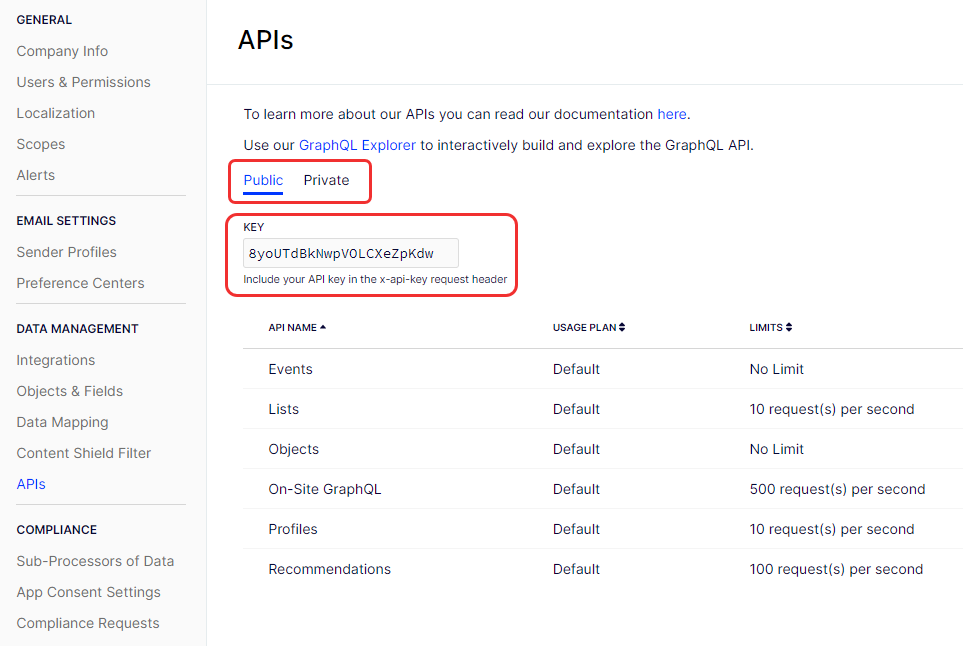
You need to configure the SDK with your API keys. If you are only sending data to ODP, you normally only need your public API key, however, some API calls require your private API key. You can obtain these from the Account Settings > APIs page in the ODP app.
import {odp} from '@zaiusinc/node-sdk';
odp.configure({
  apiKey: 'your_public_or_private_api_key'
});

const event = {type: 'pageview', identifiers: {email}, data: {page}};
await odp.event(event);
Alternatively, you can provide the apiKey as an environment variable ODP_SDK_API_KEY and omit cofigure method.
Note For compatibility with previous versions of the SDK, module scoped instance is also exported as
zfrom the SDK.
Note Calling
configuremethod is not needed when using the ODP Node SDK in an OCP app. The SDK is pre-configured with the private API key.
import {ODPClient} from '@zaiusinc/node-sdk';
const odp = new ODPClient({
  apiKey: 'your_public_or_private_api_key'
});

const event = {type: 'pageview', identifiers: {email}, data: {page}};
await odp.event(event);
Alternatively, you can provide the apiKey as an environment variable ODP_SDK_API_KEY and use parameterless constructor.
The ODP Node SDK is TypeScript first, so no need to install or create additional type definitions.
To access the exported types, import ODP from the SDK.
import {odp, ODP} from '@zaiusinc/node-sdk';

async function pageview(email: string, page: string) {
  const event: ODP.Event = {type: 'pageview', identifiers: {email}, data: {page}};
  const result = await odp.event(event);
  return result.success;
}
Note For compatibility with previous versions of the SDK, types are also exported as
Zaiusfrom the SDK.
import {odp} from '@zaiusinc/node-sdk';

/**
 * Configure the OCP Node SDK for use
 */
odp.configure(sdkConfig);

/**
 * Access public values of the current configuration
 */
odp.config;

/**
 * Send an event to ODP using the v3 event API
 */
odp.event(eventPayload);
odp.event(eventPayload[]);

/**
 * Create or update a customer profile in ODP using the v3 profiles API
 */
odp.customer(customerPayload, options);
odp.customer(customerPayload[], options);

/**
 * Create or update an object in ODP using the v3 objects API
 */
odp.object(type, objectPayload, options);

/**
 * Manage schema (ODP domain objects and fields) using the v3 APIs
 */
odp.schema.createField(object, field);
odp.schema.createIdentifier(identifier);
odp.schema.getEnabledModules();
odp.schema.enableModule(moduleName);
odp.schema.getObject(name);
odp.schema.getAllObjects();
odp.schema.createObject(objectDefinition);
odp.schema.createRelation(object, relationDefinition);

/**
 * Manage customer identifiers using the v3 APIs
 */
odp.identifier.updateMetadata(identifierUpdates);
odp.identifier.getMetadata(identifierFieldName, identifierValue);
odp.identifier.updateReachability(reachabilityUpdates);
odp.identifier.getReachability(identifierFieldName, identifierValue);
odp.identifier.updateConsent(consentUpdates);
odp.identifier.getConsent(identifierFieldName, identifierValue);

/**
 * Manage list subscriptions using the v3 APIs
 */
odp.list.createList(listName);
odp.list.getLists(listName);
odp.list.subscribe(listId, identifiers);
odp.list.unsubscribe(listId, identifiers);
odp.list.updateSubscriptions(listId, arrayOfUpdates);

/**
 * Query data using the GraphQL API
 */
odp.graphql<ResponseType>(query, variables);If you need to use an API that is not supported by the ODP Node SDK yet, you can follow the ODP REST API documentation and use the v3Api helper to query the APIs directly. For example:
await odp.v3Api.post('objects/products', [
  {
    product_id: '123',
    name: 'Red Shirt'
  },
  {
    product_id: '456',
    name: 'Blue Shirt'
  }
]);