TensorTune is a user-friendly toolkit for efficiently running KoboldCpp, intelligently managing VRAM usage through optimized tensor offload strategies to maximize performance on consumer GPUs. Available in both GUI and CLI versions.
Here are some real-world examples of performance improvements using tensor offloading:
Traditional Layer Offloading:
python koboldcpp.py --threads 6 --usecublas --contextsize 40960 --flashattention --port 5000 --model MODELNAME.gguf --gpulayers 59 --quantkv 1Tokens per second: 3.95 t/s
With TensorTune's Smart Tensor Offloading:
python koboldcpp.py --threads 10 --usecublas --contextsize 40960 --flashattention --port 5000 --model MODELNAME.gguf --gpulayers 65 --quantkv 1 --overridetensors "\.[13579]\.ffn_up|\.[1-3][13579]\.ffn_up=CPU"Tokens per second: 10.61 t/s Result: 168% speed improvement while using the same amount of VRAM!
Traditional Layer Offloading: Offloading 30 layers
python koboldcpp.py --model Qwen3-30B-A3B-Q4_K_M.gguf --usecublas --gpulayers 30Tokens per second: 10 t/s
With TensorTune's Smart Tensor Offloading: All layers on GPU with tensor offloading
python koboldcpp.py --model Qwen3-30B-A3B-Q4_K_M.gguf --usecublas --gpulayers 99 --overridetensors "blk\.([0-9]*[02468])\.ffn_.*_exps\.=CPU"Tokens per second: 15 t/s Result: 50% speed improvement with better model quality!
Traditional Layer Offloading: Baseline with 46 layers offloaded
python koboldcpp.py --model gemma3-27b-IQ4_XS.gguf --contextsize 16384 --flashattention --gpulayers 46Tokens per second: 6.86 t/s
With TensorTune's Smart Tensor Offloading: All layers on GPU with selective tensor offloading
python koboldcpp.py --model gemma3-27b-IQ4_XS.gguf --contextsize 16384 --flashattention --gpulayers 99 --overridetensors "\.(5[3-9]|6[0-3])\.(ffn_*)=CPU"Tokens per second: 10.4 t/s Result: 52% speed improvement with the same VRAM usage!
Traditional Layer Offloading: Standard approach
python koboldcpp.py --model Qwen3-235B-IQ4_XS.gguf --contextsize 32768 --flashattention --gpulayers 95Tokens per second: 2.9 t/s
With TensorTune's Smart Tensor Offloading: Using tensor-specific offloading
python koboldcpp.py --model Qwen3-235B-IQ4_XS.gguf --contextsize 32768 --flashattention --gpulayers 95 --overridetensors "([4-9]+).ffn_.*_exps.=CPU"Tokens per second: 4.2 t/s Result: 45% speed improvement while maintaining all 95 layers on GPU!
- Intelligent Auto-Tuning: Automatically finds optimal tensor offload strategies.
- Multiple Launch Options: Direct launch, best remembered config, or full auto-tuning.
- VRAM Monitoring: Real-time display of GPU VRAM usage, with support for vendor-specific selection and manual override.
- Configuration Management: Global, model-specific, and session-based settings. Configurable data/config paths.
- Database-Backed History: Remembers what worked best for each model.
- Process Management: Easily start and stop KoboldCpp instances.
- Both CLI and GUI: Choose the interface that suits your preference.
- Dynamically Adjusts GPU Layers: Coordinates GPU layer counts with tensor offload levels for maximum performance.
- Export/Import Settings: Backup and share your TensorTune configurations.
- Context-Aware Library Warnings: Startup messages for optional libraries (PyADLX, PyZE, WMI) are now more relevant to your detected hardware, reducing unnecessary log noise.
- Detailed Setup Guides: Includes guides for setting up optional advanced monitoring libraries (PyADLX, PyZE, WMI).
Ensure you have Python 3.8+ installed. (While older 3.x versions might partially work, 3.8+ is strongly recommended for full compatibility, especially for the GUI and all dependencies.)
-
Download or clone this repository:
git clone https://github.com/Viceman256/TensorTune.git cd TensorTune -
Run the installation script (updated for v1.1.1):
python tensortune_install.py
The script will:
- Check for a compatible Python version.
- Create a default
requirements.txtif one isn't found. - Offer to install dependencies into your current environment or a new virtual environment (
tensortune_env). - Provide advice on optional components.
- Offer to create convenience launch scripts (e.g.,
launch_tensortune_gui.bat/.sh).
If you prefer to install manually:
-
Install required Python packages:
pip install -r requirements.txt
(Ensure
requirements.txtincludesappdirsand other necessary packages likeWMIif on Windows.) -
Ensure all core files are in the same directory:
tensortune_core.pytensortune_cli.pytensortune_gui.pytensortune_examples.pytensortune_install.pyrequirements.txt- Documentation guides (
PYADLX_SETUP_GUIDE.md,PYZE_SETUP_GUIDE.md,WMI_SETUP_GUIDE.md)
-
Run TensorTune:
# For GUI
python tensortune_gui.py

# For CLI
python tensortune_cli.py
TensorTune automatically creates and manages its configuration files and history database in your user-specific application data/configuration directory (e.g., ~/.config/TensorTune on Linux, AppData/Roaming/TensorTune/Config and AppData/Local/TensorTune/Data on Windows), typically managed by the appdirs library.
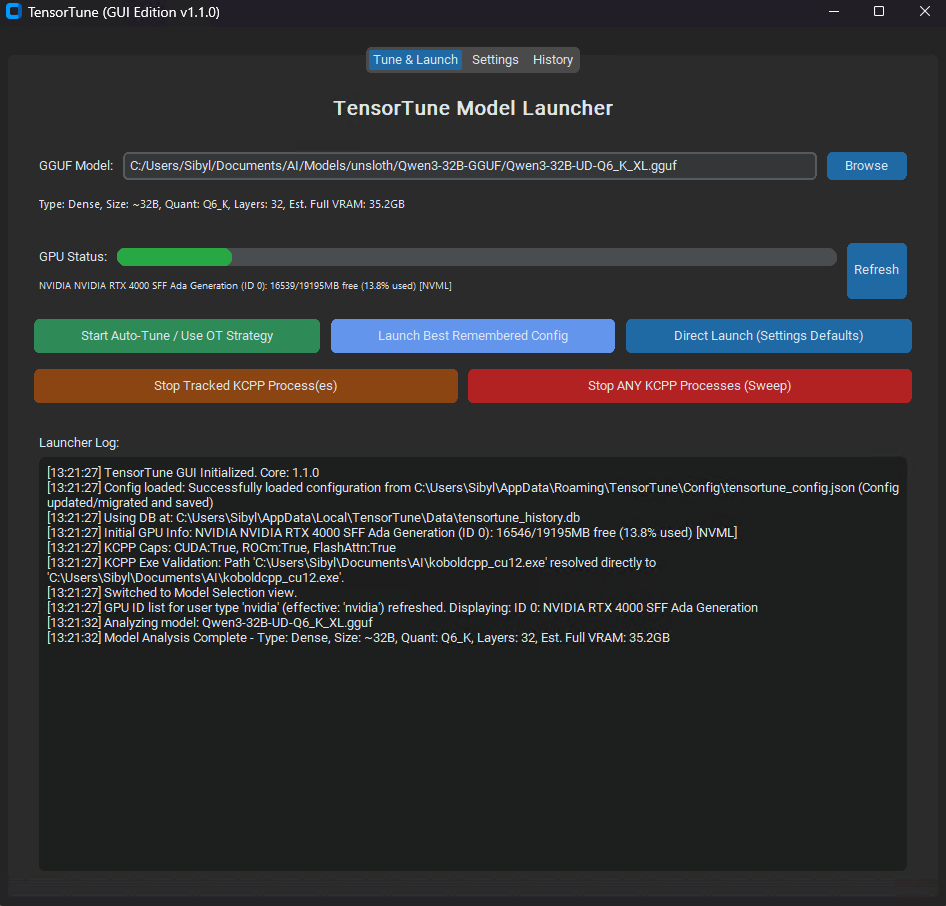
The application has three main tabs:
- Select your GGUF model.
- Monitor VRAM usage (reflects selected GPU and override settings).
- Choose a launch method:
- Auto-Tune / Use OT Strategy (recommended).
- Launch Best Remembered Config.
- Direct Launch with Settings Defaults.
- Stop any running KoboldCpp processes.
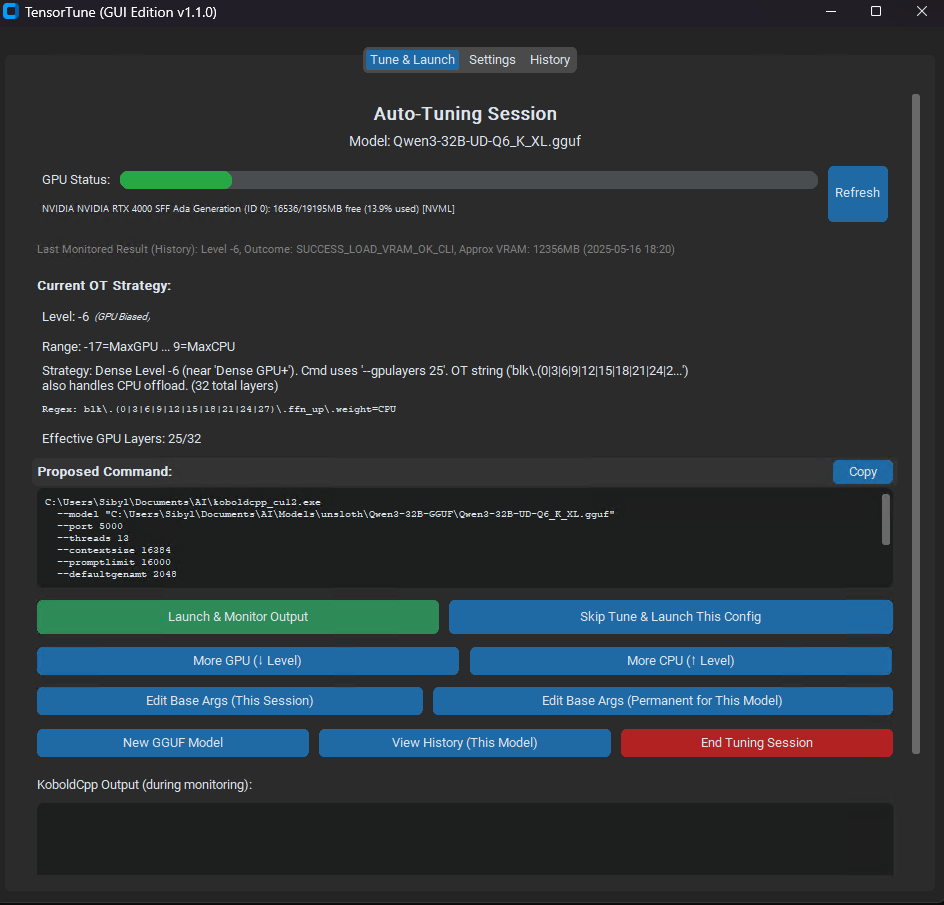
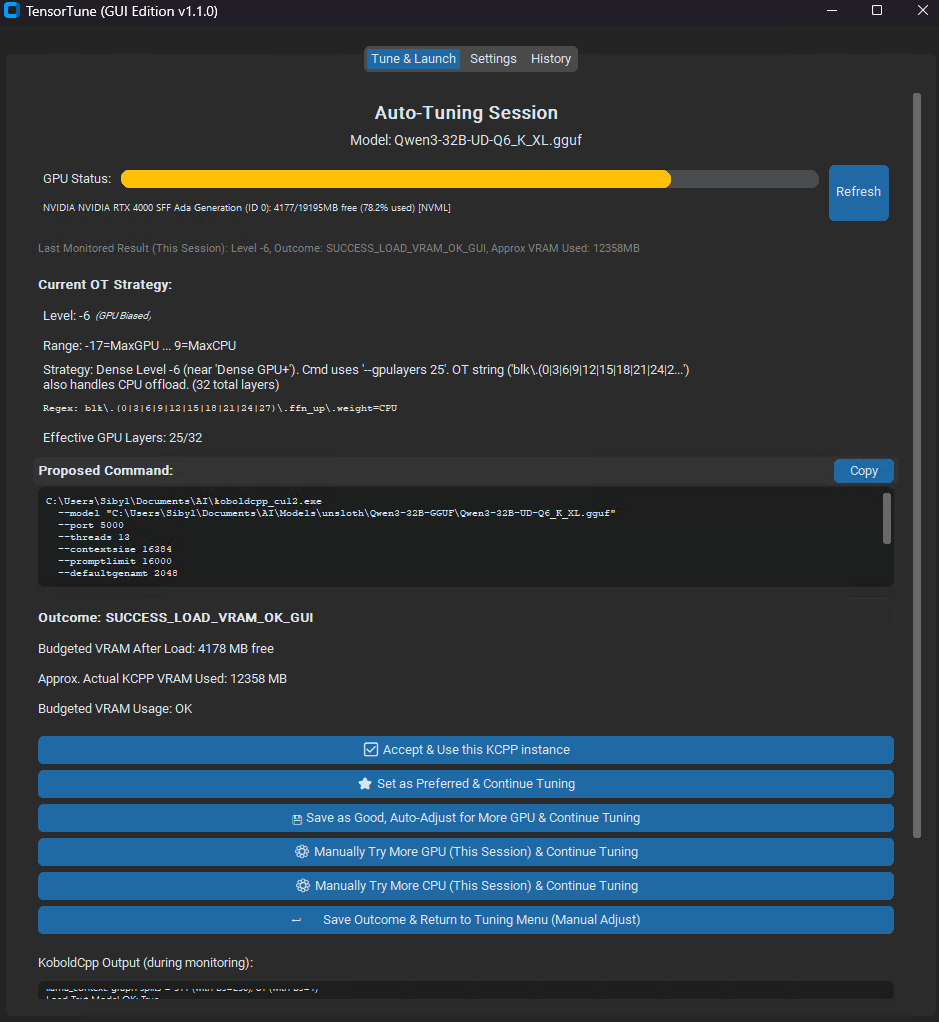
- View and adjust the current tensor offload strategy (OT Level).
- Launch and monitor KoboldCpp for testing. Output is displayed in the GUI.
- Make adjustments based on results (more GPU/CPU offload).
- Save successful configurations to the history database.
- Edit session or permanent base arguments for the model.
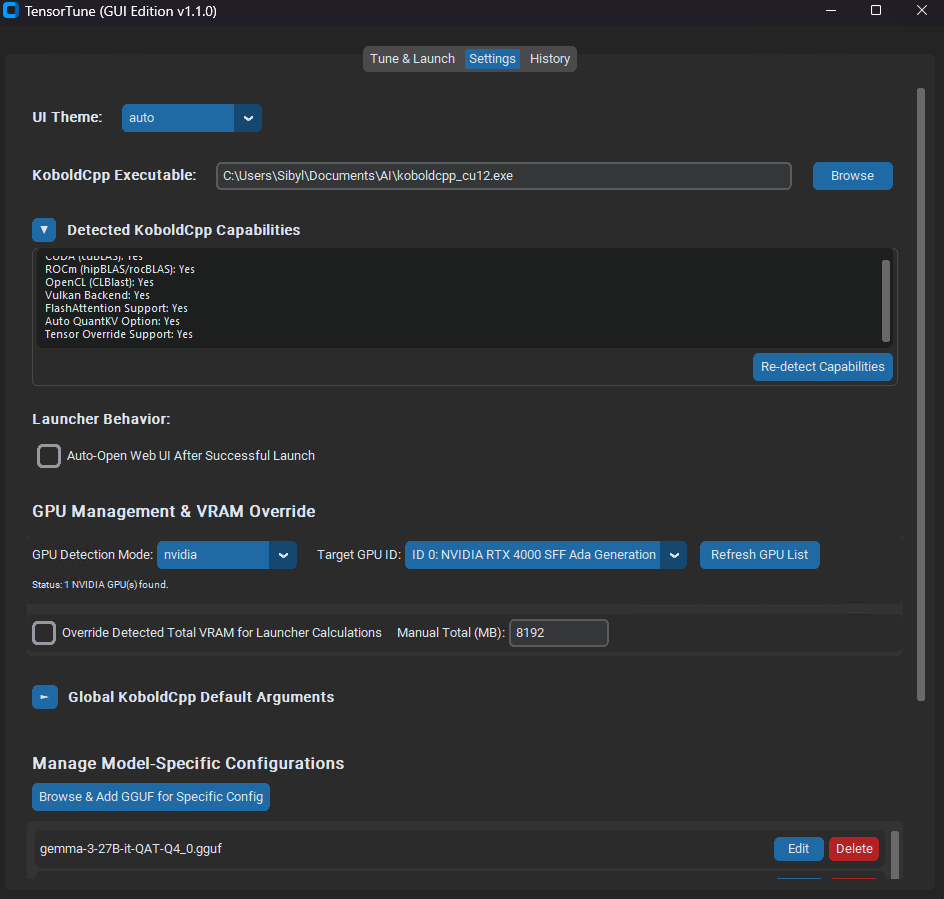
- Set KoboldCpp executable path.
- Configure global default arguments for KoboldCpp.
- GPU Management: Select target GPU type and ID for VRAM monitoring.
- VRAM Override: Manually set the total VRAM budget for launcher calculations.
- Choose UI theme (Dark/Light/System).
- Manage Model-Specific argument overrides.
- Export/Import TensorTune settings.
- Reset all settings to default.
- View past launch attempts.
- See which configurations worked best, filtered by model or globally.
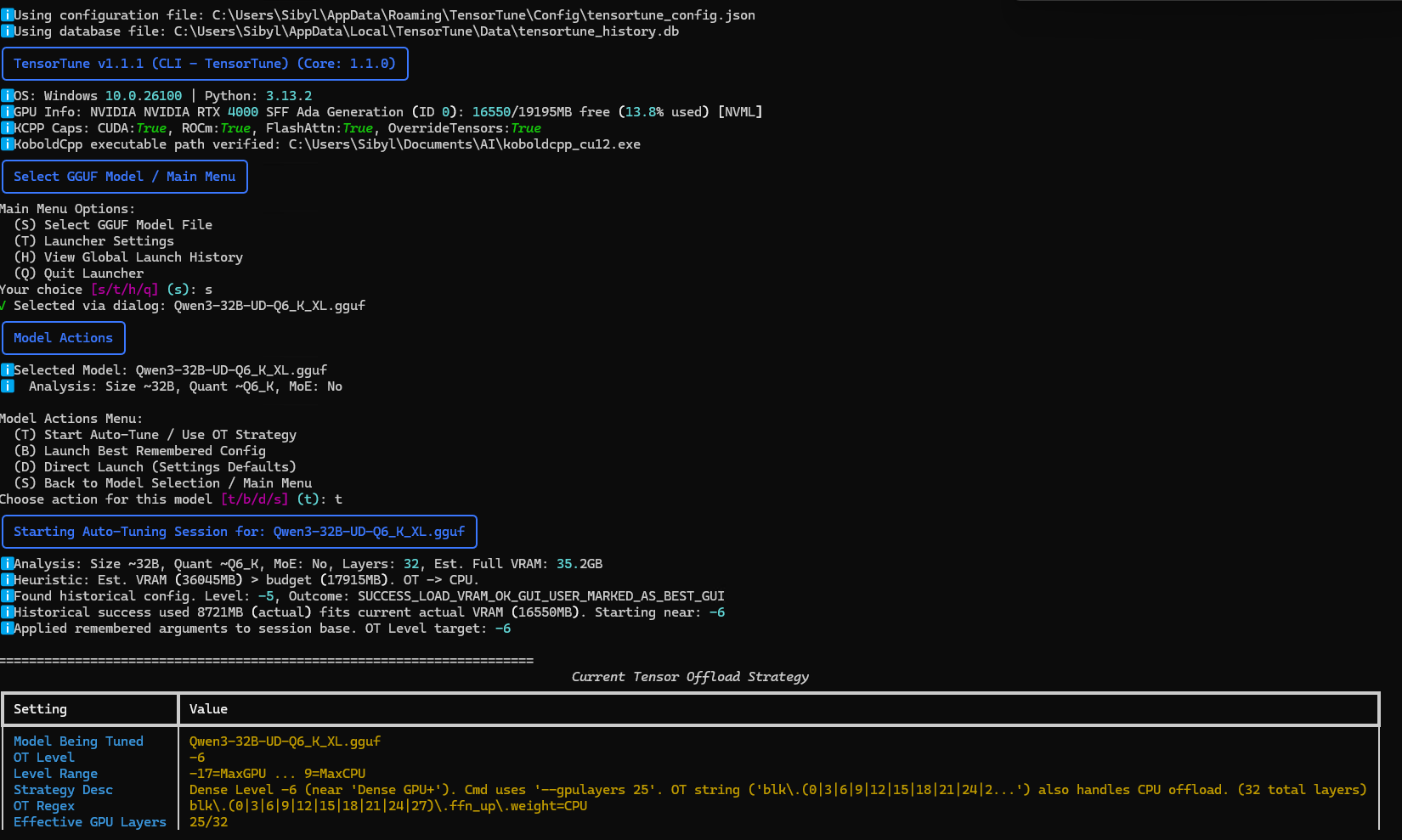
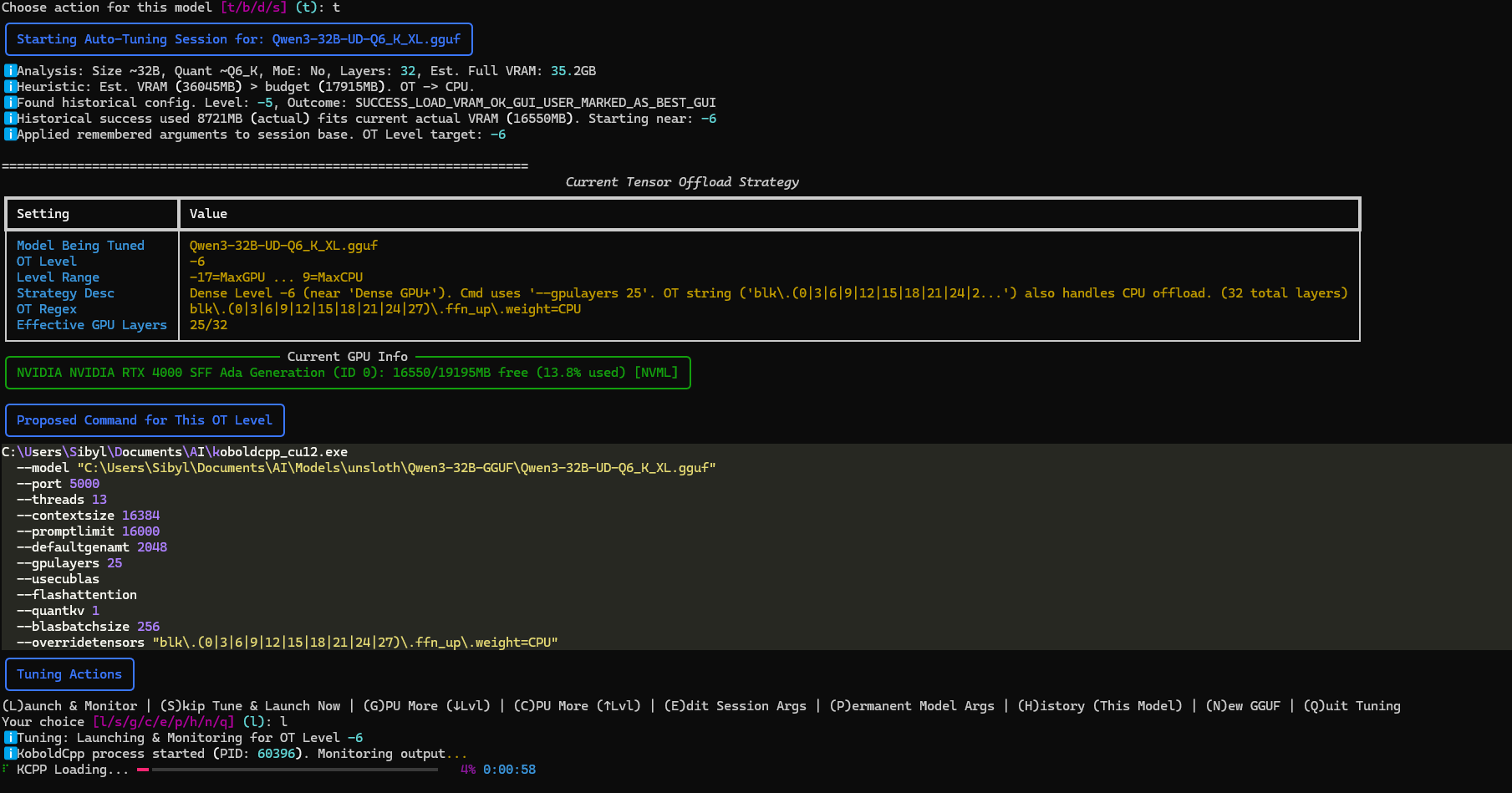
The CLI offers an interactive text-based interface with similar functionality:
- Select a GGUF model.
- Choose between auto-tuning or direct launch.
- Follow the prompts to adjust settings and launch KoboldCpp.
- View launch history and performance statistics.
- Access "Launcher Settings" (
tfrom main menu) to configure paths, GPU targets, VRAM overrides, default arguments, and toggle optional library startup warnings (woption).
Traditional layer offloading moves entire transformer layers between CPU and GPU. Tensor offloading is more granular - it selectively keeps specific tensors (like FFN up/down/gate) on CPU while keeping smaller, computation-intensive tensors (like attention) on GPU.
TensorTune helps you find the optimal balance by:
- Analyzing your model's characteristics (size, layers, MoE).
- Testing different offloading patterns (OT Levels).
- Monitoring VRAM usage and load success/failure.
- Remembering what works best for each model based on your hardware and available VRAM.
TensorTune can leverage additional Python libraries for more detailed hardware information. These are optional. If not installed, TensorTune will use fallback methods and provide relevant (less noisy) status messages.
- NVIDIA GPUs:
pynvml(installed byrequirements.txt) provides detailed VRAM and GPU stats. - AMD GPUs (Windows):
PyADLXcan provide enhanced details. This requires a manual C++ binding build. SeePYADLX_SETUP_GUIDE.mdfor instructions. - Intel GPUs (Arc/Xe):
pyze-l0(PyZE) offers specific Intel GPU metrics. Installation viapip install pyze-l0is needed along with up-to-date drivers. SeePYZE_SETUP_GUIDE.mdfor setup. - Windows General/Fallback: The
WMIPython package is used on Windows. SeeWMI_SETUP_GUIDE.mdfor details if issues arise. - Other useful libraries:
psutil(for system info),appdirs(for path management),rich(for CLI) are included inrequirements.txt.
- KoboldCpp Not Found: Set the correct path in the Settings tab (GUI) or Launcher Settings (CLI).
- Python Errors / Missing Modules: Ensure you've run
python tensortune_install.pyand installed dependencies fromrequirements.txt, preferably in a virtual environment. - VRAM Info Not Displaying / Library Status Warnings:
- TensorTune v1.1.1 now shows more context-aware warnings. If a library for a specific GPU vendor is missing, the warning is prioritized if that GPU type is detected.
- NVIDIA: Ensure
pynvmlis installed. - AMD (Windows): For PyADLX issues, refer to
PYADLX_SETUP_GUIDE.md. WMI is the fallback. - Intel (Arc/Xe): For PyZE issues, ensure
pyze-l0is installed and drivers are current. Refer toPYZE_SETUP_GUIDE.md. - WMI (Windows): Ensure
WMIPython package is installed. Refer toWMI_SETUP_GUIDE.mdfor WMI service troubleshooting. - In CLI, you can suppress non-critical optional library warnings via Settings (
tthenw).
- Auto-Tuning Fails: Try reducing context size or other memory-intensive settings. Manually adjust the OT Level towards more CPU offload.
This project was inspired by the tensor offloading technique shared on Reddit. TensorTune aims to make this optimization method accessible and manageable for more users.
This project is licensed under the MIT License - see the LICENSE.md file for details.
CLI Example 1
CLI Example 2
GUI Example 1 (Main Tab)
GUI Example 2 (Tuning Session)
GUI Example 3 (Settings Tab)
GUI Example 4 (History Tab)
We're always looking to improve TensorTune! Here are some of the features and enhancements we're considering for future releases:
-
🌟 Enhanced Model Support & Heuristics (for KoboldCpp & Llama.cpp):
- Continuously refine model analysis (e.g.,
num_layers, MoE detection) for new and popular model architectures, applicable to both backends. - Improve the initial OT Level heuristics (or equivalent logic for
llama.cpp) based on model characteristics and VRAM availability. - Add specific tuning profiles or known-good starting points for very popular models.
- Continuously refine model analysis (e.g.,
-
📊 Advanced VRAM & Performance Logging:
- Provide more detailed VRAM usage breakdowns.
- Offer more comprehensive performance logging during tuning sessions (e.g., prompt processing speed, token generation speed) for the active backend.
- Allow users to export tuning session logs/data.
-
🎛️ Finer-Grained Offloading Controls:
- Explore options for more granular control over tensor offloading beyond the current "OT Level" abstraction for KoboldCpp.
- Investigate similar granular controls if exposed by
llama.cpp's command-line interface.
-
🚀 Multi-GPU Support (for KoboldCpp & Llama.cpp):
- Investigation: Research how both KoboldCpp and
llama.cpphandle multi-GPU setups (e.g., layer distribution, tensor splitting like--tensor-splitinllama.cpp). - TensorTune Integration:
- Detect multiple GPUs of the same vendor.
- Allow users to specify which GPUs to use for the selected backend.
- Develop heuristics for distributing layers or tensors across multiple GPUs, tailored to each backend's capabilities.
- Note: This is a complex feature and depends heavily on the CLI capabilities of both KoboldCpp and
llama.cpp.
- Investigation: Research how both KoboldCpp and
-
🐑 Llama.cpp Support (as an Alternative Backend):
- Backend Selection: Allow users to choose between KoboldCpp and
llama.cpp(or compatible forks likeik_llama.cpp) as the target application for TensorTune to manage. - Capability Detection: Implement logic to detect
llama.cpp's features and command-line arguments relevant to offloading (e.g.,--n-gpu-layers,--tensor-split, quantization options). - Argument Generation: Adapt TensorTune's "OT Level" concept or develop new heuristics to generate optimal command-line arguments specifically for
llama.cpp, focusing on its methods for GPU offloading and CPU tensor placement. - Tuning & Monitoring: Extend the auto-tuning and monitoring features to work with
llama.cpp's output and behavior. - Separate Configuration: Potentially manage separate default arguments and executable paths for
llama.cpp.
- Backend Selection: Allow users to choose between KoboldCpp and
-
⚙️ User Experience & Polish:
- Continue to refine the GUI and CLI for ease of use, accommodating the choice of backend.
- Add more in-app help and tooltips, especially for backend-specific options.
- Improve error handling and user guidance for common issues with both backends.
We welcome community feedback and contributions to help shape the future of TensorTune!
TensorTune v1.2.0 is a major update focusing on giving users more precise control over GPU layer allocation, significantly improving the core logic for model analysis and tensor offloading strategies, and squashing numerous bugs for a smoother experience.
Key Changes in v1.2.0:
- Manual GPU Layer Control (GUI & CLI):
- Users can now manually specify the exact number of GPU layers to use during tuning sessions. This custom setting will override the automatic calculation derived from the OT (OverrideTensors) Level.
- An "Auto GPU Layers" checkbox (GUI) or option (CLI, implicitly) allows reverting to TensorTune's dynamic calculation.
- Rewritten Core Offloading Logic:
- Model Analysis (
analyze_filename): Completely redesigned for more accurate model family recognition (e.g., Gemma, Llama, Mixtral, Qwen, Dark Champion), better layer count detection, and improved handling of MoE models. Includes fallback mechanisms for models with unclear layer information. - GPU Layer Allocation (
get_gpu_layers_for_level): Entirely rebuilt to provide smoother, more predictable transitions between CPU/GPU bias levels. Eliminates sudden jumps in layer counts (e.g., from few to 999) and uses percentage-based scaling respectful of actual model architecture. - Offload Descriptions (
get_offload_description): Updated to provide clearer insights into the current tensor offloading strategy, including more accurate GPU layer counts and qualitative descriptions.
- Model Analysis (
- Improved Tuning Experience:
- Historical Preference: Configurations marked as "preferred" are now more reliably used when starting new tuning sessions for the same model.
- Consistent Levels: Fixed issues where tuning might not start at the exact level from a previous successful or preferred run.
- Last Run Info: Tuning sessions now better display information from the last relevant historical run.
- CLI Enhancements:
- Resolved issues with Rich library progress bar display during KCPP monitoring.
- Progress bar now automatically completes upon successful API detection, with a brief pause for visibility.
- Multiple bug fixes in the KCPP monitoring code for stability.
- GUI Stability & UX:
- Fixed
TclErrorthat could occur when closing dialogs. - Improved handling and display of model-specific configurations.
- Fixed
- General Bug Fixes & Refinements:
- Corrected handling of model-specific arguments and global settings interactions.
- Enhanced parameter estimation for large and MoE models.
- More robust selection of historical configurations.
This update aims to provide a more powerful, intuitive, and reliable experience for optimizing your KoboldCpp launches.
For a full list of changes, see the CHANGELOG.md.
Contributions are welcome! Please feel free to submit a Pull Request.