This repository contains three tightly‑coupled components that together provide an agentic spectrum analysis platform:
| Component | Language | Purpose |
|---|---|---|
| tensorrt_yolo_engine (tye) | C++ / CUDA | High‑performance TensorRT‑accelerated YOLO inference on radio spectrograms. |
| agent | Python | CLI / web UI that talks to the Spectrum Server, enriches commands with an LLM and forwards them to the engine. |
| spectrum_server | Python (FastAPI) | Exposes radio‑control, measurement and MCP (Model Context Protocol) endpoints. |
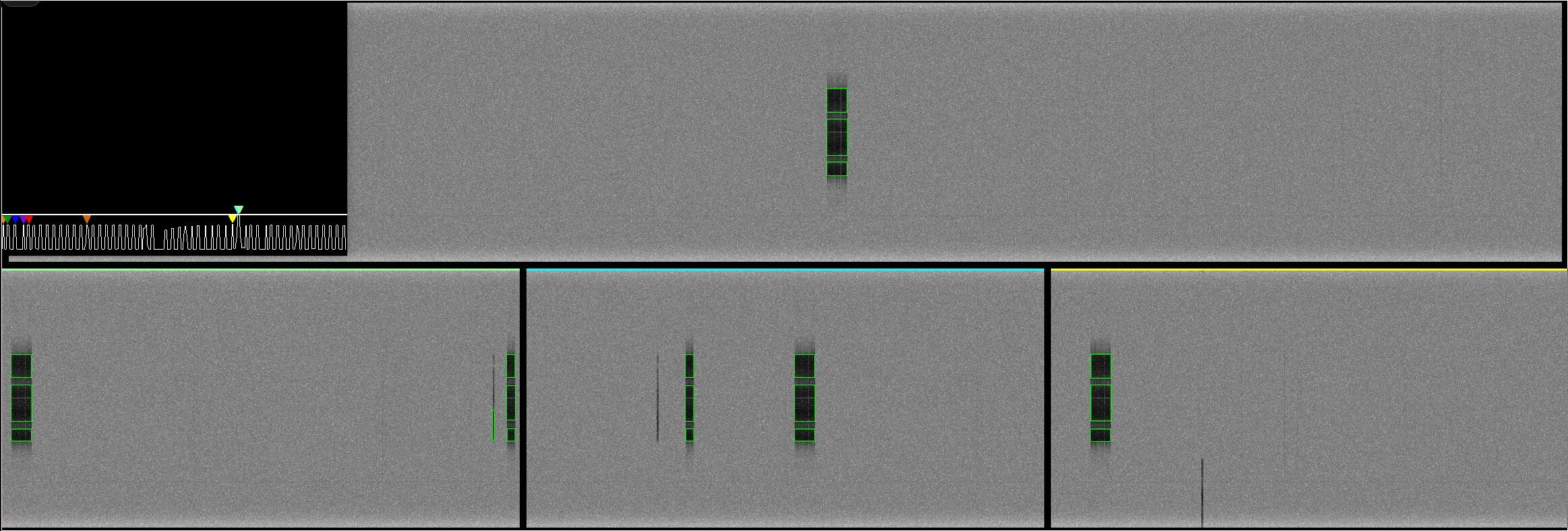
tensorrt_yolo_engine OpenGL GUI
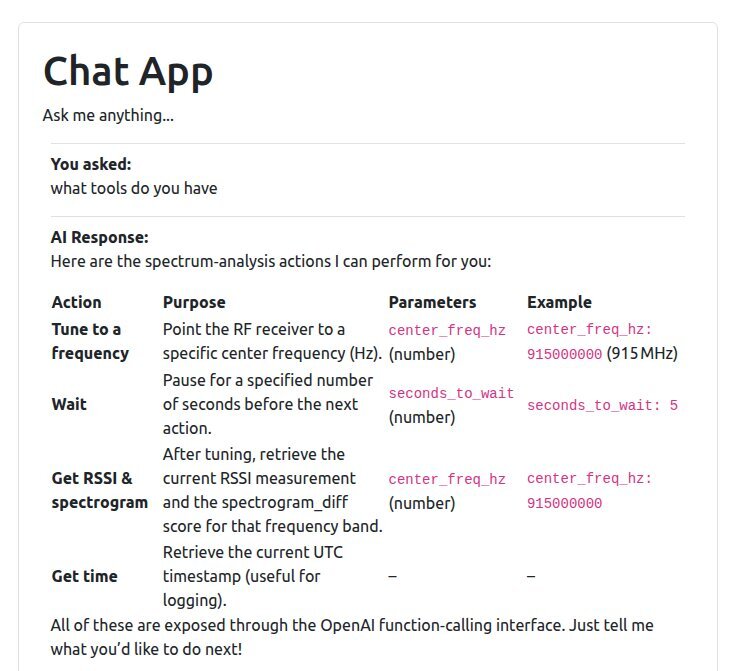
Prompt for tensorrt_yolo_engine interaction http://localhost:8001/
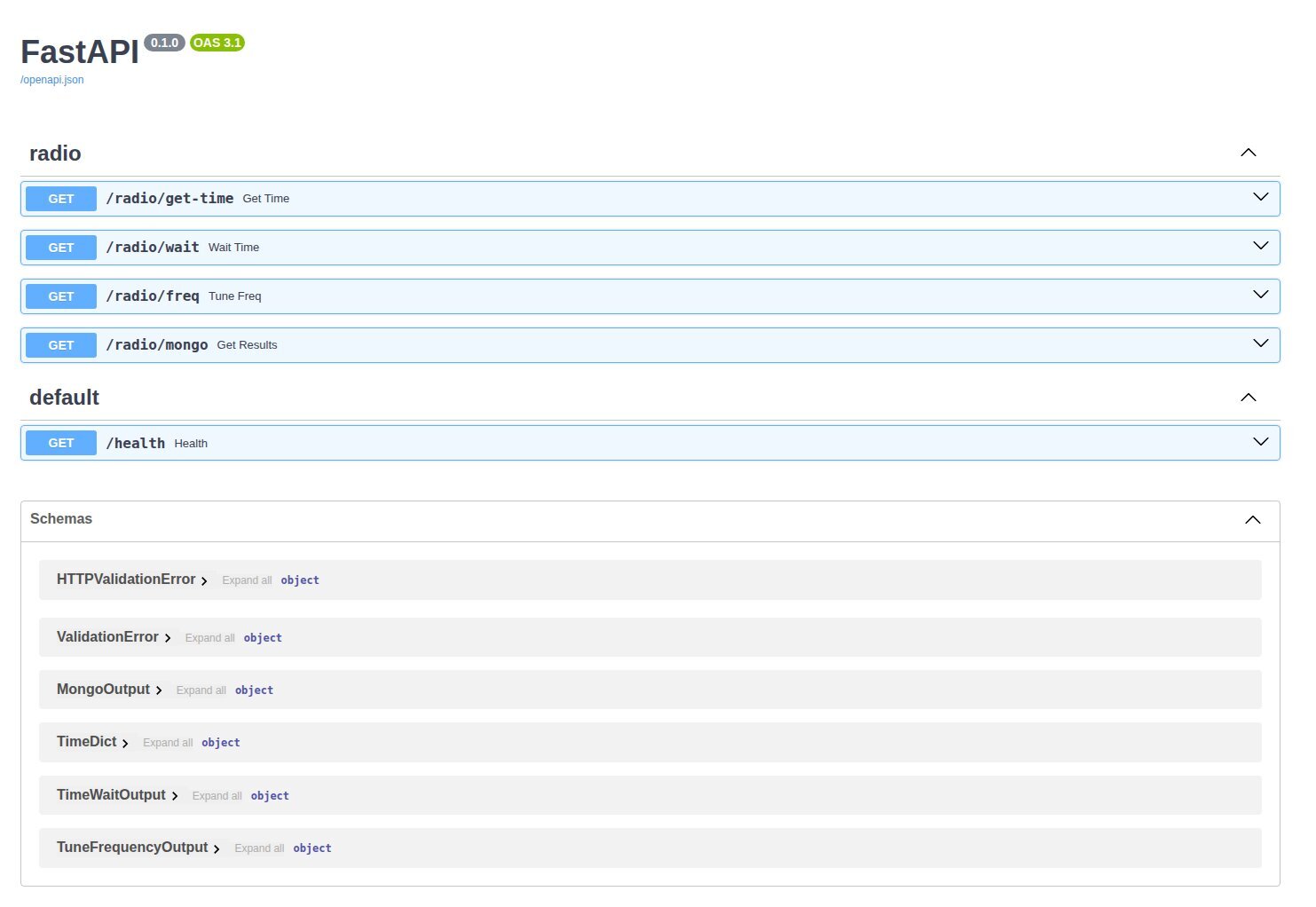
spectrum_server FastAPI http://localhost:8000/docs#/
The system can operate in stream mode (real‑time radio data) or file mode (processing SIGMF recordings). Detected events are visualised, stored in MongoDB and can be retuned on‑the‑fly via UDP advertisements.
.
├── agent/                     # Python agent package
│   └── src/agent/
│       └── settings.py        # Pydantic settings (env.example)
├── spectrum_server/           # FastAPI MCP server
│   └── pyproject.toml
├── tensorrt_yolo_engine/      # C++/CUDA TensorRT YOLO engine
│   ├── src/
│   │   ├── apps/
│   │   │   ├── tye_app/      # Main application (stream & file processors)
│   │   │   │   ├── tye_sp/   # Stream processor (radio input)
│   │   │   │   └── tye_fp/   # File processor (SIGMF)
│   │   │   └── tye_lib/      # Core library (buffer pool, spectrogram, ops, etc.)
│   │   ├── common/
│   │   │   └── cuda/         # CUDA kernels (Spectrogram, FFT Spectral Differnece, RSSI, etc.)
│   │   └── test/             # Unit‑test programs
│   ├── Dockerfile             # Build image with CUDA, TensorRT, OpenCV, MongoDB driver, etc.
│   ├── CMakeLists.txt
│   └── README.*               # Additional docs (dependencies, NATS, OpenCV, etc.)
├── env.example                # Template for environment variables used by agent & server
└── README.md                  # **This file**
| Item | Minimum version / notes |
|---|---|
| Docker | >= 24.0 (includes Docker Compose v2) |
| CUDA | 12.9 (installed in the Docker image) |
| TensorRT | Available in the NVIDIA CUDA base image |
| OpenCV | Built with CUDA support (see README_OPENCV) |
| MongoDB C++ driver | Built from source (README_MONGODB_CLIENT) |
| Python | >= 3.12 (for agent and spectrum_server) |
| FastAPI | fastapi[all] (installed via pyproject.toml) |
| LLM endpoint | Any OpenAI‑compatible API (e.g., vLLM) |
VLLM now uses the vllm/vllm-openai:latest contianer
- vllm serve has been set up to serve a pre-downloaded gpt-oss model so that every time the vllm container starts its not downloading the model each time
- To download the model first make sure git-lfs is installed and then clone the model: git clone https://huggingface.co/openai/gpt-oss-20b/
- Make a TIKTOKEN directory: mkdir TIKTOKEN
- cd to TIKTOKEN and wget https://openaipublic.blob.core.windows.net/encodings/cl100k_base.tiktoken && wget https://openaipublic.blob.core.windows.net/encodings/o200k_base.tiktoken
- cp o200k_base.tiktoken fb374d419588a4632f3f557e76b4b70aebbca790 && cp cl100k_base.tiktoken 9b5ad71b2ce5302211f9c61530b329a4922fc6a4
- edit the compose.yml to point to where the model and tiktoken files have been downloaded
The engine is compiled inside the provided Docker image.
# Build the Docker image (includes all dependencies)
docker build -t tensorrt_yolo_engine -f tensorrt_yolo_engine/Dockerfile .

# Run the build steps inside the container
docker run --rm -v $(pwd)/tensorrt_yolo_engine:/src/tensorrt_yolo_engine \
    tensorrt_yolo_engine \
    bash -c "cd /src/tensorrt_yolo_engine && ./do_run_cmake -t tye_sp -c /usr/local/cuda-12.9 && ./do_run_cmake -t tye_fp -c /usr/local/cuda-12.9 && cd build && make"
The resulting binaries are:
tye_sp– stream processor (radio input)tye_fp– file processor (SIGMF) (Beta feature under development)
Both binaries read configuration from command‑line arguments (see tye_sp.cpp / tye_fp.cpp for the full list).
A docker-compose.yml (not shown here) orchestrates three services:
- spectrum_server – built from
spectrum_server/pyproject.toml. - agent – runs the Python agent (
agent/src/agent). - tye_sp / tye_fp – compiled binaries from the engine image (mounted as a volume).
All services share the same .env file (derived from env.example).
# Edit env.example to match your environment (LLM key, MongoDB host, etc.)

# Start everything
docker compose up --build
The agent will start an interactive REPL; you can also import it as a module:
from agent.agent import AgentRunner
import asyncio

runner = AgentRunner(
    spectrum_server_mcp="http://spectrum_server:8000/llm",
    llm_api="http://vllm:8888/v1",
    llm_api_key="my-key",
    llm_model="gpt-oss-20b",
    llm_reasoning="high",
    system_prompt="You are an expert spectrum analyzer …",
    otel_exporter_otlp_endpoint=None,
    ca_chain="/etc/ssl/certs/ca-certificates.crt",
)

asyncio.run(runner.run())
The Prompt web UI is available at http://localhost:8001/.
The Swagger web UI is available at http://localhost:8000/docs#/.
| Variable | Description |
|---|---|
SPECTRUM_SERVER_MCP_SERVER |
Base URL of the Spectrum Server MCP (e.g., http://spectrum_server:8000) |
SPECTRUM_SERVER_MCP_ROUTE |
MCP route (/llm/mcp/) |
LLM_API_KEY |
API key for the LLM provider |
HOST_NAME |
Fully qualified host name (used by the agent) |
LLM_API |
LLM endpoint (e.g., http://vllm:8888/v1) |
LLM_MODEL |
Model name (e.g., gpt-oss-20b) |
CA_CHAIN |
Path to CA bundle for TLS |
REASONING_LEVEL |
LLM reasoning level (low, medium, high) |
SYSTEM_PROMPT |
System prompt injected into every LLM request |
- Start the services (docker compose build, docker compose up) (sometimes vllm times out downloading gpt-oss-20b, just run docker compose up until it succeeds.
- Download YOLO Model and convert to INT8 TensorRT Engine – trained_model_download.sh. ./model_pt_to_trt_engine_int8 11s.pt 1. Assumes you are running gpt-oss-20b on GPU 0 and tye_sp on GPU 1. System was tested with two Nvidia A10 GPU's.
- Stream mode – launch
tye_spinside the engine container; it will automatically advertise its ports, listen for retune commands, and forward detections to MongoDB. bin/tye_sp --gpus 1 --engine-path 11s.int8.gpu1.engine --engines-per-gpu 2 --database-port 27018 --sample-rate-mhz 50 --center-freq 2450000000 --pixel-min-val -100.0 --pixel-max-val -10.0 --boxes-plot --history-plot - Retune – use
tye_sp_ad_retuneortye_sp_ad_update_paramsto change radio parameters or detection thresholds on‑the‑fly. - Monitor – the agent’s web UI shows live spectrograms, detection boxes, and a spectral difference history plot.
All detections are stored in MongoDB (collection name includes a timestamp). The mongodb_sink class handles asynchronous inserts/updates.
Both the C++ engine and the Python services ship with unit tests.
# C++ tests (run inside the engine container)
cd tensorrt_yolo_engine/build && ctest   # or ./test_* executables

# Python tests
cd agent && pytest
cd spectrum_server && pytest