



This Cub3D project is more than a raycasting demo. It's a compact, full-featured engine built entirely in C, with puzzle mechanics, animation, and AI.
This project was created during our training at 42/Hive School, expanding on the base Cub3D assignment to build a dynamic first person view experience with additional storyline elements. Beyond fundamental raycasting (wall projections, sprite management...), this version introduces A pathfinding* for NPC behavior, animated doors, dialogue systems, inventory items, minimap HUD, and more.
By developing and optimizing core engine components like camera transformations, texture mapping, drawing pixel directly into the image and event-driven interactions, we improved our fluency in low-level C programming and performance tuning. The emphasis on modularity and clean code led to a well-structured codebase that's straightforward to maintain, debug, and extend.
Careful attention was given to error handling, project architecture, and portability across UNIX-like systems (using MiniLibX). The code is commented in a Doxygen-friendly style, ensuring each subsystem (rendering, AI, parsing, etc.) is easy to understand and integrate. In addition to satisfying the 42/Hive curriculum, Cub3D serves as a springboard for future C graphics or game development projects.
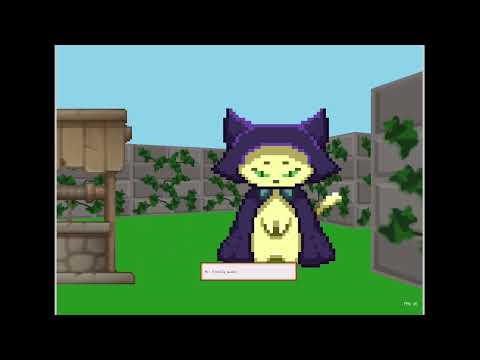
Click the image above to watch a short demo of the game in action on Youtube!
See Features
Cub3D is designed to deliver a polished Wolfenstein-like experience in C, featuring advanced systems, optimized performance, and a modular codebase.
🔦 Extended Raycasting Engine
Built upon the classic DDA raycasting technique, our engine supports:
- Textured wall rendering with proper depth and perspective
- Depth-based sprite rendering
- Efficient background drawing (floor and ceiling are pre-rendered once per frame)
- Fast Pixel Drawing, instead of relying on MiniLibX’s
put_pixel()(which is slow), we write directly to the image buffer. This avoids costly per-pixel function calls and drastically improves frame rates.
🤖 Astar Pathfinding for NPC AI
NPCs move intelligently using the A* algorithm:
- Dynamic chasing or random patrolling
- Doors are opened when blocking paths in follow mode
- Behaviors can be narrative-driven (chasing or following the player)
- The animation frame of NPCs is based on both their direction and the player’s view, creating a smoother and more reactive visual experience.
- Wall and door collisions are solid for both players and NPCs
- Out-of-bounds detection ensures a stable and bug-free experience
🚪 Interactive Objects & Doors
- Doors have open/closed states
- Some are locked behind specific items (e.g. keys)
- Objects in the world react based on proximity and player actions
🪶 Dialogue & Storyline Integration
- NPCs react dynamically to your presence, progress, and choices. Every playthrough may differ slightly based on what you trigger.
- A generic raycast utility function that lets any entity or the player check what's in its surroundings Combined with an
is_facing_targetfunction, it enables smooth and realistic interactions between player, entities and the environment.
🗺️ Minimap & HUD Overlays
- Real-time minimap showing player, NPCs, and static geometry
- HUD elements: FPS counter, status indicators, messages
🧪 Modular & Extensible
Each subsystem (rendering, pathfinding, entity management, story line...) is cleanly separated:
- Easy to maintain
- Easy to expand (new enemy types, NPCs or interaction systems)
📚 Clear Documentation & Structure
- Concise comments on all functions
- Larger systems include more detailed comments to explain flow
- Folder layout reflects logical system divisions for easier onboarding
Easy to install and play on linux and mac.
See Usage Guide
1. Clone the repository (with submodules)
git clone --recurse-submodules https://github.com/to0nsa/cub3d.gitIf you already cloned it without submodules, then run:
git submodule update --init --recursive2. Install dependencies A make setup rule is provided, it attempts to install essential packages on macOS or Debian/Ubuntu-based Linux to be able to compile the executable:
make setup
⚠️ Note: MiniLibX is not compatible with Windows. The project can only be built and run on macOS or Linux systems.
3. Build the project This compiles all sources as well as the correct MiniLibX (macOS or Linux).
make4. Clean and rebuild
Clean object files (and all sub-projects):
make cleanRemove everything (binary + object files):
make fcleanFull rebuild (equivalent to fclean then make):
make re5. Run Start the cub3D executable:
./cub3D maps/adventure.cubThis project is licensed under the MIT License.
You are free to use, modify, and distribute this code for academic, personal, or professional purposes. Attribution is appreciated but not required.
Developpers:
- 💻 GitHub: github.com/to0nsa
- 💻 GitHub: github.com/rinatiamaev
If you have any questions, suggestions, or feedback, feel free to reach out:
- 📧 Email: nicolas.lovis@hotmail.fr
You're also welcome to open an issue or leave a comment on the repository.