Unified Vulnerability Intelligence Platform
Features • Tech Stack • Getting Started • Installation • API Docs • Contributing • License


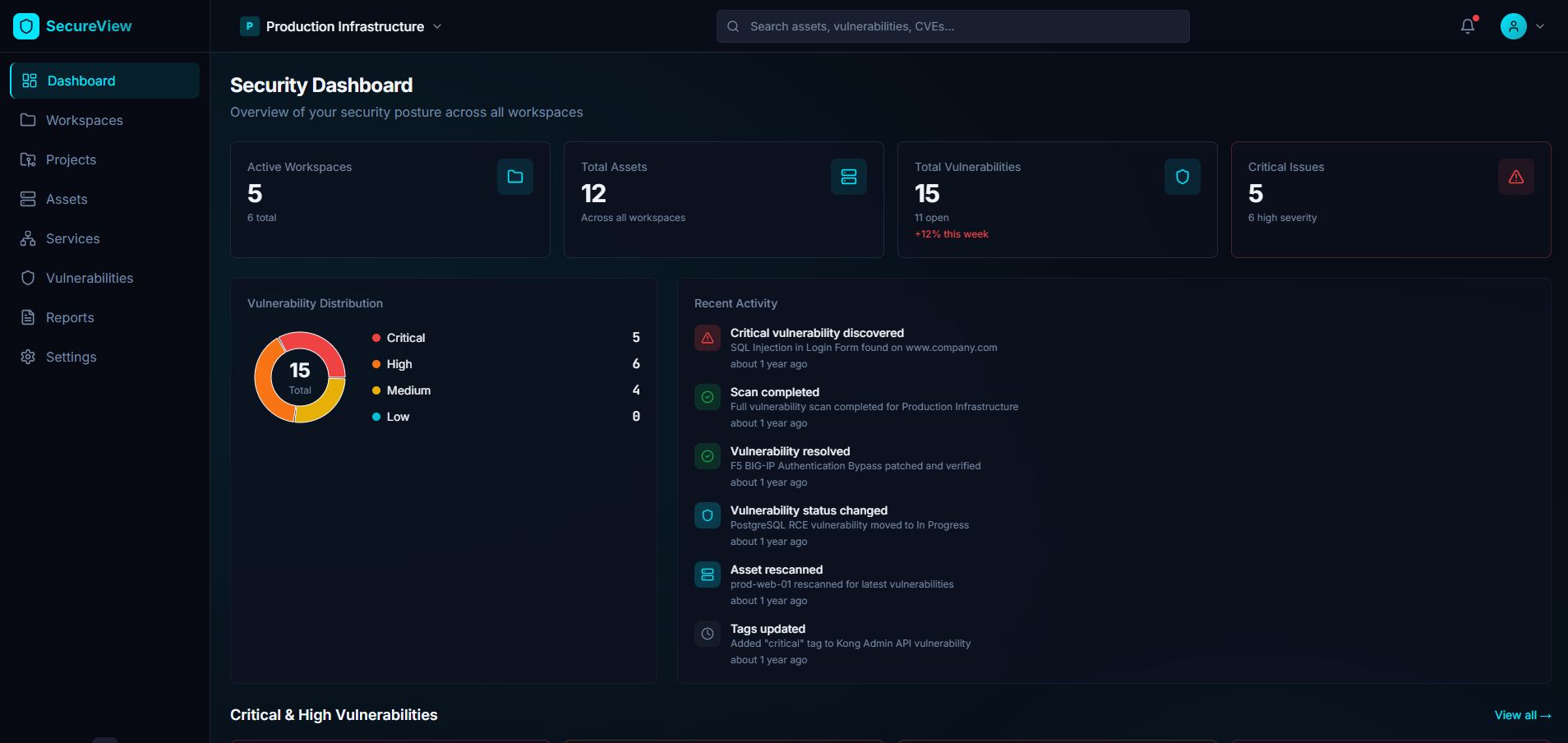
Fluxion is a comprehensive, open-source vulnerability intelligence and management platform designed to help security teams centralize, track, and manage their security operations. It provides a unified interface for managing assets, vulnerabilities, security reports, and knowledge base articles, making it easier for organizations to maintain a strong security posture.
- 🎯 Centralized Vulnerability Management - Track and manage vulnerabilities across your entire infrastructure
- 🏢 Multi-Workspace Support - Organize assets and vulnerabilities by workspaces and projects
- 📊 Comprehensive Reporting - Generate detailed security reports and analytics
- 🔍 Asset Discovery & Management - Track all your digital assets in one place
- 📚 Knowledge Base - Build and maintain your security knowledge repository
- 🔔 Activity Tracking - Monitor all security-related activities and changes
- 🔐 Enterprise Security - Built-in authentication and authorization
- 🚀 Modern Tech Stack - React + TypeScript frontend with FastAPI backend
-
Workspace & Project Management
- Create and manage multiple workspaces
- Organize projects within workspaces
- Role-based access control
-
Asset Management
- Track web applications, APIs, networks, and cloud resources
- Associate assets with projects and workspaces
- Monitor asset status and criticality
-
Vulnerability Management
- Comprehensive vulnerability tracking and classification
- CVSS scoring and severity assessment
- Vulnerability lifecycle management (Open, In Progress, Resolved, etc.)
- Link vulnerabilities to affected assets
-
Security Services
- Manage various security service types
- Track service status and completion
- Associate services with projects
-
Reporting & Analytics
- Generate detailed security reports
- Track report status and types
- Export capabilities for compliance
-
Knowledge Base
- Create and manage security articles
- Categorize knowledge by type and status
- Build institutional security knowledge
-
User Management
- User authentication and authorization
- Role-based permissions
- Telegram integration for notifications
- Framework: React 18 with TypeScript
- Build Tool: Vite 5
- UI Components: Radix UI primitives
- Styling: Tailwind CSS with custom theme
- Forms: React Hook Form with Zod validation
- Data Fetching: TanStack Query (React Query)
- Routing: React Router v6
- Charts: Recharts
- State Management: React Context API
- HTTP Client: Axios
- Framework: FastAPI
- Database: MySQL 8.0
- ORM: SQLModel
- Authentication: JWT with python-jose
- Password Hashing: Passlib with bcrypt
- Migrations: Alembic
- Validation: Pydantic
- ASGI Server: Uvicorn
- Containerization: Docker & Docker Compose
- Web Server: Nginx (for frontend)
- Database: MySQL 8.0
- Python Version: 3.11+
- Node Version: 18+
Before you begin, ensure you have the following installed:
- Docker (v20.10+) and Docker Compose (v2.0+)
- Node.js (v18+) and npm or bun
- Python (v3.11+)
- Git
The fastest way to get Fluxion up and running is using Docker Compose:
# Clone the repository
git clone https://github.com/TinyActive/fluxion.git
cd fluxion

# Edit docker-compose.yml to update configuration
# IMPORTANT: Change the following before running:
# 1. Database passwords (MYSQL_ROOT_PASSWORD, MYSQL_PASSWORD, DB_PASSWORD)
# 2. SECRET_KEY for JWT tokens
# 3. CORS_ORIGINS to match your domain/IP
# 4. VITE_API_BASE_URL in frontend build args
# 5. TELEGRAM_BOT_TOKEN (optional)

# Start all services
docker-compose up -d

# Wait for services to be healthy (may take 1-2 minutes)
docker-compose ps

# Run database migrations
docker-compose exec backend alembic upgrade head

# Create initial admin user (optional)
docker-compose exec backend python -m app.initial_data
The application will be available at:
- Frontend: http://localhost:8080
- Backend API: http://localhost:8000
- API Docs (Swagger): http://localhost:8000/api/v1/docs
- API Docs (ReDoc): http://localhost:8000/api/v1/redoc
-
Clone the repository
git clone https://github.com/TinyActive/fluxion cd fluxion -
Configure environment variables
Edit
docker-compose.ymlfile and update the following environment variables:Database service:
environment:
  MYSQL_ROOT_PASSWORD: your_secure_root_password  # Change this
  MYSQL_DATABASE: vuls_db
  MYSQL_USER: vuls_user
  MYSQL_PASSWORD: your_secure_password  # Change this
Backend service:
environment:
  DB_HOST: db
  DB_CONNECTION: mysql
  DB_PORT: 3306
  DB_DATABASE: vuls_db
  DB_USERNAME: vuls_user
  DB_PASSWORD: your_secure_password  # Must match MYSQL_PASSWORD
  SECRET_KEY: "your_random_secret_key_here"  # Change this
  CORS_ORIGINS: '["http://localhost:8080", "http://127.0.0.1:8080"]' # Change this
  TELEGRAM_BOT_TOKEN: "your_telegram_bot_token"  # Optional
  AUTH_ENABLED: "True"
Frontend service:
build:
  context: .
  dockerfile: Dockerfile
  args:
    - VITE_API_BASE_URL=http://localhost:8000/api/v1  # Update to your API URL
-
Start the services
docker-compose up -d
-
Navigate to backend directory
cd backend -
Create a virtual environment
python -m venv venv
source venv/bin/activate  # On Windows: venv\Scripts\activate
-
Install dependencies
pip install -r requirements.txt
-
Create
.envfileDB_CONNECTION=mysql DB_HOST=localhost DB_PORT=3306 DB_DATABASE=vuls_db DB_USERNAME=root DB_PASSWORD=your_password SECRET_KEY=your_secret_key TELEGRAM_BOT_TOKEN=optional_bot_token AUTH_ENABLED=True
-
Run migrations
alembic upgrade head
-
Start the backend server
uvicorn app.main:app --reload --host 0.0.0.0 --port 8000
-
Navigate to project root
cd .. # from backend directory
-
Install dependencies
npm install # or using bun bun install -
Configure API endpoint
Create
.envfile in the root directory:VITE_API_BASE_URL=http://localhost:8000/api/v1
-
Start the development server
npm run dev # or using bun bun run dev -
Access the application
Open your browser and navigate to
http://localhost:5173
If running locally without Docker, you'll need to set up MySQL:
# Install MySQL 8.0
# Create database
mysql -u root -p
CREATE DATABASE vuls_db CHARACTER SET utf8mb4 COLLATE utf8mb4_unicode_ci;
CREATE USER 'vuls_user'@'localhost' IDENTIFIED BY 'your_password';
GRANT ALL PRIVILEGES ON vuls_db.* TO 'vuls_user'@'localhost';
FLUSH PRIVILEGES;
EXIT;After initial setup, you can login with the default credentials:
- Username:
admin@vuls.local - Password:
admin
-
Create a Workspace
- Navigate to Workspaces page
- Click "New Workspace"
- Fill in workspace details
-
Add a Project
- Select a workspace
- Create a new project within the workspace
- Define project scope and objectives
-
Register Assets
- Navigate to Assets page
- Add web applications, APIs, or other digital assets
- Associate assets with projects
-
Track Vulnerabilities
- Create vulnerability entries
- Set severity and CVSS scores
- Link to affected assets
- Update status as remediation progresses
-
Generate Reports
- Navigate to Reports page
- Create comprehensive security reports
- Track report status and distribution
-
Build Knowledge Base
- Document security findings
- Create reusable security articles
- Categorize by type and status
Once the backend is running, you can explore the API using:
- Swagger UI: http://localhost:8000/api/v1/docs
- ReDoc: http://localhost:8000/api/v1/redoc
POST /api/v1/auth/login- User loginPOST /api/v1/auth/register- User registrationGET /api/v1/auth/me- Get current user
GET /api/v1/workspaces- List all workspacesPOST /api/v1/workspaces- Create workspaceGET /api/v1/workspaces/{id}- Get workspace detailsPUT /api/v1/workspaces/{id}- Update workspaceDELETE /api/v1/workspaces/{id}- Delete workspace
GET /api/v1/projects- List all projectsPOST /api/v1/projects- Create projectGET /api/v1/projects/{id}- Get project detailsPUT /api/v1/projects/{id}- Update projectDELETE /api/v1/projects/{id}- Delete project
GET /api/v1/assets- List all assetsPOST /api/v1/assets- Create assetGET /api/v1/assets/{id}- Get asset detailsPUT /api/v1/assets/{id}- Update assetDELETE /api/v1/assets/{id}- Delete asset
GET /api/v1/vulnerabilities- List all vulnerabilitiesPOST /api/v1/vulnerabilities- Create vulnerabilityGET /api/v1/vulnerabilities/{id}- Get vulnerability detailsPUT /api/v1/vulnerabilities/{id}- Update vulnerabilityDELETE /api/v1/vulnerabilities/{id}- Delete vulnerability
GET /api/v1/reports- List all reportsPOST /api/v1/reports- Create reportGET /api/v1/reports/{id}- Get report detailsPUT /api/v1/reports/{id}- Update reportDELETE /api/v1/reports/{id}- Delete report
GET /api/v1/knowledge-base- List all articlesPOST /api/v1/knowledge-base- Create articleGET /api/v1/knowledge-base/{id}- Get article detailsPUT /api/v1/knowledge-base/{id}- Update articleDELETE /api/v1/knowledge-base/{id}- Delete article
GET /api/v1/services- List all servicesPOST /api/v1/services- Create serviceGET /api/v1/services/{id}- Get service detailsPUT /api/v1/services/{id}- Update serviceDELETE /api/v1/services/{id}- Delete service
GET /api/v1/activities- List all activitiesGET /api/v1/activities/{id}- Get activity details
GET /api/v1/users- List all usersPOST /api/v1/users- Create userGET /api/v1/users/{id}- Get user detailsPUT /api/v1/users/{id}- Update userDELETE /api/v1/users/{id}- Delete user
fluxion/
├── backend/                    # FastAPI backend application
│   ├── alembic/               # Database migrations
│   │   └── versions/          # Migration files
│   ├── app/
│   │   ├── api/               # API routes
│   │   │   └── v1/
│   │   │       ├── endpoints/ # API endpoint modules
│   │   │       └── api.py     # API router
│   │   ├── core/              # Core configurations
│   │   │   ├── config.py      # Settings and config
│   │   │   └── security.py    # Security utilities
│   │   ├── db/                # Database configuration
│   │   ├── models/            # SQLModel database models
│   │   ├── schemas/           # Pydantic schemas
│   │   ├── services/          # Business logic
│   │   ├── main.py            # FastAPI application
│   │   └── initial_data.py    # Initial data seeding
│   ├── requirements.txt       # Python dependencies
│   └── Dockerfile             # Backend Docker config
├── src/                       # React frontend application
│   ├── components/            # React components
│   │   ├── ui/               # Reusable UI components
│   │   ├── assets/           # Asset-related components
│   │   ├── vulnerabilities/  # Vulnerability components
│   │   └── ...               # Other feature components
│   ├── pages/                # Page components
│   ├── hooks/                # Custom React hooks
│   ├── context/              # React Context providers
│   ├── data/                 # Data fetching functions
│   ├── lib/                  # Utility libraries
│   ├── services/             # Service layer
│   ├── utils/                # Utility functions
│   └── config/               # Frontend configuration
├── public/                    # Static assets
├── docker-compose.yml         # Docker Compose configuration
├── Dockerfile                 # Frontend Docker config
├── package.json               # Node.js dependencies
├── vite.config.ts            # Vite configuration
├── tailwind.config.ts        # Tailwind CSS configuration
├── tsconfig.json             # TypeScript configuration
└── README.md                 # This file
| Variable | Description | Default | Required |
|---|---|---|---|
DB_CONNECTION |
Database connection type | mysql |
Yes |
DB_HOST |
Database host | localhost |
Yes |
DB_PORT |
Database port | 3306 |
Yes |
DB_DATABASE |
Database name | vuls_db |
Yes |
DB_USERNAME |
Database username | - | Yes |
DB_PASSWORD |
Database password | - | Yes |
SECRET_KEY |
JWT secret key | - | Yes |
ALGORITHM |
JWT algorithm | HS256 |
No |
ACCESS_TOKEN_EXPIRE_MINUTES |
Token expiration time | 10080 (7 days) |
No |
TELEGRAM_BOT_TOKEN |
Telegram bot token for notifications | - | No |
AUTH_ENABLED |
Enable/disable authentication | True |
No |
CORS_ORIGINS |
Allowed CORS origins | [] |
No |
| Variable | Description | Default | Required |
|---|---|---|---|
VITE_API_BASE_URL |
Backend API URL | http://localhost:8000/api/v1 |
Yes |
We welcome contributions from the community! Here's how you can help:
- Fork the repository
- Create a feature branch
git checkout -b feature/amazing-feature
- Make your changes
- Commit your changes
git commit -m "Add some amazing feature" - Push to the branch
git push origin feature/amazing-feature
- Open a Pull Request
- Follow existing code style and conventions
- Write clear, descriptive commit messages
- Add tests for new features
- Update documentation as needed
- Ensure all tests pass before submitting PR
- Keep PRs focused on a single feature/fix
Please be respectful and constructive in all interactions. We're all here to build something great together!
If you discover a bug, please create an issue with:
- Clear description of the bug
- Steps to reproduce
- Expected vs actual behavior
- Screenshots (if applicable)
- Environment details (OS, browser, versions)
Have an idea for a new feature? We'd love to hear it!
- Check if the feature has already been requested
- Create a new issue with the "enhancement" label
- Describe the feature and its use case
- Explain why it would be valuable
MIT License

Copyright (c) 2024 Fluxion

Permission is hereby granted, free of charge, to any person obtaining a copy
of this software and associated documentation files (the "Software"), to deal
in the Software without restriction, including without limitation the rights
to use, copy, modify, merge, publish, distribute, sublicense, and/or sell
copies of the Software, and to permit persons to whom the Software is
furnished to do so, subject to the following conditions:

The above copyright notice and this permission notice shall be included in all
copies or substantial portions of the Software.

THE SOFTWARE IS PROVIDED "AS IS", WITHOUT WARRANTY OF ANY KIND, EXPRESS OR
IMPLIED, INCLUDING BUT NOT LIMITED TO THE WARRANTIES OF MERCHANTABILITY,
FITNESS FOR A PARTICULAR PURPOSE AND NONINFRINGEMENT. IN NO EVENT SHALL THE
AUTHORS OR COPYRIGHT HOLDERS BE LIABLE FOR ANY CLAIM, DAMAGES OR OTHER
LIABILITY, WHETHER IN AN ACTION OF CONTRACT, TORT OR OTHERWISE, ARISING FROM,
OUT OF OR IN CONNECTION WITH THE SOFTWARE OR THE USE OR OTHER DEALINGS IN THE
SOFTWARE.
- Documentation: https://github.com/TinyActive/fluxion/wiki
- Issues: https://github.com/TinyActive/fluxion/issues
- Discussions: https://github.com/TinyActive/fluxion/discussions
- Email: contact@tinyactive.net
- FastAPI - Modern web framework for building APIs
- React - JavaScript library for building user interfaces
- Radix UI - Unstyled, accessible components
- Tailwind CSS - Utility-first CSS framework
- shadcn/ui - Re-usable components built with Radix UI and Tailwind CSS
- TanStack Query - Powerful data synchronization for React
- All our contributors
- Role-based access control (RBAC)
- Integration with popular vulnerability scanners
- Advanced reporting and analytics
- Export to common formats (PDF, CSV, JSON)
- Vulnerability scanner integration (Nmap, Nessus, OpenVAS)
- Automated vulnerability correlation
- Slack/Discord/Teams integrations
- Real-time notifications and alerts
- API rate limiting
- Advanced search and filtering
- Compliance frameworks mapping (OWASP, CWE, NIST)
- Multi-language support (i18n)
🚧 Active Development - This project is under active development. Features and APIs may change.
- v1.0.0 (Current) - Initial release with core features
If you find this project useful, please consider giving it a star! ⭐
Made with ❤️ by the Fluxion Team
GitHub • Issues • Discussions