The Social Network API was created to allow for the creation, update, and edit of user data. This includes users thoughts and their reactions to other thoughts posted on the site. Users can also interact with other users by adding friends. When Users are deleted, all their thoughts and other data will also be deleted.
- Installation Steps
- Usage
- Built With
- File Structure
- Credits
- Resources Used to Complete Project
- License
- Recording
Before using this application you must install Node.js.
After installing Node.js, open the integrated terminal in VS Code and run npm install. This will install all of the dependencies listed in the package.json file.
Installation Resources:
- Before beginning make sure you have completed the Installation Steps
- Open integrated terminal in VS Code and type
node server.jsto begin the application - Open Insomnia
- Add
http://localhost:3001/apito the search bar - Based on the desired outcome:
- Select the method
GET,POST,PUT, orDELETE - Update the URL to included the desired route
- Select the method
The Social Network API consists of 4 GET routes:
- GET all Users -
/users - GET all Thoughts -
/thoughts - GET single User -
/users/:userId - GET single Thought -
/thoughts/:thoughtsId
The Social Network API consists of 4 POST routes:
-
POST new User -
/users-
Sample JSON Body:
{ "username": "jojorabbit", "email": "jojo.rabbit@gmail.com" } -
Email Validation: Users must have a valid email address before the user can be created. Email addresses are validated using the
/^([a-z0-9_\.-]+)@([\da-z\.-]+)\.([a-z\.]{2,6})$/regular expression. You will receive a500error if the email address is not valid.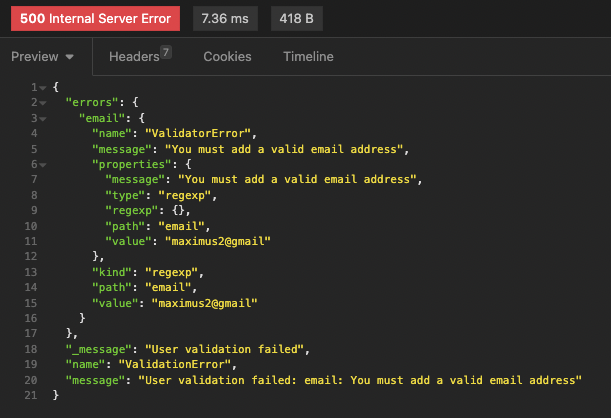
-
-
POST new Thought -
/thoughts- When you create a new thought, the new thought can be found in the collection of all thoughts and in the thought array for each user.
- Sample JSON Body:
{ "thoughtText": "Case Closed", "username": "jojorabbit", "userId": "640fd5f84494b938f5a1b1c0" } - Moment.js npm package is used to format the
createdAtdate
-
POST Reaction to a User Thought -
/thought/:thoughtId/reactions-
Sample JSON Body:
{ "reactionBody": "Is it thought?", "username": "captaink" } -
Moment.js npm package is used to format the
createdAtdate -
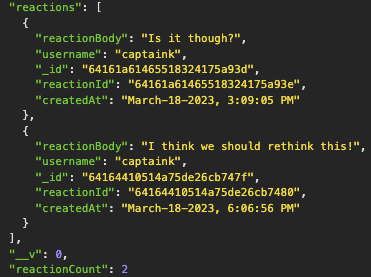
When adding a new Reaction to a Thought, the Reaction will be added to the reactions array and the Reaction count will be increased by
1.
-
-
POST User to User's Friends Array -
/users/:userId/friends/:friendsId-
When adding a new User to your friends array, your friends count will increase by
1and theuserIdwill be added to the friends array.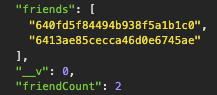
-
The Social Network API consists of 2 PUT (update) routes:
- PUT single User -
/users/:userId- Sample JSON Body:
{ "username": "jojo.rabbit", "email": "jojo.rabbit@gmail.com" }
- Sample JSON Body:
- PUT single Thought -
/thoughts/:thoughtId- Sample JSON Body:
{ "thoughtText": "Case Closed Again", "username": "jojorabbit", "userId": "640fd5f84494b938f5a1b1c0" }
- Sample JSON Body:
The Social Network API consists of 4 DELETE routes:
-
DELETE User and all User's Thoughts -
/users/:userId-
If you delete a single User you will also delete the Thoughts created by the User.
- User with thought in thought array:
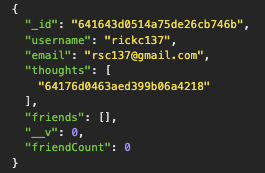
- Delete user:

- Notice thought associated with User that was deleted cannot be found following deletion of user.

-
-
DELETE Thought and DELETE from User's Thoughts Array -
/thoughts/:thoughtId- If you delete a single Thought, it will be removed from the Users thoughts array.
-
DELETE Reaction from User's Thought -
/thoughts/:thoughtId/reactions/:reactionId- When deleting a new friend from the users friends array, the friends array will be decreased by
1.
- When deleting a new friend from the users friends array, the friends array will be decreased by
-
DELETE USER from Friends Array -
/users/:userId/friends/:friendsId- When deleting a new friend from the users friends array, the friends array will be decreased by
1.
- When deleting a new friend from the users friends array, the friends array will be decreased by
- Express.js
- Mongoose
- Insomnia
- Moment.js
The directory for this application is as follows:
- config/ - connection file for the database
- controller/ - creates the controller for the api routes for Users and Thoughts
- models/ - creates the models for Users and Thoughts and the Schema for the Reaction
- routes/ - contains the routes
- Torre and Jason for helping me work through issues with a couple of my routes.
- Activity and Mini Project examples from Week 18 class respository
- Mongoose Documentation: Models
- Mongoose Documentation: Subdocuments
- Mongoose Documentation: Virtuals
- Mongoose Documentation: SchemaTypes
- Introduction to Mongoose for MongoDB
- Moment.js
