Examples
A catalog of common layer and wall setups.
- Creating a New PolyWall Instance
- Creating and Indexing Layers
- Configuring Layers
- Creating Layers Fast
- Regularized Layers
- Proportionalized Layers
- Creating Walls
- Overriding
cWall() - Freezing Parameters
- Defining Parameters
- The SPL Effect
Create a new instance of PolyWall and assign it to a variable.
PW = PolyWall:new()The rest of the examples in this page will use the variable
PW.
The code in one example does not necessarily have any relation to the previous example or any other example.
Add a layer with index 0 to the root layer (PW).
PW:add(0)Index layer 0.
PW[0]
-- OR
PW.L[0] -- Not recommended
Add a layer with index 1 to layer 0 (the one we just created).
PW[0]:add(1)Index layer 0, 1.
PW[0][1]Set root layer speed to 30.
PW.speed:set(30)Set the color of all verticies of layer 2 to red.
PW[2].vertex:chset(255, 0, 0, 255)Set the cartesian transformation of vertex 0 of layer 4.
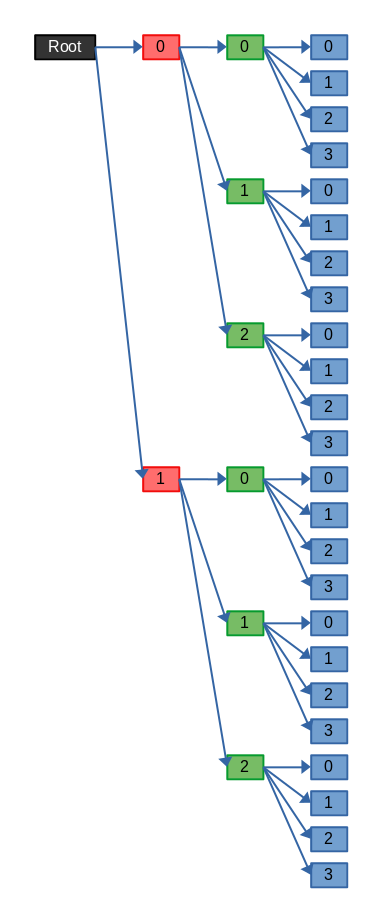
PW[4].vertex[0].cart:set(function(x, y) return x * 0.5, y * 0.5 end)Recursively create layers using the template function.
PW:template(0, 2)
PW:template(1, 3)
PW:template(2, 4)
This creates 2 layers on the root layer. Then it creates 3 layers on each of those 2 layers for a total of 6 new layers. Then on each of those 6 layers, 4 new layers are created for a total of 24 new layers.
Resulting structure:
Set up a regular hexagon on the root layer.
PW:template(0, 6)
PW:regularize(0, 6)
Set up regular triangles on all sublayers 2 layers down from the root layer with an angle offset of -0.25 radians.
PW:template(2, 3)
PW:regularize(2, 3, -0.25)Set up an irregular pentagon on layer 2 with one side's arc length half as long as the others and an angle offset of 0.5 radians.
PW[2]:template(0, 5)
PW[2]:proportionalize(0, 0.5, 2, 2, 2, 2, 1) -- Ratio of 2:2:2:2:1Create a standard wall on layer 2
PW[2]:sWall()Create a non-solid wall on every layer 2 layers down from layer 3.
PW[3]:nWall(2)Overriding the default cWall() function will change it's behavior in all patterns that use it. This is desireable if you want to use PolyWalls with normal pattern functions without having to rewrite all of the functions.
Create a new cWall() function at the initialization of a level script to override it's functionality.
Remember to use
t_eval()for non-timeline functions.
function cWall(side)
    t_eval(([[
        PW[%d]:sWall()
    ]]):format(side % l_getSides()))
end
PolyWall has no "sides" system like the previous version. Each "side" is it's own layer that must be indexed to create walls on specific sides.
To prevent indexing out of bounds and restore the cyclic nature of side indicies, use a modulo operator (
%) with the corresponding correct side count.
When a level increments, none of the walls currently around the player suddenly speed up. All walls remain at the same speed until new walls are spawned. However, PolyWall dynamically calculates its speed values which means that walls will instantly speed up the moment a level increments. To prevent this from happening, parameters can be frozen and updated manually:
function onLoad()
    -- Freeze the speed parameter to prevent dynamic updating.
    PW.speed:freeze()
end

function onIncrement()
    t_waitS(2) -- Wait until all existing walls have despawned.
    t_eval([[PW.speed:freeze()]]) -- Reset the speed parameter.
end
Defining parameters allows the library to dynamically get values by customizing the get functions. This is most effective when used with values that change often. For example:
Define the thickness parameter of layer 0 to the level's pulse.
PW[0].thickness:define(function()
    return l_getPulse()
end)WARNING: This example uses unsupported behavior!
The effect that Super Probably Level uses is free axis scaling. Instead of scaling walls along the usual x or y axis, the level scales along an axis that constantly rotates. This is achieved with transformations by rotating all walls to a certain angle, scaling like usual along the x or y axis, then rotating everything back.
Polar transfromation:
PW.vertex:polset(function(r, a, rd, _)
    -- Rotate everything backwards by <rd>.
    return r, a - rd
end)
Cartesian transformation:
PW.vertex:cartset(function(x, y, rd, scl)
    -- Scale along the x axis by <scl> and rotate everything forward again by <rd>.
    return rotate2DPointAroundOrigin(rd, x * scl, y)
end)
Remember that polar and cartesian transformations are only applied once each per wall vertex.