
Mass Asset Retrieval Platform
- Introduction
- Key Storage and Job Handling Features
- The Challenge
- StreamVault Solution Architecture
- Resource Requirements
- Deployment Options
- Service Architecture
- Archive Delivery and Access
- Configuration Reference
- API Reference
- Performance Benchmarks
- Security Considerations
- Monitoring and Administration
- Screenshots
- Contributing
- License
- Acknowledgements
StreamVault is a high-performance S3 bulk downloader designed to overcome a critical limitation in the AWS S3 ecosystem: the inability to efficiently download entire folder hierarchies containing numerous files. While AWS's own interface is optimized for individual file operations, StreamVault delivers a scalable, memory-efficient approach to bulk downloads through advanced queuing systems and streaming architecture.
- S3-Based Archive Storage: All generated ZIP archives are stored directly in your S3 bucket at the destination path configured in your
.envfile. - Intelligent Job Caching: If multiple users request the same folder, StreamVault returns the existing archive URL instead of regenerating the archive, improving efficiency and reducing processing overhead.
- Configurable Cache Expiry: Job results are maintained for a configurable period (default: 1 hour) before being expired from the system.
- Resource-Efficient Processing: By leveraging S3 for storage and Redis for job state management, the system maintains minimal local resource usage.
AWS S3's native interface presents significant challenges when managing bulk operations:
- No Native Folder Downloads: The S3 Console doesn't support downloading entire folder structures
- Limited Batch Operations: Managing thousands of files becomes unwieldy through the standard interface
- Technical Barriers: Alternative solutions require AWS CLI proficiency or custom API development
- Resource Consumption: Naive implementations risk memory exhaustion and connection timeouts
StreamVault employs a sophisticated, microservices-based architecture to process bulk S3 downloads efficiently:
- Intelligent Queue Management: Dynamic job routing based on size classification
- Memory-Optimized Streaming Pipeline: Zero buffer copying for minimal memory footprint
- On-the-fly Archive Creation: Progressive ZIP generation without requiring full local storage
- Adaptive Throttling System: Real-time resource monitoring with automatic flow control
- Secure Delivery Mechanism: Configurable authentication for download access
| Feature | Specification |
|---|---|
| Maximum Download Size | Tested up to 50GB (theoretically unlimited) |
| File Count Capacity | Successfully processed 25,000+ files in testing |
| Memory Efficiency | Constant memory usage regardless of download size |
| Throughput | Limited primarily by network bandwidth |
| Concurrency | Configurable parallel processing (default: 2 workers) |
StreamVault's resource consumption scales efficiently due to its streaming architecture:
| Resource | Minimum | Recommended | Production |
|---|---|---|---|
| CPU | 2 cores | 4 cores | 8+ cores |
| RAM | 2GB | 4GB | 8GB+ |
| Storage | 1GB + temp space | 2GB + temp space | 5GB + temp space |
| Network | 100Mbps | 1Gbps | 10Gbps |
StreamVault implements advanced memory safeguards:
- Heap Monitoring: Automatic throttling when heap usage exceeds 512MB
- Streaming Processing: Constant memory footprint regardless of file size
- Garbage Collection Optimization: Strategic memory release during processing
- CPU Scaling: Additional cores directly improve parallel processing capability
- Memory Scaling: Primarily affects concurrent job capacity rather than individual job performance
- Network Scaling: Direct impact on overall throughput and download speed
# Clone the repository
git clone https://github.com/Slacky300/StreamVault.git
cd StreamVault

# Configure environment variables
cp .env.example .env
# Edit .env with your AWS credentials and settings

# Deploy with Docker Compose
docker-compose up -d# Clone the repository
git clone https://github.com/Slacky300/StreamVault.git
cd StreamVault
# Install dependencies
npm install
# Configure environment variables
cp .env.example .env
# Edit .env with your AWS credentials and settings
# Build the project
npm run build
# Start components in separate terminals
npm run start # API Server
npm run worker # Processing Workers
npm run dashboard # Admin Dashboard (optional)StreamVault implements a robust microservices architecture:
View on Eraser
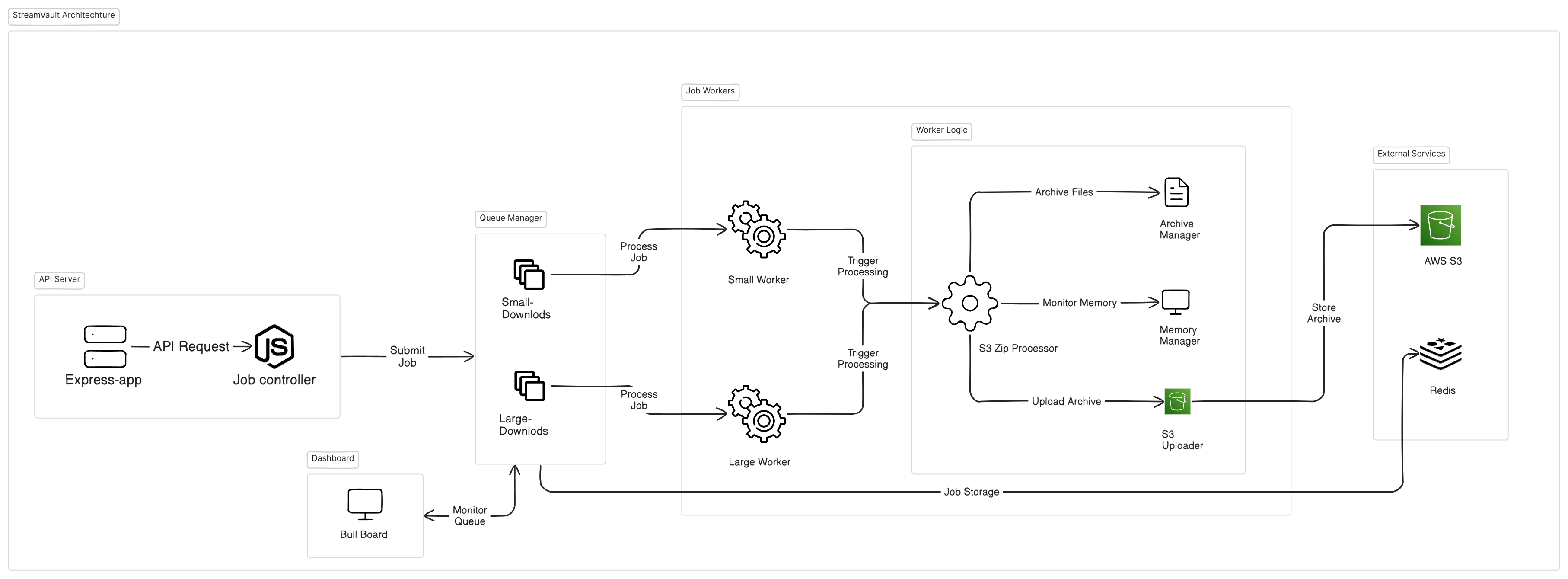
- API Server: Handles client requests, job validation, and queue management
- Redis Queue: Distributes workload and maintains job state
- Worker Nodes: Execute download and archival operations with resource management
- Monitoring Dashboard: Provides real-time visibility into system operations
StreamVault offers flexible options for accessing completed archives:
- Direct S3 Delivery: Archives stored directly in your S3 bucket
- Configurable Storage Path: Custom prefix for organizational control
- Metadata Tagging: Optional tagging for archive categorization
- Pre-signed URLs: Time-limited access links for private buckets
- Direct S3 Paths: For integration with existing authentication systems
- Public Access: Optional public bucket configuration for simpler workflows
Comprehensive configuration options via environment variables:
# Service Configuration
NODE_ENV=development             # Environment mode (development/production)
PORT=3000                       # API service port

REDIS_HOST=redis # Redis server host
REDIS_PORT=6379 # Redis server port
REDIS_CONNECTION_TIMEOUT=60000 # Redis connection timeout in ms
REDIS_PASSWORD=your_redis_password # Redis password (if applicable)

# AWS Configuration
AWS_REGION=us-east-1 # AWS region
AWS_ACCESS_KEY_ID=your_key # AWS credentials
AWS_SECRET_ACCESS_KEY=your_secret # AWS credentials
AWS_BUCKET_NAME=your_bucket_name # S3 bucket name
AWS_S3_EXPORT_DESTINATION_PATH=your_export_path # S3 export path
AWS_S3_GENERATE_PRESIGNED_URL=true # Generate pre-signed URLs for downloads
AWS_S3_PRESIGNED_URL_EXPIRATION=3600 # Pre-signed URL expiration time in seconds

# CORS Configuration
CORS_ALLOWED_ORIGINS=http://localhost:3000,http://localhost:5173,http://localhost:8080 # CORS allowed origins

# Dashboard Configuration
ENABLE_DASHBOARD=true # Enable/disable the dashboard
DASHBOARD_PORT=3001 # Dashboard port
DASHBOARD_USER=admin # Dashboard username
DASHBOARD_PASSWORD=admin123 # Dashboard password

# Worker Configuration
WORKER_CONCURRENCY=2 # Number of concurrent workers
LARGE_WORKER_CONCURRENCY=1 # Number of concurrent workers for large jobs

# Download Parameters
DOWNLOAD_THRESHOLD_IN_GB=5      # Large/small queue threshold
MAX_HEAP_USAGE_MB=512           # Memory pressure threshold
JOB_ATTEMPTS=3 # Retry attempts for failed jobsPOST /create-job
Request body:
{
  "s3Key": "path/to/s3/folder"
}
Response:
{
  "message": "Small download job created successfully",
  "s3Key": "__outputs/",
  "sizeOfFolder": "320.40 MB",
  "thresholdValueInGB": 10,
  "createdAt": "04/29/2025 01:54:21 PM",
  "jobId": "__outputs_-small",
  "isLargeDownload": false
}GET /job/:jobId
Response:
{
  "message": "Job details retrieved successfully",
  "jobDetails": {
    "jobId": "job_14a72b9e3d",
    "name": "large-download",
    "data": {
      "s3Key": "path/to/s3/folder",
      "sizeOfFolder": 16492674825,
      "progress": 78,
      "state": "active"
    }
  }
}{
"downloadUrl": "https://bucket-name.s3.bucket-region.amazonaws.com/path-of-archive",
"status": "completed",
"totalSize": "320.40 MB",
"noOfFiles": 1227
}| Scenario | Files | Total Size | Processing Time* | Peak Memory | Testing Status |
|---|---|---|---|---|---|
| Small Archive | 100 | 500MB | 45s | 220MB | ✓ Tested |
| Medium Archive | 1,000 | 5GB | 8m 20s | 340MB | ✓ Tested |
| Large Archive | 25,000 | 50GB | 1h 45m | 480MB | ✓ Tested |
| Enterprise Scenario | 100,000+ | 500GB+ | ~18h** | 510MB** |
*Processing times depend on network bandwidth and S3 throttling limits
**Projected values based on small-to-large scale testing; not yet verified with actual 500GB+ workloads
All benchmarks were conducted on an AWS t2.large instance with the following specifications:
- CPU: 2 vCPUs
- RAM: 8GB
- Network: Up to 1Gbps (burst capacity)
This demonstrates that StreamVault can handle substantial workloads even on moderately-sized infrastructure, making it suitable for teams with various resource constraints.
- AWS Credentials: Least-privilege IAM roles recommended
- Pre-signed URLs: Configurable expiration for secure sharing
- Authentication: Admin dashboard protected by configurable credentials
- Network Security: All S3 operations use TLS encryption
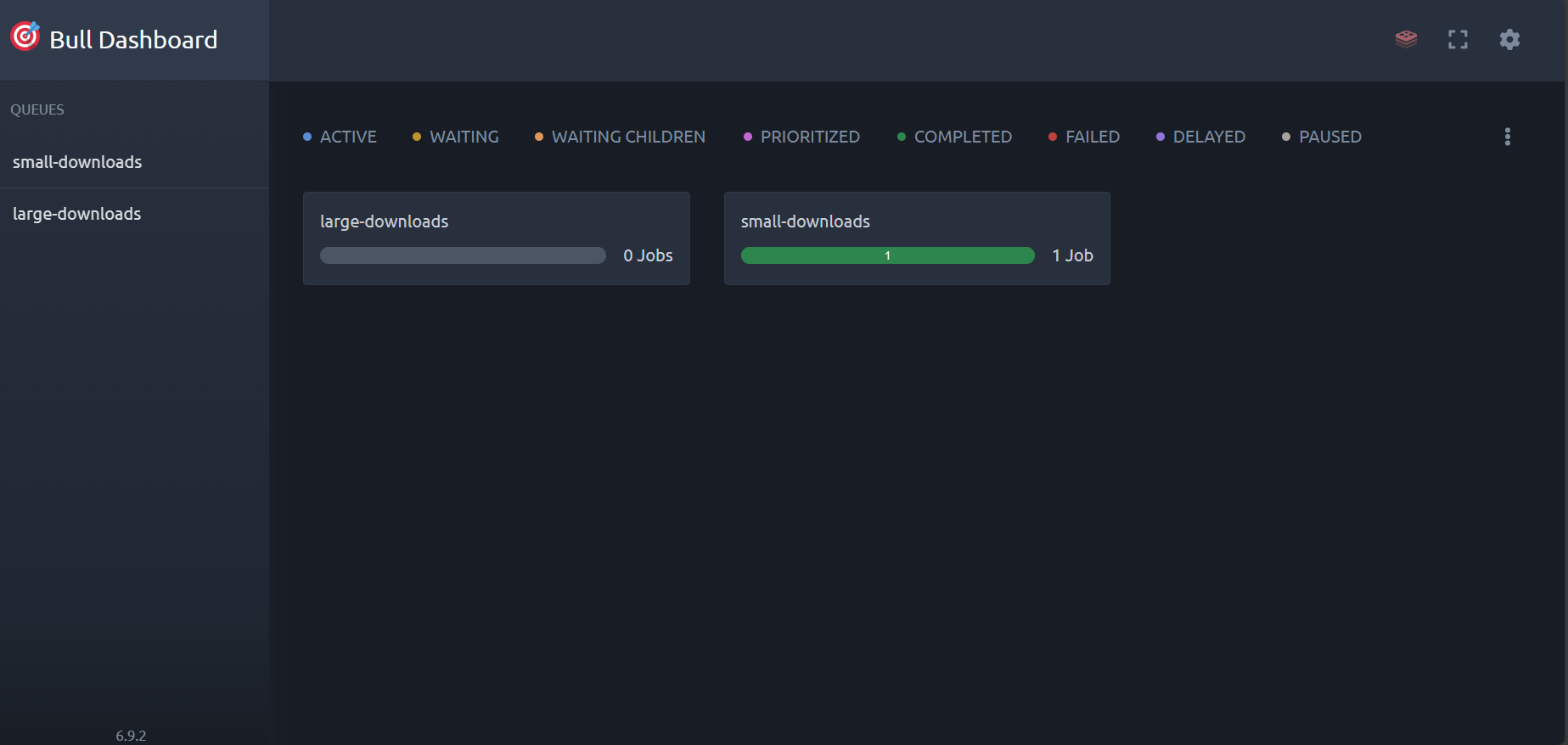
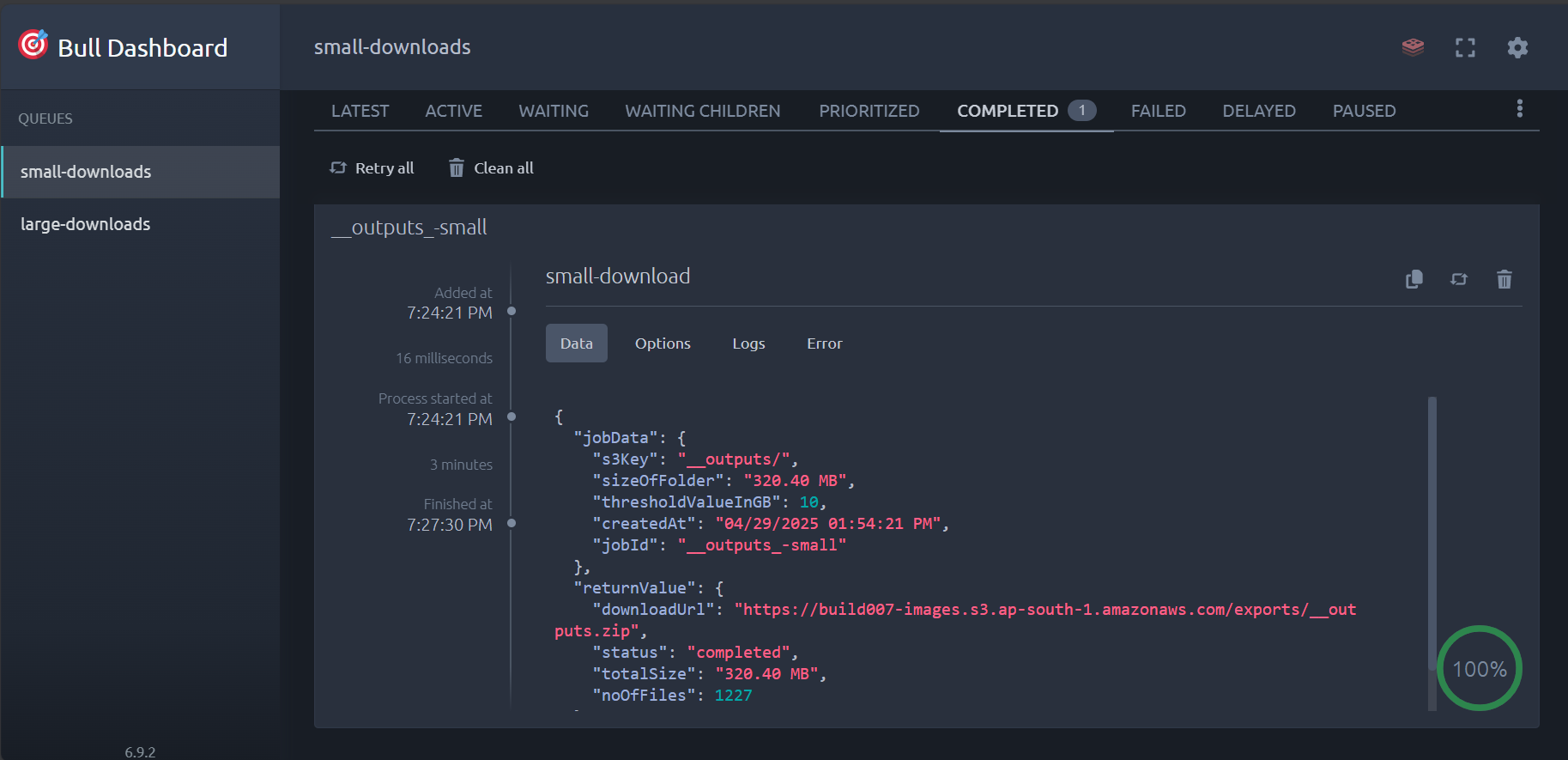
Access the Bull Dashboard at http://localhost:3001/dashboard to:
- Monitor job statuses and queue depths
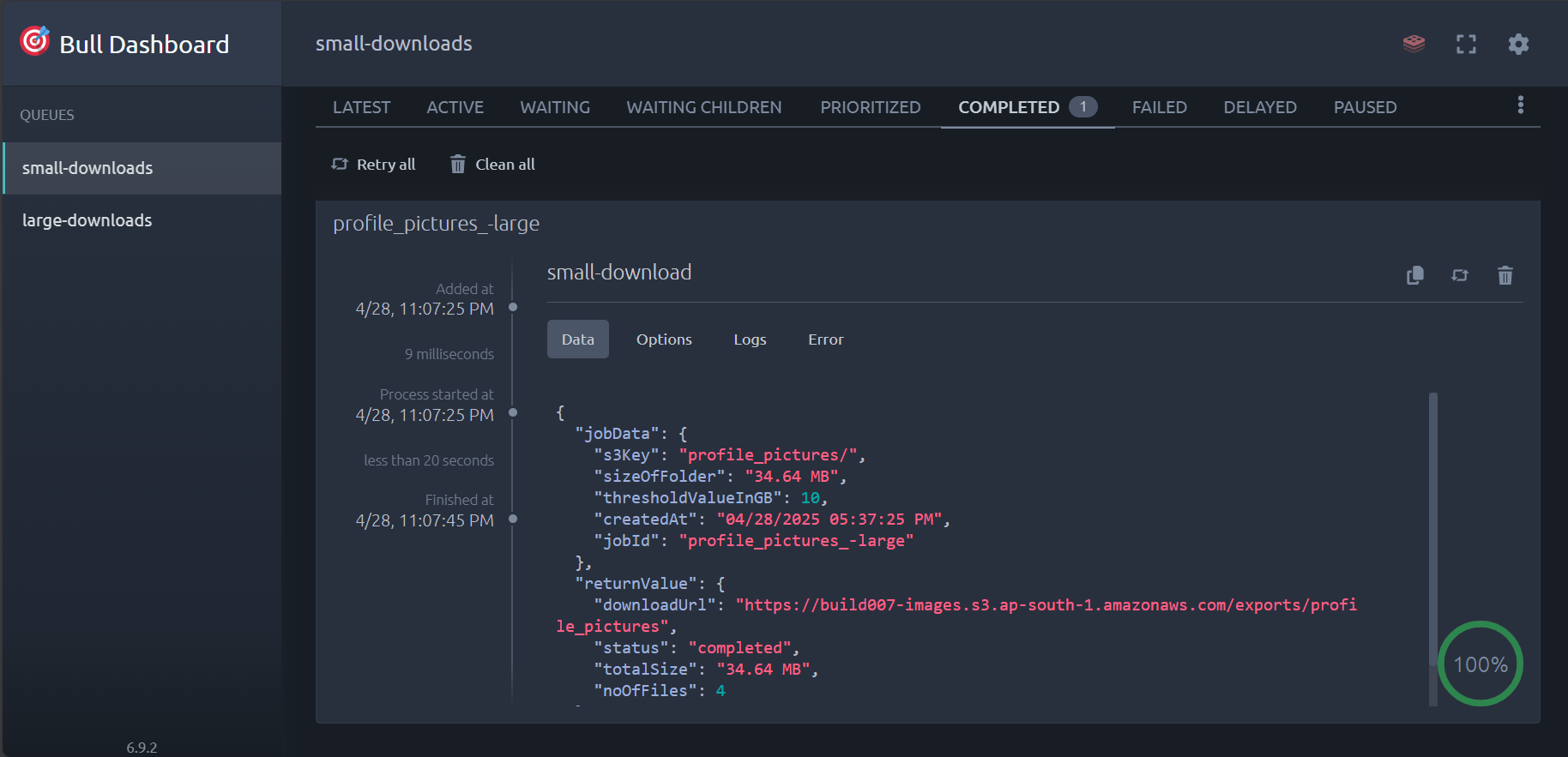
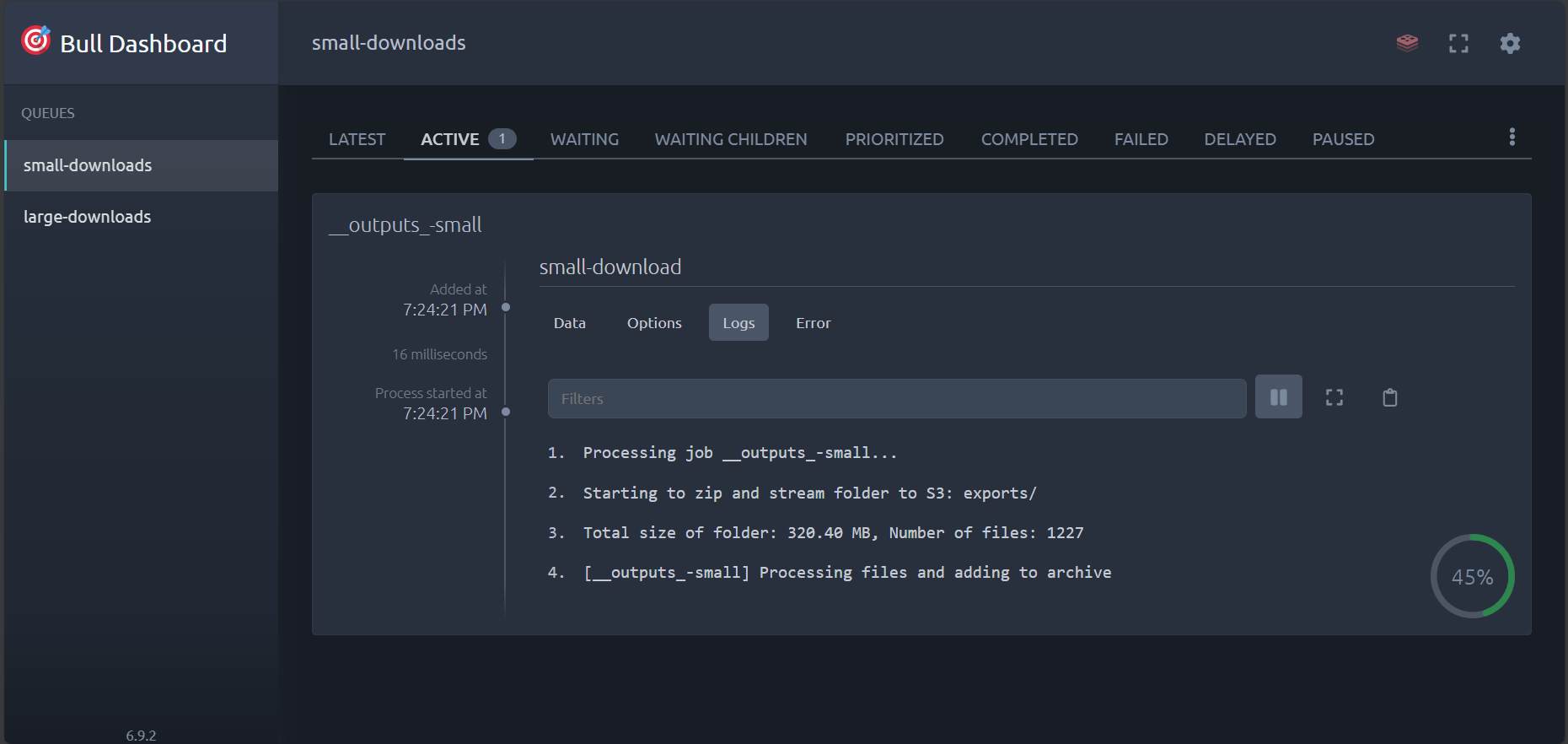
- View detailed job progress and statistics
- Manage failed jobs with retry capabilities
- Analyze performance metrics and system health
Default credentials (customize in .env):
- Username:
admin - Password:
admin123
-
Dashboard Overview (Used BullMQ Dashboard)
-
Active Jobs
-
Job Logs
-
Completed Jobs
-
Exported Archive

We welcome contributions to enhance StreamVault's capabilities. Please review our contribution guidelines:
- Fork the repository
- Create a feature branch (
git checkout -b feature/amazing-feature) - Commit your changes (
git commit -m 'Add some amazing feature') - Push to the branch (
git push origin feature/amazing-feature) - Open a Pull Request
This project is licensed under the ISC License - see the LICENSE file for details.
- BullMQ for robust job queue management
- AWS SDK for JavaScript for S3 integration
- Archiver for streaming ZIP creation