Important
This resource is barebones and is intended to be used with an existing implementation of an inventory system or as the base of one.
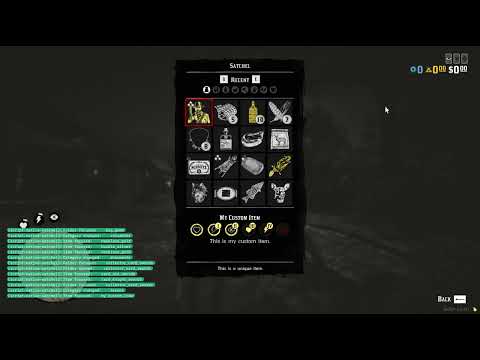
Native Satchel is a RedM resource that provides a fully native implementation of the satchel UI for Red Dead Redemption 2 multiplayer servers. This resource allows developers to create custom inventory systems using the game's original satchel interface, complete with categories, folders, item management, and all the visual elements players expect from the authentic Red Dead experience.
Unlike traditional web-based or custom UI implementations, Native Satchel leverages the game's built-in interface systems to provide seamless integration with the player's existing UI experience.
You can click below to watch a short demonstration of Native Satchel.
If you're missing functionality or have ideas for new features that would improve Native Satchel, please don't hesitate to open an issue. Feature requests from the community are always welcome, and feedback about use cases and requirements helps shape the direction of this project!
This resource is provided free of charge and represents countless hours of development work. Like most RedM resources, it builds upon the game's existing functionality rather than being created from scratch - the underlying native functionality belongs to Rockstar Games.
While the RedM community is fantastic and there's certainly a space for paid resources, there's unfortunately a trend of knowledge being gatekept behind paywalls, making important development knowledge harder to access for the community.
For Server Owners: You're absolutely welcome to use Native Satchel on your servers without any restrictions beyond the license terms.
For Resource Developers: If you want to use this as a base for your own projects or distribute modified versions, please pay close attention to the license requirements. As stated in the GNU GPL v3 license, any distributed modifications must be shared under the same open source license. This ensures that improvements benefit the entire community rather than being locked behind paywalls.
The goal is to foster collaboration and shared knowledge, not to enable profiteering from freely contributed work. This is simply a request for license compliance - since the code is open source and properly licensed, you are free to do with it what the license permits. Ultimately, everyone should strive to make the whole of RedM a better place for all players and developers.
Native Satchel is licensed under the GNU GPL v3.
The Native Satchel system is built around three main data types that define how items, categories, and folders are structured and displayed in the satchel interface. Understanding these types is essential for implementing a custom inventory system.
local item = {
    -- Required: Any string identifier you want to internally use
    id = "my_custom_item",

    -- Required: The amount of items for that specific item
    count = 1,

    -- Optional: The maximum amount of items for that specific item
    -- This affects the footer text depending on the count and maxCount
    maxCount = 1,

    -- Optional: When set to a string, uses catalog_sp and catalog_mp to fill UI data
    catalog = nil,

    -- Optional: Whether the item is enabled/selectable in the UI (defaults to true)
    enabled = true,

    -- Required if missing item.catalog or Config.enableAutoCategorization is disabled
    -- Optional if item.catalog is set and Config.enableAutoCategorization is enabled
    -- The category the item belongs to, see the category type
    category = "provisions",

    -- Optional: Groups the item in a folder, see the folder type
    folder = nil,

    -- Optional: Sets the display label for the item (free string, can be anything)
    label = "My Custom Item",

    -- Optional: Sets the description text for the item (free string, can be anything)
    description = "This is my custom item.",

    -- Optional: The hash of the price label to show in shop mode
    priceLabelHash = nil,

    -- Optional: The price value to show in shop mode
    priceValue = nil,

    -- Optional: The texture dictionary for the icon of this item
    txd = "toasts_mp_generic",

    -- Optional: The texture to use for the icon of this item
    texture = "toast_mp_standalone_sp",

    -- Optional: A list of effect IDs to show as icons in the description of the item
    effects = {
        health = { value = 11, duration = 4 },
        stamina = { value = 11, duration = 4 },
        deadeye = { value = 11, duration = 4 },
    },

    -- Optional: The amount of quality stars to show on the item, can be 0, 1, 2 or 3 stars
    stars = 3,

    -- Optional: Whether to mark the item as special, which gives the texture a yellow hue
    special = true,

    -- Optional: Whether the item appears equipped in list view
    equipped = false,

    -- Optional: Whether the item can be dropped
    droppable = false,

    -- Optional: Whether the item can be discarded
    discardable = false,

    -- Optional: Whether the item can be broken down
    breakable = false,

    -- Optional: Whether the item can be cooked
    cookable = false,

    -- Optional: Whether the item can be used
    usable = false,

    -- Optional: Whether the item can be drunk
    drinkable = false,

    -- Optional: Whether the item can be eaten
    edible = false,

    -- Optional: Whether the item can be read
    readable = false,
}local category = {
-- Required: Any string identifier you want to internally use
id = "recent",
-- Required: Whether the category lists the 48 most recently added items, does not include folders
recent = true,
-- Required: The texture name to use (string, not hash)
-- Due to UI limitations it has to be in the "satchel_textures" dictionary
texture = "satchel_nav_all",
-- Required: The hash of the UI label to use for the category title (must be valid game text key)
titleHash = 0x504364F1,
-- Alternative to emptyLabelHash: Custom label (free string, use either this or emptyLabelHash)
emptyLabel = nil,
-- Alternative to emptyLabel: The hash for the empty state label when no items are present (must be valid game text key)
emptyLabelHash = 0x504364F1,
-- Alternative to emptyDescriptionHash: Custom description (free string, use either this or emptyDescriptionHash)
emptyDescription = nil,
-- Alternative to emptyDescription: The hash for the empty state description when no items are present (must be valid game text key)
emptyDescriptionHash = 0x4E6F9F15,
-- Required: Tags used for auto-categorization (array of tag strings)
tags = {},
}local folder = {
-- Required: Any string identifier you want to internally use
id = "collector_arrowheads",
-- Required: Which category the folder belongs to, see the category type
category = "valuables",
-- Required: The hash for the folder title (must be valid game text key)
titleHash = "CI_TAG_FOLDER_COLLECTOR_ARROWHEADS",
-- Alternative to labelHash: Custom label (free string, use either this or labelHash)
label = nil,
-- Alternative to label: The hash of the UI label to use for the folder (must be valid game text key)
labelHash = "CI_TAG_FOLDER_COLLECTOR_ARROWHEADS",
-- Alternative to descriptionHash: Custom description (free string, use either this or descriptionHash)
description = nil,
-- Alternative to description: The hash of the UI description to use for the folder (must be valid game text key)
descriptionHash = "CI_TAG_FOLDER_COLLECTOR_ARROWHEADS_DESC",
-- Required: The texture dictionary to use (string, not hash)
txd = "inventory_items_mp",
-- Required: The texture to use (string, not hash)
texture = "provision_arrowhead_set",
-- Required: Tags used for auto-folder assignment (array of tag strings)
tags = { "CI_TAG_FOLDER_COLLECTOR_ARROWHEADS" },
}Triggers are client-side events that allow you to control the satchel's behavior and manage items programmatically. These events provide the core functionality for opening/closing the satchel, synchronizing data, and performing item operations.
-- Forces the satchel to open
-- Mode is optional and can be "shop" for shop mode or anything else for regular ingame mode
-- Index is optional and specifies the category index to open to (0-based), use -1 for last category
TriggerEvent("native_satchel:open_satchel", mode, index)

-- Forces the satchel to close
-- Mode can be used to only close from a specific mode, e.g. "shop" or "ingame"
-- Anything else or nil will close it regardless of mode
TriggerEvent("native_satchel:close_satchel", mode)-- Synchronizes the satchel to the given item table, see the item type above
TriggerEvent("native_satchel:synchronize", items)
-- Adds a new item to the satchel, see the item type above
TriggerEvent("native_satchel:add_item", item)
-- Increments an item from the satchel by count by ID
TriggerEvent("native_satchel:increment_item", itemId, count)
-- Decrements an item from the satchel by count by ID
TriggerEvent("native_satchel:decrement_item", itemId, count)
-- Removes all of an item from the satchel by ID
TriggerEvent("native_satchel:remove_item", itemId)Events are fired automatically by the Native Satchel system when specific actions occur. You can listen to these events to implement custom logic, such as saving inventory changes, logging player actions, or triggering server-side operations when players interact with items.
AddEventHandler("native_satchel:satchel_opened", function(mode)
    print("This event is fired when the player opens the satchel with mode:", mode)
end)

AddEventHandler("native_satchel:satchel_closed", function(mode)
    print("This event is fired when the player closes the satchel from mode:", mode)
end)

AddEventHandler("native_satchel:category_changed", function(categoryId)
    print("This event is fired when the player changes the category, it has ID", categoryId)
end)AddEventHandler("native_satchel:item_used", function(itemId)
print("This event is fired when the player uses an item, it has ID", itemId)
end)
AddEventHandler("native_satchel:item_crafted", function(itemId)
print("This event is fired when the player breaks down an item, it has ID", itemId)
end)
AddEventHandler("native_satchel:item_dropped", function(itemId)
print("This event is fired when the player drops an item, it has ID", itemId)
end)
AddEventHandler("native_satchel:item_discarded", function(itemId)
print("This event is fired when the player discards an item, it has ID", itemId)
end)
AddEventHandler("native_satchel:item_sent", function(itemId)
print("This event is fired when the player sends an item, it has ID", itemId)
end)
AddEventHandler("native_satchel:item_focused", function(itemId)
print("This event is fired when the player focuses on an item, it has ID", itemId)
end)AddEventHandler("native_satchel:folder_opened", function(folderId)
print("This event is fired when the player opens a folder, it has ID", folderId)
end)
AddEventHandler("native_satchel:folder_focused", function(folderId)
print("This event is fired when the player focuses on a folder, it has ID", folderId)
end)Native Satchel has been refactored into a modular architecture for better maintainability and code organization. The system is composed of several focused modules:
satchel.lua- Main entry point and UI event processingconfig.lua- Configuration data and settingsplayer-state.lua- State management and data persistenceutils.lua- Utility functions and resource initializationui-databinding.lua- UI databinding setup and updatessatchel-renderer.lua- UI rendering and item management logicevent-handlers.lua- Event handling and user interaction processingitemdatabase.lua- Game database integration and item data retrieval
dataview.lua- Low-level memory operations and data structuresdebug.lua- Development and debugging utilitiesticker.lua- UI notification system
This modular design follows dependency injection patterns, with each module having clearly defined responsibilities and interfaces. The architecture is inspired by the Native Abilities project structure while preserving all existing functionality and event systems.
This project builds upon the hard work and research of many talented individuals in the RedM community. Their contributions made this native satchel implementation possible:
- aaron1a12's Research
- alloc8or's Native DB
- femga's RDR3 Discoveries
- gottfriedleibniz's Data View implementation
- MagnarRDC's Support
- VORPCORE's Research
Thank you for considering contributing to Native Satchel! Please note that this project is released with a Contributor Covenant Code of Conduct. By participating in any way in this project, you agree to abide by its terms.
Before contributing, please take a moment to read the Contribution Guide to understand the development process and how to contribute.
