Releases: RobertApikyan/ViewComponent
1.0.3

Gradle update
1.0.2

release_1.0.2
Removed onDestroy() method from lifecycle
1.0.1

release_1.0.1
Removed onDestroy() method from lifecycle
1.0.0

release_1.0.0
ViewComponent
Create Android custom views with View Component pattern.
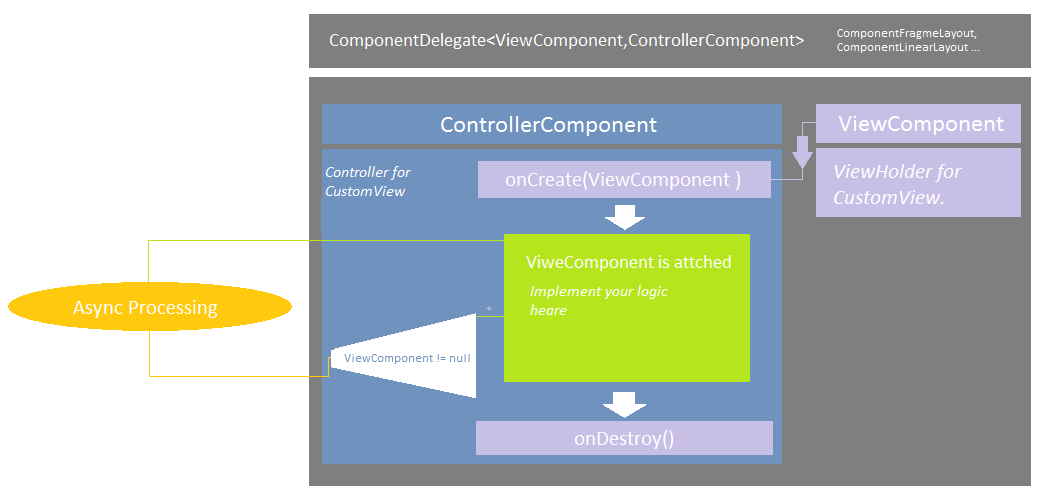
-
Create your custom view's layout file.
-
Create class CustomViewComponent, extend it from ViewComponent class, make all findViewById's inside this class, or ButterKnife bindings. Hold all View objects inside this class (EditText, Button, ImageView ...).
-
Create class CustomControllerComponent extend it from ControllerComponent class, inside onCreate() method receive non null CustomViewComponent. In this class implement your custom view's logic.
-
At last Create your CustomView class, extend it from one of the ComponentLayout (ComponenetFrameLayout , ComponentLinearLayout ... or create your component layout using ComponentDelegateImpl class ).
Implement createViewComponent(LayoutInflater inflater)
and
createControllerComponent() methods.
GRADLE
Add it in your root build.gradle at the end of repositories:
allprojects {
repositories {
...
maven { url 'https://jitpack.io' }
}
}
Step 2. Add the dependency
dependencies {
compile 'com.github.RobertApikyan:ViewComponent:0.0.2'
}
View Component
Create Android custom views with View Component pattern.
-
Create your custom view's layout file.
-
Create class CustomViewComponent, extend it from ViewComponent class, make all findViewById's inside this class, or ButterKnife bindings. Hold all View objects inside this class (EditText, Button, ImageView ...).
-
Create class CustomControllerComponent extend it from ControllerComponent class, inside onCreate() method receive non null CustomViewComponent. In this class implement your custom view's logic.
-
At last Create your CustomView class, extend it from one of the ComponentLayout (ComponenetFrameLayout , ComponentLinearLayout ... or create your component layout using ComponentDelegateImpl class ).
Implement createViewComponent(LayoutInflater inflater)
and
createControllerComponent() methods.
GRADLE
allprojects {
repositories {
...
maven { url 'https://jitpack.io' }
}
}
dependencies {
...
compile 'com.github.RobertApikyan:ViewComponent:0.0.1'
}