-
Notifications
You must be signed in to change notification settings - Fork 4
GUI Inventory Integration (Closes #41) #52
New issue
Have a question about this project? Sign up for a free GitHub account to open an issue and contact its maintainers and the community.
By clicking “Sign up for GitHub”, you agree to our terms of service and privacy statement. We’ll occasionally send you account related emails.
Already on GitHub? Sign in to your account
Merged
ultimateownsz
merged 15 commits into
PyCeas:main
from
AnSiChen:feature/gui-inventory-integration-41
Dec 17, 2024
Merged
Changes from all commits
Commits
Show all changes
15 commits
Select commit
Hold shift + click to select a range
e279bb5
feat: extend Inventory class with dynamic item management.
AnSiChen 75cf575
feat: add JSON-based dynamic messaging for inventory actions.
AnSiChen 4e01320
feat: implement inventory overlay with solid background
AnSiChen e3cf14c
feat: add interactive buttons for the inventory item management
AnSiChen 4135fd8
feat: initialize inventory items from JSON
AnSiChen f481cff
feat: add in-game action messages for inventory interactions.
AnSiChen 13904aa
feat: integrate icons for inventory
AnSiChen 11ecc7e
feat: Add scrolling and messsage background to inventory
AnSiChen 69943c7
feat: expand inventory.json and implement new sample icons in Invento…
AnSiChen 6e98cd6
docs: Add documentation for Inventory and Utils(related functionality)
AnSiChen 824f8ad
chore: Include pytest to requirements_dev.txt for tests
AnSiChen 7d91572
tests: Add inventory.py tests
AnSiChen 25e1c06
fix: resolve type issues, formatting, and update style
AnSiChen 59daae8
refactor: add __init__.py, update tests and docs
AnSiChen 9e0a871
Merge main into feature/gui-inventory-integration-41 and resolve conf…
AnSiChen File filter
Filter by extension
Conversations
Failed to load comments.
Loading
Jump to
Jump to file
Failed to load files.
Loading
Diff view
Diff view
There are no files selected for viewing
This file contains hidden or bidirectional Unicode text that may be interpreted or compiled differently than what appears below. To review, open the file in an editor that reveals hidden Unicode characters.
Learn more about bidirectional Unicode characters
| Original file line number | Diff line number | Diff line change |
|---|---|---|
| @@ -0,0 +1,43 @@ | ||
| { | ||
| "Gold Coin": {"type": "currency", "effect": "collect", "quantity": 1}, | ||
| "Silver Coin": {"type": "currency", "effect": "collect", "quantity": 1}, | ||
| "Coin Stack (1)": {"type": "currency", "effect": "collect", "quantity": 3}, | ||
| "Coin Stack (2)": {"type": "currency", "effect": "collect", "quantity": 5}, | ||
| "Circular Gem": {"type": "gem", "effect": "trade", "quantity": 1}, | ||
| "Single Gold Bar": {"type": "treasure", "effect": "trade", "quantity": 1}, | ||
| "Gold Bar Stack": {"type": "treasure", "effect": "trade", "quantity": 3}, | ||
| "Treasure Block": {"type": "treasure", "effect": "open_for_reward", "quantity": 1}, | ||
| "Golden Crown": {"type": "artifact", "effect": "boost_status", "quantity": 1}, | ||
| "Ornate Cup": {"type": "artifact", "effect": "boost_status", "quantity": 1}, | ||
| "Golden Figurine": {"type": "artifact", "effect": "boost_status", "quantity": 1}, | ||
| "Simple Sword": {"type": "weapon", "effect": "melee_attack", "quantity": 1}, | ||
| "Ornate Sword": {"type": "weapon", "effect": "melee_attack", "quantity": 1}, | ||
| "Double-Bladed Axe": {"type": "weapon", "effect": "melee_attack", "quantity": 1}, | ||
| "Spear": {"type": "weapon", "effect": "melee_attack", "quantity": 1}, | ||
| "Circular Shield": {"type": "armor", "effect": "defense_boost", "quantity": 1}, | ||
| "Golden Trophy": {"type": "reward", "effect": "achievement", "quantity": 1}, | ||
| "Candelabra": {"type": "decorative", "effect": "none", "quantity": 1}, | ||
| "Potion (Red)": {"type": "consumable", "effect": "restore_health", "quantity": 1}, | ||
| "Potion (Blue)": {"type": "consumable", "effect": "restore_mana", "quantity": 1}, | ||
| "Potion (Green)": {"type": "consumable", "effect": "poison_resistance", "quantity": 1}, | ||
| "Square Jar": {"type": "consumable", "effect": "unknown", "quantity": 1}, | ||
| "Cake": {"type": "food", "effect": "restore_health", "quantity": 1}, | ||
| "Donut": {"type": "food", "effect": "restore_health", "quantity": 1}, | ||
| "Bread": {"type": "food", "effect": "restore_health", "quantity": 1}, | ||
| "Rug Tile": {"type": "decorative", "effect": "none", "quantity": 1}, | ||
| "Geometric Pattern": {"type": "decorative", "effect": "none", "quantity": 1}, | ||
| "Glowing Orb (Blue)": {"type": "artifact", "effect": "magic_boost", "quantity": 1}, | ||
| "Glowing Orb (Red)": {"type": "artifact", "effect": "fire_boost", "quantity": 1}, | ||
| "Glowing Orb (Green)": {"type": "artifact", "effect": "nature_boost", "quantity": 1}, | ||
| "Golden Ring": {"type": "artifact", "effect": "magic_resistance", "quantity": 1}, | ||
| "Amulet": {"type": "artifact", "effect": "protection", "quantity": 1}, | ||
| "Scroll": {"type": "scroll", "effect": "learn_spell", "quantity": 1}, | ||
| "Key": {"type": "tool", "effect": "unlock", "quantity": 1}, | ||
| "Tool": {"type": "tool", "effect": "repair", "quantity": 1}, | ||
| "Dragon (Red)": {"type": "creature", "effect": "fire_attack", "quantity": 1}, | ||
| "Dragon (Green)": {"type": "creature", "effect": "nature_attack", "quantity": 1}, | ||
| "Dragon (Black)": {"type": "creature", "effect": "dark_attack", "quantity": 1}, | ||
| "Dragon (White)": {"type": "creature", "effect": "light_attack", "quantity": 1}, | ||
| "Gem Cluster": {"type": "treasure", "effect": "trade", "quantity": 1}, | ||
| "Glowing Crystal": {"type": "treasure", "effect": "magic_boost", "quantity": 1} | ||
| } |
This file contains hidden or bidirectional Unicode text that may be interpreted or compiled differently than what appears below. To review, open the file in an editor that reveals hidden Unicode characters.
Learn more about bidirectional Unicode characters
| Original file line number | Diff line number | Diff line change |
|---|---|---|
| @@ -0,0 +1,10 @@ | ||
| { | ||
| "inventory": { | ||
| "add_success": "Successfully added {quantity} {item}(s) to your inventory.", | ||
| "add_fail": "Failed to add {item} to your inventory.", | ||
| "remove_success": "Successfully removed {quantity} {item}(s) from your inventory.", | ||
| "remove_fail": "Cannot remove {quantity} {item}(s), insufficient quantity.", | ||
| "use_success": "You used {item}.", | ||
| "use_fail": "You dont' have {item} in your inventory." | ||
| } | ||
| } |
AnSiChen marked this conversation as resolved.
Show resolved
Hide resolved
|
This file contains hidden or bidirectional Unicode text that may be interpreted or compiled differently than what appears below. To review, open the file in an editor that reveals hidden Unicode characters.
Learn more about bidirectional Unicode characters
| Original file line number | Diff line number | Diff line change |
|---|---|---|
| @@ -0,0 +1,70 @@ | ||
| ## Inventory Guide (GUI Version) | ||
|
|
||
| ### Description of the Inventory GUI | ||
| The Inventory GUI serves as a user-friendly interface for managing in-game items. It allows players to view, interact with, and organize their inventory. | ||
|
|
||
| [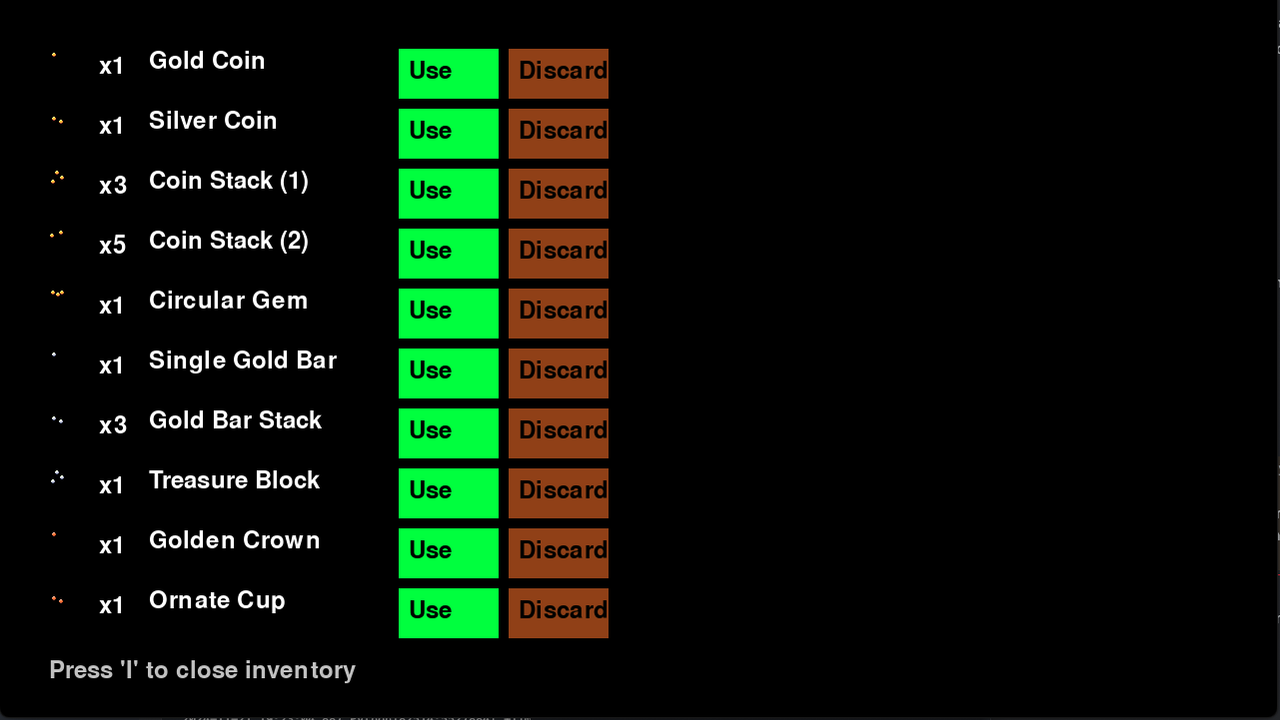](https://postimg.cc/14rGdxtV) | ||
|
|
||
| ### Key Features | ||
| - **Visual Display**: Items are displayed as icon, also providing name and quantity. | ||
| - **Responsive Interaction**: Interactive buttons for using, or discarding items. | ||
| - **Dynamic Updates**: Changes are reflected in real time. | ||
| - **Real Time Message Feedback**: Display message actions for better user experience. *(Refer to [utils](./UtilsGuide) for more details.)* | ||
|
|
||
| [](https://postimg.cc/Y4N0SHT1) | ||
| [](https://postimg.cc/H8nk37n2) | ||
|
|
||
| ## Controls Documentation | ||
|
|
||
| ### Controls Summary | ||
| - **Keyboard**: Press `I` to toggle the inventory screen on and off. | ||
| - **Mouse**: Click buttons to perform actions. | ||
|
|
||
| ## Running Tests | ||
| Tests in this project use `pytest`. To run the tests: | ||
| `pytest tests/test_inventory.py` | ||
|
|
||
| ## Testing Items | ||
|
|
||
| ### Modifying `inventory.json` | ||
| The `data/inventory.json` file controls the data for all items in the inventory. It can be modified for testing purposes as follows: | ||
|
|
||
| 1. Open the `inventory.json` file. | ||
| 2. Add, remove, or edit item entries using the following format: | ||
| ```json | ||
| { | ||
| ... | ||
| "Gold Coin": {"type": "currency", "effect": "collect", "quantity": 1}, | ||
| ... | ||
| } | ||
| ``` | ||
|
|
||
| ## Key Properties | ||
|
|
||
| Each item in the inventory has the following properties: | ||
|
|
||
| - **`type`**: The classification of the item (e.g., `weapon`, `potion`, `material`). | ||
| - **`effect`**: The functional impact of the item (e.g., `damage`, `healing`, `crafting material`). | ||
| - **`quantity`**: The number of instances available for the item. | ||
|
|
||
| ## Working with icons | ||
|
|
||
| ### Adding a New Item Icon | ||
| To add a new item icon to the inventory: | ||
|
|
||
| 1. Open `src/GUI/inventory_gui.py`. | ||
| 2. Locate the initializer method (`self.icons: {}`). | ||
| 3. Map the item name in `inventory.json` to the icon's location in the spritesheet. Use the following format: | ||
|
|
||
| ```python | ||
| "Gold Coin": self.extract_icon(0, 0), | ||
| ``` | ||
|
|
||
| [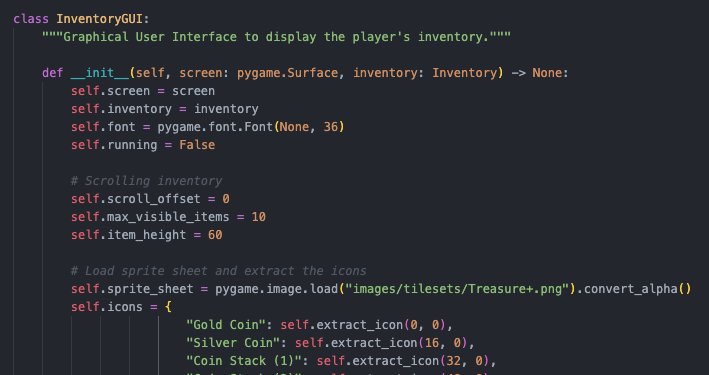](https://postimg.cc/231YcYT2) | ||
|
|
||
| 4. Test the new item in-game to verify functionality and ensure no errors occur. | ||
|
|
||
| ## Known Issues | ||
|
|
||
| 1. Icons Mapping: Placeholder icons are used for certain items as not all of them | ||
| accurately represent the icon they are linked to. |
ultimateownsz marked this conversation as resolved.
Show resolved
Hide resolved
|
This file contains hidden or bidirectional Unicode text that may be interpreted or compiled differently than what appears below. To review, open the file in an editor that reveals hidden Unicode characters.
Learn more about bidirectional Unicode characters
| Original file line number | Diff line number | Diff line change |
|---|---|---|
| @@ -0,0 +1,45 @@ | ||
| # UtilsGuide.md | ||
|
|
||
| ## Utility: `messaging.py` | ||
|
|
||
| This utility module provides functionality for retrieving and formatting messages stored in a centralized JSON file. It simplifies message management and allows for better modularity, multi-language support, and scalability across the game. | ||
|
|
||
| --- | ||
|
|
||
| ### File: `src/utils/messaging.py` | ||
|
|
||
| #### Function: `get_message(category: str, key: str, **kwargs) -> str` | ||
|
|
||
| Retrieve and format a message from a JSON file located at `data/messages.json`. | ||
|
|
||
| **Parameters:** | ||
| - `category` (`str`): The category of the message (e.g., `"inventory"`). | ||
| - `key` (`str`): The specific key for the desired message (e.g., `"add_success"`). | ||
| - `**kwargs`: Dynamic keyword arguments for formatting placeholders in the message. | ||
|
|
||
| **Returns:** | ||
| - The formatted message string from the JSON file. | ||
| - If the message is not found or the file is missing, a default error message is returned: `"An error occurred while retrieving the message."` | ||
|
|
||
| ### Usage Examples | ||
|
|
||
| [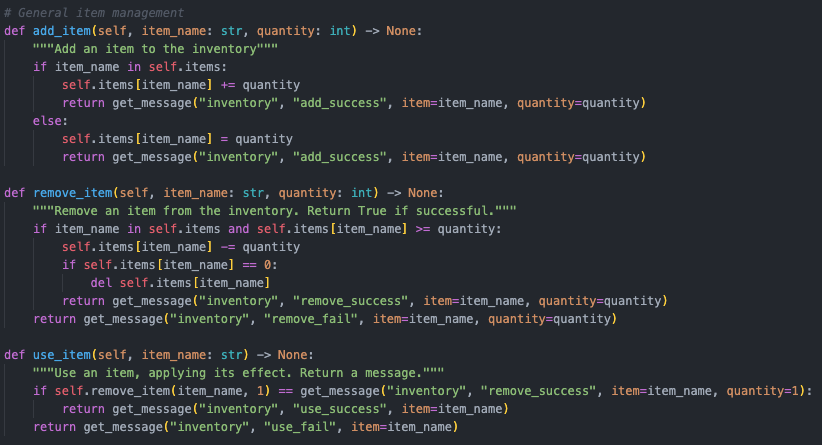](https://postimg.cc/WqckrZqc) | ||
|
|
||
| ## Possible Expansion | ||
| The messaging.py utility can be expanded to other areas of the game, including: | ||
|
|
||
| - Multi-language support by replacing or extending data/messages.json with localized versions. | ||
| - General feedback and logging, ensuring consistency across UI and gameplay mechanics. | ||
| - Integration with game state management for dynamic message generation. | ||
|
|
||
| ## Best Practices | ||
| ### Error Handling: | ||
|
|
||
| - Ensure data/messages.json is correctly formatted and accessible. | ||
| - Validate category and key inputs to avoid KeyError. | ||
|
|
||
| - Message Consistency: | ||
| - Keep all game-related messages in the JSON file for easier updates and consistency. | ||
|
|
||
| - Localization: | ||
| - Prepare data/messages.json to support multi-language keys for localization, e.g., en, es, ko. |
This file contains hidden or bidirectional Unicode text that may be interpreted or compiled differently than what appears below. To review, open the file in an editor that reveals hidden Unicode characters.
Learn more about bidirectional Unicode characters
| Original file line number | Diff line number | Diff line change |
|---|---|---|
| @@ -1,2 +1,3 @@ | ||
| ruff>=0.5.3 | ||
| mypy>=1.11.1 | ||
| mypy>=1.11.1 | ||
| pytest>=7.4.4 |
Empty file.
ultimateownsz marked this conversation as resolved.
Show resolved
Hide resolved
|
This file contains hidden or bidirectional Unicode text that may be interpreted or compiled differently than what appears below. To review, open the file in an editor that reveals hidden Unicode characters.
Learn more about bidirectional Unicode characters
This file contains hidden or bidirectional Unicode text that may be interpreted or compiled differently than what appears below. To review, open the file in an editor that reveals hidden Unicode characters.
Learn more about bidirectional Unicode characters
Oops, something went wrong.
Add this suggestion to a batch that can be applied as a single commit.
This suggestion is invalid because no changes were made to the code.
Suggestions cannot be applied while the pull request is closed.
Suggestions cannot be applied while viewing a subset of changes.
Only one suggestion per line can be applied in a batch.
Add this suggestion to a batch that can be applied as a single commit.
Applying suggestions on deleted lines is not supported.
You must change the existing code in this line in order to create a valid suggestion.
Outdated suggestions cannot be applied.
This suggestion has been applied or marked resolved.
Suggestions cannot be applied from pending reviews.
Suggestions cannot be applied on multi-line comments.
Suggestions cannot be applied while the pull request is queued to merge.
Suggestion cannot be applied right now. Please check back later.
Uh oh!
There was an error while loading. Please reload this page.