
My personal Engine from scratch with C++ and OpenGl.
© 2023 Pere Prim Carol
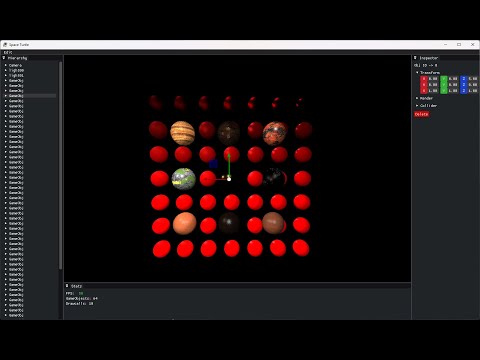
- Entity Component System (ECS)
- Obj Instancing
- Hierarchy Transformations
- Load OBJ
- Lights (Directional, Point & Spot)
- ShadowMapping (Directional and Spotlight)
- Load Textures
- Texture Atlas
- Skybox/CubeMap
- Material Configuration
- Translucent
- Picking System
- Deferred Pipeline
- PBR Materials
- Normal Mapping
- Assets System
- SSAO
- Save/Load Scene
- VR Port
Visual Studio 2019/2022
Thanks to the use of Premake you only have to do the following
- Run the file that you will find in -> ./tools/compile_vs[version].bat
- Then open the visual solution that has been created in -> ./build/3VGP_SpaceTurtlevs[version].sln
Inside the solution, press 'F5' to build and run.


#include <st_engine.h>

int main() {
 ST::Window w;
 w.ColorBg(0.2f, 0.2f, 0.2f); // Optional

 // ----------------------------------------------------------------

 // Here Your Awesome Start Code!

 // --------------------------

 while (w.isOpen() && !w.inputPressed(ST::ST_INPUT_ESCAPE)) {
	 w.Clear();

	 // ----------------------------------------------------------------

	 // Here Your Awesome Loop Code!

	 // ----------------------------

	 w.Render();
  }
  return 0;
 }
· GLFW (https://github.com/glfw/glfw)
· Glad (https://github.com/Dav1dde/glad)
· ImGui (https://github.com/ocornut/imgui)
· ImGuizmo (https://github.com/CedricGuillemet/ImGuizmo)
· MiniAudio (https://github.com/mackron/miniaudio)
· STB (https://github.com/nothings/stb)
· TyniObj (https://github.com/tinyobjloader/tinyobjloader)
· FastNoiseLite (https://github.com/Auburn/FastNoiseLite)