
Ya already know what this extension does, is just the other guy's extension but with no promo, also pretty sure he vibecoded ts
🚀 Features • 📦 Installation • 🎯 Usage • ⚙️ Configuration • 🤝 Support
Rewards Search Automator is a powerful Chrome/Edge extension designed to help you maximize your Microsoft Rewards points by automating Bing searches. Whether you're on desktop or mobile, this extension handles the tedious task of performing daily searches, so you can focus on redeeming your rewards!
✨ Completely free • 🚫 No ads • 🔒 Privacy-focused • 🎨 Modern UI
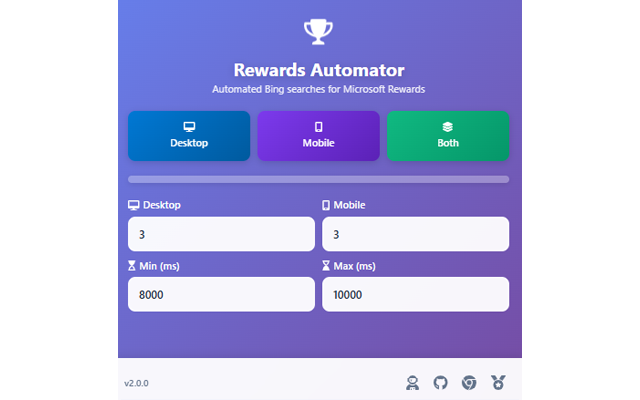
- Perform automated searches on both desktop and mobile user agents
- Smart device emulation for accurate mobile searches
- Separate or combined search modes
- Adjustable search count: Set how many searches you want to perform
- Random delays: Customize minimum and maximum wait times between searches to appear more natural
- Real-time progress tracking: Visual progress bar shows your automation status
- Beautiful gradient design with smooth animations
- Compact popup (450x450px) that fits perfectly in your browser
- Intuitive controls with clear visual feedback
- Responsive layout
- Uses random word dictionary for diverse search queries
- Randomized timing to mimic human behavior
- No data collection or tracking
- Open-source and transparent
- Visit the Chrome Web Store listing
- Click "Add to Chrome"
- Confirm the installation
- The extension icon will appear in your toolbar
- Download or clone this repository:
git clone https://github.com/AsoStrife/Rewards-Search-Automator.git
- Open Chrome/Edge and navigate to
chrome://extensions/ - Enable Developer mode (toggle in top right)
- Click "Load unpacked"
- Select the extension folder
- The extension is now installed!
- Click the extension icon in your browser toolbar
- Configure your preferences (optional):
- Desktop searches: Number of desktop searches (default: 3)
- Mobile searches: Number of mobile searches (default: 3)
- Min/Max delay: Wait time between searches in milliseconds (default: 8000-10000ms)
- Choose your automation mode:
- 🖥️ Desktop: Desktop searches only
- 📱 Mobile: Mobile searches only
- 📊 Both: Desktop followed by mobile searches
- Watch the progress bar and let the automation do its magic!
- Daily routine: Run the extension once per day to maximize rewards
- Natural timing: Keep delays between 8-15 seconds for more realistic behavior
- Combined mode: Use "Both" mode to complete all daily searches in one go
- Check progress: The progress bar shows real-time completion status
Desktop Searches: 3
Mobile Searches: 3
Min Delay: 8000ms (8 seconds)
Max Delay: 10000ms (10 seconds)All settings can be adjusted in the popup before starting automation:
- Increase search count for higher daily quotas
- Adjust delays to balance between speed and natural appearance
- Settings persist across sessions
- Manifest Version: 3 (Latest Chrome extension standard)
- Permissions: Debugger (for mobile device emulation)
- Technologies: JavaScript (ES6+), jQuery, Bootstrap 5, Font Awesome
- Compatible with: Chrome, Edge, Brave, and other Chromium-based browsers
If this extension has helped you earn more Microsoft Rewards points, please consider:


Your support keeps this project alive and helps fund future updates! ✨
- 🌐 Personal Website: andreacorriga.com
- 🏢 Company: Strifelab
- 💼 GitHub: @AsoStrife
Please open an issue with:
- Detailed description of the problem
- Steps to reproduce
- Expected vs actual behavior
- Browser version and OS
Have an idea to improve the extension? Create a feature request and let's discuss it!
This project is licensed under the MIT License - see the LICENSE file for details.
This extension is an independent project and is not affiliated with, endorsed by, or connected to Microsoft Corporation or the Microsoft Rewards program. Use this tool responsibly and in accordance with Microsoft Rewards terms of service. The author is not responsible for any account actions taken by Microsoft.
Made with ❤️ by Andrea Corriga | Strifelab

