Intelligent PCAP file analysis with AI-powered insights and interactive network visualization
Features • Quick Start • Usage • Documentation


A comprehensive network packet analysis tool that runs entirely self-hosted. Upload PCAP files to visualize network traffic patterns, analyze packet flows, generate intelligent filters, and gain insights through AI-powered analysis. Perfect for network troubleshooting, security analysis, protocol debugging, or educational purposes.
Important
This project is still in early development. While functional, it is currently suboptimal for larger PCAP files (>100MB). Performance optimizations and scalability improvements are planned for future releases. For best results, use with small to medium-sized capture files.
| Feature | Description |
|---|---|
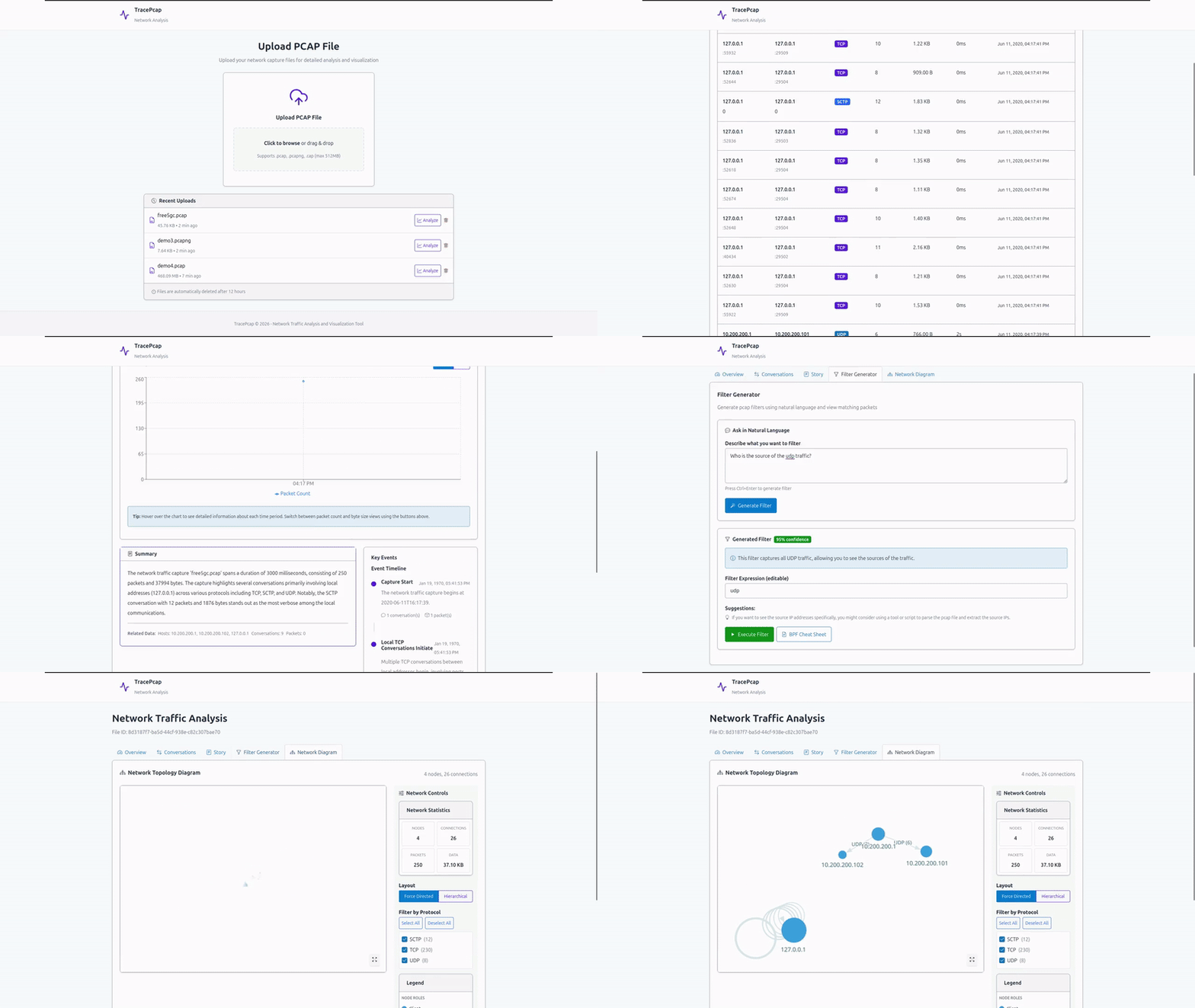
| PCAP Upload & Management | Upload and manage PCAP/CAP files (max 512MB) with MinIO object storage |
| Network Visualization | Interactive 3D network topology diagrams showing communication patterns and relationships |
| Timeline Analysis | Chronological view of network events with detailed packet information |
| AI Filter Generator | LLM-powered Wireshark/tcpdump filter generation from natural language queries |
| Packet Analysis | Deep packet inspection with protocol-level analysis using pcap4j |
| Conversation Tracking | Identify and analyze network conversations between hosts |
| Story Mode | Narrative reconstruction of network activities and events |
| Export Options | Export analysis results and filters for use in Wireshark or other tools |
| Real-time Processing | Asynchronous analysis with progress tracking |
| Multi-protocol Support | Supports TCP, UDP, ICMP, and various application-layer protocols |
| Software | Version | Purpose |
|---|---|---|
| Docker | Latest | Container runtime |
| Docker Compose | Latest | Multi-container orchestration |
| LLM Server | Any OpenAI-compatible API | AI filter generation (e.g., LM Studio, Ollama, OpenAI) |
Minimum Hardware:
- RAM: 4GB (8GB+ recommended)
- Storage: 10GB (for database, PCAP files, and object storage)
1. Clone and setup:
git clone https://github.com/NotYuSheng/TracePcap.git
cd TracePcap
cp .env.example .env
2. Configure .env:
# Upload Configuration
MAX_UPLOAD_SIZE_BYTES=536870912  # 512MB default

# Nginx Port Configuration
NGINX_PORT=80  # Change if port 80 is already in use

# LLM Configuration (Local LLM Server)
LLM_API_BASE_URL=http://localhost:1234/v1
LLM_API_KEY=
LLM_MODEL=Qwen2.5-14B-Coder-Instruct
LLM_TEMPERATURE=0.7
LLM_MAX_TOKENS=2000
3. Start the application:
docker compose up -d4. Access TracePcap:
Open http://localhost:80 in your browser.
Note: The application includes PostgreSQL for metadata storage and MinIO for PCAP file storage. First startup may take a few minutes while containers initialize.
- Upload - Navigate to the Upload page and drag-and-drop your PCAP file or click to browse
- Analyze - File is automatically processed and analyzed for network patterns
- Visualize - View interactive 3D network topology showing hosts and communication flows
- Timeline - Explore packet-level details in chronological order
- Conversations - Review network conversations between specific endpoints
- Generate Filters - Use AI to create Wireshark filters from natural language (e.g., "show all HTTP traffic from 192.168.1.1")
- Export - Apply generated filters in Wireshark or save analysis results
PCAP, CAP (max 512MB default, configurable via MAX_UPLOAD_SIZE_BYTES)
| Component | Technology |
|---|---|
| Backend | Spring Boot 3.2.1, Java 21, Maven, Lombok, MapStruct |
| Architecture | Layered architecture (Controller → Service → Repository → Database) |
| Frontend | React 19, Vite, TypeScript, Lucide Icons, SGDS React |
| Visualization | D3.js, reagraph (3D network graphs), Recharts |
| Reverse Proxy | Nginx |
| Packet Parsing | pcap4j 1.8.2 |
| Database | PostgreSQL 15 with Flyway migrations |
| Object Storage | MinIO (S3-compatible) |
| Containerization | Docker, Docker Compose |
| API Documentation | SpringDoc OpenAPI (Swagger UI) |
Comprehensive documentation is available in the docs/ directory:
| Document | Description |
|---|---|
| API Endpoints | Complete REST API documentation with request/response examples |
| Backend Structure | Backend architecture, package organization, and design patterns |
# All services
docker compose logs -f

# Specific service
docker compose logs -f tracepcap-backend
docker compose logs -f postgres
docker compose logs -f minio# Restart all
docker compose restart
# Restart backend only
docker compose restart tracepcap-backend# Backup database
docker exec tracepcap-postgres pg_dump -U tracepcap_user tracepcap > backup.sql
# Backup MinIO data (PCAP files)
docker exec tracepcap-minio mc mirror minio/tracepcap-files ./backup-pcaps/
# Backup all volumes
sudo tar -czf tracepcap_backup.tar.gz /var/lib/docker/volumes/tracepcap_*docker exec -it tracepcap-postgres psql -U tracepcap_user tracepcapNavigate to http://localhost:9001 and login with:
- Username:
minioadmin - Password:
minioadmin
Navigate to http://localhost:80/swagger-ui.html to explore the API interactively.
TracePcap is designed for self-hosted deployment:
- Development: Use built-in configuration with exposed ports
- Production:
- Change default MinIO credentials in
docker-compose.yml - Update PostgreSQL password
- Configure reverse proxy with SSL/TLS
- Adjust
MAX_UPLOAD_SIZE_BYTESbased on your needs - Set appropriate LLM configuration for your infrastructure
- Change default MinIO credentials in
- Local Processing: PCAP analysis runs entirely on your server
- Data Privacy: Network captures never leave your infrastructure (except LLM filter generation)
- Object Storage: MinIO provides S3-compatible secure file storage
- Database: PostgreSQL not exposed outside Docker network by default
- No Authentication: Add authentication layer for multi-user deployments
- LLM Privacy: Use local LLM servers (LM Studio, Ollama) to keep filter queries private
- Async Processing: File analysis runs asynchronously to prevent blocking
- Object Storage: MinIO provides scalable storage for large PCAP files
- Database Indexing: Optimized queries with proper indexing for fast lookups
- Connection Pooling: Efficient database connection management
- File Size Limits: Configurable upload limits to prevent resource exhaustion
- Layered Architecture: Clean separation of concerns (API → Service → Repository → Database)
- DTO Pattern: MapStruct for efficient object mapping between layers
- Database Migrations: Flyway for version-controlled schema management
- Health Checks: Built-in health checks for all services
- API-First Design: OpenAPI specification with Swagger UI
The sample-files/ directory contains example PCAP files:
atm_capture1.cap- ATM network traffic samplefree5gc.pcap- 5G core network traffic sample
These files can be used to test the application's analysis capabilities.
This project is licensed under the MIT License. See LICENSE for details.