


The screensaver that screensaves back. An intelligent prank screensaver that lulls viewers into thinking your computer is still awake... until an eye suddenly opens and starts watching them.
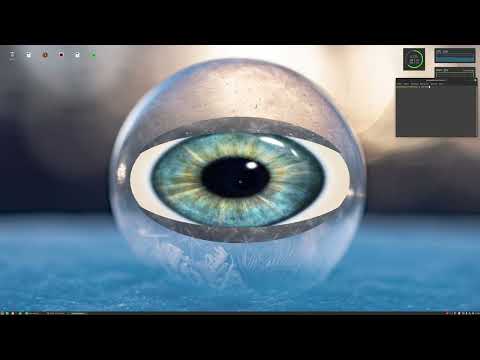
Picture this: Someone walks by your "idle" computer and sees your normal desktop—maybe an email client, a code editor, whatever was on screen. They might even stop to look at something interesting. They lean in closer...
And then the eye opens.
TheEye creates a perfect illusion by capturing a screenshot of your actual desktop and rendering it as a 3D texture. The screen appears completely normal until AI-powered face detection realizes someone has been staring for a few seconds. That's when the "eyelids" (textured with your desktop screenshot) slowly open to reveal a 3D eye that locks onto the viewer's position and follows their every move.
It's the digital equivalent of a jump scare, but with more sophistication and way cooler technology.
- 🖼️ Perfect Desktop Camouflage: Captures and renders your actual screen as a seamless texture
- 🧠 AI-Powered Face Detection: Uses MobileNet neural network to detect when someone is watching
- ⏱️ Strategic Timing: Waits for sustained attention before revealing itself
- 👁️ 3D Eye Tracking: Real-time face position tracking
- 🎨 Custom OpenGL Renderer: Efficient 3D graphics with texture-mapped eyelids for the reveal effect
- ⚡ Lightweight Performance: Optimized to run smoothly as a background screensaver
TheEye combines several technologies to create this experience:
The Illusion Pipeline:
- Screenshot Capture: Grabs the current desktop state before activating
- Texture Mapping: Projects the screenshot onto 3D geometry (background plane + eyelid surfaces)
- Face Detection: OpenCV + MobileNet SSD continuously monitors for faces
- Trigger Logic: Waits for sustained face presence (several seconds of detected staring)
- The Reveal: Animates eyelids opening, transitioning texture coordinates to expose the 3D eye
- Active Tracking: Eye orientation updates in real-time based on detected face position
Technology Stack:
- Computer Vision: OpenCV with MobileNet SSD for face detection
- Graphics Engine: Custom OpenGL 3.3+ renderer with GLSL shaders
- Window Management: GLFW for fullscreen rendering
- Build System: CMake with automated packaging
✅ Working Features:
- Screenshot capture and texture rendering
- Desktop camouflage mode
- AI-powered face detection with trigger logic
- Smooth eyelid opening animation
- Real-time 3D eye tracking
- Tested on Mint/Cinnamon and Ubuntu/KDE
🔮 Roadmap:
-
Windows support
-
Procedural iris texture with more details
-
Better eye animations
-
Configuration options (trigger delay, eye appearance)
-
Customizable appearance and behavior settings
Download the latest release from the Releases page and install:
sudo dpkg -i the-eye_*.debInstall the required dependencies on Ubuntu/Debian-based systems:
sudo apt-get install libopencv-dev libeigen3-dev libglfw3-dev cmake build-essential- Clone the repository with submodules:
git clone --recursive https://github.com/MickaelOnTheWave/TheEye.git
cd TheEye- Build the project:
cd scripts
./buildLinuxBinaries.sh- (Optional) Create a DEB package:
./makeDebianPackage.shThe package will be generated at: TheEye/build/debPackage/the-eye_*.deb
After installation, configure your system screensaver to launch TheEye:
the-eyeWhat happens:
- TheEye captures your current desktop and displays it seamlessly
- Your webcam activates (but stays invisible to the viewer)
- When someone stares at the "desktop" for a few seconds...
- The eye reveals itself and tracks their movement
- Press any key or move your mouse to exit
Pro tip: Don't tell people about this before they experience it. The surprise is half the fun.
I wanted to create something that would genuinely surprise people who wander by my idle computer—something that combines technical sophistication with a bit of playful mischief. It's also a perfect sandbox for exploring technologies I'm passionate about: real-time 3D graphics, computer vision, and AI integration.
The challenge of creating a convincing illusion (the fake desktop), implementing smooth real-time face tracking, and orchestrating the reveal animation made this an incredibly fun project that showcases modern C++ development, OpenGL rendering techniques, and practical AI applications.
This is primarily a portfolio project, but suggestions and bug reports are welcome! Feel free to:
- Open issues for bugs or feature requests
- Submit pull requests for improvements
- Share your experience (or your victims' reactions) using TheEye
If you like this project, give it a ⭐! And maybe set it up on a colleague's computer.