Lecture 2
- Set up Git
$ git config [--help | -h]
$ git config --global user.name <bala>
$ git config --global user.email <bala>
$ git config --global color.ui "auto"
$ git config --global core.editor <"nano -w" | "subl -n -w" | "gedit -s -w" | "emacs" | "vim"- proxy set-up & disable
$ git config --global http.proxy proxy-url
$ git config --global https.proxy proxy-url
# disable
$ git config --global --unset http.proxy
$ git config --global --unset https.proxy- Git diff
# show diff of current head with its previous commit
$ git diff
# show diff between stage and the head
$ git diff --staged- Git log
# paging when viewing logs: use n-key or space-key
# search when viewing logs: type /<word_to_search>, and pres n-key to navigate thro matches
# limit log size
$ git log -<num_of_log_to_show>
# change the display mode to Oneline
$ git log --oneline
# other useful options of git log
$ git log --oneline --graph --all --decorate- Search thru commit for a specific change
$ git log --patch mars.txt
# You should get a long list of output, and you should
# be able to see both commit messages and the difference between each commit.
# Then redirect output to grep command to search- Git author vs. commiter
# to see
$ git log --format=full
# to assign
$ git commit --author="name<email@he.re>"- The HEAD
# refer to the most recent commit of the working directory by
# using the identifier HEAD
$ git diff HEAD <a_file_changed_but_not_add>
# refer to older commit, use HEAD~<A_NUMBER>
$ git diff HEAD~1 mars.txt # one commit older
$ git diff HEAD~2 mars.txt # tow commit older- Dettached HEAD warning & reattaching HEAD
$ git checkout <HEAD~N | SHA_ID>
Note: checking out '0cc45963'.

You are in 'detached HEAD' state. You can look around, make experimental
changes and commit them, and you can discard any commits you make in this
state without impacting any branches by performing another checkout.

If you want to create a new branch to retain commits you create, you may
do so (now or later) by using -b with the checkout command again. Example:

  git checkout -b <new-branch-name>

HEAD is now at 0cc4596...
# to get back, just checkout the branch where you are
$ git checkout <the_branch_you_are_at>- Get rid of staged but not-committed changes (Unstage)
$ git checkout <a_file> # recover the file from HEAD, by default
$ git checkout <HEAD~N | SHA_ID> <a_file> # recover the file from older commit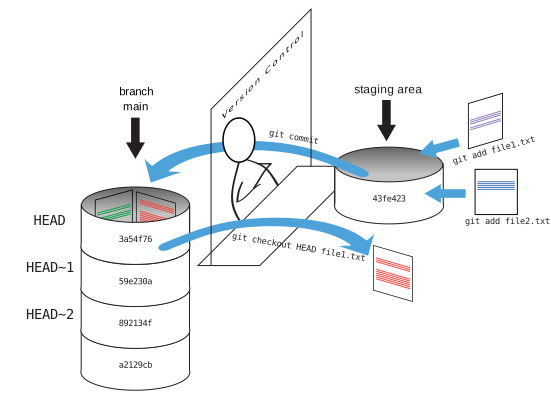
- Repo .gitinore: adding in the root directory of the repo
- If you want to share this .gitignore to people, add and commit it to the repo, otherwise, keep it local and never add it to that repo
- What if you want to add a file that is set to ignore in .gitignore?
$ git add -f <the_file> # use the -f option
# otherwise, git will reminds you of
The following paths are ignored by one of your .gitignore files:
<the_file>
Use -f if you really want to add them.- Check what are ignored in this repo
$ git status --ignored # this comes really handy- git fetch vs pull
- git rebase
$ branch -v -a # see all branches, including remote# if you want to keep those commits, new a branch before reset HEAD
git branch <new_branch_name>
# reset HEAD, and lose those change (so that's why we new a branch before we reset)
git reset --hard HEAD~3 - remove file from git's tracking
# (1) option one: delete it, commit, then add it to gitignore
$ git rm
$ <the_file_name> >> .gitignore
# (2) option two: remove command
$ git remove --cached <filename>