
ProVision: Syntax
The best way to keep your notes organized
ProVision Bundle ProVision: Lens ProVision: Bar ProVision: Syntax


ext install fooxly.provision-syntax
- Even quicker load and response times 🚀
- Easier configuration



A package by Fooxly.
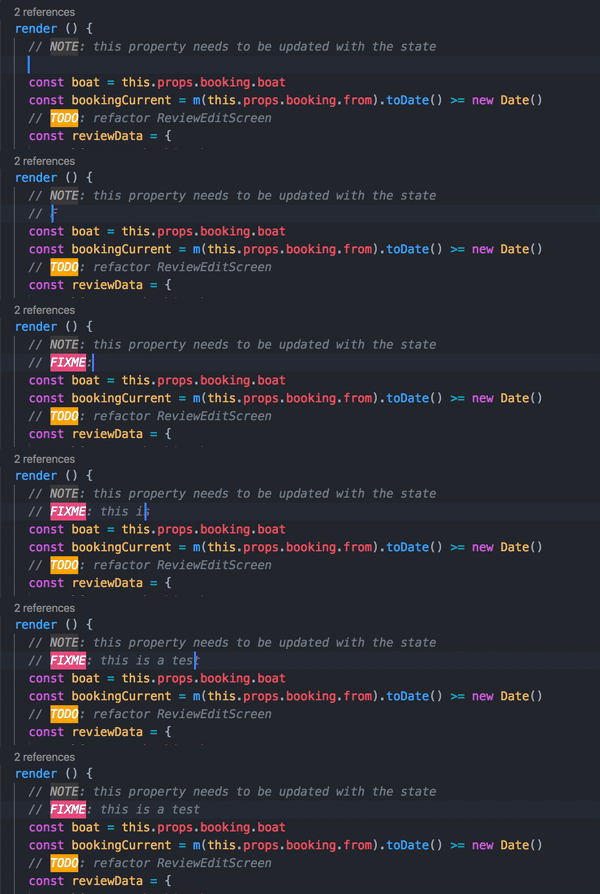
ProVision: Syntax applies easy to use and highly customizable syntaxing to your editor. With this extension you can quickly recognize your notes and seperate them from your actual code. Our theming supports everything from color and background to borders and font changes!
- Create custom keywords
- Custom highlighting for your keywords
- Group keywords together
- Jump directly to a note
- View all of your notes in a long and complex file instantly
You can start using it right away! But if you want to customize it more, you can take a look at our manual via the Help: ProVision command.
Help: ProVision: Shows you the manual you are currently reading.ProVision: List All: Shows you all the notes in the current file.ProVision: List Group: Shows you all the notes in the current file from a specifc group.ProVision: Toggle Syntax: Toggle the syntax highlighting.
-
ProVision.keywords: The keywords will be searched for. (For setup take a look at our manual) -
ProVision.groups: Custom group appearance. (For setup take a look at our manual) -
ProVision.list.moveOnSingleResult: Instantly jump to the note when there are is only 1 result."ProVision.list.moveOnSingleResult": <true|false>
MIT © Fooxly
